
kackerx/sqlmux
kackerx/sqlmux has 281 GitHub stars and 15 forks. GitHot measured +19 stars in 24 hours. Last checked 2026-11-10 00:04 UTC. Last push 2026-11-02.
A tmux-style terminal database client with Vim keybindings for PostgreSQL, MySQL, SqlServer, Redis, and more.
What you can do
- Five engines in one tree: PostgreSQL, MySQL, SQLite, SQL Server and Redis, side by side in the same session.
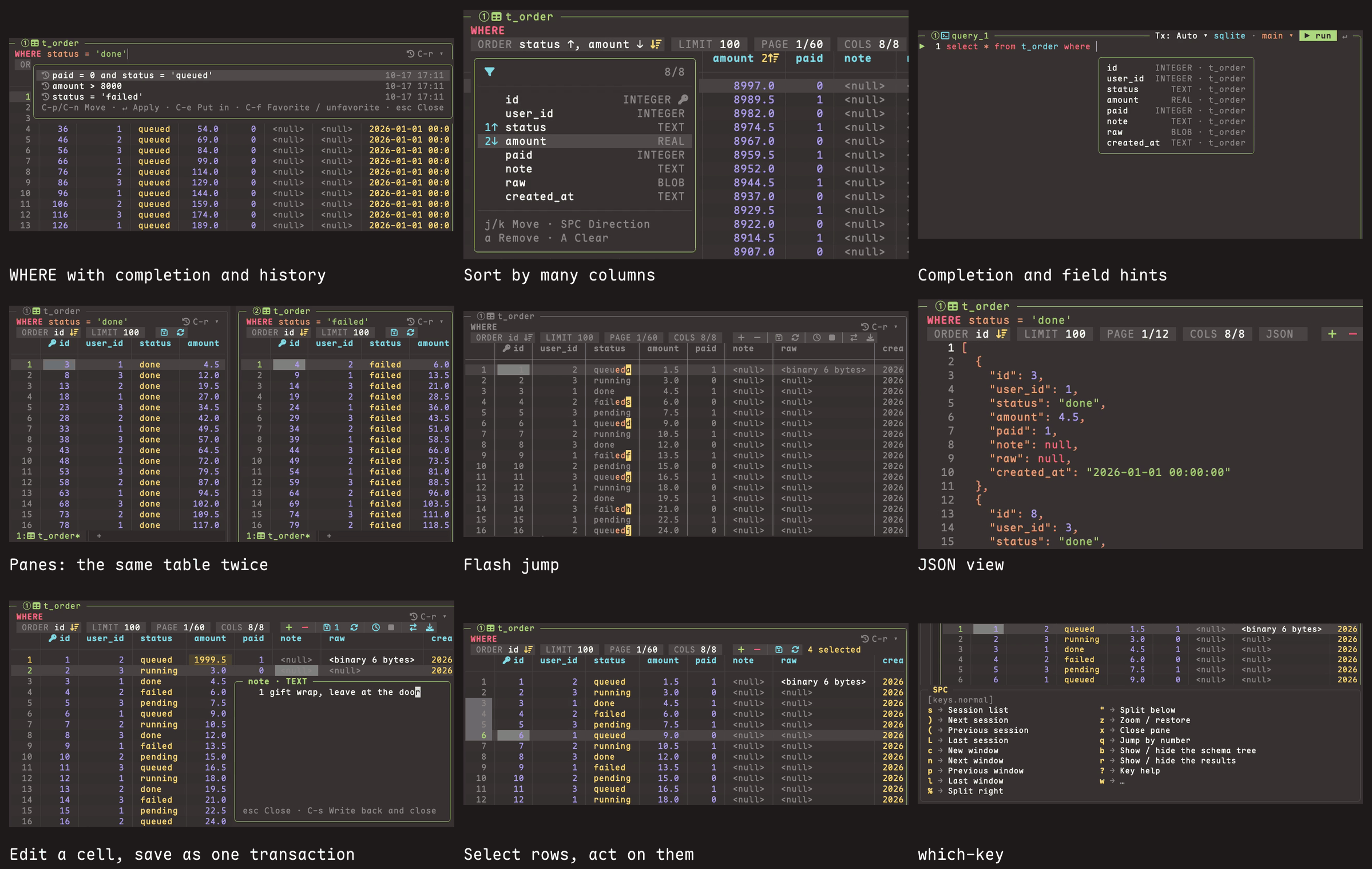
- tmux inside. Sessions, windows, split panes and tabs, with SPC as the leader (SPC % splits, SPC c opens a window, SPC s lists sessions). Each session sees all your connections. The layout you quit from comes back next time, and you can save named layouts.
- Edit tables in place. Change cells, add and delete rows, then C-s saves everything in one transaction. Enum, boolean and time columns get pickers; long text and JSON open in a value editor.
- Table tabs. A WHERE input with completion, history and favorites; multi-column ORDER, LIMIT, paging, a column picker, transpose, filter by a cell's value, export to CSV or JSON.
측정된 스타 증가
- in 24h
- +19
- in 7 days
- 업데이트 지연
- in 15 days
- 업데이트 지연
- in 1 month
- 업데이트 지연
서로 겹치는 기간의 순증가량이며 일별 합계가 아닙니다. 측정값이 없으면 비워 둡니다. 스타는 관심도를 나타내며 품질을 보장하지 않습니다.
README.md
Original
If you live in tmux and vim,
your database client should too.
Made for people like you, by one of you.


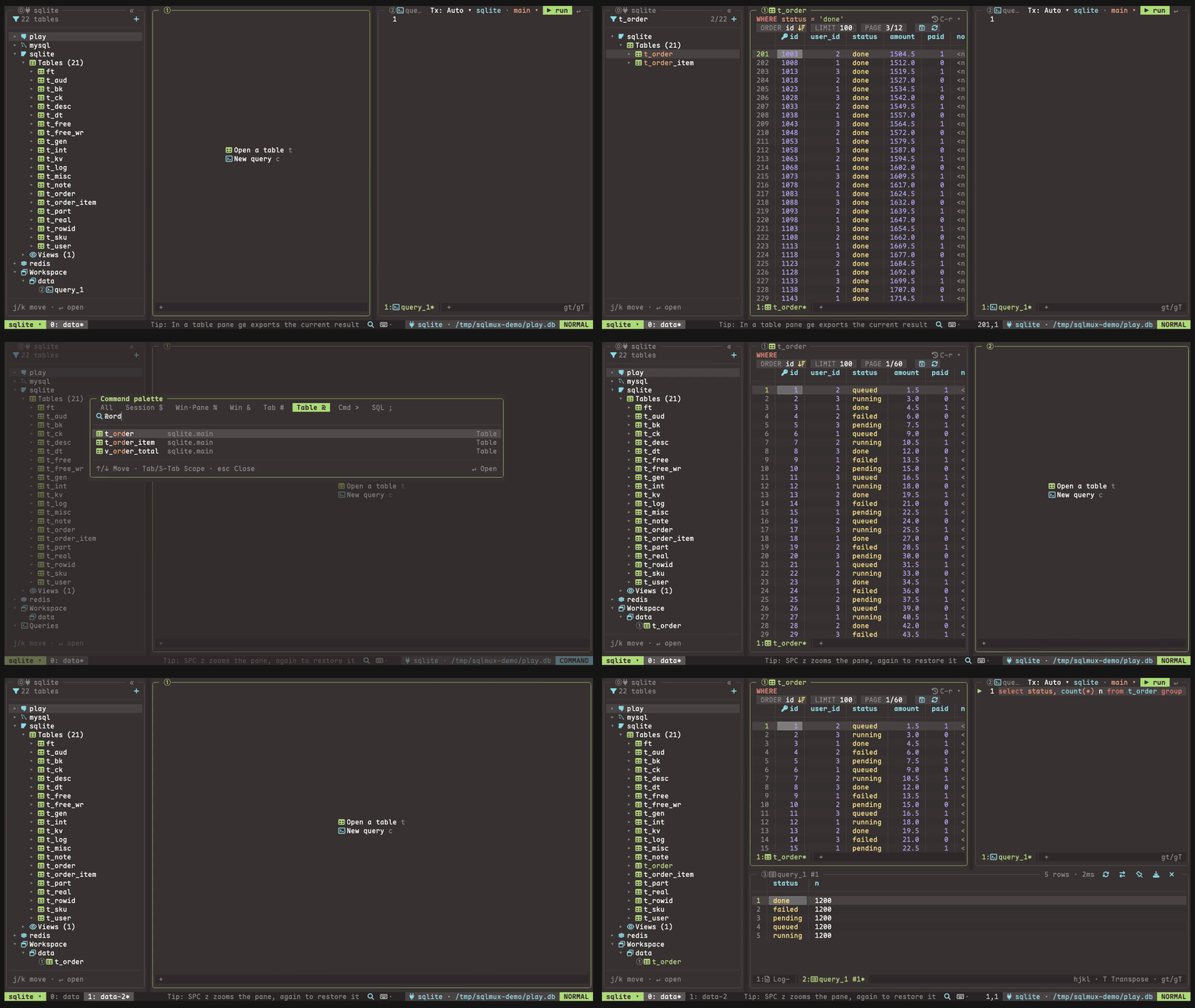
Watch the 68-second tour (MP4): a SQLite table, the palette and quick SQL, split panes and sessions, Redis keys and the console.
Install
brew install kackerx/tap/sqlmux
| Homebrew (macOS, Linux) | brew install kackerx/tap/sqlmux |
| npm (no Go needed) | npm install -g sqlmux, or npx sqlmux to try it |
| Go 1.26+ | go install github.com/kackerx/sqlmux/cmd/sqlmux@latest |
| Binaries | macOS, Linux and Windows, amd64 and arm64, on the Releases page, with checksums.txt |
Windows
sqlmux runs natively in Windows Terminal, with PowerShell or cmd. Install it with npm install -g sqlmux, with go install as above, or from the sqlmux_<version>_windows_amd64.zip (or arm64) on the Releases page: unzip it and put sqlmux.exe on your PATH.
- The configuration lives in
%APPDATA%\sqlmux, history, state and layouts in%LOCALAPPDATA%\sqlmux(XDG_*variables still win when set). password_cmd, the external editor (C-o,notepadwhenEDITORis unset) andformatprgrun throughcmd /c.- There is no keychain support on Windows: the connection form saves the password in
connections.toml; usepassword_cmdorpassword_envto keep it out of the file. - The old console window (conhost) is not supported; use Windows Terminal. Install a Nerd Font there too, or use
icons = "ascii". - In WSL, sqlmux is the Linux build: install it there as on Linux.
The icons come from a Nerd Font. Without one they show up as boxes: put icons = "ascii" in ~/.config/sqlmux/config.toml.
Then open something:
sqlmux ./app.db                                       # a SQLite file
sqlmux "postgres://me@localhost:5432/app?sslmode=disable"   # or mysql://…
sqlmux local --table orders --where "user_id = 42"    # straight to one table of a saved connection
sqlmux                                                # no connections yet: a form to add one
The quickstart goes from here to editing your first row.
Features
- Five engines in one tree: PostgreSQL, MySQL, SQLite, SQL Server and Redis, side by side in the same session.
- tmux inside. Sessions, windows, split panes and tabs, with
SPCas the leader (SPC %splits,SPC copens a window,SPC slists sessions). Each session sees all your connections. The layout you quit from comes back next time, and you can save named layouts. - Edit tables in place. Change cells, add and delete rows, then
C-ssaves everything in one transaction. Enum, boolean and time columns get pickers; long text and JSON open in a value editor. - Table tabs. A WHERE input with completion, history and favorites; multi-column ORDER, LIMIT, paging, a column picker, transpose, filter by a cell's value, export to CSV or JSON.
- A vim editor for SQL, diff-tested against nvim: operators and text objects, VISUAL and block selection, registers, search,
:s, formatting withgq;clipboard = "unnamedplus"as in nvim. Results go to a bottom pane, one tab per query, which you can pin. - Completion and signature hints. Tables, columns, keywords and functions as you type, with fuzzy matching; enum values where a value goes; a line above the cursor that says which column the value you are typing is for.
- Command palette (
C-p) for every command, table, tab, window and session, with a DDL preview. Quick SQL (;) runs a one-off statement from anywhere. - JSON view (
gj) of a table page or a result, read-only with vim movement and search. - Redis: a tree of databases, namespaces and keys read with
SCAN; each key (string, hash, list, set, zset, stream, RedisJSON) as an editable table; a console with completion and signatures from the server'sCOMMAND DOCS; key names complete fuzzily, as table names do, and show up in the palette. See Redis. - Every key can be rebound, per pane type, plus vim-style maps (
J = "5j").vim = falsegives plain editors and arrow keys. - Passwords from the OS keychain, a command (
pass,op, …) or an environment variable; SSH tunnels through~/.ssh/config; read-only connections; manual transactions; two built-in themes (tokyonight-storm and ristretto) or your own; Nerd Font or ASCII icons; English or Chinese UI.
Safety
sqlmux edits live databases, so it has guards against mistakes. They are not a permission boundary: for production data, connect with a read-only database account.
- Read-only connections (
read_only = true) are enforced twice. sqlmux refuses a whole run if any statement in it writes or would lift read-only, and the session is read-only on the server too (PostgreSQLdefault_transaction_read_only = on, MySQLSET SESSION TRANSACTION READ ONLY). SQL Server and Redis have no such session switch, so there it is sqlmux's check alone (for Redis, based on the server'sCOMMAND INFO); use a read-only login or Redis ACLs (-@write) to really restrict them. - Dangerous statements ask first:
DELETEorUPDATEwithoutWHERE,TRUNCATE,DROP, and Redis commands the server marks@dangerous(confirm_dangerous, on by default). - Saves are one transaction, and each
UPDATEcarries the old values of the cells you changed: if someone changed that row after you loaded it, the save rolls back and names the row. - Preview before save:
C-sfirst shows the exact statements, values inlined, with the counts of changed, added and deleted rows ([grid] preview_save, on by default). - Production connections (
production = true) are drawn in a warning color, ask before every write (even withconfirm_dangerousoff; the save preview cannot be turned off there), and are read-only unless you also writeread_only = false. - No silent re-runs: after a dropped connection, a statement that may have reached the server is never re-run on its own; only requests that never left are retried.
- Tested on real databases: the integration tests run in CI against PostgreSQL 17, MySQL 8.4, SQL Server 2022, SQLite and Redis Stack 7.4, not mocks.
The checks read the SQL text, so a write hidden inside a function or procedure (select my_func()) is not caught by sqlmux; the server-side read-only, or the account's privileges, still are.
Keys and configuration
- Keys: every action and its default keys.
sqlmux keysprints the same list, and?in any pane shows the keys that work there. - Configuration:
config.toml,connections.toml,keymaps.toml, themes and layouts.sqlmux keys --format tomlwrites a completekeymaps.tomlto start from. - Changelog: what changed in each version, and how to migrate. sqlmux is 0.x, so a minor version can change keys or config.
Build from source
With Go 1.26+ and just: just build puts the binary in bin/, and just --list shows the tests, lint and the sample databases (just db-up starts PostgreSQL and MySQL with sample data in Docker). Without just:
go build -o bin/sqlmux ./cmd/sqlmux
Built with Bubble Tea v2. The design notes are in specs/ (in Chinese).