
jriosdev/iOSDropDown
jriosdev/iOSDropDown has 673 GitHub stars and 152 forks. GitHot measured 0 stars in 24 hours and 0 in 7 days. Last checked 2026-11-25 06:51 UTC. Last push 2023-12-13.
What you can do
- Simple UITextField Extension And simple to use , We can Access all properties of UITextField
- DropDown Search can be enabled or disabled
- Change background color of the List and the selected color as well
- Change the maximum height of the List and the height of each Row
측정된 스타 증가
- in 24h
- 0
- in 7 days
- 0
- in 15 days
- 기록 수집 중
- in 1 month
- 기록 수집 중
서로 겹치는 기간의 순증가량이며 일별 합계가 아닙니다. 측정값이 없으면 비워 둡니다. 스타는 관심도를 나타내며 품질을 보장하지 않습니다.
소개
검색 및 다양한 사용자 지정 기능을 지원하는 iOS 드롭다운 메뉴
학습README.md
OriginaliOS DropDown


Drop Down With Search for iOS
It's a Swift Library to support Drop Down Menu in iOS
Watch Video on :

Support Search and Return Correct index

Customizing

Example
To run the example project, clone the repo, and run pod install from the Example directory first.
Features
- Simple UITextField Extension And simple to use , We can Access all properties of UITextField
- DropDown Search can be enabled or disabled
- Change background color of the List and the selected color as well
- Change the maximum height of the List and the height of each Row

Installation
Swift Package Manager
The Swift Package Manager is a tool for automating the distribution of Swift code and is integrated into the swift compiler.
Once you have your Swift package set up, adding iOSDropDown as a dependency is as easy as adding it to the dependencies value of your Package.swift.
dependencies: [
    .package(url: "https://github.com/jriosdev/iOSDropDown.git", .upToNextMajor(from: "0.4.0"))
]
CocoaPods
Use CocoaPods. iOSDropDown is available through CocoaPods. To install it, simply add the following line to your Podfile:
- Add
pod 'iOSDropDown'to your Podfile. - Install the pod(s) by running
pod install. - Add
iOSDropDown.frameworkin Build Phases > Link Binary with Libraries - Add
import iOSDropDownin the .swift files where you want to use it
Carthage
Use Carthage.
- Create a file name
Cartfile. - Add the line
github "jriosdev/iOSDropDown". - Run
carthage update. - Drag the built
iOSDropDown.frameworkinto your Xcode project.
Manual
Just clone and add the following Swift files to your project:
- iOSDropDown.swfit
Basic usage ✨
StoryBoard Method
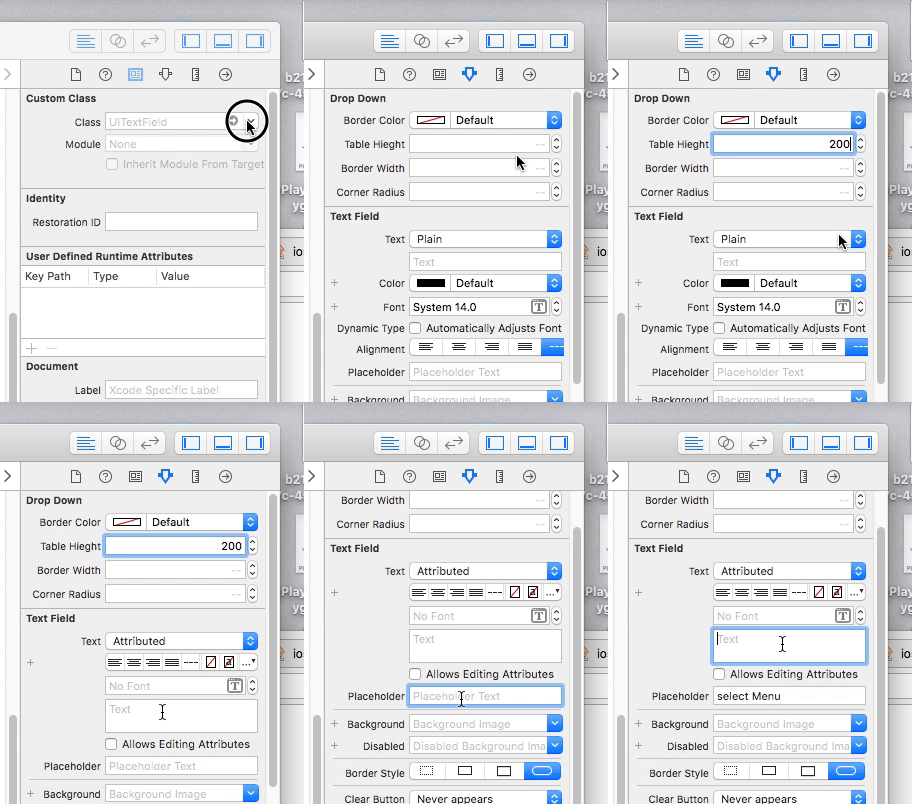
Simply add UITextField to Your ViewCOntroller And Connect @IBOutlet - DropDown Class

@IBOutlet weak var dropDown : DropDown!
// The list of array to display. Can be changed dynamically
dropDown.optionArray = ["Option 1", "Option 2", "Option 3"]
//Its Id Values and its optional
dropDown.optionIds = [1,23,54,22]
// Image Array its optional
dropDown.ImageArray = [👩🏻🦳,🙊,🥞]
// The the Closure returns Selected Index and String
dropDown.didSelect{(selectedText , index ,id) in
self.valueLabel.text = "Selected String: \(selectedText) \n index: \(index)"
}
OR
Code Method
let dropDown = DropDown(frame: CGRect(x: 110, y: 140, width: 200, height: 30)) // set frame
// The list of array to display. Can be changed dynamically
dropDown.optionArray = ["Option 1", "Option 2", "Option 3"]
// Its Id Values and its optional
dropDown.optionIds = [1,23,54,22]
// Image Array its optional
dropDown.ImageArray = [👩🏻🦳,🙊,🥞]
// The the Closure returns Selected Index and String
dropDown.didSelect{(selectedText , index ,id) in
self.valueLabel.text = "Selected String: \(selectedText) \n index: \(index)"
}
}
Other Options
Actions
 dropDown.showList()  // To show the Drop Down Menu
 dropDown.hideList() // To hide the Drop Down Menu
Closures
 listWillAppear() {
  //You can Do anything when iOS DropDown willAppear
 }

listDidAppear() {
    //You can Do anything when iOS DropDown listDidAppear
}

listWillDisappear() {
  //You can Do anything when iOS DropDown listWillDisappear
}

 listDidDisappear() {
  //You can Do anything when iOS DropDown listDidDisappear
}
Custom filter fuction
// overridable function for filter action

   func searchFilter(text: String, searchText: String) -> Bool {
       // you can add custom filter fuctions as your need, like other than english ..etc
   }
Customizes iOSDropDown 🖌
You can customizes these properties of the drop down:
isSearchEnabled: You can Enable or Disable on DropDown .Default value IstruehideOptionsWhenSelect: This option to hide the list when click option one item. Default value istrueselectedRowColor: Color of selected Row item in DropDown Default value is.cyanrowBackgroundColor: Color of DropDown Default value is.whitelistHeight: The maximum Height of of List. Default value is150rowHeight: The Height of of List in the List. Default value is30selectedIndex:For preSelection of any of item in listarrowSize: The Size of arrow . Default value is15arrowColor: The Color of arrow . Default value is.blackcheckMarkEnabled: The check Mark Enabled for selection of Row. Default value istruetextColor: You can change DropDown selected Text ColorsemanticContentAttribute: Semantic attribute for RTL or LTRAll Other TextField Properties are available with DropDownlikealignment,font,textColor,semanticContentAttribute...etc
Note :
1.After Update the pod just do clean your buld folder
      Product > Clean Build Folder .
Author
✨✨If you like my project please Give me a STAR on Github✨✨
If this project help you to reduce develop time, can you offer a cup of coffee :)

Jishnu Raj T, [email protected]

License
iOSDropDown is available under the MIT license. See the LICENSE file for more info.
관련 프로젝트 살펴보기
불러오는 중…