
jdan/isomer
소개
HTML5 캔버스용 간단한 아이소메트릭 그래픽 라이브러리
창작 및 미디어측정된 스타 증가
- in 24h
- 0
- in 7 days
- -1
- in 15 days
- 0
- in 1 month
- 기록 수집 중
서로 겹치는 기간의 순증가량이며 일별 합계가 아닙니다. 측정값이 없으면 비워 둡니다. 스타는 관심도를 나타내며 품질을 보장하지 않습니다.
README.md
Original
An isometric graphics library for HTML5 canvas.
View the official project page or try it out.
About
Isomer is an easy-to-use graphics library for drawing isometric scenes.
var Shape = Isomer.Shape;
var Point = Isomer.Point;
var Color = Isomer.Color;
var red = new Color(160, 60, 50);
var blue = new Color(50, 60, 160);

iso.add(Shape.Prism(Point.ORIGIN, 3, 3, 1));
iso.add(Shape.Pyramid(Point(0, 2, 1)), red);
iso.add(Shape.Prism(Point(2, 0, 1)), blue);
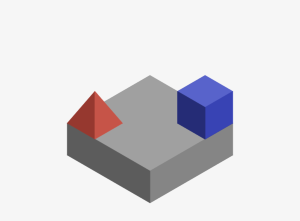
Getting Started
First, grab a copy of Isomer here. Then, include the script wherever you see fit:
<script src="/path/to/isomer.min.js"></script>
After which you'll need to place a canvas in your document that we can later refer to. Be sure to give it a width and height.
<canvas width="800" height="600" id="art"></canvas>
Note (Optional): To improve the look of your canvas on retina displays, declare the width and height of your canvas element as double how you want it to appear. Then style your canvas with CSS to include the original dimensions.
#art {
  width: 400px;
  height: 300px;
}
At this point we can finally instantiate an Isomer object. Pass it a reference to your canvas like so:
var iso = new Isomer(document.getElementById("art"));
Now you're ready to start drawing!
Build
Isomer uses Gulp as a build tool. To build the project, first install the dependencies.
$ npm install
Then run npm run dist:
$ npm run dist    # or, alternatively, `gulp dist`

> [email protected] dist /Users/jordan/Projects/isomer
> gulp

[gulp] Using gulpfile ~/Projects/isomer/gulpfile.js
[gulp] Starting 'dist'...
[gulp] Version: webpack 1.7.3
           Asset     Size  Chunks             Chunk Names
./dist/isomer.js  23.1 kB       0  [emitted]  isomer
[gulp] Version: webpack 1.7.3
               Asset     Size  Chunks             Chunk Names
./dist/isomer.min.js  9.33 kB       0  [emitted]  isomer
[gulp] Finished 'dist' after 911 ms
[gulp] Starting 'default'...
[gulp] Finished 'default' after 6.2 μs
To generate isomer.js and isomer.min.js in the dist/ directory.
Develop
Isomer is developed using Webpack. Install dependencies and build the project like so:
$ npm install
$ npm run dist
test/index.html contains a basic testing page that draws various shapes. This page will load a unminified bundle with source maps.
The test script (accessible via npm test) uses webpack-dev-server to automatically rebuild Isomer on any file changes. This script also opens the testing page (located at http://localhost:2992/webpack-dev-server/) in your default browser. The testing page includes a live reload script to refresh when Isomer is rebuilt and notify if the code is not conform the styling conventions for Isomer.
$ npm test

> [email protected] test /Users/jordan/Projects/isomer
> gulp test

[Isomer] listening on http://localhost:2992/
webpack: wait until bundle finished: /webpack-dev-server/
Hash: ************
Version: webpack 1.8.2
Time: 432ms
    Asset     Size  Chunks             Chunk Names
isomer.js  59.5 kB       0  [emitted]  isomer
chunk    {0} isomer.js (isomer) 20.1 kB [rendered]
    [0] ./index.js 83 bytes {0} [built]
    [1] ./js/isomer.js 3.86 kB {0} [built]
    [2] ./js/canvas.js 729 bytes {0} [built]
    [3] ./js/color.js 2.68 kB {0} [built]
    [4] ./js/path.js 3.77 kB {0} [built]
    [5] ./js/point.js 2.44 kB {0} [built]
    [6] ./js/shape.js 5.47 kB {0} [built]
    [7] ./js/vector.js 1.05 kB {0} [built]
webpack: bundle is now VALID.
With node-canvas
Isomer also accepts the canvas provided by node-canvas, meaning you can generate isometric graphics on the command line.
var Canvas = require('canvas');
var canvas = new Canvas(400, 400);
var Isomer = require('isomer');   // npm install isomer
var fs = require('fs');
var out = fs.createWriteStream('output.png');

var iso = new Isomer(canvas);
iso.add(Isomer.Shape.Prism(Isomer.Point.ORIGIN));

canvas.pngStream().pipe(out);
More Info
For more info, check out the official project page.
관련 프로젝트 살펴보기
불러오는 중…