
infinum/android-collar
infinum/android-collar has 28 GitHub stars and 3 forks. Star changes are not measured yet. Last checked 2026-11-14 08:31 UTC. Last push 2026-11-01.
측정된 스타 증가
- in 24h
- 기록 수집 중
- in 7 days
- 기록 수집 중
- in 15 days
- 기록 수집 중
- in 1 month
- 기록 수집 중
서로 겹치는 기간의 순증가량이며 일별 합계가 아닙니다. 측정값이 없으면 비워 둡니다. 스타는 관심도를 나타내며 품질을 보장하지 않습니다.
소개
Gradle plugin which collects all analytics screen names, events and user properties for Android projects.
데이터README.md
Original



Collar Android plugin
Description
Gradle plugin which collects all analytics screen names, events and user properties for Android projects.
This plugin has been written in Kotlin but works both inside Kotlin and Java projects.
IMPORTANT: Collar does NOT send out analytics data to remote services. This is left for the developer to solve in their own codebase, with Collar being simply a reflection of the current state of analytics data.
The project is organized in the following modules:
annotations- contains all annotations necessary for the plugin to workcore- plugin implementation core, depends on theannotationsmoduleprocessor- annotation processor generating and transforming classes for plugin, depends on theannotationsmoduleplugin- the Gradle plugin that adds all necessary dependencies to the projectui- contains a single screen UI that provides visual tracking of sent eventsui-no-op- contains a stub for easy release implementation of UI packagegenerator- contains a generator code for provided tracking planlint- contains custom Lint checkssample- a sample app for testing the Gradle plugin
Table of contents
Requirements
This plugin has been written in Kotlin but works both inside Kotlin and Java projects. Minimum required API level to use Collar is 23.
Usage
To include plugin to your project, you have to add buildscript dependencies in your project level build.gradle or build.gradle.kts:
Groovy
buildscript {
    repositories {
        mavenCentral()
    }
    dependencies {
        classpath "com.infinum.collar:collar-plugin:2.1.0"
    }
}
KotlinDSL
buildscript {
    repositories {
        mavenCentral()
    }
    dependencies {
        classpath("com.infinum.collar:collar-plugin:2.1.0")
    }
}
Then apply the plugin in your app build.gradle or build.gradle.kts :
Groovy
apply plugin: "com.infinum.collar.plugin"
KotlinDSL
plugins {
    ...

    id("com.infinum.collar.plugin")
}
Now you can sync your project.
Getting started
Create or inject an instance of Collar in your Application class and attach a Collector:
Collar.attach(object : Collector {

    override fun onScreen(screen: Screen) =
        analyticsProvider.sendScreenName(screenName = screen.name)

    override fun onEvent(event: Event) =
        analyticsProvider.sendEvent(eventName = event.name, eventParameters = event.params ?: mapOf<String, *>())

    override fun onProperty(property: Property) =
        analyticsProvider.sendProperty(property.name, property.value)
})
analyticsProvider is your own implementation of an analytics delegate class.
Screen names
Screen names can be annotated on top of Activities or Fragments. No other views are eligible as screen name destination holders.
@ScreenName(AnalyticsKeys.ScreenName.BRAND_DETAILS)
class BrandFragment : Fragment(R.layout.fragment_brand) {

    ...

    override fun onResume() = super.onResume().run { trackScreen() }

}
Actual screen name annotation values are maintained and provided per project implementing this plugin.
If a screen name annotation value is not provided then class name will be used as annotation value.
A convenience extension method will be generated by annotation processor trackScreen which must be called explicitly and preferably in onResume lifecycle callback.
However, you can always use Collar methods explicitly besides the extension one to track your screen names.
Collar.trackScreen(screen)
Events
Create a model container sealed class with arbitrary name where you see fit in your project and annotate as illustrated below.
Nested classes represent the events you want to track.
Class name will be processed into lowercase snake_case appropriate for most analytics dependencies, as well as the containing variable names.
Variable values will be propagated as event parameter values.
You can override event name for specific nested class then use EventName annotation with a respective new event name.
Accordingly, you can override event parameter name using EventParameterName annotation too.
@AnalyticsEvents
sealed class AnalyticsEvent {

    data class LanguageSelection(
        val selectedLanguage: String,
        val exhibitorCount: Int
    ) : AnalyticsEvent()

    class Login : AnalyticsEvent()

    @EventName("login_guest")
    class Guest : AnalyticsEvent()

    data class ShortcutLink(
        @EventParameterName("URL")
        val url: String
    ) : AnalyticsEvent()
}
You can have multiple annotated sealed classes declared like this through your project.
A convenience extension method will be generated by annotation processor trackEvent which must be called explicitly with the instance of your previously defined event class.
However, you can always use Collar methods explicitly besides the extension one to track your analytics events in the same way.
Collar.trackEvent(event)
@ScreenName(AnalyticsKeys.ScreenName.BRAND_DETAILS)
class BrandFragment : Fragment(R.layout.fragment_brand) {

    ...

    override fun onResume() = super.onResume().run { trackScreen() }

    ...

    private fun onFavor(exhibitor: Exhibitor) {
        viewModel.favor(exhibitor)

        ...

        trackEvent(AnalyticsEvent.ExhibitorFavored(exhibitorId = exhibitor.id, exhibitorName = exhibitor.name))
    }

}
Properties
Create a model container sealed class with arbitrary name where you see fit in your project and annotate as illustrated below.
Nested classes represent the user properties you want to track.
Class name will be processed into lowercase snake_case appropriate for most analytics dependencies, as well as the containing variable names.
Variable value will be propagated as user property value.
You can override user property name for specific nested class then use PropertyName annotation with a respective new property name.
A property nested class can have only 1 declared variable as value.
@UserProperties
sealed class UserProperty {

    @PropertyName(value = "user_type_corporate")
    data class UserType1(
        val value: String
    ) : UserProperty()

    data class UserTypeRetail(
        val someCoolValue: String
    ) : UserProperty()
}
You can have multiple annotated sealed classes declared like this through your project.
A convenience extension method will be generated by annotation processor trackProperty which must be called explicitly with the instance of your previously defined property class.
However, you can always use Collar methods explicitly besides the extension one to track your user properties in the same way.
Collar.trackProperty(property)
@ScreenName(AnalyticsKeys.ScreenName.BRAND_DETAILS)
class BrandFragment : Fragment(R.layout.fragment_brand) {

    ...

    override fun onCreate() = super.onCreate().run {
        trackProperty(UserProperty.UserTypeRetail("retail"))
    }

    ...

    override fun onResume() = super.onResume().run { trackScreen() }

    ...

    private fun onFavor(exhibitor: Exhibitor) {
        viewModel.favor(exhibitor)

        ...

        trackEvent(AnalyticsEvent.ExhibitorFavored(exhibitorId = exhibitor.id, exhibitorName = exhibitor.name))
    }

}
Options
Annotation processor
Collar plugin has been tuned per default for the most often used Firebase Analytics but additional options can be passed to annotation processor for fine tuning:
javaCompileOptions {
    annotationProcessorOptions {
        argument "events_count", "100"
        argument "event_parameters_count", "10"
        argument "event_name_length", "20"
        argument "event_name_regex", "^[a-zA-Z0-9_]*$"
        argument "properties_count", "17"
        argument "property_name_regex", "^[a-zA-Z0-9_]*$"
        argument "reserved_prefixes", "ga_,fb_"
        argument "reserved_properties", "Age,Country"
    }
}
Lint checks
Collar plugin provides it's own custom Lint checks. These can be disabled, suppressed or fixed like any other Lint registered issues.
Checks:
MissingScreenNameAnnotation- All Activities and Fragments require a valid screen name annotation on the class. You must annotate an Activity or Fragment with @ScreenName with a valid value parameter or set enabled parameter to false.
Debug UI
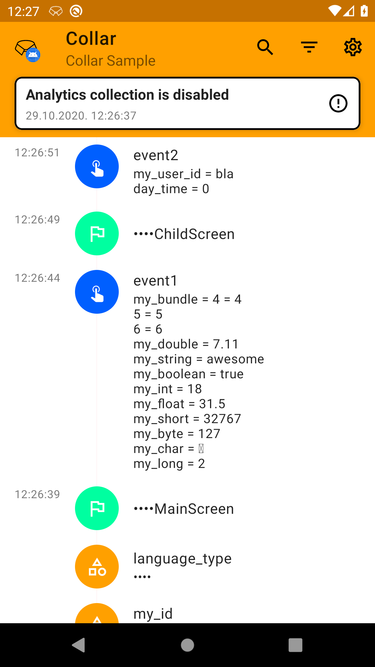
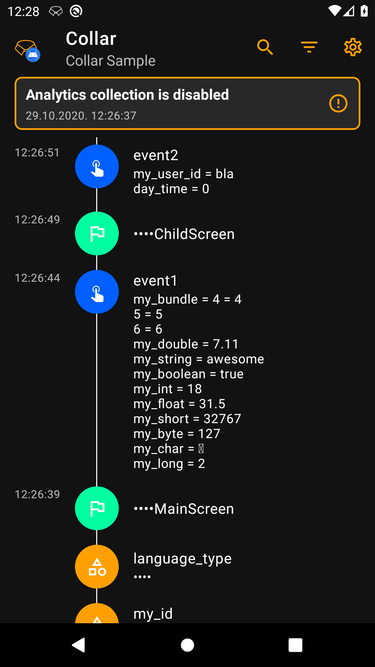
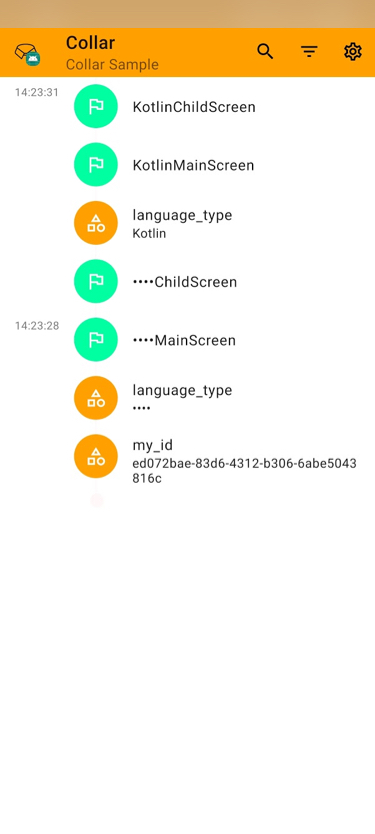
A separate ui and ui-no-op packages are provided if you want to visually track what has been sent through Collar.
You can search, filter and clear all sent analytics.
In your app build.gradle or build.gradle.kts add:
Groovy
debugImplementation "com.infinum.collar:collar-ui:2.1.0"
releaseImplementation "com.infinum.collar:collar-ui-no-op:2.1.0"
KotlinDSL
debugImplementation("com.infinum.collar:collar-ui:2.1.0")
releaseImplementation("com.infinum.collar:collar-ui-no-op:2.1.0")
In order to start tracking with UI you must use LiveCollector as in this example:
val configuration = Configuration(
  analyticsCollectionEnabled = true,
  showSystemNotifications = true,
  showInAppNotifications = true,
  redactedKeywords = redactedWords
)
Collar.attach(object : LiveCollector(configuration) {

    override fun onScreen(screen: Screen) =
        super.onScreen(screen).run {
            analyticsProvider.sendScreenName(screenName = screen.name)
        }

    override fun onEvent(event: Event) =
        super.onEvent(event).run {
            analyticsProvider.sendEvent(eventName = event.name, eventParameters = event.params ?: mapOf<String, *>())
        }

    override fun onProperty(property: Property) =
        super.onProperty(property).run {
            analyticsProvider.sendProperty(property.name, property.value)
        }
})
LiveCollector constructor has a Configuration parameter that consists of the following members.
The first parameter (setAnalyticsCollectionEnabled) defines the default state of analytics collection. If set to false, a warning message will appear in the Collar UI.
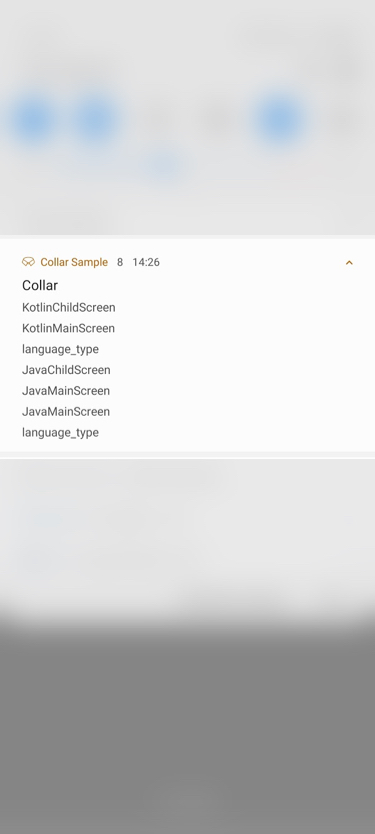
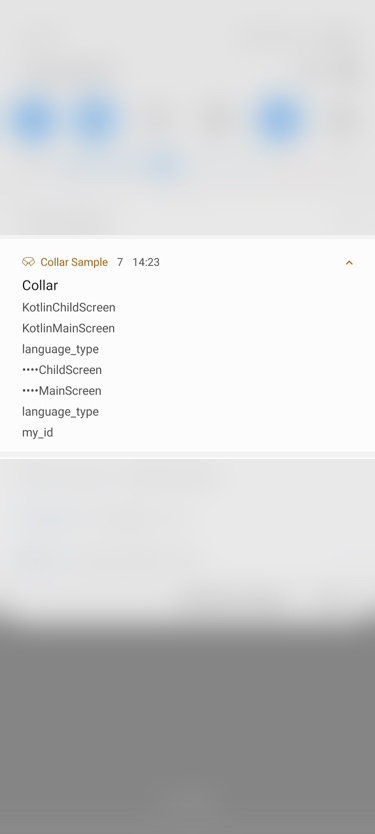
If you set the second parameter (showSystemNotification) as true, a notification will show once analytics are gathered and clicking on it will open a dedicated screen.
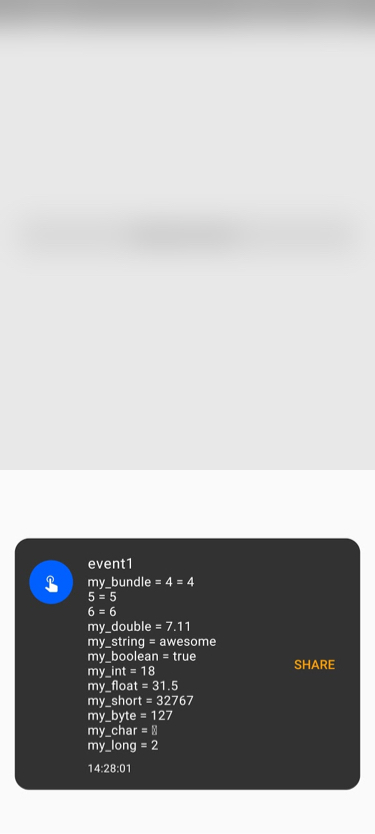
The third parameter (showInAppNotification) with value true will show a Snackbar-ish popup once analytics are gathered inside the currently running Activity.
These parameters are default values per collector session but can be changed via CollarActivity menu and will remain valid until the next session.
Otherwise if set to false notification will not be shown but you can always run the UI with following command of getting the launch Intent instead of clicking the actual notification:
startActivity(
    CollarUi.launchIntent().apply {
        addFlags(Intent.FLAG_ACTIVITY_SINGLE_TOP)
    }
)
Alternatively, you can use a dedicated method with default Intent setup:
CollarUi.show()
The final Configuration parameter is a set of keywords to redact if found in screen names, analytics events names and parameters and user properties names or values.
Redaction
In order to prevent potential leaks of user sensitive data, developers have an option to implement a set of keywords to be replaced by a • in length of the matched keyword.
This set of keywords is provided to LiveCollector via Configuration.
Tasks
Generate
Gradle plugin supports code generation from a JSON formatted file.
You will need to specify fileName and packageName in collar plugin extension.
For example:
collar {
    fileName = "example.json"
    packageName = "com.infinum.collar.sample.analytics.generated"
}
JSON file has to be formatted in the same way as it is in sample project module.
If you don't want to use this task simply don't specify data parameters in plugin extension.
Using this file is just a temporary solution and fetching the tracking plan will be implemented soon in future releases.
To run the task you can:
- Open
gradlepanel on right side, findcollartask group and rungeneratetask - Type
./gradlew generatein terminal
generate Gradle task will create classes prepared for the Collar annotation processor.
Contributing
We believe that the community can help us improve and build better a product. Please refer to our contributing guide to learn about the types of contributions we accept and the process for submitting them.
To ensure that our community remains respectful and professional, we defined a code of conduct that we expect all contributors to follow.
We appreciate your interest and look forward to your contributions.
License
Copyright 2020 Infinum

Licensed under the Apache License, Version 2.0 (the "License");
you may not use this file except in compliance with the License.
You may obtain a copy of the License at

   http://www.apache.org/licenses/LICENSE-2.0

Unless required by applicable law or agreed to in writing, software
distributed under the License is distributed on an "AS IS" BASIS,
WITHOUT WARRANTIES OR CONDITIONS OF ANY KIND, either express or implied.
See the License for the specific language governing permissions and
limitations under the License.
Credits
Maintained and sponsored by Infinum.

관련 프로젝트 살펴보기
Asabeneh/30-Days-Of-Python
30 Days of Python 프로그래밍 챌린지는 Python 프로그래밍 언어를 30일 동안 배우기 위한 단계별 가이드입니다. 이 챌린지는 100일 이상 걸릴 수 있습니다. 자신의 속도에 맞춰 진행하세요. 다음 동영상도 도움이 될 수 있습니다: https://www.youtube.com/channel/UC7PNRuno1rzYPb1xLa4yktw
78,725 스타grafana/grafana
개방적이고 조합 가능한 옵저버빌리티 및 데이터 시각화 플랫폼입니다. Prometheus, Loki, Elasticsearch, InfluxDB, Postgres 등 여러 소스의 메트릭, 로그, 트레이스를 시각화합니다.
77,897 스타redis/redis
실시간 데이터 기반 애플리케이션을 구축하는 개발자에게 Redis는 가장 선호되고, 가장 빠르며, 기능이 가장 풍부한 캐시, 데이터 구조 서버이자 문서 및 벡터 쿼리 엔진입니다.
77,491 스타apache/superset
Apache Superset는 데이터 시각화 및 데이터 탐색 플랫폼입니다.
75,522 스타