
hyiltiz/vim-plugins-profile
hyiltiz/vim-plugins-profile has 627 GitHub stars and 38 forks. GitHot measured 0 stars in 24 hours. Last checked 2026-11-18 21:41 UTC. Last push 2022-06-29.
측정된 스타 증가
- in 24h
- 0
- in 7 days
- 기록 수집 중
- in 15 days
- 기록 수집 중
- in 1 month
- 기록 수집 중
서로 겹치는 기간의 순증가량이며 일별 합계가 아닙니다. 측정값이 없으면 비워 둡니다. 스타는 관심도를 나타내며 품질을 보장하지 않습니다.
소개
:clock4: Profile Vim's plugins, generate awesome statistics and optimize (n)vim startup time
학습README.md
Original
TL;DR
# Perl version as an example:
perl <(curl -sSL https://raw.githubusercontent.com/hyiltiz/vim-plugins-profile/master/vim-plugins-profile.pl)

# or Ruby
ruby <(curl -sSL https://raw.githubusercontent.com/hyiltiz/vim-plugins-profile/master/vim-plugins-profile.rb)

# or Python (add -p flat to plot a bar chart)
python <(curl -sSL https://raw.githubusercontent.com/hyiltiz/vim-plugins-profile/master/vim-plugins-profile.py)

# or R
bash <(curl -sSL https://raw.githubusercontent.com/hyiltiz/vim-plugins-profile/master/vim-plugins-profile.sh)
Here is a screenshot to have a quick look at what this is all about.
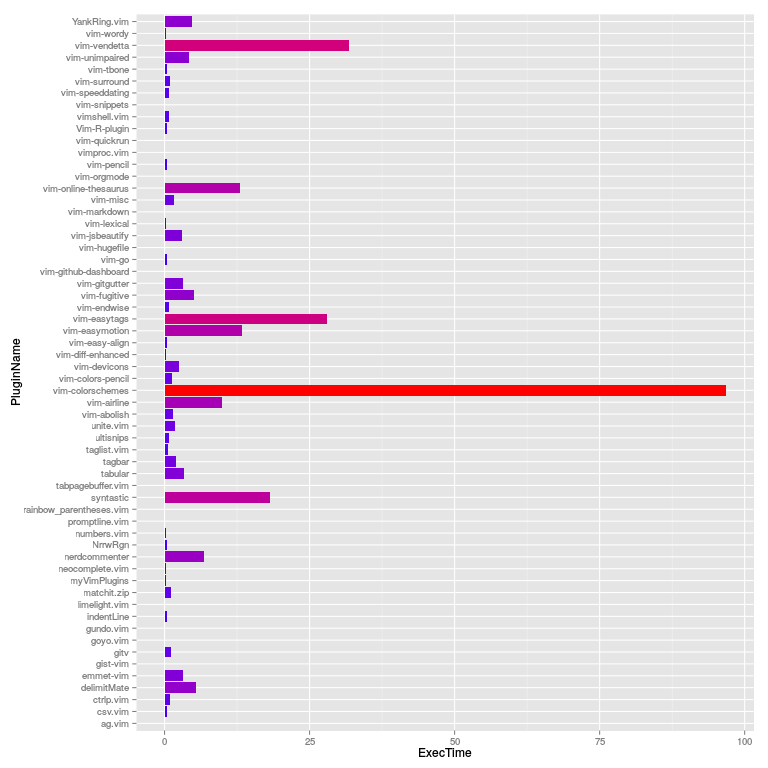
Here is a peek at the profiling result for my plugins:
Generating vim startup profile...
Parsing vim startup profile...
Crunching data and generating profile plot ...

Your plugins startup profile graph is saved
as `profile.png` under current directory.

==========================================
Top 10 Plugins That Slows Down Vim Startup
==========================================
   1	105.13	"vim-colorschemes"
   2	42.661	"vim-easytags"
   3	31.173	"vim-vendetta"
   4	22.02	"syntastic"
   5	13.362	"vim-online-thesaurus"
   6	7.888	"vim-easymotion"
   7	6.931	"vim-airline"
   8	6.608	"YankRing.vim"
   9	5.266	"nerdcommenter"
  10	5.017	"delimitMate"
==========================================
Done!
Story
If you use vim-plug (or other amazing plugin manager of your choice) to install
your vim (gvim or macvim) plugins, then chances are high that it gets
addictive. You will find yourself with several dozens of useful plugins.
vim-plug (and NeoBundle) offers you to load your plugins on-demand (lazy-loading). But
which needs fine tuning? Well, using vim's built-in profiling vim --startuptime you can get a timing for all function calls during
startup. However, the data is for each functions. You will have to
figure out the math, and make sure those functions calls are form the
same plugins. Even some sorting might help, but sorting the timing for
each functions does not really make sense because it is really time of the
plugins (but not the functions) that you really care about.
I am poor at doing mental math, even for simple sums. However, with the power
of a simple bash script and R, we can get all we want.
This utility automatically detects your plugins directory, and does the rest of the hard work for you.
Supported Plugin-Managers
Here is the list of supported managers. Hopefully, your favourite plugin manager is among the list. If not, or if you prefer to manage your own plguins (using symlinks, of course), we could still adjust the code.
Installation
This is NOT a vim plugin! This is simply a profiler for your vim
plugins that are installed through various plugin managers such as
vim-plug.
Download the .zip here and then simply run the bash script:
bash ./vim-plugins-profile.sh  # calls R after pre-processing

# Use Perl powers! Built-in RegEx, no dependencies.
perl ./vim-plugins-profile.pl

# Or Python if you are from the other camp.
python ./vim-plugins-profile.py # -p flag plots a bar chart

# Alternatively use Ruby powers! Less dependency, graph with ASCII art
ruby ./vim-plugins-profile.rb

# To use an alternative executable such as neovim, pass it as the first argument.
ruby ./vim-plugins-profile.rb nvim
Then open the profile.png file for the result! It is that simple.
You can run it even without installation:
Dependency
Nothing. Well, at least Bash or Ruby or Perl or Python, but most systems already come with those pre-installed already.
If not (e.g. in M$ Windows systems), then you will need to install several tools before you can run this.
For the Perl Version:
- Git for Windows: The Git Bash contains a minimal Perl installation which is sufficient to run
vim-plugins-profile.pl.
For the Ruby Version:
- Bash (Cygwin, or Git for Windows will also work).
- Ruby 2.3 (other version might as well just work. If not, you can repurt an Issue then I'll fix it)
To produce the eye-candy graphs, you can use either R, Perl + GNUplot or Python.
For R, the script prompts whether it should install the R:ggplot2 package if you already have R. Here are the list of dependencies for it:
For Python, you can use either python2 or python3. If you have
matplotlib (optional) installed, then you can even generate the bar plot.
Implementation for people from the Python camp is merged from @bchretien. It also supports a custom command to run in the exec mode. Feel free to hack your way!