
goodwithtech/dockle
goodwithtech/dockle has 3,299 GitHub stars and 171 forks. GitHot measured 0 stars in 24 hours and 0 in 7 days. Last checked 2026-11-05 03:18 UTC. Last push 2026-08-10.
보안을 위한 컨테이너 이미지 린터로, 모범 사례를 따르는 Docker 이미지 구축을 돕고 쉽게 시작할 수 있습니다.
What you can do
- Detect container's vulnerabilities
- Helping build best-practice Dockerfile
- Specify only the image name
- See Quick Start and Common Examples
측정된 스타 증가
- in 24h
- 0
- in 7 days
- 0
- in 15 days
- 업데이트 지연
- in 1 month
- 업데이트 지연
서로 겹치는 기간의 순증가량이며 일별 합계가 아닙니다. 측정값이 없으면 비워 둡니다. 스타는 관심도를 나타내며 품질을 보장하지 않습니다.
README.md
Original


Dockle - Container Image Linter for Security, Helping build the Best-Practice Docker Image, Easy to start
Dockle helps you:
- Build Best Practice Docker images
- Build secure Docker images
- Checkpoints includes CIS Benchmarks
$ brew untap goodwithtech/dockle # who use 0.1.16 or older version
$ brew install goodwithtech/r/dockle
$ dockle [YOUR_IMAGE_NAME]
See Installation and Common Examples

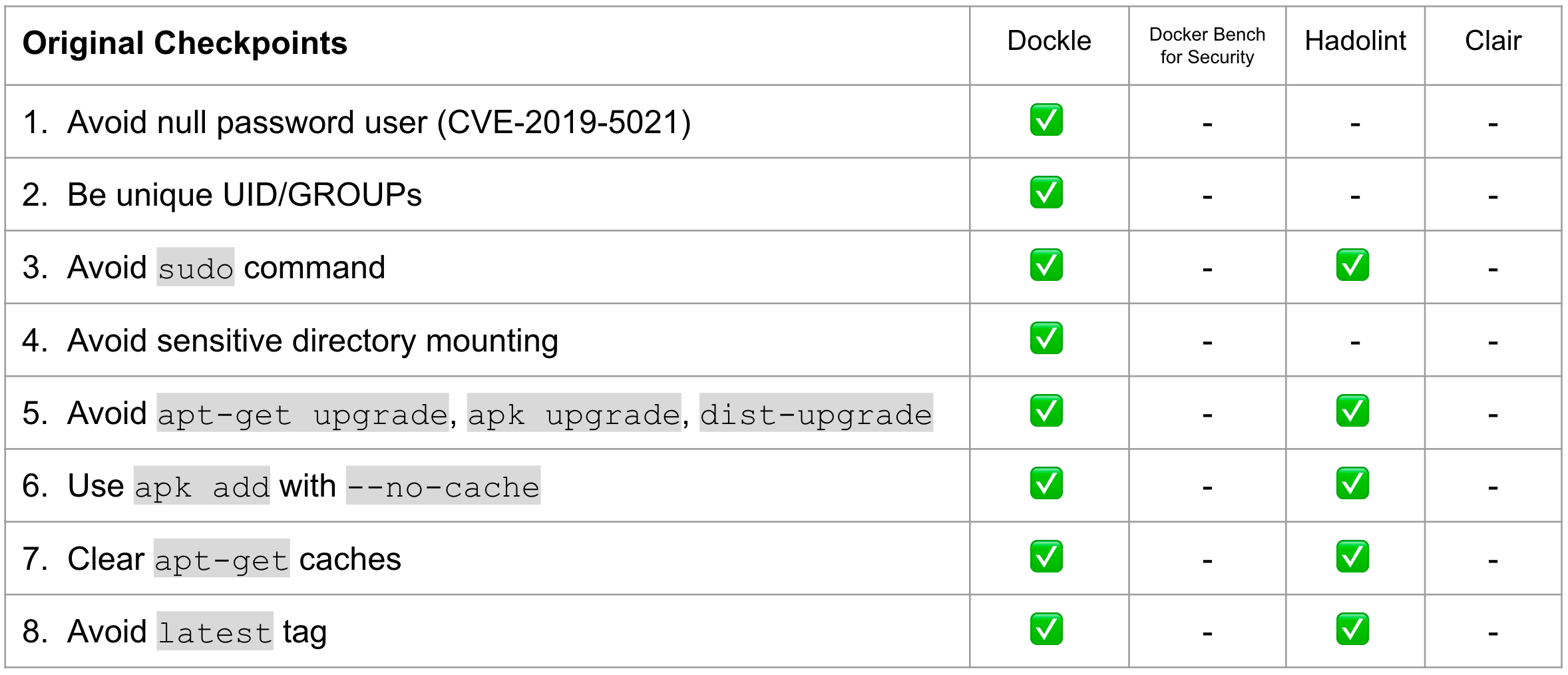
Checkpoints Comparison

TOC
- Features
- Comparison
- Installation
- Quick Start
- Checkpoint Summary
- Common Examples
- Continuous Integration
- Contributors
- License
- Author
Features
- Detect container's vulnerabilities
- Helping build best-practice Dockerfile
- Simple usage
- Specify only the image name
- See Quick Start and Common Examples
- CIS Benchmarks Support
- High accuracy
- DevSecOps
- Suitable for CI such as Travis CI, CircleCI, Jenkins, etc.
- See CI Example
Comparison
| Dockle | Hadolint | Docker Bench for Security | Clair | |
|---|---|---|---|---|
| Target | Image | Dockerfile | Host Docker Daemon Image Container Runtime |
Image |
| How to run | Binary | Binary | ShellScript | Binary |
| Dependency | No | No | Some dependencies | No |
| CI Suitable | ✓ | ✓ | x | x |
| Purpose | Security Audit Dockerfile Lint |
Dockerfile Lint | Security Audit Dockerfile Lint |
Scan Vulnerabilities |
Installation
Homebrew (Mac OS X / Linux and WSL)
You can use Homebrew on Mac OS X or Linux and WSL (Windows Subsystem for Linux).
$ brew install goodwithtech/r/dockle
RHEL/CentOS
VERSION=$(
 curl --silent "https://api.github.com/repos/goodwithtech/dockle/releases/latest" | \
 grep '"tag_name":' | \
 sed -E 's/.*"v([^"]+)".*/\1/' \
) && rpm -ivh https://github.com/goodwithtech/dockle/releases/download/v${VERSION}/dockle_${VERSION}_Linux-64bit.rpm
Debian/Ubuntu
VERSION=$(
 curl --silent "https://api.github.com/repos/goodwithtech/dockle/releases/latest" | \
 grep '"tag_name":' | \
 sed -E 's/.*"v([^"]+)".*/\1/' \
) && curl -L -o dockle.deb https://github.com/goodwithtech/dockle/releases/download/v${VERSION}/dockle_${VERSION}_Linux-64bit.deb
$ sudo dpkg -i dockle.deb && rm dockle.deb
Arch Linux
dockle can be installed from the Arch User Repository using dockle or dockle-bin package.
git clone https://aur.archlinux.org/dockle-bin.git
cd dockle-bin
makepkg -sri
Windows
VERSION=$(
 curl --silent "https://api.github.com/repos/goodwithtech/dockle/releases/latest" | \
 grep '"tag_name":' | \
 sed -E 's/.*"v([^"]+)".*/\1/' \
) && curl -L -o dockle.zip https://github.com/goodwithtech/dockle/releases/download/v${VERSION}/dockle_${VERSION}_Windows-64bit.zip
$ unzip dockle.zip && rm dockle.zip
$ ./dockle.exe [IMAGE_NAME]
Microsoft PowerShell 7
if (((Invoke-WebRequest "https://api.github.com/repos/goodwithtech/dockle/releases/latest").Content) -match '"tag_name":"v(?<ver>[^"]+)"') {
$VERSION=$Matches.ver &&
Invoke-WebRequest "https://github.com/goodwithtech/dockle/releases/download/v${VERSION}/dockle_${VERSION}_Windows-64bit.zip" -OutFile dockle.zip &&
Expand-Archive dockle.zip && Remove-Item dockle.zip }
Binary
You can get the latest version binary from releases page.
Download the archive file for your operating system/architecture. Unpack the archive, and put the binary somewhere in your $PATH (on UNIX-y systems, /usr/local/bin or the like).
- NOTE: Make sure that it's execution bits turned on. (
chmod +x dockle)
asdf
You can install dockle with the asdf version manager with this plugin, which automates the process of installing (and switching between) various versions of github release binaries. With asdf already installed, run these commands to install dockle:
# Add dockle plugin
asdf plugin add dockle

# Show all installable versions
asdf list-all dockle

# Install specific version
asdf install dockle latest

# Set a version globally (on your ~/.tool-versions file)
asdf global dockle latest

# Now dockle commands are available
dockle --version
mise
You can install dockle with mise, the polyglot tool versions manager. With mise already installed, run these commands to install dockle:
# Show all installable versions
mise ls-remote dockle

# Install specific version
mise install dockle@latest

# Set a version globally
mise use -g dockle@latest

# Now dockle commands are available
dockle --version
From source
$ GO111MODULE=off go get github.com/goodwithtech/dockle/cmd/dockle
$ cd $GOPATH/src/github.com/goodwithtech/dockle && GO111MODULE=on go build -o $GOPATH/bin/dockle cmd/dockle/main.go
Use Docker
There's a Dockle image on Docker Hub also. You can try dockle before installing the command.
$ VERSION=$(
 curl --silent "https://api.github.com/repos/goodwithtech/dockle/releases/latest" | \
 grep '"tag_name":' | \
 sed -E 's/.*"v([^"]+)".*/\1/' \
) && docker run --rm -v /var/run/docker.sock:/var/run/docker.sock \
  goodwithtech/dockle:v${VERSION} [YOUR_IMAGE_NAME]
You only need -v /var/run/docker.sock:/var/run/docker.sock when you'd like to scan the image on your host machine.
Quick Start
Basic
Simply specify an image name (and a tag).
$ dockle [YOUR_IMAGE_NAME]
Result
FATAL   - CIS-DI-0009: Use COPY instead of ADD in Dockerfile
        * Use COPY : /bin/sh -c #(nop) ADD file:81c0a803075715d1a6b4f75a29f8a01b21cc170cfc1bff6702317d1be2fe71a3 in /app/credentials.json
FATAL   - CIS-DI-0010: Do not store credential in ENVIRONMENT vars/files
        * Suspicious filename found : app/credentials.json
FATAL   - DKL-DI-0005: Clear apt-get caches
        * Use 'rm -rf /var/lib/apt/lists' after 'apt-get install' : /bin/sh -c apt-get update && apt-get install -y git
FATAL   - DKL-LI-0001: Avoid empty password
        * No password user found! username : nopasswd
WARN    - CIS-DI-0001: Create a user for the container
        * Last user should not be root
INFO    - CIS-DI-0005: Enable Content trust for Docker
        * export DOCKER_CONTENT_TRUST=1 before docker pull/build
INFO    - CIS-DI-0008: Confirm safety of setuid/setgid files
        * setuid file: app/suid.txt urw-r--r--
        * setgid file: app/gid.txt grw-r--r--
        * setuid file: usr/bin/gpasswd urwxr-xr-x
        * setgid file: usr/bin/wall grwxr-xr-x
        * setuid file: bin/su urwxr-xr-x
        * setuid file: bin/umount urwxr-xr-x
        * setuid file: bin/mount urwxr-xr-x
        * setgid file: usr/bin/ssh-agent grwxr-xr-x
        * setuid file: etc/shadow urw-r-----
        * setuid file: usr/bin/chsh urwxr-xr-x
        * setuid file: usr/bin/chfn urwxr-xr-x
        * setuid file: usr/lib/openssh/ssh-keysign urwxr-xr-x
        * setgid file: etc/passwd grw-r--r--
        * setgid file: sbin/unix_chkpwd grwxr-xr-x
        * setgid file: usr/bin/chage grwxr-xr-x
        * setuid file: usr/bin/passwd urwxr-xr-x
        * setgid file: usr/bin/expiry grwxr-xr-x
        * setuid file: usr/bin/newgrp urwxr-xr-x
IGNORE  - CIS-DI-0006: Add HEALTHCHECK instruction to the container image
Docker
Also, you can use Docker to use dockle command as follow.
$ export DOCKLE_LATEST=$(
 curl --silent "https://api.github.com/repos/goodwithtech/dockle/releases/latest" | \
 grep '"tag_name":' | \
 sed -E 's/.*"v([^"]+)".*/\1/' \
)
$ docker run --rm goodwithtech/dockle:v${DOCKLE_LATEST} [YOUR_IMAGE_NAME]
If you'd like to scan the image on your host machine, you need to mount
docker.sock.$ docker run --rm -v /var/run/docker.sock:/var/run/docker.sock ...
Checkpoint Summary
- Details of each checkpoint see CHECKPOINT.md
| CODE | DESCRIPTION | LEVEL※ |
|---|---|---|
| CIS's Docker Image Checkpoints | ||
| CIS-DI-0001 | Create a user for the container | WARN |
| CIS-DI-0002 | Use trusted base images for containers | FATAL |
| CIS-DI-0003 | Do not install unnecessary packages in the container | FATAL |
| CIS-DI-0004 | Scan and rebuild the images to include security patches | FATAL |
| CIS-DI-0005 | Enable Content trust for Docker | INFO |
| CIS-DI-0006 | Add HEALTHCHECK instruction to the container image |
INFO |
| CIS-DI-0007 | Do not use update instructions alone in the Dockerfile |
FATAL |
| CIS-DI-0008 | Confirm safety of setuid and setgid files |
INFO |
| CIS-DI-0009 | Use COPY instead of ADD in Dockerfile |
FATAL |
| CIS-DI-0010 | Do not store secrets in Dockerfiles | FATAL |
| CIS-DI-0011 | Install verified packages only | INFO |
| Dockle Checkpoints for Docker | ||
| DKL-DI-0001 | Avoid sudo command |
FATAL |
| DKL-DI-0002 | Avoid sensitive directory mounting | FATAL |
| DKL-DI-0003 | Avoid apt-get dist-upgrade |
WARN |
| DKL-DI-0004 | Use apk add with --no-cache |
FATAL |
| DKL-DI-0005 | Clear apt-get caches |
FATAL |
| DKL-DI-0006 | Avoid latest tag |
WARN |
| Dockle Checkpoints for Linux | ||
| DKL-LI-0001 | Avoid empty password | FATAL |
| DKL-LI-0002 | Be unique UID/GROUPs | FATAL |
| DKL-LI-0003 | Only put necessary files | INFO |
Level
Dockle has 5 check levels.
| LEVEL | DESCRIPTION |
|---|---|
| FATAL | Be practical and prudent |
| WARN | Be practical and prudent, but limited uses (even if official images) |
| INFO | May negatively inhibit the utility or performance |
| SKIP | Not found target files |
| PASS | Not found any problems |
Common Examples
Scan an image
Simply specify an image name (and a tag).
$ dockle goodwithtech/test-image:v1
Result
FATAL   - CIS-DI-0001: Create a user for the container
        * Last user should not be root
WARN    - CIS-DI-0005: Enable Content trust for Docker
        * export DOCKER_CONTENT_TRUST=1 before docker pull/build
FATAL   - CIS-DI-0006: Add HEALTHCHECK instruction to the container image
        * not found HEALTHCHECK statement
FATAL   - CIS-DI-0007: Do not use update instructions alone in the Dockerfile
        * Use 'Always combine RUN 'apt-get update' with 'apt-get install' : /bin/sh -c apt-get update && apt-get install -y git
FATAL   - CIS-DI-0008: Remove setuid and setgid permissions in the images
        * Found setuid file: etc/passwd grw-r--r--
        * Found setuid file: usr/lib/openssh/ssh-keysign urwxr-xr-x
        * Found setuid file: app/hoge.txt ugrw-r--r--
        * Found setuid file: app/hoge.txt ugrw-r--r--
        * Found setuid file: etc/shadow urw-r-----
FATAL   - CIS-DI-0009: Use COPY instead of ADD in Dockerfile
        * Use COPY : /bin/sh -c #(nop) ADD file:81c0a803075715d1a6b4f75a29f8a01b21cc170cfc1bff6702317d1be2fe71a3 in /app/credentials.json
FATAL   - CIS-DI-0010: Do not store secrets in ENVIRONMENT variables
        * Suspicious ENV key found : MYSQL_PASSWD
FATAL   - CIS-DI-0010: Do not store secret files
        * Suspicious filename found : app/credentials.json
PASS    - DKL-DI-0001: Avoid sudo command
FATAL   - DKL-DI-0002: Avoid sensitive directory mounting
        * Avoid mounting sensitive dirs : /usr
PASS    - DKL-DI-0003: Avoid apt-get/apk/dist-upgrade
PASS    - DKL-DI-0004: Use apk add with --no-cache
FATAL   - DKL-DI-0005: Clear apt-get caches
        * Use 'apt-get clean && rm -rf /var/lib/apt/lists/*' : /bin/sh -c apt-get update && apt-get install -y git
PASS    - DKL-DI-0006: Avoid latest tag
FATAL   - DKL-LI-0001: Avoid empty password
        * No password user found! username : nopasswd
PASS    - DKL-LI-0002: Be unique UID
PASS    - DKL-LI-0002: Be unique GROUP
Scan an image file
$ docker save alpine:latest -o alpine.tar
$ dockle --input alpine.tar
Get or Save the results as JSON
$ dockle -f json goodwithtech/test-image:v1
$ dockle -f json -o results.json goodwithtech/test-image:v1
Result
{
  "summary": {
    "fatal": 6,
    "warn": 2,
    "info": 2,
    "pass": 7
  },
  "details": [
    {
      "code": "CIS-DI-0001",
      "title": "Create a user for the container",
      "level": "WARN",
      "alerts": [
        "Last user should not be root"
      ]
    },
    {
      "code": "CIS-DI-0005",
      "title": "Enable Content trust for Docker",
      "level": "INFO",
      "alerts": [
        "export DOCKER_CONTENT_TRUST=1 before docker pull/build"
      ]
    },
    {
      "code": "CIS-DI-0006",
      "title": "Add HEALTHCHECK instruction to the container image",
      "level": "WARN",
      "alerts": [
        "not found HEALTHCHECK statement"
      ]
    },
    {
      "code": "CIS-DI-0008",
      "title": "Remove setuid and setgid permissions in the images",
      "level": "INFO",
      "alerts": [
        "Found setuid file: usr/lib/openssh/ssh-keysign urwxr-xr-x"
      ]
    },
    {
      "code": "CIS-DI-0009",
      "title": "Use COPY instead of ADD in Dockerfile",
      "level": "FATAL",
      "alerts": [
        "Use COPY : /bin/sh -c #(nop) ADD file:81c0a803075715d1a6b4f75a29f8a01b21cc170cfc1bff6702317d1be2fe71a3 in /app/credentials.json "
      ]
    },
    {
      "code": "CIS-DI-0010",
      "title": "Do not store secrets in ENVIRONMENT variables",
      "level": "FATAL",
      "alerts": [
        "Suspicious ENV key found : MYSQL_PASSWD"
      ]
    },
    {
      "code": "CIS-DI-0010",
      "title": "Do not store secret files",
      "level": "FATAL",
      "alerts": [
        "Suspicious filename found : app/credentials.json "
      ]
    },
    {
      "code": "DKL-DI-0002",
      "title": "Avoid sensitive directory mounting",
      "level": "FATAL",
      "alerts": [
        "Avoid mounting sensitive dirs : /usr"
      ]
    },
    {
      "code": "DKL-DI-0005",
      "title": "Clear apt-get caches",
      "level": "FATAL",
      "alerts": [
        "Use 'rm -rf /var/lib/apt/lists' after 'apt-get install' : /bin/sh -c apt-get update \u0026\u0026 apt-get install -y git"
      ]
    },
    {
      "code": "DKL-LI-0001",
      "title": "Avoid empty password",
      "level": "FATAL",
      "alerts": [
        "No password user found! username : nopasswd"
      ]
    }
  ]
}
Get or Save the results as SARIF
$ dockle -f sarif goodwithtech/test-image:v1
$ dockle -f sarif -o results.json goodwithtech/test-image:v1
Result
{
  "version": "2.1.0",
  "$schema": "https://raw.githubusercontent.com/oasis-tcs/sarif-spec/master/Schemata/sarif-schema-2.1.0.json",
  "runs": [
    {
      "tool": {
        "driver": {
          "name": "Dockle",
          "informationUri": "https://github.com/goodwithtech/dockle",
          "rules": [
            {
              "id": "CIS-DI-0009",
              "shortDescription": {
                "text": "Use COPY instead of ADD in Dockerfile"
              },
              "help": {
                "text": "https://github.com/goodwithtech/dockle/blob/master/CHECKPOINT.md#CIS-DI-0009"
              }
            },
            {
              "id": "CIS-DI-0010",
              "shortDescription": {
                "text": "Do not store credential in ENVIRONMENT vars/files"
              },
              "help": {
                "text": "https://github.com/goodwithtech/dockle/blob/master/CHECKPOINT.md#CIS-DI-0010"
              }
            },
            {
              "id": "DKL-DI-0005",
              "shortDescription": {
                "text": "Clear apt-get caches"
              },
              "help": {
                "text": "https://github.com/goodwithtech/dockle/blob/master/CHECKPOINT.md#DKL-DI-0005"
              }
            },
            {
              "id": "DKL-LI-0001",
              "shortDescription": {
                "text": "Avoid empty password"
              },
              "help": {
                "text": "https://github.com/goodwithtech/dockle/blob/master/CHECKPOINT.md#DKL-LI-0001"
              }
            },
            {
              "id": "CIS-DI-0005",
              "shortDescription": {
                "text": "Enable Content trust for Docker"
              },
              "help": {
                "text": "https://github.com/goodwithtech/dockle/blob/master/CHECKPOINT.md#CIS-DI-0005"
              }
            },
            {
              "id": "CIS-DI-0008",
              "shortDescription": {
                "text": "Confirm safety of setuid/setgid files"
              },
              "help": {
                "text": "https://github.com/goodwithtech/dockle/blob/master/CHECKPOINT.md#CIS-DI-0008"
              }
            },
            {
              "id": "CIS-DI-0001",
              "shortDescription": {
                "text": "Create a user for the container"
              },
              "help": {
                "text": "https://github.com/goodwithtech/dockle/blob/master/CHECKPOINT.md#CIS-DI-0001"
              }
            },
            {
              "id": "CIS-DI-0006",
              "shortDescription": {
                "text": "Add HEALTHCHECK instruction to the container image"
              },
              "help": {
                "text": "https://github.com/goodwithtech/dockle/blob/master/CHECKPOINT.md#CIS-DI-0006"
              }
            }
          ]
        }
      },
      "results": [
        {
          "ruleId": "CIS-DI-0009",
          "level": "error",
          "message": {
            "text": "Use COPY : /bin/sh -c #(nop) ADD file:81c0a803075715d1a6b4f75a29f8a01b21cc170cfc1bff6702317d1be2fe71a3 in /app/credentials.json "
          }
        },
        {
          "ruleId": "CIS-DI-0010",
          "level": "error",
          "message": {
            "text": "Suspicious filename found : app/credentials.json , Suspicious ENV key found : MYSQL_PASSWD"
          }
        },
        {
          "ruleId": "DKL-DI-0005",
          "level": "error",
          "message": {
            "text": "Use 'rm -rf /var/lib/apt/lists' after 'apt-get install' : /bin/sh -c apt-get update \u0026\u0026 apt-get install -y git"
          }
        },
        {
          "ruleId": "DKL-LI-0001",
          "level": "error",
          "message": {
            "text": "No password user found! username : nopasswd"
          }
        },
        {
          "ruleId": "CIS-DI-0005",
          "level": "note",
          "message": {
            "text": "export DOCKER_CONTENT_TRUST=1 before docker pull/build"
          }
        },
        {
          "ruleId": "CIS-DI-0008",
          "level": "note",
          "message": {
            "text": "setuid file: urwxr-xr-x usr/bin/newgrp, setgid file: grwxr-xr-x usr/bin/ssh-agent, setgid file: grwxr-xr-x usr/bin/expiry, setuid file: urwxr-xr-x usr/lib/openssh/ssh-keysign, setuid file: urwxr-xr-x bin/umount, setgid file: grwxr-xr-x usr/bin/chage, setuid file: urwxr-xr-x usr/bin/passwd, setgid file: grwxr-xr-x sbin/unix_chkpwd, setuid file: urwxr-xr-x usr/bin/chsh, setgid file: grwxr-xr-x usr/bin/wall, setuid file: urwxr-xr-x bin/ping, setuid file: urwxr-xr-x bin/su, setuid file: urwxr-xr-x usr/bin/chfn, setuid file: urwxr-xr-x usr/bin/gpasswd, setuid file: urwxr-xr-x bin/mount"
          }
        },
        {
          "ruleId": "CIS-DI-0001",
          "level": "none",
          "message": {
            "text": "Last user should not be root"
          }
        },
        {
          "ruleId": "CIS-DI-0006",
          "level": "none",
          "message": {
            "text": "not found HEALTHCHECK statement"
          }
        }
      ]
    }
  ]
}
Specify exit code
By default, Dockle exits with code 0 even if there are some problems.
Use the --exit-code, -c option to exit with a non-zero exit code if WARN or FATAL alert were found.
$ dockle --exit-code 1 [IMAGE_NAME]
Specify exit level
By default, --exit-code run when there are WARN or FATAL level alerts.
Use the --exit-level, -l option to change alert level. You can set info, warn or fatal.
$ dockle --exit-code 1 --exit-level info [IMAGE_NAME]
$ dockle --exit-code 1 --exit-level fatal [IMAGE_NAME]
Ignore the specified checkpoints
The --ignore, -i option can ignore specified checkpoints.
$ dockle -i CIS-DI-0001 -i DKL-DI-0006 [IMAGE_NAME]
Or, use DOCKLE_IGNORES:
export DOCKLE_IGNORES=CIS-DI-0001,DKL-DI-0006
dockle [IMAGE_NAME]
Or, use .dockleignore file:
$ cat .dockleignore
# set root to default user because we want to run nginx
CIS-DI-0001
# Use latest tag because to check the image inside only
DKL-DI-0006
Accept suspicious environment variables / files / file extensions
# --accept-key value, --ak value             You can add acceptable keywords.
dockle -ak GPG_KEY -ak KEYCLOAK_VERSION [IMAGE_NAME]
or DOCKLE_ACCEPT_KEYS=GPG_KEY,KEYCLOAK_VERSION dockle [IMAGE_NAME]

# --accept-file value, --af value            You can add acceptable file names.
dockle -af id_rsa -af id_dsa [IMAGE_NAME]
or DOCKLE_ACCEPT_FILES=id_rsa,id_dsa dockle [IMAGE_NAME]

# --accept-file-extension value, --ae value  You can add acceptable file extensions.
dockle -ae pem -ae log [IMAGE_NAME]
or DOCKLE_ACCEPT_FILE_EXTENSIONS=pem,log dockle [IMAGE_NAME]
Reject suspicious environment variables / files / file extensions
# --sensitive-word value, --sw value             You can add acceptable keywords.
dockle -sw PRIVATE [IMAGE_NAME]
or DOCKLE_ACCEPT_KEYS=GPG_KEY,KEYCLOAK_VERSION dockle [IMAGE_NAME]

# --sensitive-file value, --sf value            You can add acceptable file names.
dockle -sf .env [IMAGE_NAME]
or DOCKLE_REJECT_FILES=.env dockle [IMAGE_NAME]

# --sensitive-file-extension value, --se value  You can add acceptable file extensions.
dockle -se pfx [IMAGE_NAME]
or DOCKLE_REJECT_FILE_EXTENSIONS=pfx dockle [IMAGE_NAME]
Continuous Integration (CI)
You can scan your built image with Dockle in Travis CI/CircleCI.
In these examples, the test will fail with if any warnings were found.
Though, you can ignore the specified target checkpoints by using .dockleignore file.
Or, if you just want the results to display and not let the test fail for this, specify --exit-code to 0 in dockle command.
GitHub Action
We provide goodwithtech/dockle-action.
- uses: goodwithtech/dockle-action@main
  with:
    image: 'target'
    format: 'list'
    exit-code: '1'
    exit-level: 'warn'
    ignore: 'CIS-DI-0001,DKL-DI-0006'
Travis CI
.travis.yml
services:
  - docker

env:
  global:
    - COMMIT=${TRAVIS_COMMIT::8}

before_install:
  - docker build -t dockle-ci-test:${COMMIT} .
  - export VERSION=$(curl --silent "https://api.github.com/repos/goodwithtech/dockle/releases/latest" | grep '"tag_name":' | sed -E 's/.*"v([^"]+)".*/\1/')
  - wget https://github.com/goodwithtech/dockle/releases/download/v${VERSION}/dockle_${VERSION}_Linux-64bit.tar.gz
  - tar zxvf dockle_${VERSION}_Linux-64bit.tar.gz
script:
  - ./dockle dockle-ci-test:${COMMIT}
  - ./dockle --exit-code 1 dockle-ci-test:${COMMIT}
- Example: https://travis-ci.org/goodwithtech/dockle-ci-test
- Repository: https://github.com/goodwithtech/dockle-ci-test
CircleCI
.circleci/config.yml
jobs:
  build:
    docker:
      - image: docker:18.09-git
    steps:
      - checkout
      - setup_remote_docker
      - run:
          name: Build image
          command: docker build -t dockle-ci-test:${CIRCLE_SHA1} .
      - run:
          name: Install dockle
          command: |
            apk add --update curl
            VERSION=$(
                curl --silent "https://api.github.com/repos/goodwithtech/dockle/releases/latest" | \
                grep '"tag_name":' | \
                sed -E 's/.*"v([^"]+)".*/\1/'
            )
            wget https://github.com/goodwithtech/dockle/releases/download/v${VERSION}/dockle_${VERSION}_Linux-64bit.tar.gz
            tar zxvf dockle_${VERSION}_Linux-64bit.tar.gz
            mv dockle /usr/local/bin
      - run:
          name: Scan the local image with dockle
          command: dockle --exit-code 1 dockle-ci-test:${CIRCLE_SHA1}
workflows:
  version: 2
  release:
    jobs:
      - build
- Example: https://circleci.com/gh/goodwithtech/dockle-ci-test
- Repository: https://github.com/goodwithtech/dockle-ci-test
GitLab CI
.gitlab-ci.yml
image: docker:stable
stages:
  - test

variables:
  DOCKER_HOST: tcp://docker:2375/
  DOCKER_DRIVER: overlay2
services:
  - docker:dind

unit_test:
  stage: test
  before_script:
    - apk -Uuv add bash git curl tar sed grep
  script:
    - docker build -t dockle-ci-test:${CI_COMMIT_SHORT_SHA} .
    - |
      VERSION=$(
      curl --silent "https://api.github.com/repos/goodwithtech/dockle/releases/latest" | \
      grep '"tag_name":' | \
      sed -E 's/.*"v([^"]+)".*/\1/' \
      ) && curl -L -o dockle.tar.gz https://github.com/goodwithtech/dockle/releases/download/v${VERSION}/dockle_${VERSION}_Linux-64bit.tar.gz &&  \
      tar zxvf dockle.tar.gz
    - ./dockle --exit-code 1 dockle-ci-test:${CI_COMMIT_SHORT_SHA}
- Example: https://gitlab.com/tomoyamachi/dockle-ci-test/-/jobs/238215077
- Repository: https://github.com/goodwithtech/dockle-ci-test
Authorization for Private Docker Registry
Dockle can download images from a private registry, without installing Docker or any other 3rd party tools. It's designed so for ease of use in a CI process.
All you have to do is: install Dockle and set ENVIRONMENT variables.
- NOTE: I don't recommend using ENV vars in your local machine.
Docker Hub
To download the private repository from Docker Hub, you need to set DOCKLE_AUTH_URL, DOCKLE_USERNAME and DOCKLE_PASSWORD ENV vars.
export DOCKLE_AUTH_URL=https://registry.hub.docker.com
export DOCKLE_USERNAME={DOCKERHUB_USERNAME}
export DOCKLE_PASSWORD={DOCKERHUB_PASSWORD}
- NOTE: You don't need to set ENV vars when downloading from the public repository.
Amazon ECR (Elastic Container Registry)
Dockle uses the AWS SDK. You don't need to install aws CLI tool.
Use AWS CLI's ENVIRONMENT variables.
export AWS_ACCESS_KEY_ID={AWS ACCESS KEY}
export AWS_SECRET_ACCESS_KEY={SECRET KEY}
export AWS_DEFAULT_REGION={AWS REGION}
GCR (Google Container Registry)
Dockle uses the Google Cloud SDK. So, you don't need to install gcloud command.
If you'd like to use the target project's repository, you can settle via GOOGLE_APPLICATION_CREDENTIAL.
# must set DOCKLE_USERNAME empty char
export GOOGLE_APPLICATION_CREDENTIALS=/path/to/credential.json
Self Hosted Registry (BasicAuth)
BasicAuth server needs DOCKLE_USERNAME and DOCKLE_PASSWORD.
export DOCKLE_USERNAME={USERNAME}
export DOCKLE_PASSWORD={PASSWORD}

# if you'd like to use 80 port, use NonSSL
export DOCKLE_NON_SSL=true
Contributors
Code Contributors
This project exists thanks to all the people who contribute. [Contribute].

Financial Contributors
Become a financial contributor and help us sustain our community. [Contribute]
Individuals

Organizations
Support this project with your organization. Your logo will show up here with a link to your website. [Contribute]



OSS Program Supporters
This project uses services provided through the following OSS programs.


License
- Apache License 2.0
Author
@tomoyamachi (Tomoya Amachi)
관련 프로젝트 살펴보기
trimstray/the-book-of-secret-knowledge
영감을 주는 목록, 매뉴얼, 치트시트, 블로그, 팁, 원라이너, CLI/웹 도구 등을 모은 컬렉션.
256,125 스타Hack-with-Github/Awesome-Hacking
해커, 펜테스터, 보안 연구자를 위한 다양한 Awesome 목록 모음.
124,649 스타swisskyrepo/PayloadsAllTheThings
웹 애플리케이션 보안과 모의 침투 테스트/CTF에 유용한 페이로드 및 우회 방법 목록.
82,393 스타caddyserver/caddy
빠르고 확장 가능한 멀티플랫폼 HTTP/1-2-3 웹 서버이며, 자동 HTTPS를 지원합니다
78,786 스타