
erikgrinaker/toydb
erikgrinaker/toydb has 7,311 GitHub stars and 622 forks. GitHot measured 0 stars in 24 hours, 0 in 7 days, and +6 in 15 days. Last checked 2026-11-24 12:38 UTC. Last push 2026-10-02.
측정된 스타 증가
- in 24h
- 0
- in 7 days
- 0
- in 15 days
- +6
- in 1 month
- 기록 수집 중
서로 겹치는 기간의 순증가량이며 일별 합계가 아닙니다. 측정값이 없으면 비워 둡니다. 스타는 관심도를 나타내며 품질을 보장하지 않습니다.
소개
교육용 프로젝트로 작성된 Rust 기반 분산 SQL 데이터베이스
데이터README.md
Original toyDB
Distributed SQL database in Rust, built from scratch as an educational project. Main features:
Raft distributed consensus for linearizable state machine replication.
ACID transactions with MVCC-based snapshot isolation.
Pluggable storage engine with BitCask and in-memory backends.
Iterator-based query engine with heuristic optimization and time-travel support.
SQL interface including joins, aggregates, and transactions.
toyDB is intended to be simple and understandable, and also functional and correct. Other aspects like performance, scalability, and availability are non-goals -- these are major sources of complexity in production-grade databases, and obscure the basic underlying concepts. Shortcuts have been taken where possible.
I originally wrote toyDB in 2020 to learn more about database internals. Since then, I've spent several years building real distributed SQL databases at CockroachDB and Neon. Based on this experience, I've rewritten toyDB as a simple illustration of the architecture and concepts behind distributed SQL databases.
Documentation
Architecture guide: a guided tour of toyDB's code and architecture.
SQL examples: walkthrough of toyDB's SQL features.
SQL reference: reference documentation for toyDB's SQL dialect.
References: research materials used while building toyDB.
Usage
With a Rust compiler installed, a local five-node cluster can be built and started as:
$ ./cluster/run.sh
Starting 5 nodes on ports 9601-9605 with data under cluster/*/data/.
To connect to node 1, run: cargo run --release --bin toysql

toydb4 21:03:55 [INFO] Listening on [::1]:9604 (SQL) and [::1]:9704 (Raft)
toydb1 21:03:55 [INFO] Listening on [::1]:9601 (SQL) and [::1]:9701 (Raft)
toydb2 21:03:55 [INFO] Listening on [::1]:9602 (SQL) and [::1]:9702 (Raft)
toydb3 21:03:55 [INFO] Listening on [::1]:9603 (SQL) and [::1]:9703 (Raft)
toydb5 21:03:55 [INFO] Listening on [::1]:9605 (SQL) and [::1]:9705 (Raft)
toydb2 21:03:56 [INFO] Starting new election for term 1
[...]
toydb2 21:03:56 [INFO] Won election for term 1, becoming leader
A command-line client can be built and used with node 1 on localhost:9601:
$ cargo run --release --bin toysql
Connected to toyDB node n1. Enter !help for instructions.
toydb> CREATE TABLE movies (id INTEGER PRIMARY KEY, title VARCHAR NOT NULL);
toydb> INSERT INTO movies VALUES (1, 'Sicario'), (2, 'Stalker'), (3, 'Her');
toydb> SELECT * FROM movies;
1, 'Sicario'
2, 'Stalker'
3, 'Her'
toyDB supports most common SQL features, including joins, aggregates, and transactions. Below is an
EXPLAIN query plan of a more complex query (fetches all movies from studios that have released any
movie with an IMDb rating of 8 or more):
toydb> EXPLAIN SELECT m.title, g.name AS genre, s.name AS studio, m.rating
  FROM movies m JOIN genres g ON m.genre_id = g.id,
    studios s JOIN movies good ON good.studio_id = s.id AND good.rating >= 8
  WHERE m.studio_id = s.id
  GROUP BY m.title, g.name, s.name, m.rating, m.released
  ORDER BY m.rating DESC, m.released ASC, m.title ASC;

Remap: m.title, genre, studio, m.rating (dropped: m.released)
└─ Order: m.rating desc, m.released asc, m.title asc
   └─ Projection: m.title, g.name as genre, s.name as studio, m.rating, m.released
      └─ Aggregate: m.title, g.name, s.name, m.rating, m.released
         └─ HashJoin: inner on m.studio_id = s.id
            ├─ HashJoin: inner on m.genre_id = g.id
            │  ├─ Scan: movies as m
            │  └─ Scan: genres as g
            └─ HashJoin: inner on s.id = good.studio_id
               ├─ Scan: studios as s
               └─ Scan: movies as good (good.rating > 8 OR good.rating = 8)
Architecture
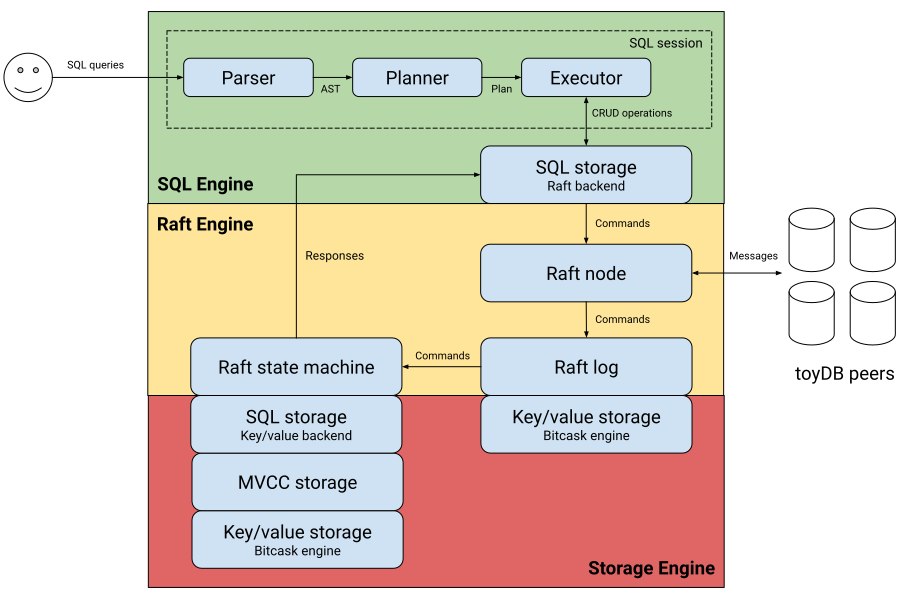
toyDB's architecture is fairly typical for a distributed SQL database: a transactional key/value store managed by a Raft cluster with a SQL query engine on top. See the architecture guide for more details.
Tests
toyDB mainly uses Goldenscripts for tests. These script various scenarios, capture events and output, and later assert that the behavior remains the same. See e.g.:
Run tests with cargo test, or have a look at the latest
CI run.
Benchmarks
toyDB is not optimized for performance, but comes with a workload benchmark tool that can run
various workloads against a toyDB cluster. For example:
# Start a 5-node toyDB cluster.
$ ./cluster/run.sh
[...]

# Run a read-only benchmark via all 5 nodes.
$ cargo run --release --bin workload read
Preparing initial dataset... done (0.179s)
Spawning 16 workers... done (0.006s)
Running workload read (rows=1000 size=64 batch=1)...

Time   Progress     Txns      Rate       p50       p90       p99      pMax
1.0s      13.1%    13085   13020/s     1.3ms     1.5ms     1.9ms     8.4ms
2.0s      27.2%    27183   13524/s     1.3ms     1.5ms     1.8ms     8.4ms
3.0s      41.3%    41301   13702/s     1.2ms     1.5ms     1.8ms     8.4ms
4.0s      55.3%    55340   13769/s     1.2ms     1.5ms     1.8ms     8.4ms
5.0s      70.0%    70015   13936/s     1.2ms     1.5ms     1.8ms     8.4ms
6.0s      84.7%    84663   14047/s     1.2ms     1.4ms     1.8ms     8.4ms
7.0s      99.6%    99571   14166/s     1.2ms     1.4ms     1.7ms     8.4ms
7.1s     100.0%   100000   14163/s     1.2ms     1.4ms     1.7ms     8.4ms

Verifying dataset... done (0.002s)
The available workloads are:
read: single-row primary key lookups.write: single-row inserts to sequential primary keys.bank: bank transfers between various customers and accounts. To make things interesting, this includes joins, secondary indexes, sorting, and conflicts.
For more information about workloads and parameters, run cargo run --bin workload -- --help.
Example workload results are listed below. Write performance is atrocious, due to fsync and a lack of write batching in the Raft layer. Disabling fsync, or using the in-memory engine, significantly improves write performance (at the expense of durability).
| Workload | BitCask | BitCask w/o fsync | Memory |
|---|---|---|---|
read |
14163 txn/s | 13941 txn/s | 13949 txn/s |
write |
35 txn/s | 4719 txn/s | 7781 txn/s |
bank |
21 txn/s | 1120 txn/s | 1346 txn/s |
Debugging
VSCode and the CodeLLDB
extension can be used to debug toyDB, with the debug configuration under .vscode/launch.json.
Under the "Run and Debug" tab, select e.g. "Debug executable 'toydb'" or "Debug unit tests in library 'toydb'".
Credits
The toyDB logo is courtesy of @jonasmerlin.
관련 프로젝트 살펴보기
불러오는 중…