
elstongun/leviathan
elstongun/leviathan has 887 GitHub stars and 52 forks. GitHot measured 0 stars in 24 hours and +4 in 7 days. Last checked 2026-11-24 08:48 UTC. Last push 2026-11-09.
측정된 스타 증가
- in 24h
- 0
- in 7 days
- +4
- in 15 days
- 기록 수집 중
- in 1 month
- 기록 수집 중
서로 겹치는 기간의 순증가량이며 일별 합계가 아닙니다. 측정값이 없으면 비워 둡니다. 스타는 관심도를 나타내며 품질을 보장하지 않습니다.
소개
대규모 데이터셋을 대상으로 에이전트에 깊은 기억을 제공합니다. Leviathan은 단일 정적 바이너리로, 레코드(JSONL, JSON, CSV/TSV, SQLite 또는 데이터베이스 CLI로 내보낼 수 있는 모든 데이터)를 순위가 매겨진 전문 검색 색인으로 변환합니다.
데이터README.md
Original

Deep memory for agents over large datasets.
Index any table, export or log once; your agent gets the few records that answer the question.




Leviathan is a single binary that turns records (JSONL, JSON, CSV/TSV, SQLite, or any database CLI's output) into a ranked full-text index. Agents ask in plain words and get short, cited result cards: ~450 tokens per answer at any dataset size, instead of grepping and reading raw history.
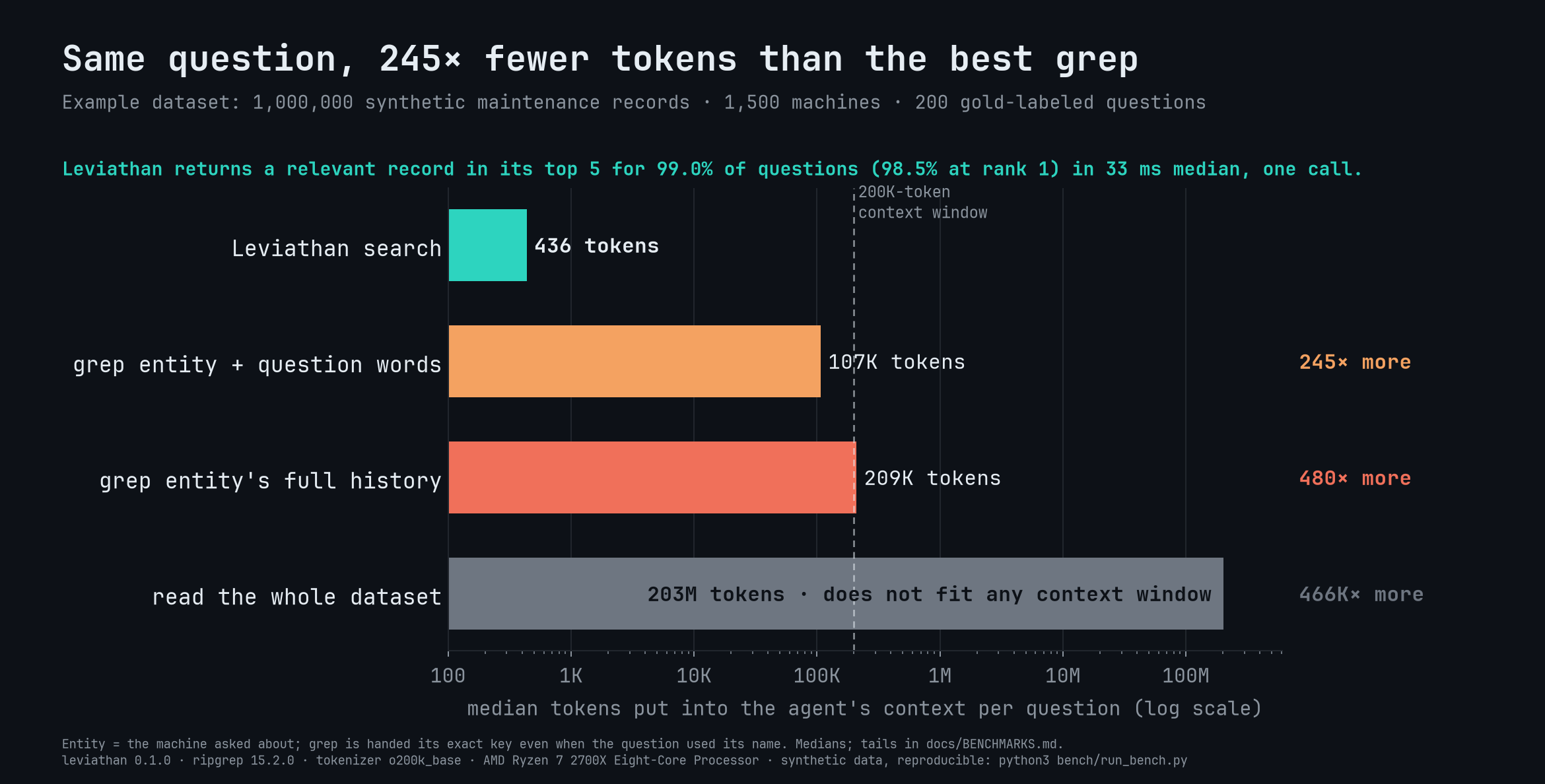
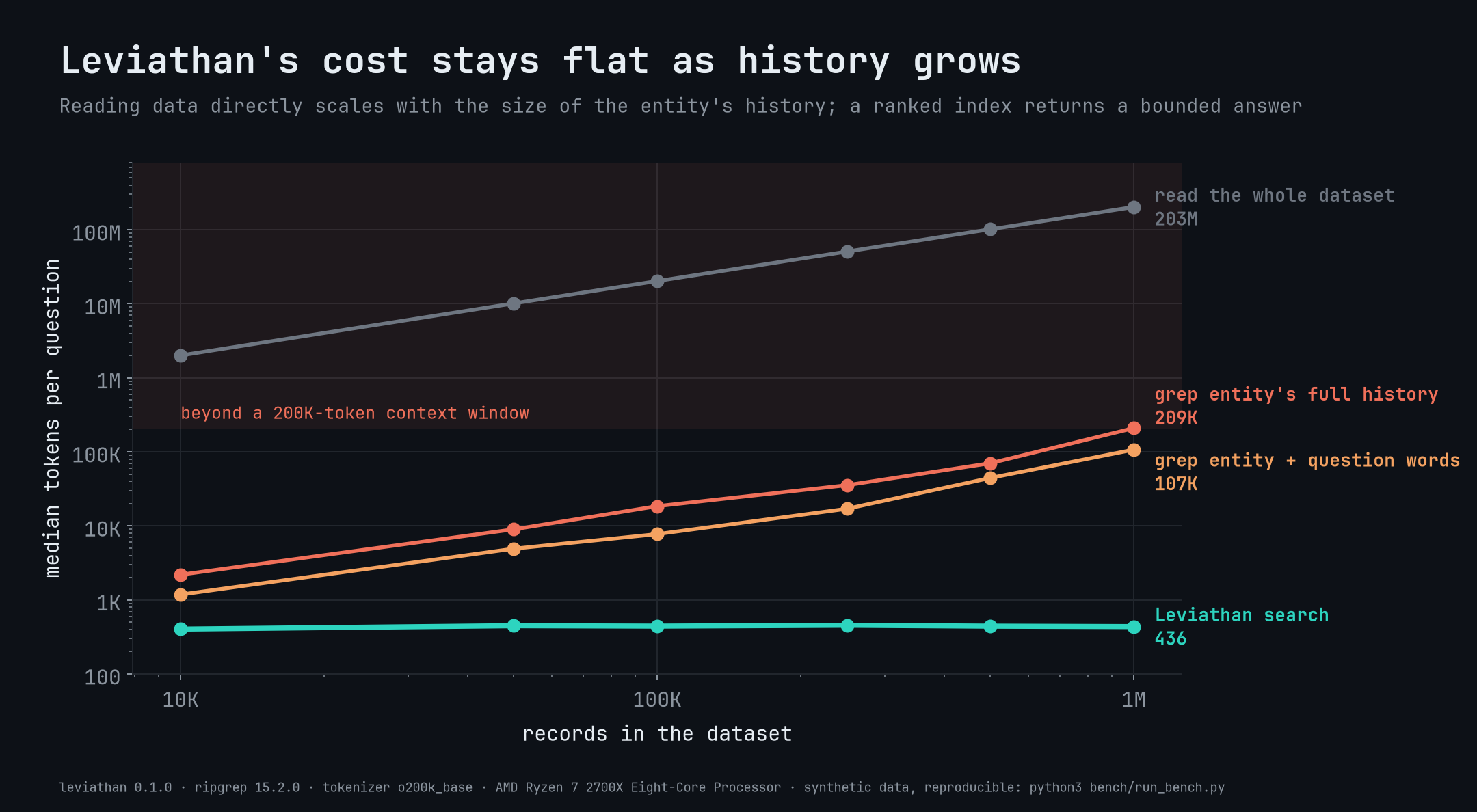
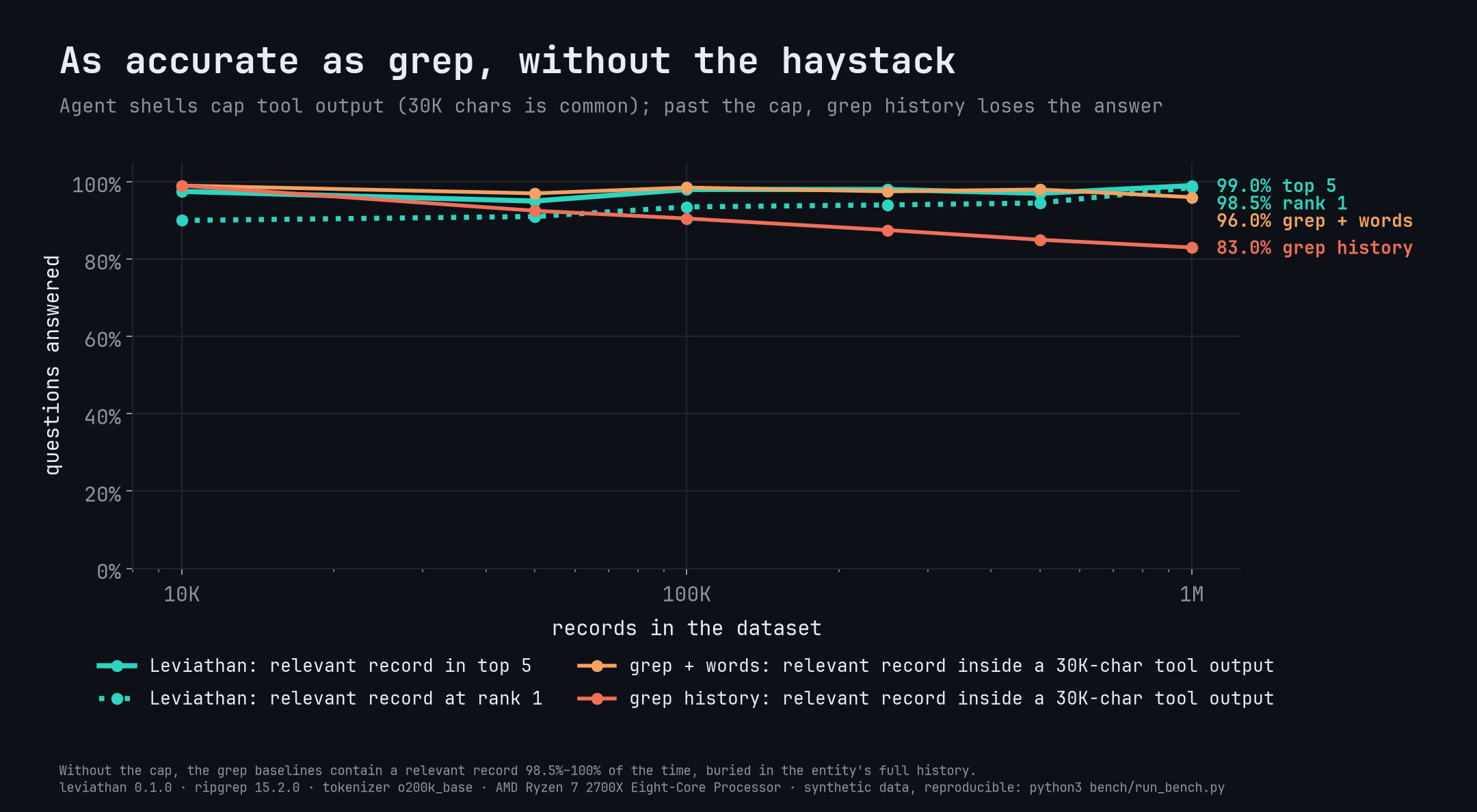
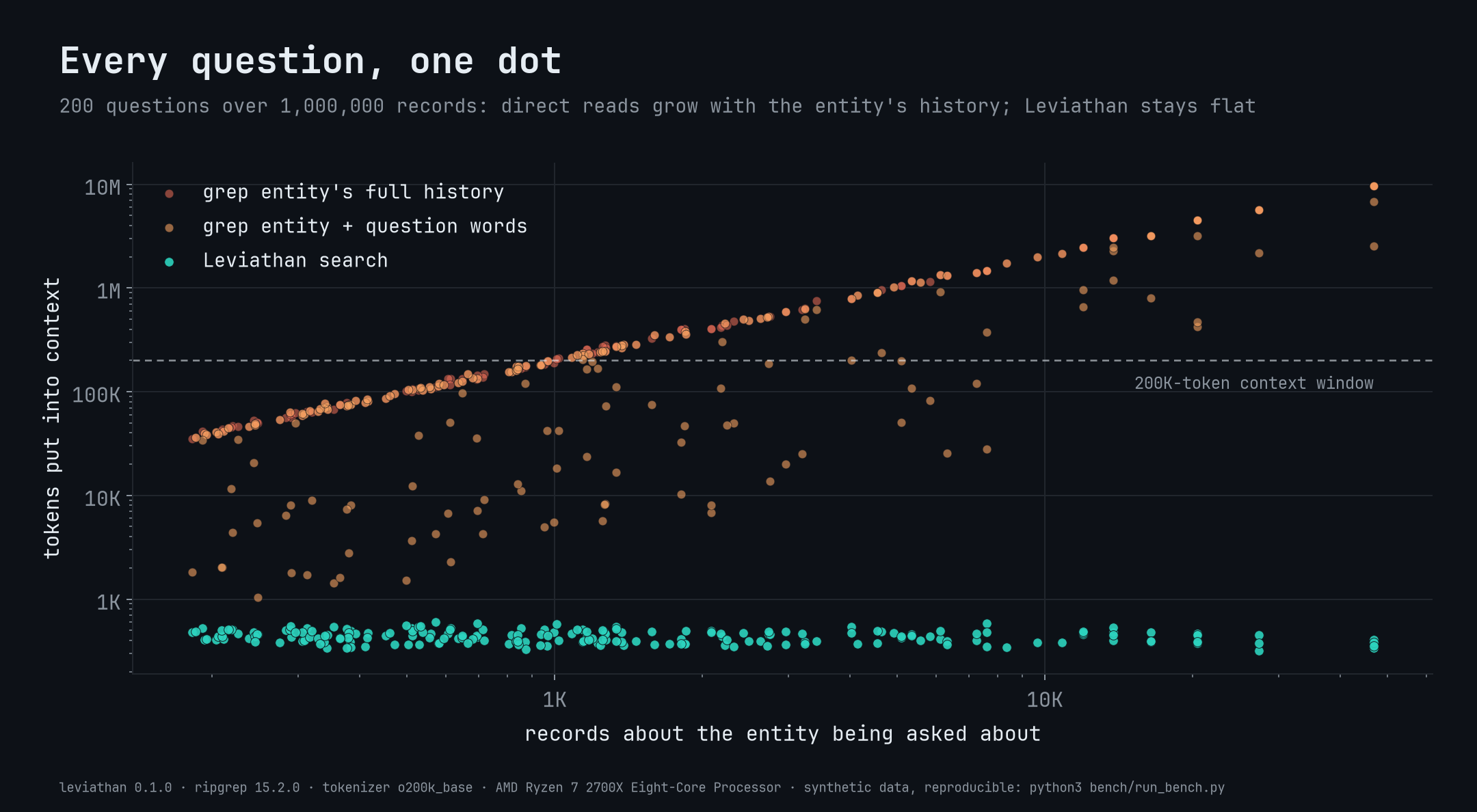
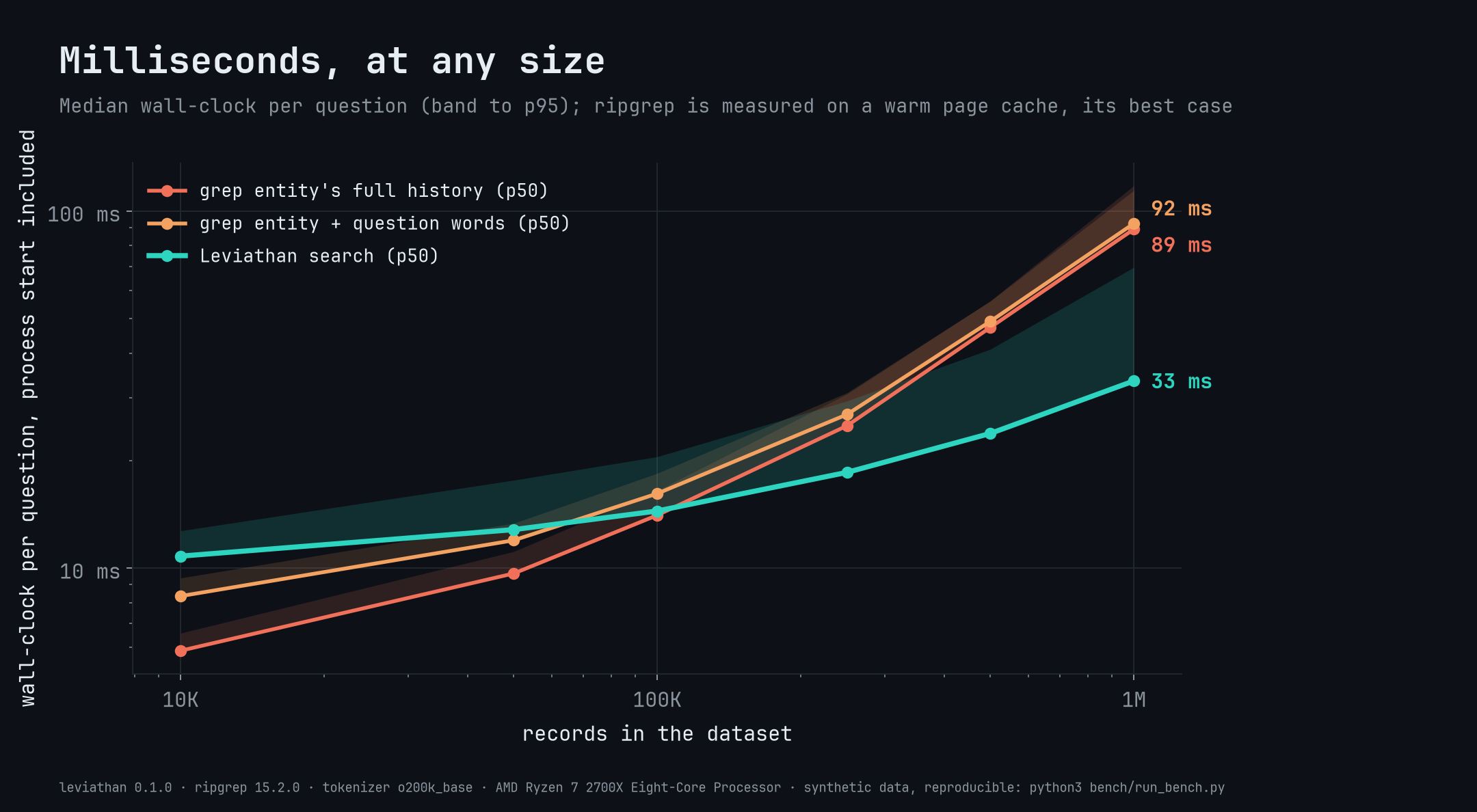
| At 1M records (678 MB) | Leviathan | best grep strategy |
|---|---|---|
| Median tokens per question | 436 | 107,122 (245×) |
| Relevant record returned | 99.0% top 5 · 98.5% rank 1 | 96.0% within a 30K-char output |
| Worst case (1,200 questions) | 602 tokens | 9.7M tokens |
| Median latency | 33 ms | 92 ms |
Measured on a synthetic maintenance log (one example dataset; nothing in Leviathan is specific to it). Methodology, all six scales and caveats: docs/BENCHMARKS.md.
Quickstart
cargo install leviathan-index       # or: cargo install --git https://github.com/elstongun/leviathan
cd examples/tickets && leviathan index
leviathan search -g acme "sso login loop after password reset"
leviathan search · customer C-ACME "Acme Corp" (7 tickets) · query "sso login loop after password reset" · shown 3 of 3 · 24 tickets indexed
[1] T-1001 · 2024-01-08 09:12 · rel 16.9
  Login loops back to sign-in page after password reset
  status: closed · priority: high
  resolution: Cleared stale session cookies on password reset; shipped in 4.2.1. Workaround: clear site data.
  match: Users who reset their password get redirected to the sign-in page again in an endless loop.
...
-gaccepts a key, name or partial name. Ambiguous or unknown groups list candidates and exit 3, never guess.- No match in the group falls back to other groups, labeled
OTHER CUSTOMER. - Combine
--where field=value,--since/--until,"phrases"and-exclusions.
Prebuilt binaries are on Releases. No runtime dependencies; the index is one SQLite file.
Map your data
Fields are paths (a.b, items[].name); only id is required.
| Field | Enables |
|---|---|
id |
get, upsert, delete, citations |
title / text |
Card headline (weighted 2×) / searched text (default: all strings) |
group / group_name |
-g scoped search, name resolution, labeled fallback |
date |
--since, --until, recent |
filters / display |
--where facets / fields shown on cards |
empty_values / rank.boost |
Placeholders treated as missing / favor complete records |
leviathan index ./export                      # everything in a folder: files of every format, every SQLite table
leviathan init ./export                       # infer a commented leviathan.toml
leviathan index tickets.csv --id "Ticket ID" --group customer_id --date created_at   # or flags
leviathan index -c tickets.toml               # or a config your agent wrote from the schema
leviathan describe                            # fields, groups, filter values, example calls
Any database works through its own CLI; Leviathan never holds credentials:
psql "$DATABASE_URL" -At -c "SELECT row_to_json(t) FROM tickets t" | leviathan index - -c tickets.toml
leviathan index app.db --sql "SELECT * FROM tickets" -c tickets.toml
duckdb -json -c "SELECT * FROM 'events/*.parquet'" | leviathan index - -c events.toml
A folder of tickets, customers and orders becomes one index with a kind per
dataset: --where _kind=orders keeps one, ids read orders:1042, and a
customer's group holds their tickets and orders together
(several kinds). Messy exports are
fine: wrapped or pretty-printed JSON, ; or | CSVs, byte-order marks,
Latin-1, blank headers.
Builds are atomic and skipped when nothing changed; upsert and delete keep an index fresh. Full reference: docs/CONFIG.md.
Plug it into your agent
CLI + skill (recommended): any agent with a shell can call it. Copy
skills/leviathan into ~/.claude/skills/ or
paste it into AGENTS.md / .cursor/rules. Costs 0 tokens until used.
skills/leviathan-memory does the same
for memory.
MCP (optional): leviathan mcp serves five read-only stdio tools
(search, resolve_group, get, describe, aggregate) whose descriptions include a
summary of your dataset (~640 tokens per session). leviathan wrap <agent>
prints the config for 24 agents (Claude Code, Codex, Cursor, VS Code /
Copilot, Gemini CLI, Windsurf, Cline, Zed, JetBrains and more) and
--apply writes it; leviathan wrap lists them all
(docs/AGENTS.md).
Remote (optional): leviathan serve --http serves the same tools as
Streamable HTTP MCP, REST and OpenAPI, with a bearer token or OAuth 2.1, so
claude.ai, ChatGPT, the Anthropic and OpenAI APIs and agent frameworks can
connect (docs/REMOTE.md).
Memory
Optional read/write memory for agents, in its own SQLite file. The agent
remembers one claim at a time; anything that can change has a key, so the
next write replaces the old value instead of contradicting it. Sessions start
with a short briefing, and recall returns only what fits a token budget.
leviathan wrap claude --memory --hooks --rules --apply   # tools, session-start briefing, always-on rule
leviathan memory remember "Prefers pnpm over npm" --kind preference -s sam -k package_manager
leviathan memory recall package manager
leviathan memory import ~/.claude/projects/<project>/memory/MEMORY.md   # bring an existing markdown memory
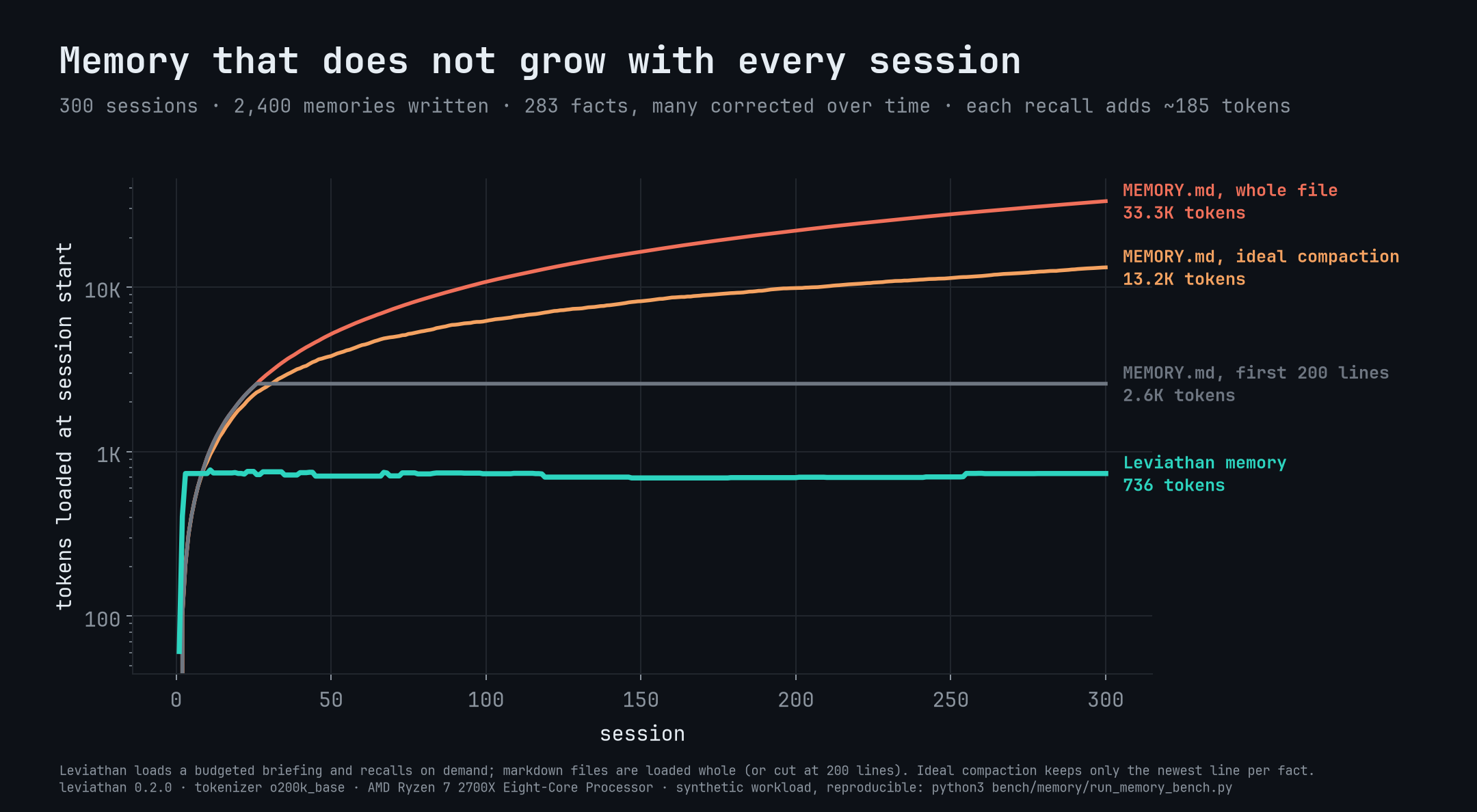
| After 300 sessions | Leviathan memory | MEMORY.md, whole file | MEMORY.md, first 200 lines |
|---|---|---|---|
| Tokens at session start | 736 | 33,313 | 2,588 |
| Answer in context | 100% | 100% | 18% |
| Stale value in context | 0% | 73.8% | 36.4% |
Writes are explicit (no model runs inside Leviathan), secrets are refused,
and history stays queryable (as_of, history). Guide, formats and
benchmark: docs/MEMORY.md.
Commands
| Command | Does |
|---|---|
init / index / upsert / delete |
Propose a mapping / build / update / remove records |
search [-g G] [words] |
Ranked records (--scope, --where, --since, --until, -n, --offset) |
aggregate [--by B] [--metric M --field F] |
Exact counts or sum/avg/min/max over every matching record, in total or per group, year/month/day or filter value (-g, --group-contains, --where, --since, --until, -n) |
recent [-g G] · resolve <g> · get <id…> · describe |
Newest · group candidates · full records · index summary |
memory remember / recall / forget / briefing |
Write / ranked read / retire / session-start briefing (--memory=PATH) |
memory list / history / stats / import / export / prune |
Browse / slot versions / counts / markdown or JSONL in / backup / clean up |
mcp [--memory] [--remote URL] · serve --http ADDR |
stdio MCP server or bridge · HTTP MCP + REST server |
wrap [agent] |
Agent config (--memory, --hooks, --rules, --apply); no agent lists targets |
Global: --index PATH, --json, --max-chars N. Exit codes: 0 ok (zero hits included), 1 error, 2 bad request, 3 group unknown/ambiguous.
How it works
Records stream into one SQLite file with an FTS5 index. A search resolves the
group (exact → name → contains → fuzzy), runs one FTS5 match where group and
filter values are indexed tokens (no post-filtering), ranks by BM25 × boosts,
and decodes only the top N into capped cards. A record's own group name is
excluded from scoped matching, placeholders count as missing, and every
answer reports shown N of M so agents can tell "no match" from "no data".
Reproduce the benchmark
python3 -m venv bench/.venv && bench/.venv/bin/pip install -r bench/requirements.txt
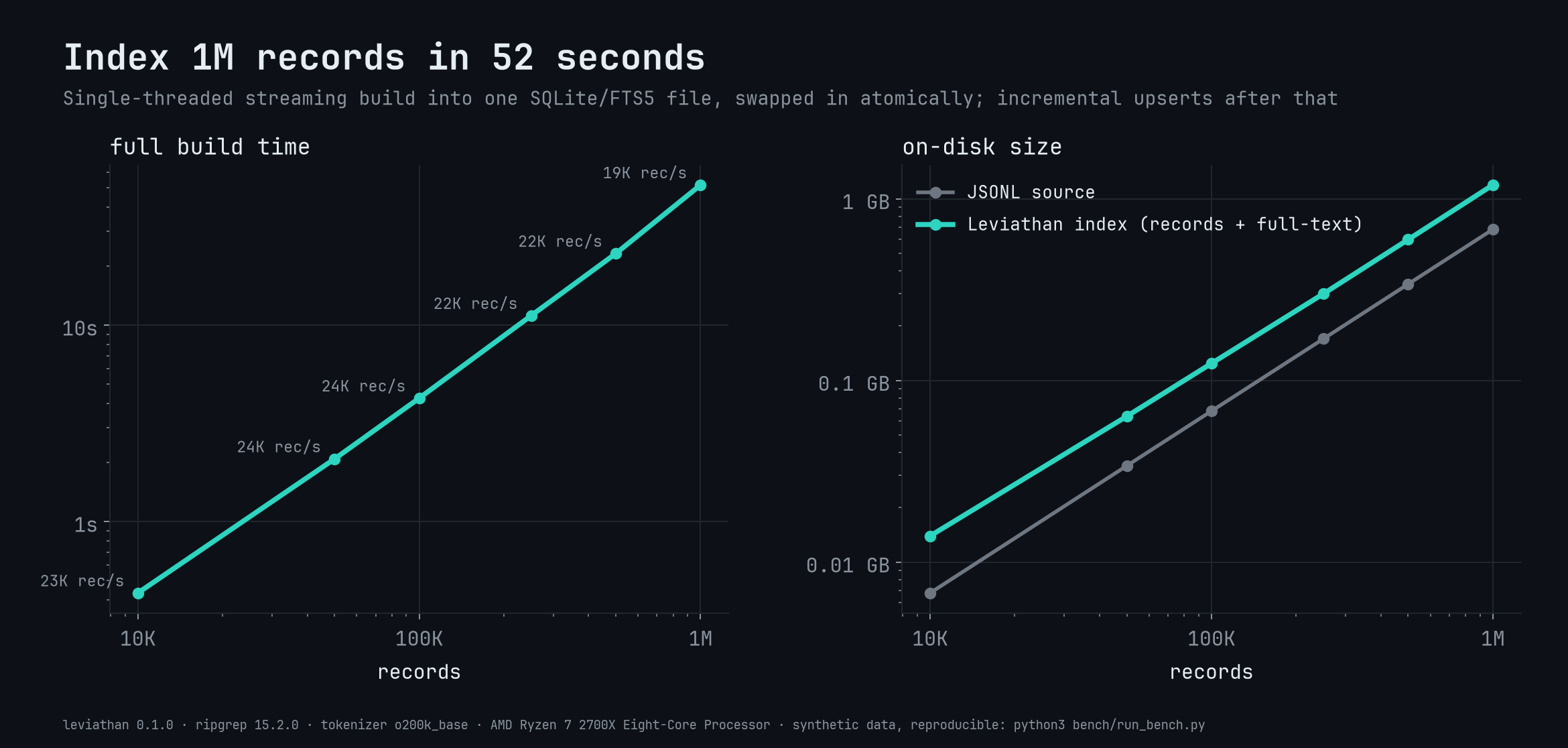
bench/.venv/bin/python bench/run_bench.py && bench/.venv/bin/python bench/report.py   # ~30 min, ~4 GB
Contributing, security, license
See CONTRIBUTING.md (ranking changes need before/after
benchmark numbers) and SECURITY.md (indexes read-only,
offline unless you serve or connect over HTTP, unsafe-free; report
privately). Licensed under Apache-2.0;
dependencies in THIRD_PARTY.md.
관련 프로젝트 살펴보기
불러오는 중…