
efremidze/Shiny
소개
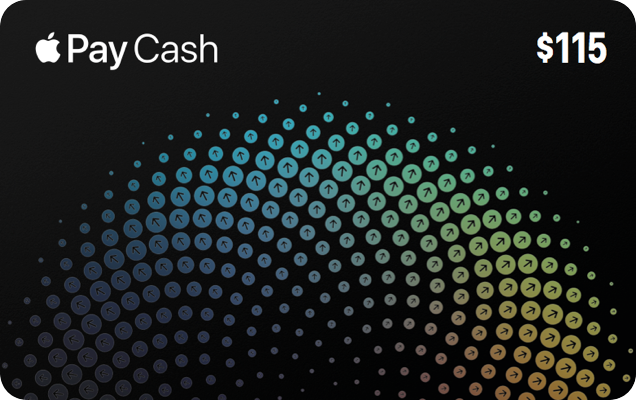
무지갯빛 효과 뷰 (Apple Pay Cash에서 영감을 받음) ✨
창작 및 미디어측정된 스타 증가
- in 24h
- 0
- in 7 days
- 0
- in 15 days
- 기록 수집 중
- in 1 month
- 기록 수집 중
서로 겹치는 기간의 순증가량이며 일별 합계가 아닙니다. 측정값이 없으면 비워 둡니다. 스타는 관심도를 나타내며 품질을 보장하지 않습니다.
README.md
OriginalShiny





Shiny is an iOS library that generates an iridescent effect view matched to the gyroscope, similar to the Apple Pay Cash card in the Wallet app.

$ pod try Shiny
Requirements
- iOS 9.0+
- Swift 5 (Shiny 2.x), Swift 4 (Shiny 1.x)
Usage
Adding ShinyView programmatically (supports storyboard/xib too):
import Shiny

let shinyView = ShinyView(frame: CGRect(x: 0, y: 0, width: 320, height: 200))
shinyView.colors = [.gray, .red, .green, .blue, .gray]
shinyView.startUpdates() // necessary
view.addSubview(shinyView)
You must call startUpdates() for the instance to observe motion changes. Calling stopUpdates() on the instance will stop motion updates.
func startUpdates() // Starts listening to motion updates.
func stopUpdates() // Stops listening to motion updates.
Customization
The ShinyView exposes several properties to customize the radial gradient used to create the shiny effect:
var colors: [UIColor] // The color of each gradient stop.
var locations: [CGFloat]? // The location of each gradient stop. The default is `nil`.
var scale: CGFloat // The scale factor of the gradient. The default is `2.0`.
Installation
Shiny is available via CocoaPods and Carthage.
CocoaPods
To install with CocoaPods, simply add this in your Podfile:
use_frameworks!
pod "Shiny"
Carthage
To install with Carthage, simply add this in your Cartfile:
github "efremidze/Shiny"
Mentions
Communication
- If you found a bug, open an issue.
- If you have a feature request, open an issue.
- If you want to contribute, submit a pull request.
Apps Using Shiny
Feel free to submit a PR if you’re using this library in your apps.
License
Shiny is available under the MIT license. See the LICENSE file for more info.
관련 프로젝트 살펴보기
불러오는 중…