
dbcli/mycli
dbcli/mycli has 11,994 GitHub stars and 698 forks. GitHot measured +2 stars in 24 hours. Last checked 2026-11-05 12:19 UTC. Last push 2026-11-02.
자동 완성, 구문 강조, 데이터프레임을 지원하는 기능이 풍부한 MySQL 터미널 클라이언트
What you can do
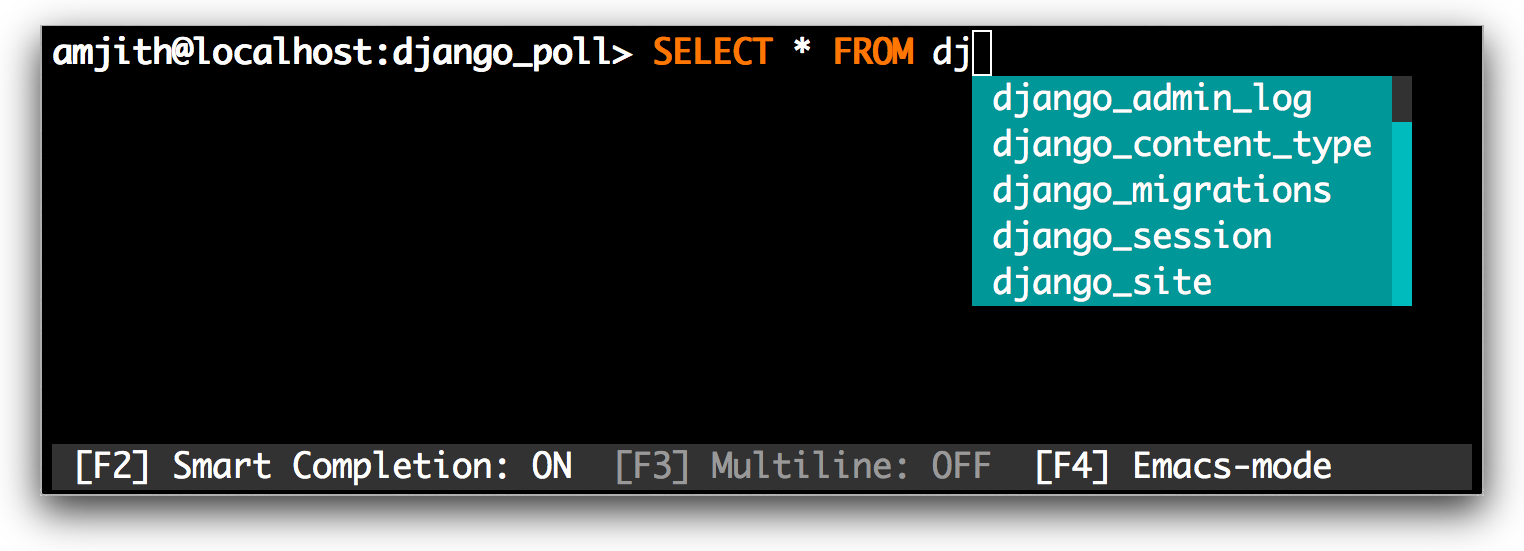
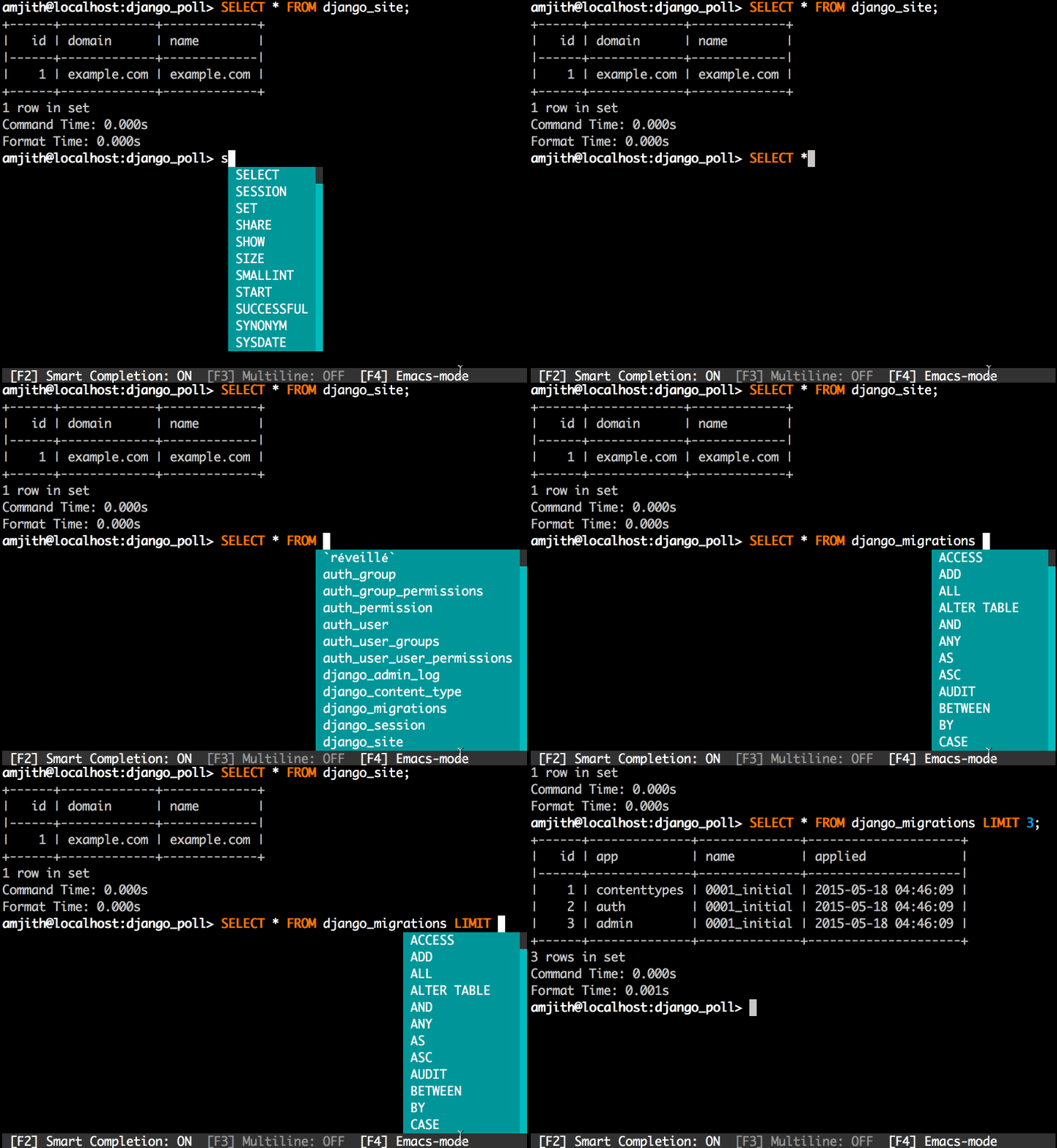
- Auto-completion as you type for SQL keywords as well as tables, views, columns, enums, and more!
- SELECT * FROM tab will only show table names.
- SELECT * FROM users WHERE tab will only show column names.
- Fuzzy history search using fzf.
측정된 스타 증가
- in 24h
- +2
- in 7 days
- 기록 수집 중
- in 15 days
- 기록 수집 중
- in 1 month
- 기록 수집 중
서로 겹치는 기간의 순증가량이며 일별 합계가 아닙니다. 측정값이 없으면 비워 둡니다. 스타는 관심도를 나타내며 품질을 보장하지 않습니다.
README.md
Originalmycli



Rich MySQL terminal client with auto-completion, syntax highlighting, and dataframes.
Homepage: https://mycli.net
Documentation: https://mycli.net/docs
Mycli is known to be compatible with
Postgres equivalent
Release 2.x
Release 2.0.0 has breaking changes!
Quick Start
If you already know how to install Python packages, then you can install mycli
via pip. This package is always up to date.
pip install --upgrade 'mycli[all]'
or, on macOS (pygments is optional):
brew update && brew install mycli pygments
or, on Debian or Ubuntu (fzf and pygments are optional):
apt-get install mycli fzf python3-pygments
Try Without Installing: uv
uv tool run 'mycli[all]' --help
Try Without Installing: Docker
The images on Dockerhub are out of date! ghcr.io images are preferred. A sample database is included:
docker run --pull=always -it ghcr.io/dbcli/mycli:latest
The same image works with macOS container:
container run -it ghcr.io/dbcli/mycli:latest
Features
- Auto-completion as you type for SQL keywords as well as tables, views, columns, enums, and more!
- Smart-completion suggests context-sensitive completion:
SELECT * FROMtab will only show table names.SELECT * FROM users WHEREtab will only show column names.
- Fuzzy history search using fzf.
- Output explorer using fzf or other tools.
- Syntax highlighting using Pygments.
- Multiline queries.
- Favorite queries with positional or named parameters using Jinja. Save a query using
and execute it with/fs alias <query>/f alias --key=value - Timing of SQL statements and table rendering.
- Many output formats for tabular results.
- Shell-style trailing redirects with
$>,$>>and$|operators. - Polars dataframe transforms and plots with
.|, and Parquet saves with.>. - Querying LLMs with context derived from your schema using
/llm. - Storing passwords in the system keyring.
- Modern defaults such as UTF-8 connection type and SSL.
- Integrations with: SSH, Kubernetes, Vault, and Boundary.
Mycli creates a config file ~/.myclirc on the first run; you can use the
options in that file to configure the above features, and more.
Some features are only exposed as key bindings.
Usage
See
mycli --help
Contributing
If you're interested in contributing to this project, first of all we would like to extend our heartfelt gratitude. We've written a small doc to describe how to get mycli running in a development setup.
https://github.com/dbcli/mycli/blob/main/CONTRIBUTING.md
Additional Install Instructions
Shell Completions
If installed via Homebrew, shell completions may already be configured.
Otherwise, to configure shell completions for the current session, execute a command like this:
eval "$(mycli --completions SHELL)"
replacing SHELL with bash, zsh, or fish, depending on your choice of
shell.
To permanently install shell completions, the above command may be added to your
~/.bashrc, ~/.zshrc, or ~/.config/fish/config.fish. To speed up login
time, the output of mycli --completions SHELL may be saved to a file and
loaded with source.
Alternative Install Methods
These are some alternative ways to install mycli that are not managed by our team but provided by OS package maintainers.
NOTE: OS packages could be considerably out of date.
If present, the fzf package can be used for fuzzy history search, and as an
output "explorer" with the \x special command. pygmentize can be used for
syntax highlighting within the fuzzy history search. The less package is
also expected, but almost always already installed.
Arch, Manjaro
You can install the mycli package available in the AUR. fzf and
python-pygments are optional but recommended:
yay -S mycli fzf python-pygments
Debian, Ubuntu
On Debian and Ubuntu distributions, you can easily install the mycli package
using apt. The fzf and python3-pygments packages are optional but
recommended:
apt-get install mycli fzf python3-pygments
Fedora
Fedora has a package available for mycli; install it using dnf. The fzf and
python-pygments packages are optional but recommended:
dnf install mycli fzf python-pygments
Windows
Option 1: Native Windows
Install the less pager, for example by scoop install less.
Install the fzf fuzzy finder, for example by scoop install fzf.
Follow the instructions on this blog post: https://web.archive.org/web/20221006045208/https://www.codewall.co.uk/installing-using-mycli-on-windows/
The libraries used in mycli are Windows-compatible, but there are known limitations according to the test suite. The basics work without any modifications, but this configuration isn't supported software at this time.
PRs to address shortcomings on Windows would be welcome!
Option 2: WSL
Mycli is more compatible with WSL than with native Windows, though still not 100% perfect. This is a good option for using mycli on Windows.
With WSL, you are probably using an Ubuntu distribution, in which case recommended dependencies can be installed by
apt-get install fzf python3-pygments
and mycli can be installed by apt-get or by pip (recommended):
pip install --upgrade 'mycli[all]'
PRs to complete WSL support would be welcome!
Thanks
This project was funded through Kickstarter. Our thanks to the backers who supported the project.
A special thanks to Jonathan Slenders for creating Python Prompt Toolkit, which is quite literally the backbone library, that made this app possible. Jonathan has also provided valuable feedback and support during the development of this app.
Click is used for command line option parsing and printing error messages.
Thanks to PyMysql for a pure Python adapter to MySQL databases.
Compatibility
Mycli is tested on macOS (full), Linux (full), Windows (partial), and WSL (partial), and requires Python 3.11 or better.
To connect to MySQL versions earlier than 5.5, you may need to set the
following in ~/.myclirc:
[connection]
# character set for connections without --charset being set at the CLI
default_character_set = utf8
or use --charset=utf8 when invoking mycli.
Configuration and Usage
For more information on using and configuring mycli, check out our documentation.
Common topics include:
License
Mycli is Open Source Software provided under the BSD 3-Clause License.
The Mycli Docker image and git repository include a copy of the employees sample database provided by Oracle under the Creative Commons Attribution-Share Alike 3.0 Unported License.
관련 프로젝트 살펴보기
Asabeneh/30-Days-Of-Python
30 Days of Python 프로그래밍 챌린지는 Python 프로그래밍 언어를 30일 동안 배우기 위한 단계별 가이드입니다. 이 챌린지는 100일 이상 걸릴 수 있습니다. 자신의 속도에 맞춰 진행하세요. 다음 동영상도 도움이 될 수 있습니다: https://www.youtube.com/channel/UC7PNRuno1rzYPb1xLa4yktw
78,163 스타grafana/grafana
개방적이고 조합 가능한 옵저버빌리티 및 데이터 시각화 플랫폼입니다. Prometheus, Loki, Elasticsearch, InfluxDB, Postgres 등 여러 소스의 메트릭, 로그, 트레이스를 시각화합니다.
77,699 스타redis/redis
실시간 데이터 기반 애플리케이션을 구축하는 개발자에게 Redis는 가장 선호되고, 가장 빠르며, 기능이 가장 풍부한 캐시, 데이터 구조 서버이자 문서 및 벡터 쿼리 엔진입니다.
77,199 스타apache/superset
Apache Superset는 데이터 시각화 및 데이터 탐색 플랫폼입니다.
75,413 스타