
crmne/zapfast
crmne/zapfast has 3,260 GitHub stars and 341 forks. GitHot measured +139 stars in 24 hours. Last checked 2026-11-06 21:52 UTC. Last push 2026-11-02.
ZapFast: a fast, native WhatsApp client in Rust and egui
측정된 스타 증가
- in 24h
- +139
- in 7 days
- 업데이트 지연
- in 15 days
- 업데이트 지연
- in 1 month
- 업데이트 지연
서로 겹치는 기간의 순증가량이며 일별 합계가 아닙니다. 측정값이 없으면 비워 둡니다. 스타는 관심도를 나타내며 품질을 보장하지 않습니다.
README.md
Original

ZapFast
WhatsApp, native and fast.
A lightweight WhatsApp app for Linux, macOS, and Windows.
Download · Getting started · User guide · Contribute



ZapFast is a WhatsApp client written in Rust with egui and fastframe, the framework behind a family of native desktop apps. It links to your phone as a companion device through whatsapp-rust and has no browser engine. In our Linux test it opens in under a second and uses about 200 MB of idle RAM, against 1.13 GB for WhatsApp Web. See the measurements.
The interface is available in English, Chinese (Simplified and Traditional), French, German, Indonesian, Italian, Portuguese (Brazil), Russian, Spanish, and Turkish.
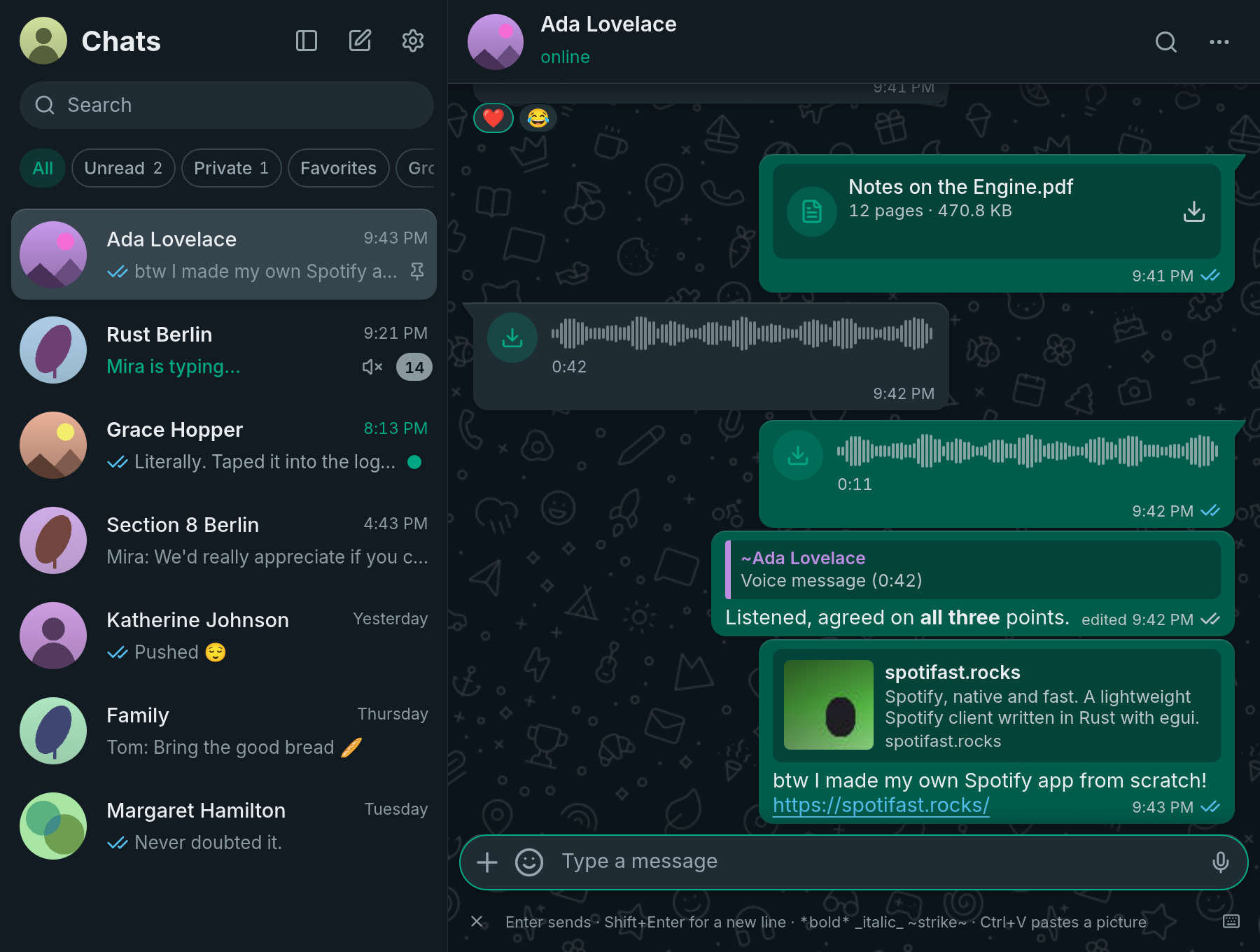
Watch ZapFast in action
https://github.com/user-attachments/assets/2bf86b54-45fc-4add-8de7-c426c3cdad9b
Features · Install · Link your phone · Help
Your chats, on your desktop
| Feature | What you can do |
|---|---|
| Messages | Send formatted text, replies, edits, reactions, forwards, pictures, files, stickers, GIFs, polls, and voice messages. |
| Media in the chat | Play voice messages, videos, round video messages, GIFs, and animated stickers in place. |
| Your history | Keep your chats in an encrypted archive on this computer, fetch older messages from your phone as you scroll, and export locally saved chat history as text or a ZIP with downloaded attachments. |
| Several numbers | Link more than one WhatsApp number and switch between them in one window. |
| Desktop controls | Use keyboard shortcuts, select and copy text across messages, and stay linked in the tray with notifications. |
| Themes | Choose light, dark, system appearance, or custom colours. On Omarchy, follow your desktop theme. |
| Privacy | Hide locked chats behind a code, or the whole window behind an app lock. Nothing goes to a server of ours. |
Install
| Platform | Installation |
|---|---|
| macOS | brew install --cask crmne/tap/zapfast, or download the Mac app. |
| Arch Linux | yay -S zapfast-bin |
| Windows | Choose your build on the Download page. |
| Other Linux | Find Nix, AppImage, and other options on the Download page. |
| From source | Follow Getting started for dependencies and commands. |
Link your phone
- Open ZapFast. It shows a QR code.
- On your phone, open WhatsApp, then Settings, Linked devices, Link a device, and scan the code. Or click Link with phone number and enter the eight-character code on your phone.
- Your recent chats arrive from the phone. Older messages follow as you scroll up.
The link survives restarts, and your phone does not need to stay online to read what ZapFast has already stored. See Getting started for the full walkthrough and How it links for the details.
Guides and help
The complete guide lives at zapfast.rocks.
| You want to… | Read |
|---|---|
| Know what ZapFast does and does not do yet | What is ZapFast? |
| Link your phone or build from source | Getting started |
| Learn messages, stickers, polls, and shortcuts | Using ZapFast |
| Find settings, stored files, encryption, the app lock, and updates | Settings and files |
| Make your own theme | Making a theme |
| Understand what stays on this computer | How it links |
| Understand account risk | Account safety |
| Report a bug or propose a feature | Read Contributing, then use the issue forms. |
Contributing
Read CONTRIBUTING.md before opening an issue or pull request. To look at the interface without a WhatsApp account, run:
cargo run --features demo -- --demo
AGENTS.md describes the architecture, DEMO.md the demo pages, screenshots, and recorded tours, and PACKAGING.md releases and packages.
Native notifications use Fastframe on Linux, macOS and Windows. ZapFast keeps its account/chat routing, privacy settings, notification limits and sound previews. Clicks open the announced message; reading a chat withdraws its tracked notifications. OS permissions and notification presentation still apply.
More native apps
Want Spotify just as fast and native? Spotifast is ZapFast's sibling. Both are built on fastframe.
Acknowledgements
ZapFast uses whatsapp-rust,
egui, fastframe, the
Inter typeface and Noto Color Emoji (OFL), and
Lucide icons (ISC), also used for the chat wallpaper
doodles. The notification sounds are Pidgin's, under the
GPL-2.0 (see assets/sounds/).
ZapFast is an unofficial client and is not affiliated with WhatsApp or Meta. Using an unofficial client may be against WhatsApp's terms of service and could get an account suspended. Use it at your own risk. WhatsApp is a trademark of WhatsApp LLC.
Licensed under the MIT License.