
colineckert/obsidian-things
소개
아름답게 디자인된 앱 Things에서 영감을 얻은 Obsidian 테마입니다.
개발 도구What you can do
- Things-inspired color palette
- Light and dark theme
- Quick preview/edit floating action button on mobile
- Customizable colors for bold, italic, highlighters, and block-quotes via the Style Settings community plugin
측정된 스타 증가
- in 24h
- 0
- in 7 days
- +1
- in 15 days
- +2
- in 1 month
- 기록 수집 중
서로 겹치는 기간의 순증가량이며 일별 합계가 아닙니다. 측정값이 없으면 비워 둡니다. 스타는 관심도를 나타내며 품질을 보장하지 않습니다.
README.md
OriginalNotes on V1 of this theme
V1 of this theme was built using code from @kepano's great Minimal theme. Please support @kepano's work!
Support @kepano on Twitter or Buy @kepano a coffee

Things 2
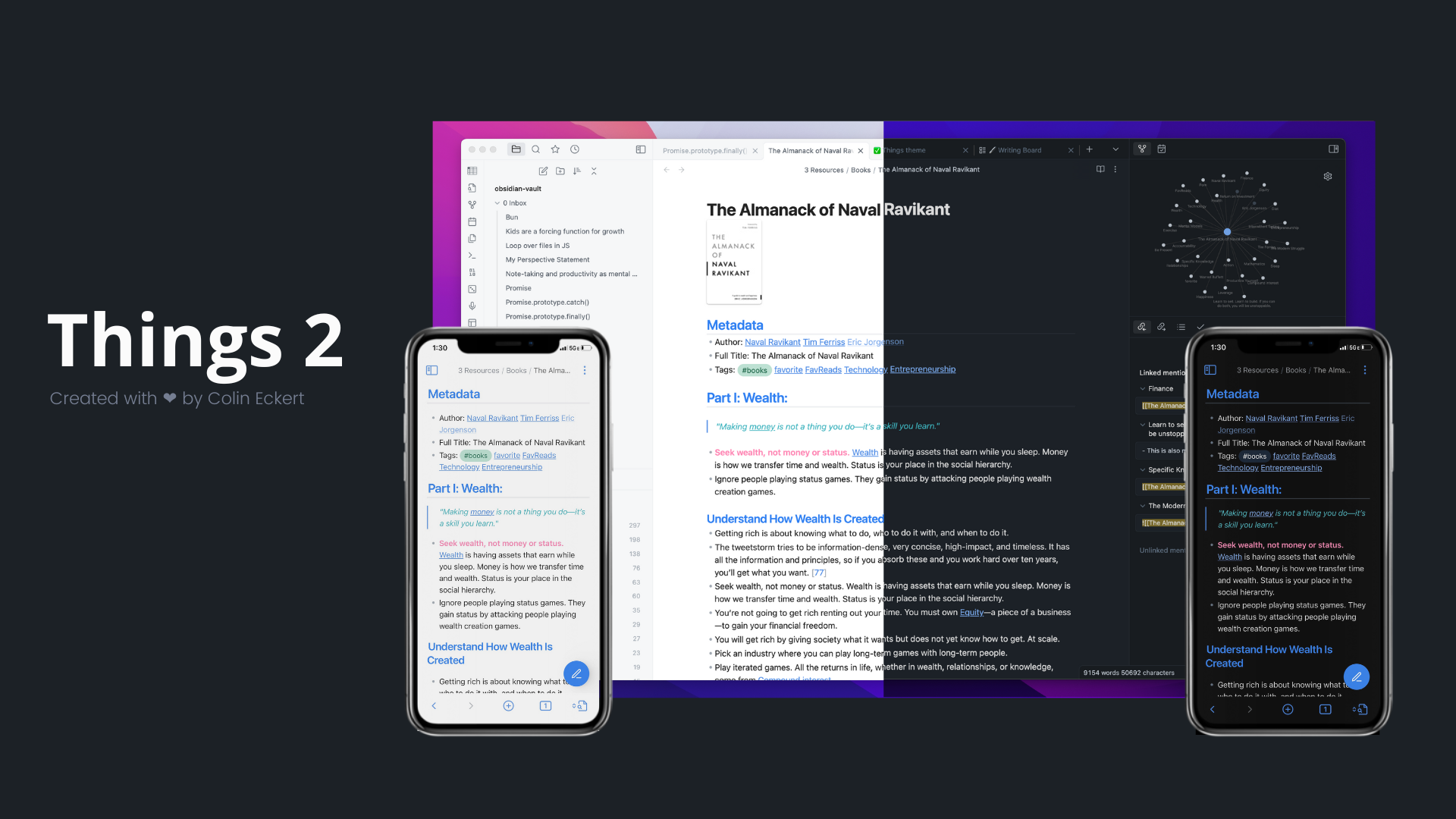
I love Things 3. It's been the task manager I've trusted and used for years, partly because the design makes using the app so enjoyable. I wanted to bring that same joy to Obsidian by creating a Things-inspired design that looked and felt native on MacOS and iOS.
The lastest release of Things leverages much of the newly improved design scheme released in Obsidian 1.0, adding the Things V1 theme's thoughtful color scheme, helpful floating action button, customization options, and unique flair.
Features
- Things-inspired color palette
- Light and dark theme
- Quick preview/edit floating action button on mobile
- Customizable colors for bold, italic, highlighters, and block-quotes via the Style Settings community plugin
- Atom code syntax higlighting
- Enhanced code blocks with line numbers
- Tag pills for readability
- Checkbox styling and icons
- Better designed image cards
- JetBrains Mono font and ligatures for code
Supported Plugins
This theme has support for the following Obsidian community plugins (Things V1):
- Sliding Panes (Andy's Mode)
- Calendar
- Kanban
- Hider
- Checklist
- Todoist (ironic, I know)
- Style Settings
- Advanced Mobile Toolbar
Checkbox Styling
Things supports a wide number of alternate checkbox types. These allow you to call out tasks that are incomplete, canceled, rescheduled, etc. See below for availale checkbox types.
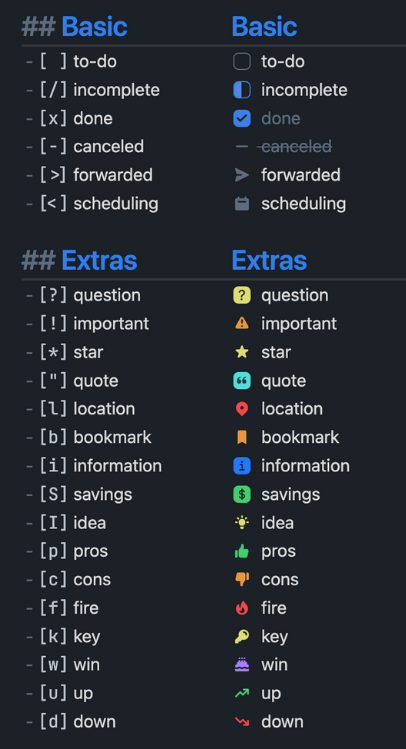
## Basic
- [ ] to-do
- [/] incomplete
- [x] done
- [-] canceled
- [>] forwarded
- [<] scheduling

## Extras
- [?] question
- [!] important
- [*] star
- ["] quote
- [l] location
- [b] bookmark
- [i] information
- [S] savings
- [I] idea
- [p] pros
- [c] cons
- [f] fire
- [k] key
- [w] win
- [u] up
- [d] down
- [D] draft pull request
- [P] open pull request
- [M] merged pull request
Installation
Obsidian Marketplace (Recommended)
- Open the Settings in Obsidian
- Navigate to Appearances tab under Options
- Under the Themes section, click on the
Managebutton across from Themes - Search for
Thingsin the Filter text input - Click
Useand then you're done! 🎉
Manual
- Download this repo
- Copy the
theme.cssfile into your vault's/.obsidian/themesdirectory - Rename the file to
Things.cssso it will have a unique name in the theme selection dropdown - Open the Settings in Obsidian
- Navigate to Appearances tab under Options
- Under the Themes section, click on the dropdown menu next to Theme heading
- Select
Thingsand then you're done! 🎉
Feedback
If you have any issues and/or suggestions, please submit an issue or raise a PR. I will try my best to answer as quickly as possible!
Credits
Again, I owe a huge hat tip to @kepano and his Minimal Theme, which served as the base for this theme, as well as to @chetachiezikeuzor and her Yin and Yang Theme for further inspiration on building an elegant, native-feeling design!
Support
🎉 You can help me keep improving things like this by supporting development: @colineckert on Twitter or Buy me a coffee.

관련 프로젝트 살펴보기
불러오는 중…