
coetaur0/staticfg
소개
Python3 control flow graph generator
개발 도구측정된 스타 증가
- in 24h
- 0
- in 7 days
- 0
- in 15 days
- 기록 수집 중
- in 1 month
- 기록 수집 중
서로 겹치는 기간의 순증가량이며 일별 합계가 아닙니다. 측정값이 없으면 비워 둡니다. 스타는 관심도를 나타내며 품질을 보장하지 않습니다.
README.md
OriginalStatiCFG
Python3 control flow graph generator
StatiCFG is a package that can be used to produce control flow graphs (CFGs) for Python 3 programs. The CFGs it generates can be easily visualised with graphviz and used for static analysis. This analysis is actually the main purpose of the module, hence the name of StatiCFG.
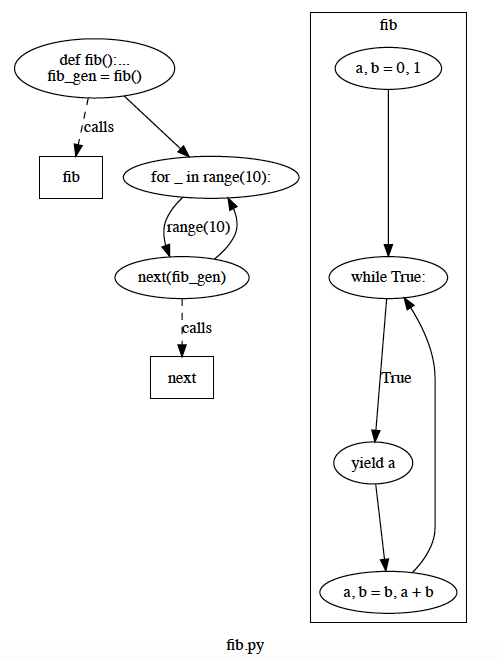
Below is an example of a piece of code that generates the Fibonacci sequence and the CFG produced for it with StatiCFG.
def fib():
    a, b = 0, 1
    while True:
        yield a
        a, b = b, a + b

fib_gen = fib()
for _ in range(10):
    next(fib_gen)
Installation
To install StatiCFG, simply clone this repository and run the command pip3 install --upgrade . inside of it. Please note that
you will also need to install Graphviz on your machine to be able to visualise the control flow
graphs generated by StatiCFG.
Usage
To use StatiCFG, simply import the module in your Python interpreter or program, and use the staticfg.CFGBuilder class to
build CFGs. For example, to build the CFG of a program defined in a file with the path ./example.py, the following code can
be used:
from staticfg import CFGBuilder

cfg = CFGBuilder().build_from_file('example.py', './example.py')
This returns the CFG for the code in ./example.py in the cfg variable. The first parameter of build_from_file is the
desired name for the CFG, and the second one is the path to the file containing the source code. The produced CFG can then be
visualised with:
cfg.build_visual('exampleCFG', 'pdf')
The first paramter of build_visual is the desired name for the DOT file produced by the method, and the second one is the
format to use for the visualisation.
The build_cfg.py script present in the /examples folder of this repository can be used to directly generate the CFG of some
Python program and visualise it. To do so, simply call the script with the command python3 build_cfg.py <path_to_some_source>.
관련 프로젝트 살펴보기
불러오는 중…