
clojure-emacs/clj-refactor.el
소개
Clojure 코드 리팩터링을 위한 강력한 명령을 제공하는 CIDER 확장입니다.
개발 도구측정된 스타 증가
- in 24h
- 0
- in 7 days
- +1
- in 15 days
- 기록 수집 중
- in 1 month
- 기록 수집 중
서로 겹치는 기간의 순증가량이며 일별 합계가 아닙니다. 측정값이 없으면 비워 둡니다. 스타는 관심도를 나타내며 품질을 보장하지 않습니다.
README.md
Original


clj-refactor.el
clj-refactor provides powerful refactoring functionality for Clojure projects. It complements
the refactoring functionality you'd find in clojure-mode and CIDER.
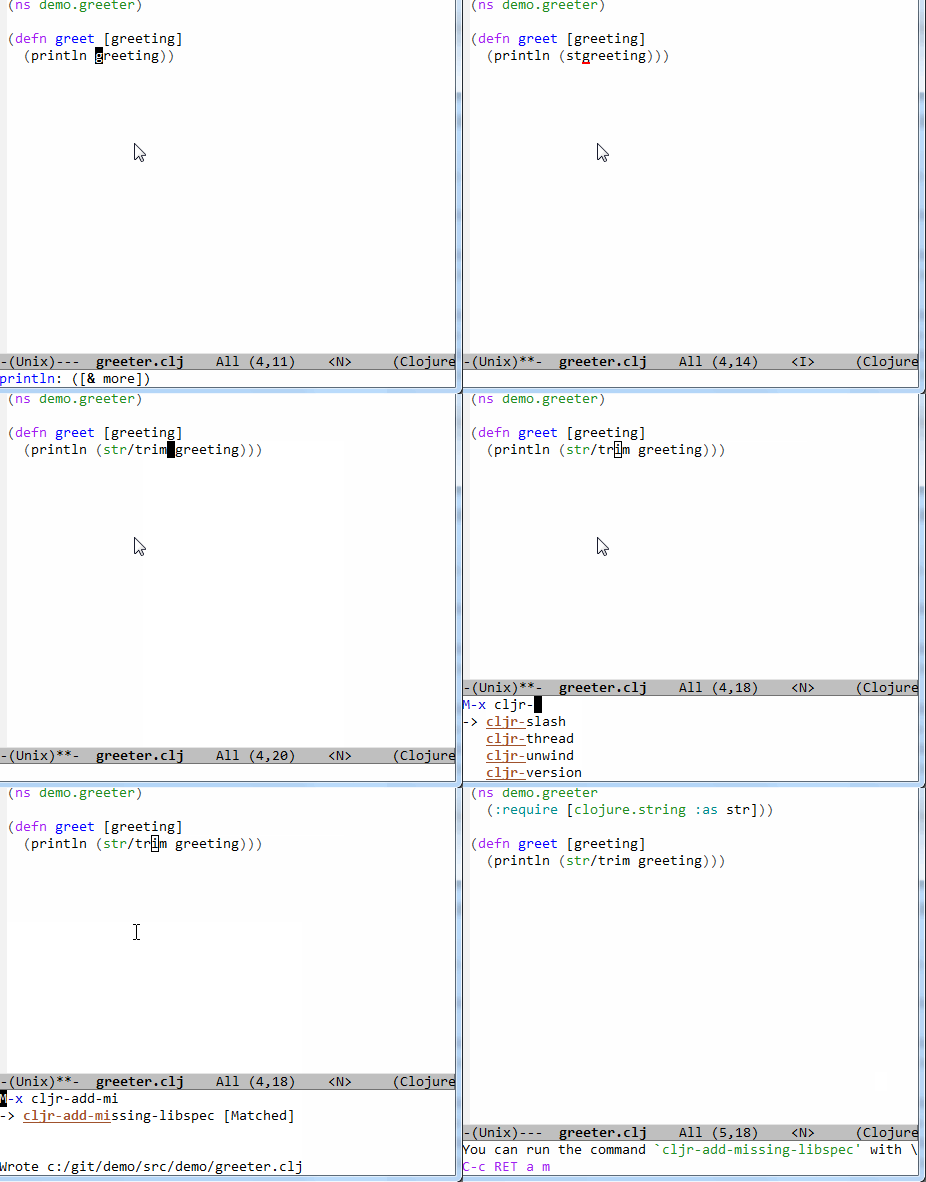
Here's a small teaser, helping you add a missing libspec:
Installation
It's highly recommended to install clj-refactor through package.el.
It's available on MELPA and MELPA Stable:
M-x package-install clj-refactor
Better IDO completions
If you are an IDO user, you will get better completions by installing the ido-completing-read+ package:
M-x package-install ido-completing-read+
...if you use a framework other than IDO, for best results, please check that it can take over completing-read automatically.
Setup
(require 'clj-refactor)

(defun my-clojure-mode-hook ()
    (clj-refactor-mode 1)
    (yas-minor-mode 1) ; for adding require/use/import statements
    ;; This choice of keybinding leaves cider-macroexpand-1 unbound
    (cljr-add-keybindings-with-prefix "C-c C-m"))

(add-hook 'clojure-mode-hook #'my-clojure-mode-hook)
If you're using clojure-ts-mode (fully supported by CIDER these days), hook that mode as well (or instead):
(add-hook 'clojure-ts-mode-hook #'my-clojure-mode-hook)
The more advanced refactorings require our nREPL middleware
refactor-nrepl. From
version 2.2.0 onwards if cider-jack-in is used it is injected
automatically.
profiles.clj or profile.boot don't need to be modified anymore for the above use case!
On the other hand if a standalone REPL or an embedded nREPL server is used you will need to manually add this dependency (see below).
Either in your project's project.clj or in the :user
profile found at ~/.lein/profiles.clj:
:plugins [[refactor-nrepl "3.16.0"]
          [cider/cider-nrepl "0.62.1"]]
Check out the much longer installation page in the wiki for a less opinionated approach.
clj-refactor has quite a few settings you can tweak to change the
behavior of various commands. You can read more about that
here.
Compatibility
| clj-refactor | refactor-nrepl | CIDER | Clojure | Java |
|---|---|---|---|---|
| 2.4.0 | 2.4.0 | 0.17, 0.18 | 1.7+ | 8+ |
| 2.5.0 | 2.5.0 | 0.24 | 1.8+ | 8+ |
| 3.0.0+ | 3.0.0+ | 1.0 | 1.9+ | 11+ |
| 4.0.0+ | 3.x (3.13.0+ recommended) | 2.0+ | 1.10+ | 8+ |
clj-refactor 4.0.0+ requires Emacs 28.1 or newer.
Middleware
Most users will not need to worry about this, but if you wish to configure middleware yourself, the name of the middleware is:
refactor-nrepl.middleware/wrap-refactor
Unlike cider-nrepl which defines many middleware with a handful of related
ops, refactor-nrepl defines a single middleware which houses all of the provided nREPL
ops.
In case refactor-nrepl is used for advanced (AST-based) refactorings
The analyzer
refactor-nrepl uses needs to eval the code too in order to be able
to build the AST we can work with. If that causes side effects like
writing files, opening connections to servers, modifying databases,
etc. performing certain refactoring functions on your code will do
that, too.
By default the user is warned about this when an AST dependent feature
is invoked. If this warning is an annoyance and the project can be
evalled without any risks set cljr-warn-on-eval to nil so
cljr-eagerly-build-asts-on-startup can take effect.
We create ASTs for all the namespaces at REPL start up if
cljr-warn-on-eval is set to nil. If that is not desired set
cljr-eagerly-build-asts-on-startup to nil in your Emacs
configuration. AST dependent features at the moment are find usages,
rename symbol, extract function, inline symbol, rename file or dir, change function signature, promote function.
What to expect from the AST-based refactorings
Because these features build (and therefore load and evaluate) an AST of your code, they come with some inherent limitations. Knowing about them up front saves a lot of head-scratching:
- They need a live, connected REPL with your project on the classpath - you can't use them before the project starts.
- They don't work on code that doesn't compile (missing dependencies, load-order issues, or a namespace you're in the middle of editing). You'll get an "unable to build an AST" error.
- They don't support ClojureScript (
.cljs), and only analyze the:cljbranch of.cljcfiles. - The first invocation can be slow on a large project, since it may need to
load much of it. With a refactor-nrepl newer than 3.16.0 you can stop a search that's
taking too long with
cider-interrupt(C-c C-b), like an evaluation. - Macro-generated code is only approximated, so occurrences that appear only after macroexpansion may be missed.
If a namespace can't be analyzed, set cljr-ignore-analyzer-errors to t so
these commands skip it instead of aborting (best reserved for read-only commands
like find usages). That can't help with the namespace you invoke the command
from, though - it has to load cleanly (try cider-load-buffer), since that's
where the symbol at point gets resolved. A common culprit is a top-level form
that only works with state you've built up in the REPL. See refactor-nrepl's
Limitations of the AST-based analysis
for the full picture and tuning options.
If you need static analysis, ClojureScript support, or refactoring without a running REPL, consider clojure-lsp alongside CIDER.
Usage
All functions in clj-refactor have a two-letter mnemonic
shortcut. E.g. rs for cljr-rename-symbol. Given the prefix choice
in the example setup you'd call this function by hitting C-c C-m rs
If you can't remember a shortcut, run M-x clj-refactor-menu (or hit hh
under your prefix, e.g. C-c C-m hh) for a transient
menu of every command grouped by category. It shows the keys as you go, so
it doubles as a way to learn them, and its Options section toggles common
settings for the current session.
See the wiki for a complete list of available refactorings, demonstrations and customization points.
CIDER 2.1 has its own commands
for editing the ns form, which don't need refactor-nrepl, so clj-refactor's
versions are deprecated:
| clj-refactor | CIDER |
|---|---|
cljr-add-require-to-ns |
cider-ns-add-require |
cljr-add-import-to-ns |
cider-ns-add-import |
cljr-add-missing-libspec |
cider-ns-add-missing |
cljr-slash |
cider-ns-magic-requires |
cljr-clean-ns |
cider-ns-clean |
They still work (though M-x stops offering them, as with any obsolete
command), but they'll go away in a future release, together with
cljr-auto-clean-ns. CIDER never cleans the ns form on its own, but it can
on save.
With cider-ns-magic-requires on, clj-refactor leaves / to CIDER's magic
requires, which work once CIDER is connected.
Changelog
An extensive changelog is available here.
Contribute
Yes, please do. There's a suite of tests, so remember to add tests for your specific feature, or we might break it later.
You'll find the repo at:
https://github.com/clojure-emacs/clj-refactor.el
Run the tests with:
$ make test
Before submitting a patch, or a pull request, make sure all tests are passing and that your patch is in line with the contribution guidelines.
Thanks to everyone who's contributed so far!
Get Help
Due to clj-refactor's kinship with CIDER, you can get help for it in most CIDER-related support channels.
Slack
CIDER has an official Clojurians Slack - #cider. The channel is very active and is a great way to
get a handle on some of the maintainers and interact with other CIDER/clj-refactor
users. If you need an invite you can go here.
There's also another channel named #emacs for generic Emacs discussions.
License
Copyright © 2012-2014 Magnar Sveen
Copyright © 2014-2026 Magnar Sveen, Lars Andersen, Benedek Fazekas, Bozhidar Batsov
Author: Magnar Sveen [email protected] Lars Andersen [email protected] Benedek Fazekas Keywords: convenience, clojure, cider
This program is free software; you can redistribute it and/or modify it under the terms of the GNU General Public License as published by the Free Software Foundation, either version 3 of the License, or (at your option) any later version.
This program is distributed in the hope that it will be useful, but WITHOUT ANY WARRANTY; without even the implied warranty of MERCHANTABILITY or FITNESS FOR A PARTICULAR PURPOSE. See the GNU General Public License for more details.
You should have received a copy of the GNU General Public License along with this program. If not, see http://www.gnu.org/licenses/.
관련 프로젝트 살펴보기
불러오는 중…