
clawsoftware/clawPDF
소개
PDF 생성, 텍스트 OCR, 이미지 인쇄를 지원하는 Windows용 오픈 소스 가상 네트워크 프린터입니다. 일반적으로 엔터프라이즈 솔루션에서만 제공되는 고급 기능도 갖추고 있습니다.
개발 도구What you can do
- Print to PDF, PDF/A-1b, PDF/A-2b, PDF/A-3b, PDF/X, PDF/Image, OCR, SVG, PNG, JPEG, TIF and TXT
- Print 100% valid PDF/A-1b, PDF/A-2b and PDF/A-3b
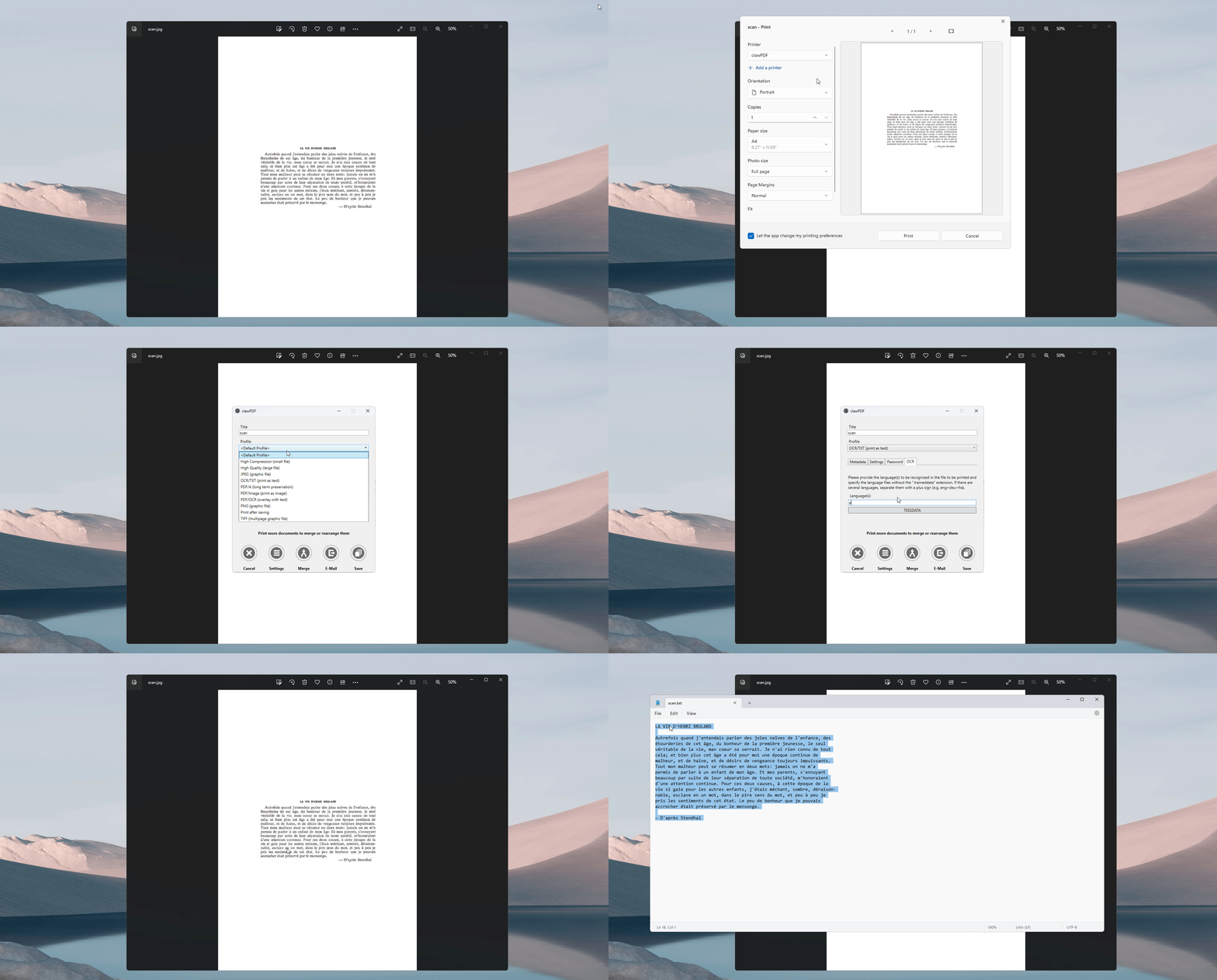
- Optical Character Recognition (OCR)
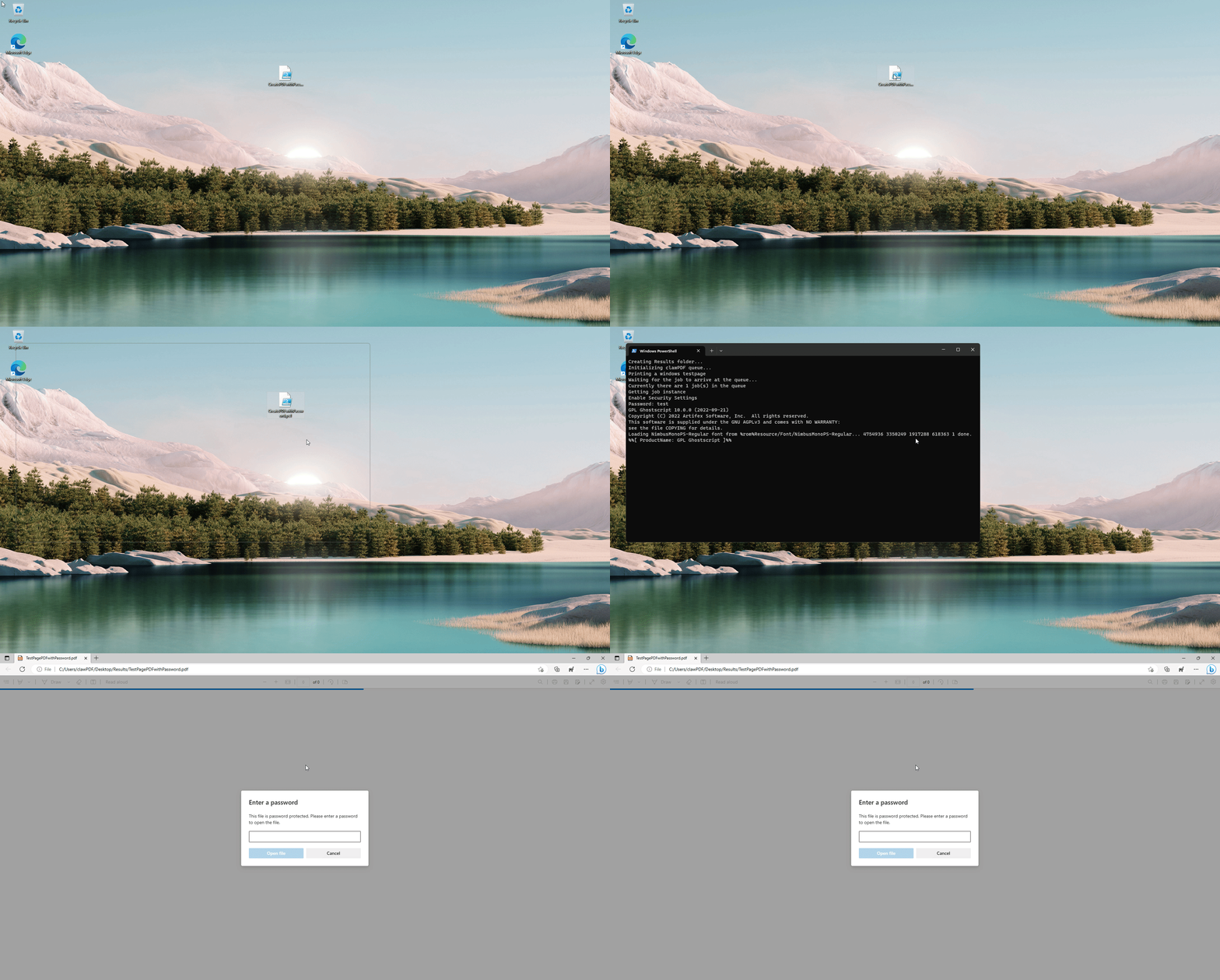
- Scripting Interface (Python, Powershell, VBScript...)
측정된 스타 증가
- in 24h
- 0
- in 7 days
- 0
- in 15 days
- +2
- in 1 month
- 기록 수집 중
서로 겹치는 기간의 순증가량이며 일별 합계가 아닙니다. 측정값이 없으면 비워 둡니다. 스타는 관심도를 나타내며 품질을 보장하지 않습니다.
README.md
OriginalclawPDF - Virtual PDF/OCR/Image (Network) Printer
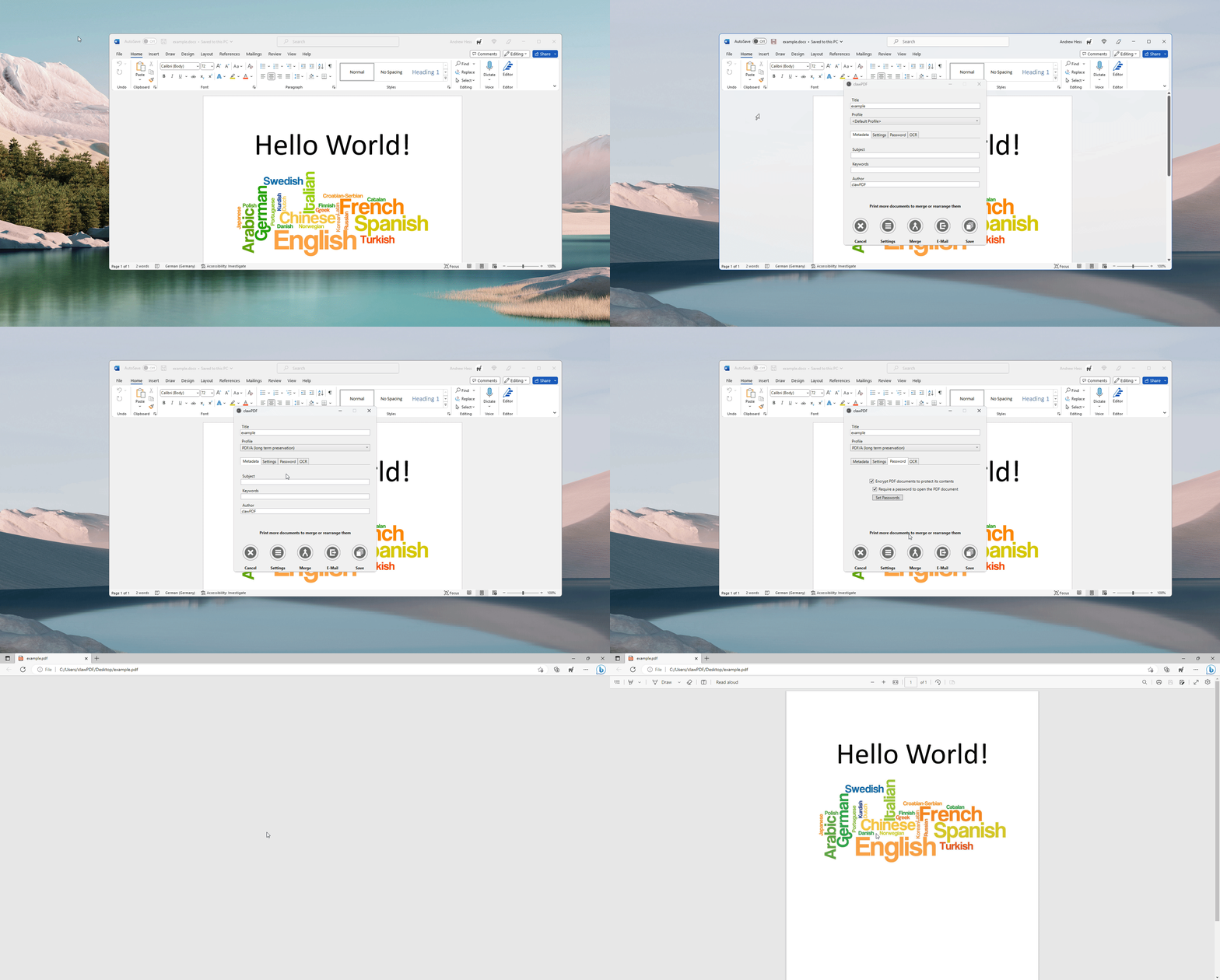
ClawPDF may seem like yet another Virtual PDF/OCR/Image Printer, but it actually comes packed with features that are typically found in enterprise solutions. With clawPDF, you can create documents in various formats, including PDF/A-1b, PDF/A-2b, PDF/A-3b, PDF/X, PDF/Image, OCR, SVG, PNG, JPEG, TIF, and TXT. You also have easy access to metadata and can remove it before sharing a document. In addition, you can protect your documents with a password and encrypt them with up to 256-bit AES.
ClawPDF offers a scripting interface that lets you automate processes and integrate it into your application. Moreover, you can install clawPDF on a print server and print documents over the network, not just locally.
ClawPDF is open-source and compatible with all major Windows client and server operating systems (x86/x64/ARM64), and it even supports multi-user environments!
Download
https://github.com/clawsoftware/clawPDF/releases/download/0.9.3/clawPDF_0.9.3_setup.msi
Features
- Print to PDF, PDF/A-1b, PDF/A-2b, PDF/A-3b, PDF/X, PDF/Image, OCR, SVG, PNG, JPEG, TIF and TXT
- Print 100% valid PDF/A-1b, PDF/A-2b and PDF/A-3b
- Optical Character Recognition (OCR)
- Scripting Interface (Python, Powershell, VBScript...)
- Shared Network Printing
- SVG Export
- Drag and Drop Support
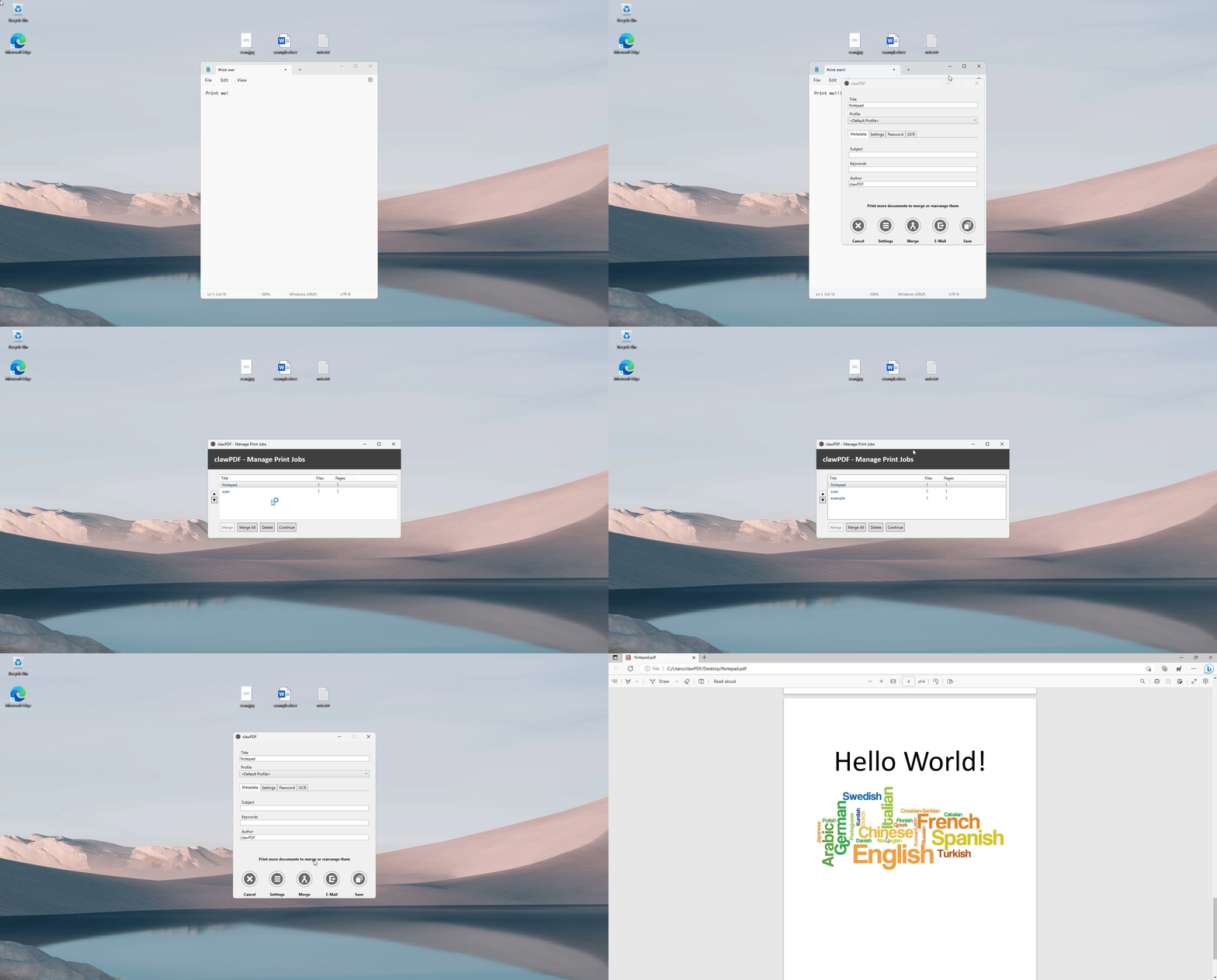
- Merge Files
- Command Line Support
- Silent Printing
- Custom Paper Sizes / Standard Paper Sizes
- 256-bit AES encryption
- Light/Dark Theme
- ARM64 Support
- Full Unicode Support
- Multiple Profiles
- Post Actions
- Create additional printers with assigned profile
- 24 translations. Add yours!
- Easy to deploy (MSI-Installer & Config)
- Many settings
- Easy to use
- No adware, spyware and nagware
Demo
Optical Character Recognition (OCR)
Scripting Interface
Print a PDF and protect it with a password
Merge multiple documents
Tested under
- Windows Server 2022 RDS
- Windows Server 2019 RDS
- Windows Server 2016 RDS
- Windows 11 x64/ARM64
- Windows 10 x86/x64/ARM64
- Windows 8 x86/x64
- Windows 7 x86/x64
Command Line
Batch Printing
The GUID for the Profile parameter is located under: HKEY_CURRENT_USER\Software\clawSoft\clawPDF\Settings\ConversionProfiles\[id]\Guid

clawPDF.exe /PrintFile=D:\example.docx /profile=f81ea998-3a76-4104-a574-9a66d6f3039b
clawPDF.exe /PrintFile=D:\example.pdf /profile=JpegGuid
clawPDF.exe /PrintFile=D:\example.pdf /profile=JpegGuid /OutputPath=D:\batchjob

clawPDF.exe /PrintFile=D:\example.txt /printerName=clawPDF2
clawPDF.exe /PrintFile=D:\example.docx /printerName=clawJPG
Overwrite Config
- To deploy a default configuration in an enterprise environment.
- To export a configuration select "Application Settings -> Debug -> Save settings to file".

clawPDF.exe /Config=D:\clawPDF.ini
Printer Managment
SetupHelper.exe /Printer=Add /Name=ExamplePrinter
SetupHelper.exe /Printer=Remove /Name=ExamplePrinter
ManagePrintJobs
clawPDF.exe /ManagePrintJobs
Changelog
v0.9.3 (2023.05.16)
- [bugfix] Fixed a bug where in some cases only administrators could use the shared network printer function
- [bugfix] Fixed Windows 7 issues caused since version 0.9.1
Requirements
- .Net Framework 4.6.2+
- Visual C++ Redistributable 14 (Download: x86/x64)
Build
- Visual Studio 2022
Third-party
clawPDF uses the following licensed software or parts of the source code:
- PDFCreator (https://github.com/pdfforge/PDFCreator), licensed under AGPL v3 license.
- Pdftosvg.net (https://github.com/dmester/pdftosvg.net), licensed under MIT license.
- iText7 (https://github.com/itext/itext7-dotnet), licensed under AGPL v3 license.
- Nlog (https://github.com/NLog/NLog), licensed under BSD 3-Clause.
- PdfScribe (https://github.com/stchan/PdfScribe), licensed under AGPL v3 license.
- clawmon (https://github.com/clawsoftware/clawPDF/tree/master/src/clawmon), licensed under GPL v2 license.
- Microsoft Postscript Printer Driver (https://docs.microsoft.com/en-us/windows-hardware/drivers/print/microsoft-postscript-printer-driver), copyright (c) Microsoft Corporation. All rights reserved.
- Ghostscript (https://www.ghostscript.com/download/gsdnld.html), licensed under AGPL v3 license.
- SystemWrapper (https://github.com/jozefizso/SystemWrapper), licensed under Microsoft Public license.
- Ftplib (https://archive.codeplex.com/?p=ftplib), licensed under MIT license.
- DataStorage.dll, licensed under pdfforge Freeware License.
- DynamicTranslator.dll, licensed under pdfforge Freeware License.
- Appbar_save (http://modernuiicons.com/), licensed under Attribution-NoDerivs 3.0 Unported.
- Appbar_cogs (http://modernuiicons.com/), licensed under Attribution-NoDerivs 3.0 Unported.
- Appbar_page_file_pdf (http://modernuiicons.com/), licensed under Attribution-NoDerivs 3.0 Unported.
License
clawPDF is licensed under AGPL v3 license
Copyright (C) 2023 // Andrew Hess // clawSoft
관련 프로젝트 살펴보기
불러오는 중…