
chiphuyen/sniffly
chiphuyen/sniffly has 1,283 GitHub stars and 118 forks. GitHot measured +6 in 7 days and +6 in 15 days. Last checked 2026-11-10 22:08 UTC. Last push 2025-08-08.
Claude Code dashboard with usage stats, error analysis, and sharable feature
측정된 스타 증가
- in 24h
- 업데이트 지연
- in 7 days
- +6
- in 15 days
- +6
- in 1 month
- 업데이트 지연
서로 겹치는 기간의 순증가량이며 일별 합계가 아닙니다. 측정값이 없으면 비워 둡니다. 스타는 관심도를 나타내며 품질을 보장하지 않습니다.
README.md
OriginalSniffly - Claude Code Analytics Dashboard
Analyze Claude Code logs to help you use Claude Code better.
Website | Quickstart | Features | Sharable dashboard
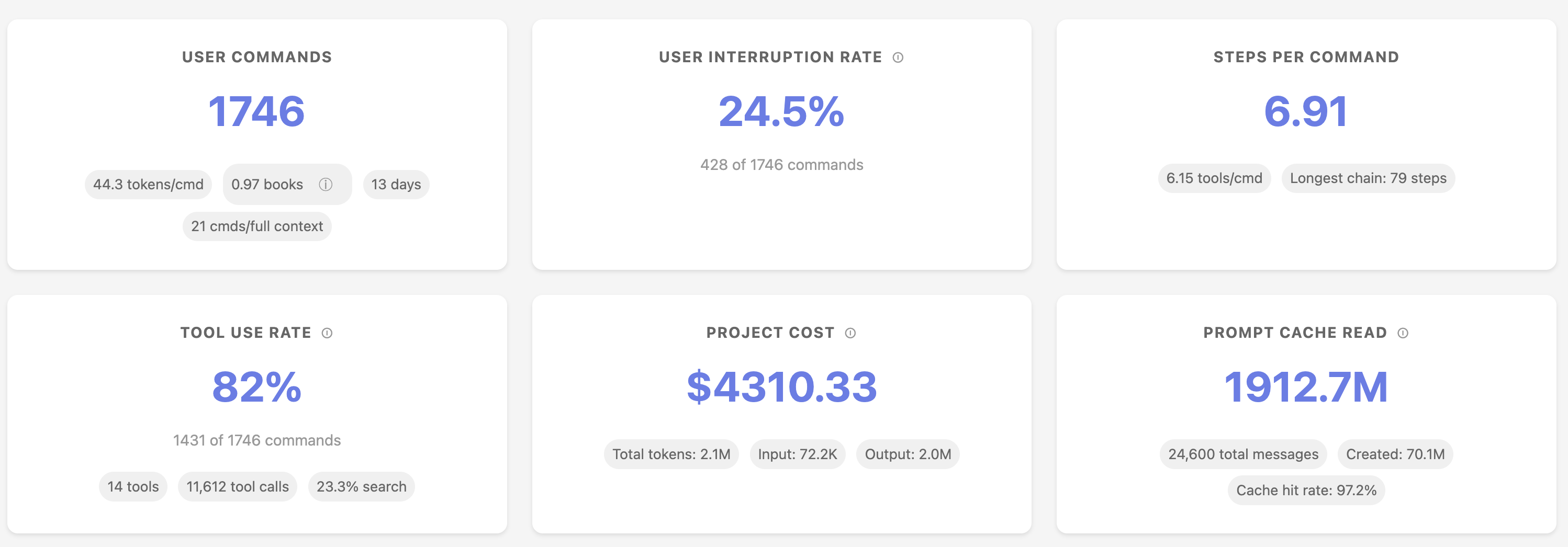
📊 Features
Understanding your usage patterns
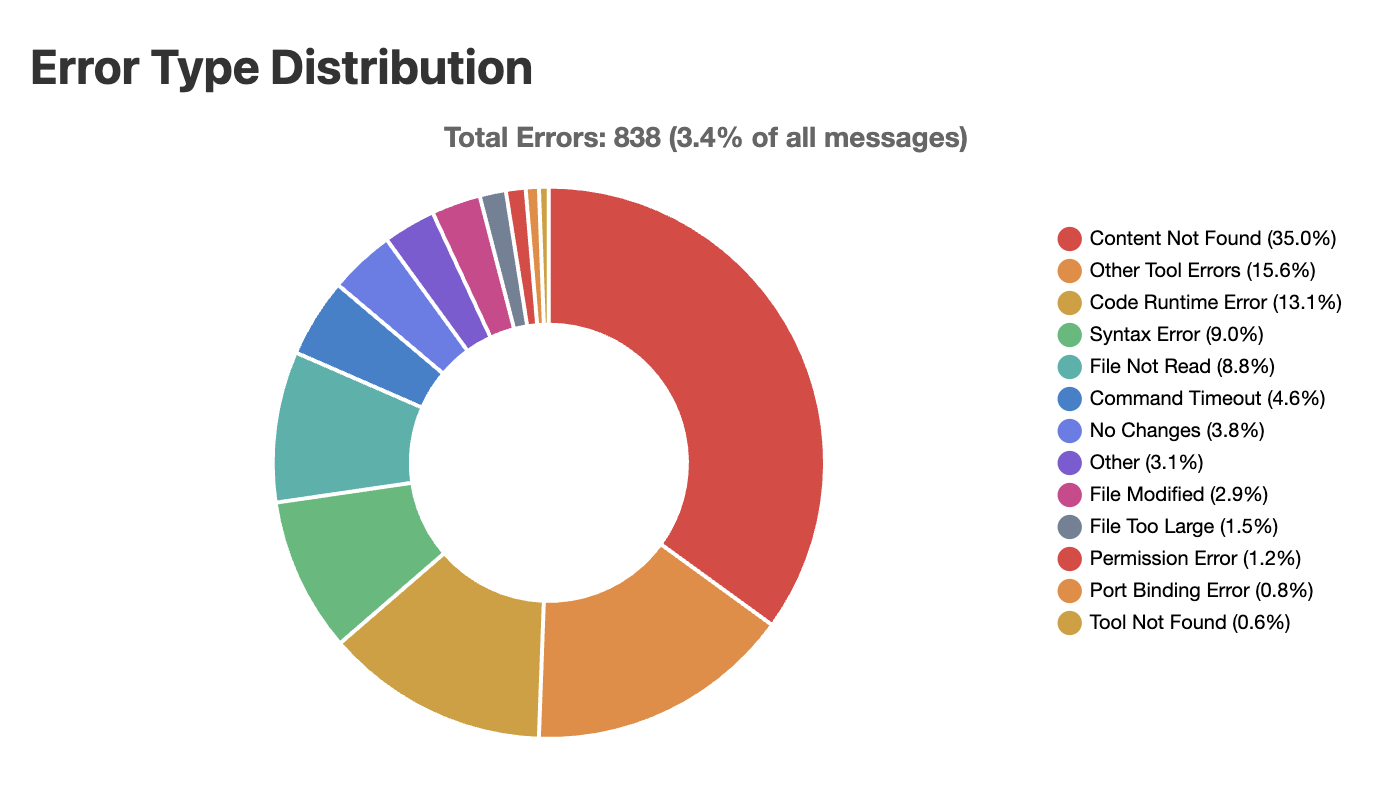
Error breakdown
See where Claude Code makes mistakes so that you avoid these mistakes.
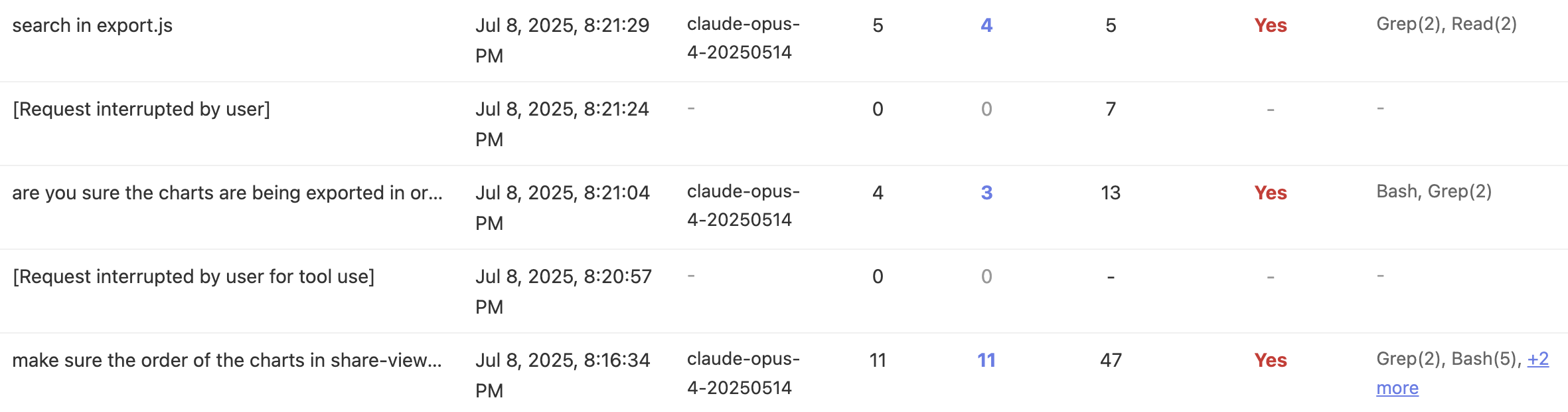
Message history analysis
Walk through all your instructions and share them with your coworkers if needed.
🚀 Quickstart
- Requirement: Python 3.10+
With UV (recommended)
Make sure you have uv installed! https://github.com/astral-sh/uv
# One-time execution (no installation needed)
uvx sniffly@latest init
# Install the package
uv tool install sniffly@latest
sniffly init
After running sniffly init, access your dashboard on your browser at http://localhost:8081 (or whichever host/port you choose).
If you run Sniffly on a remote server, use port forwarding to open the browser on your local computer.
With pip
pip install sniffly
sniffly init
From source
git clone https://github.com/chiphuyen/sniffly.git
cd sniffly
pip install -e .
sniffly init
🔧 Configuration
Common Settings
# Change port (default: 8081)
sniffly config set port 8090

# Disable auto-opening browser
sniffly config set auto_browser false

# Show current configuration
sniffly config show
All Configuration Options
| Key | Default | Description |
|---|---|---|
port |
8081 | Server port |
host |
127.0.0.1 | Server host |
auto_browser |
true | Auto-open browser on start |
cache_max_projects |
5 | Max projects in memory cache |
cache_max_mb_per_project |
500 | Max MB per project |
messages_initial_load |
500 | Initial messages to load |
max_date_range_days |
30 | Max days for date range selection |
See full CLI Reference for all options and commands.
💡 Sharing Your Dashboard
You can create a link to share your project's stats and instructions with your coworkers.
- Click the "📤 Share" button in your dashboard
- Choose privacy options:
- Private: Only people with the link can view
- Public: Listed in the public gallery
- Include Commands: Share your actual command text
- Copy and share the generated link
🚨 Troubleshooting
Common Issues
sniffly help
Port already in use?
# Use a different port
sniffly init --port 8090

# Or change default
sniffly config set port 8090
Browser doesn't open?
# Check setting
sniffly config show

# Enable auto-browser
sniffly config set auto_browser true

# Or manually visit http://localhost:8081
Configuration issues?
# View all settings and their sources
sniffly config show

# Reset a setting to default
sniffly config unset port

# Remove all custom config
rm ~/.sniffly/config.json
For more issues, see GitHub Issues.
🔐 Privacy
Sniffly runs entirely on your local machine:
- ✅ All data processing happens locally
- ✅ No telemetry
- ✅ Your conversations never leave your computer
- ✅ Shared dashboards are opt-in only
📄 License
MIT License - see LICENSE file.
🔗 Links
- Homepage: sniffly.dev
- Documentation: Full CLI Reference
- Issues: GitHub Issues
관련 프로젝트 살펴보기
Asabeneh/30-Days-Of-Python
30 Days of Python 프로그래밍 챌린지는 Python 프로그래밍 언어를 30일 동안 배우기 위한 단계별 가이드입니다. 이 챌린지는 100일 이상 걸릴 수 있습니다. 자신의 속도에 맞춰 진행하세요. 다음 동영상도 도움이 될 수 있습니다: https://www.youtube.com/channel/UC7PNRuno1rzYPb1xLa4yktw
78,560 스타grafana/grafana
개방적이고 조합 가능한 옵저버빌리티 및 데이터 시각화 플랫폼입니다. Prometheus, Loki, Elasticsearch, InfluxDB, Postgres 등 여러 소스의 메트릭, 로그, 트레이스를 시각화합니다.
77,830 스타redis/redis
실시간 데이터 기반 애플리케이션을 구축하는 개발자에게 Redis는 가장 선호되고, 가장 빠르며, 기능이 가장 풍부한 캐시, 데이터 구조 서버이자 문서 및 벡터 쿼리 엔진입니다.
77,395 스타apache/superset
Apache Superset는 데이터 시각화 및 데이터 탐색 플랫폼입니다.
75,473 스타