
cdoersch/vae_tutorial
cdoersch/vae_tutorial has 521 GitHub stars and 135 forks. GitHot measured -2 stars in 24 hours. Last checked 2026-11-20 04:28 UTC. Last push 2016-12-22.
측정된 스타 증가
- in 24h
- -2
- in 7 days
- 기록 수집 중
- in 15 days
- 기록 수집 중
- in 1 month
- 기록 수집 중
서로 겹치는 기간의 순증가량이며 일별 합계가 아닙니다. 측정값이 없으면 비워 둡니다. 스타는 관심도를 나타내며 품질을 보장하지 않습니다.
소개
Caffe code to accompany my Tutorial on Variational Autoencoders
학습README.md
OriginalTutorial on Variational Autoencoders
Introduction
This code is a supplement to the Tutorial on Variational Autoencoders. It allows you to reproduce the example experiments in the tutorial's later sections.
This code contains two demos. The first is a standard Variational Autoencoder (VAE) for MNIST. The second is a Conditional Variational Autoencoder (CVAE) for reconstructing a digit given only a noisy, binarized column of pixels from the digit's center. For details on the experimental setup, see the paper.
No additional Caffe layers are needed to make a VAE/CVAE work in Caffe. The only requirements are a working Caffe/pycaffe installation. A GPU will make the experiments run faster, but is not necessary (comment out set_mode_gpu() in the python files if you don't have one). On my system (a Titan X), these experiments all complete in about 10 minutes.
VAE and CVAE Network Structure
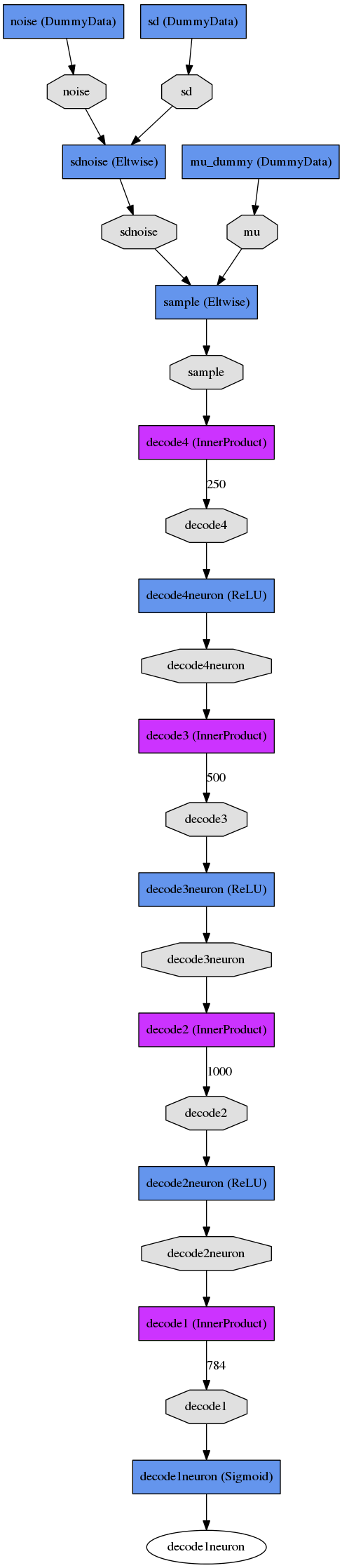
The code will generate a network drawing, but for convenience I've included the result of that drawing here. This is for the VAE:
VAE |
|
Train Net |
Test Net |
|
|

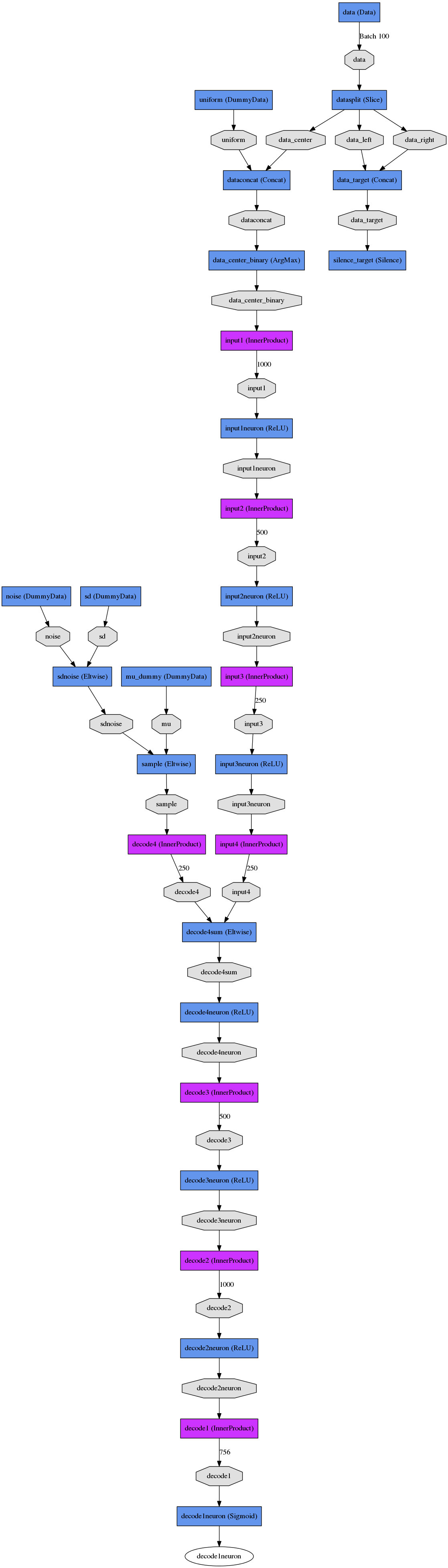
Here is a side-by-side comparison between the CVAE and regressor which solve the same problem. Note that both networks have several initial layers for constructing the input and output data that's used to train the network.
CVAE and Regressor |
|||
CVAE Train Net |
CVAE Test Net |
Regressor Train Net |
Regressor Test Net |
|
|
|
|



Setup
Install Caffe (see: Caffe installation instructions). Build
Caffeandpycaffe. For this readme, we'll call the installation path $CAFFE_PATH.Clone this repo. For this readme, we'll call the installation path $TUTORIAL_PATH
git clone https://github.com/cdoersch/vae_tutorial.git
- Download MNIST using Caffe's pre-packaged downloader, and run create_mnist.sh to create an lmdb.
  cd $CAFFE_PATH/data/mnist/
  ./get_mnist.sh
  cd $CAFFE_PATH/
  ./examples/mnist/create_mnist.sh
- Optional: create a symlink for snapshots.
  cd $TUTORIAL_PATH
  ln -s [...] snapshots
Running the VAE
Edit mnist_vae.prototxt and enter the correct "source" path to the training lmdb (line 13)
Run the code. Make sure $CAFFE_PATH/python is on your PYTHONPATH.
  cd $TUTORIAL_PATH
  python mnist_vae.py
Note that the python is only required for generating the visualizations: the net can also be trained simply by calling
$CAFFE_PATH/build/tools/caffe train --solver=mnist_vae_solver_adam.prototxt
Running the CVAE
Edit mnist_cvae.prototxt and enter the correct "source" path for BOTH training and testing lmdb's (line 13 AND 29)
Run the code. Make sure $CAFFE_PATH/python is on your PYTHONPATH.
  cd $TUTORIAL_PATH
  python mnist_cvae.py
Note that the python is only required for generating the visualizations: the net can also be trained simply by calling
$CAFFE_PATH/build/tools/caffe train --solver=mnist_cvae_solver_adam.prototxt
- Optional: do the same thing for the regressor to see the baseline results. After altering the "source" paths in mnist_regressor.prototxt, run:
  cd $TUTORIAL_PATH
  python mnist_regressor.py