
carleihar/JRMFloatingAnimation
carleihar/JRMFloatingAnimation has 225 GitHub stars and 29 forks. Star changes are not measured yet. Last checked 2026-11-15 18:35 UTC. Last push 2017-10-02.
측정된 스타 증가
- in 24h
- 업데이트 지연
- in 7 days
- 업데이트 지연
- in 15 days
- 업데이트 지연
- in 1 month
- 업데이트 지연
서로 겹치는 기간의 순증가량이며 일별 합계가 아닙니다. 측정값이 없으면 비워 둡니다. 스타는 관심도를 나타내며 품질을 보장하지 않습니다.
소개
An Objective-C animation library used to create floating image views.
창작 및 미디어README.md
OriginalJRMFloatingAnimation
[](https://travis-ci.org/Caroline Harrison/JRMFloatingAnimation)


About
JRMFloatingAnimation is an ObjC library used to create floating image views:
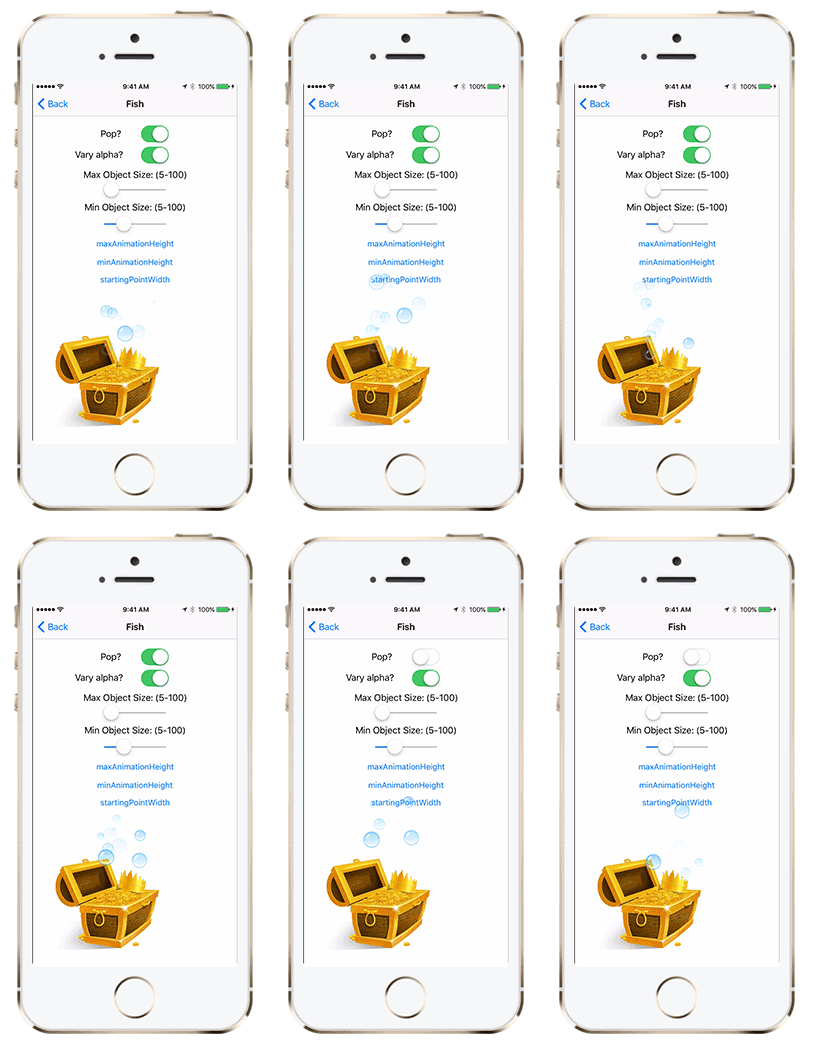


Usage
To run the example project, clone the repo, and run pod install from the Example directory first.
To create the animation view:
self.floatingView = [[JRMFloatingAnimationView alloc] initWithStartingPoint:self.view.center];
[self.floatingView addImage:[UIImage imageName:@"myImage"]];
[self.view addSubview:self.floatingView];
To animate the view:
[self.floatingView animate];
You can add as many images to your view as you want, and they will be used randomly. Note that the images should be square.
There are a variety of different settings you can add to your animation view.
startingPointWidth- Varies the x of the starting point, with the starting point y being the middle. default is 0.maxAnimationHeight- The maximum height that the animation may go. Default is the distance from the top of the frame to the starting point y value.minAnimationHeight- The minimum height that the animation may go. If this is larger than the maxAnimationHeight, they will swap. Default is 1/3 the maxAnimationHeight .animationWidth- The maximum "width" of the bezier path's control points fro the object's starting point. Changing this may give you unexpected results. Defaults:JRMFloatingShape: The object's size * 2.JRMFloatingShapeCurveLeft: The distance between the starting point x and the let edge of the frame.JRMFloatingShapeCurveRight: The distance between the starting point x and the right edge of the frame.JRMFloatingShapeTriangleUp: The width of the frame.
pop: Gives the impression of the images "popping" before they are removed from the view. Default NO.maxFloatObjectSize: The maximum size a floating object can be. Default is 20.minFloatObjectSize: The minimum size a floating object can be. If the minFloatObjectSize < maxFloatObjectSize, both sizes become the minFloatObjectSize. Default is 10.floatingShape: The "shape" that the animation can take. Default is JRMFloatingShapeStraight.JRMFloatingShapeTriangleUp- Floats up in a cone shape from the starting point.JRMFloatingShapeStraight- Floats straight up from the starting point.JRMFloatingShapeCurveLeft- Floats up and curves to the left.JRMFloatingShapeCurveRight- Floats up and curves to the right.
fadeOut: If the floating object's alpha should fade out before disappearing from the view. Default NO.varyAlpha: If the floating object's alpahs should vary (to give a more randomized look). Default NO.animationDuration: The speed of the animation. Default 2.removeOnCompletion: If the floating object should be removed from the superview when the animation is finished. Default YES.imageViewAnimationCompleted: A completion block to call whenever an image view is finished animating. It will return the image view. (See the JRMDemoBalloonViewController.m file for an example.)
Installation
CocoaPods
JRMFloatingAnimation is available through CocoaPods. To install it, simply add the following line to your Podfile:
pod "JRMFloatingAnimation"
Manually
- Download and drop
/Pod/Classesfolder in your project. - Congratulations!
Author
Caroline Harrison, [email protected]
License
JRMFloatingAnimation is available under the MIT license. See the LICENSE file for more info.