프로젝트 GitHub에서 보기
caoxinyu/RedisClient
소개
Java Redis 클라이언트 GUI 도구
개발 도구What you can do
- Manage redis server, support server password authentication
- Manage redis data favorite
- New redis data: string, list, hash, set, sorted set
- Rename redis data
측정된 스타 증가
- in 24h
- 0
- in 7 days
- -1
- in 15 days
- -2
- in 1 month
- 기록 수집 중
서로 겹치는 기간의 순증가량이며 일별 합계가 아닙니다. 측정값이 없으면 비워 둡니다. 스타는 관심도를 나타내며 품질을 보장하지 않습니다.
README.md
OriginalRedisClient
This is a redis client GUI tool written based on Java SWT and Jedis. It's my objective to build the most convenient redis client GUI tool in the world. In the first place, it will facilitate in editing redis data, such as: add, update, delete, search, cut, copy, paste etc.
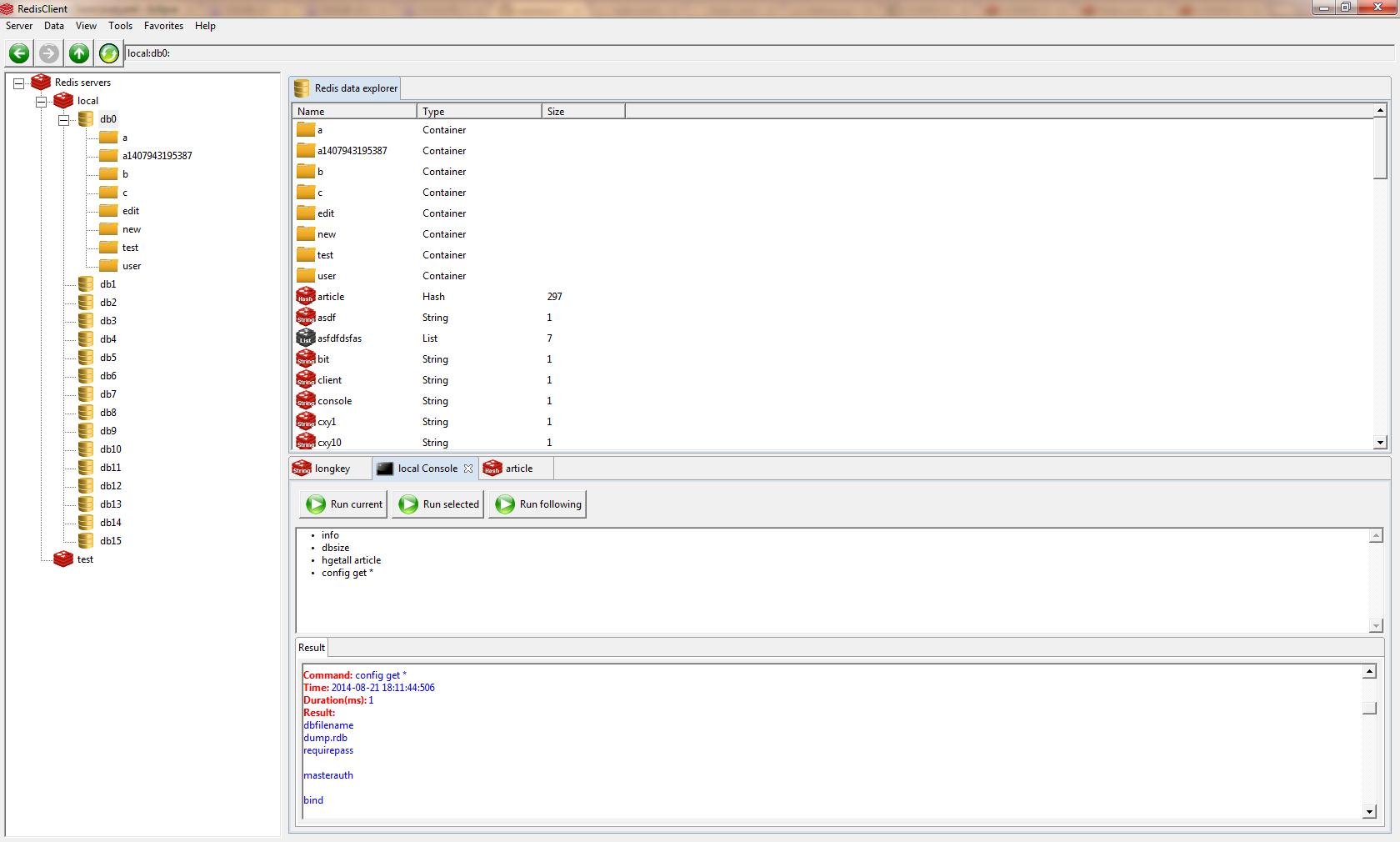
Features
Windows Explorer style UI
Multiple Redis version adaptive
- Manage redis server, support server password authentication
- Manage redis data favorite
- Manage redis data
- New redis data: string, list, hash, set, sorted set
- Rename redis data
- Delete redis data
- Update redis data
- Cut, copy paste redis data
- Import, export redis data
- Search redis data
- Order redis data by key, data type, size
- Navigation history
- Support time to live
- Support paging query redis data
- Support multiple selection to delete, cut, copy, export redis data
- Support flat view and hierarchy view to list redis data
- Support multiple language, now support English and Chinese
- Support run redis command in console
- Support run publish/subscribe
- Watch redis data for different format(plain text, json, xml, base64 image)
Install & run for Windows
(For Linux, please switch branch. For Mac, please switch branch)
If you don't want to install JDK
- Please download redisclient-win32.x86.2.0.exe
- Double click redisclient-win32.x86.2.0.exe to install it to directory you choosed
- Run it by double click redisclient-win32.x86.2.0.exe
If you have installed the JDK or JRE 5+
For 64 bit windows
- Download the runable jar file redisclient-win32.x86_64.2.0.jar
- Run the redisclient-win32.x86_64.2.0.jar
- You can run it by double clicking it if your registry for jar file is configured correctly.
- Or you can run it from command line, and input
java -jar redisclient-win32.x86_64.2.0.jar. Please pay attention to run it as administrator in windows 8.
For 32 bit windows
- Download the runable jar file redisclient-win32.x86.2.0.jar
- Run the redisclient-win32.x86.2.0.jar
- You can run it by double clicking it if your registry for jar file is configured correctly.
- Or you can run it from command line, and input
java -jar redisclient-win32.x86.2.0.jar.
Donate
If you find this software useful and would like to support it, you can do so simply by scanning my Alipay two-dimension code and donating whatever you like.

관련 프로젝트 살펴보기
불러오는 중…