
caioricciuti/duck-ui
caioricciuti/duck-ui has 657 GitHub stars and 44 forks. GitHot measured +1 stars in 24 hours and +7 in 7 days. Last checked 2026-11-11 19:16 UTC. Last push 2026-10-23.
완전한 오픈 소스 DuckDB 워크벤치로, 브라우저에서 실행됩니다. SQL 편집기, 노트북, 차트, AI 어시스턴트를 제공합니다. 설치, 가입, 백엔드가 필요 없으며 데이터는 브라우저 탭을 벗어나지 않습니다.
측정된 스타 증가
- in 24h
- +1
- in 7 days
- +7
- in 15 days
- 기록 수집 중
- in 1 month
- 기록 수집 중
서로 겹치는 기간의 순증가량이며 일별 합계가 아닙니다. 측정값이 없으면 비워 둡니다. 스타는 관심도를 나타내며 품질을 보장하지 않습니다.
README.md
Original Duck-UI
The fully open-source DuckDB workbench that runs in your browser.
No install, no signup, no backend. Your data never leaves the tab.


Try it now → duckui.com · Docs · Contributing
Or run it yourself:
docker run -p 5522:5522 ghcr.io/caioricciuti/duck-ui:latest
Open http://localhost:5522. That's the whole setup.
What you get
- Workspace and pages. Queries, notebooks and dashboards are tabs. Connections, extensions, settings, saved queries, history and the dashboards list are pages with their own sidebar.
⌘Kfinds any of them, plus tables, saved queries and recent queries. - SQL editor. CodeMirror with completion from your catalog and from DuckDB itself, DuckDB dialect formatting,
EXPLAIN ANALYZEviewer.⌘Enterruns the statement under the cursor,⌘Shift+Enterthe whole tab. A failed query is underlined where DuckDB points. - Results grid. Virtualized, with sort, filter, search, cell selection and copy, column statistics, exports to CSV, JSON, XLSX and Parquet. A result cut at the row limit is sorted and filtered in DuckDB over the whole answer, not over the rows on screen.
- Notebooks. SQL, Python (Pyodide, with
sql()returning pandas DataFrames) and markdown cells, each with its own result and chart. - Dashboards. Markdown reports with named SQL blocks, charts, tables, inputs and auto refresh. Shareable as a link.
- Query parameters.
$nameplaceholders get an input bar, in SQL tabs and notebooks. - Compare results. Pin a result and diff it against a later run: schema, row counts, changed cells.
- Charts. Bar, grouped, stacked, line, area, stacked area, pie, donut and scatter, with per series settings, aggregation and PNG export. Charts follow the theme.
- Maps and extensions. GEOMETRY results render on a map. Install and load DuckDB extensions from the Data page.
- Import anything. CSV, JSON, Parquet, Arrow, XLSX and
.duckdbfiles. Drop a file on the explorer, paste a URL, or read straight from S3, GCS, Azure, R2 or MinIO. Local folders through the File System Access API. - History. Every run is kept with duration and row count, searchable across reloads.
- Duck Brain (AI). Text to SQL and one click error fixing with your choice of provider: WebLLM fully in the browser (no API key, works offline), OpenAI, Anthropic, or any OpenAI compatible endpoint (Ollama, DeepSeek, ...). By default only your schema is sent, never your data; the optional "Explain results" action sends a small row sample and asks for consent every time. With WebLLM nothing leaves the browser.
- Live sessions. Invite another browser into your workspace over WebRTC. Shared editors with peer cursors, shared tables, no server.
- Share and embed. Encode a whole analysis (query, notebook, chart config) into a URL. No server involved. Embed live, runnable queries in any page with an iframe.
- Persistence. OPFS backed local databases that survive reloads, profiles, encrypted credential storage (AES-256-GCM in your browser). The workspace saves itself.
- Connections. In memory WASM, persistent OPFS, external DuckDB httpserver instances. DuckLake catalogs attach via the embedded database manifest,
?load=ducklake:links, or plain ATTACH SQL. - Works on a phone. Below 768px the rail moves to the bottom and the explorer becomes a drawer.
- Deploy anywhere. Docker image, static hosting, GitHub Pages subpaths, air gapped and offline setups (installable PWA), kiosk mode for publishing read only datasets.
The whole app is built on Svelte 5 and CodeMirror 6. The startup bundle is about 350 kB of JavaScript; everything else, including the AI runtime, loads the first time you use it.
Why Duck-UI and not the official duckdb -ui?
Both are good tools. The differences that matter:
| Duck-UI | Official DuckDB UI | |
|---|---|---|
| Frontend source | MIT, all of it in this repo | Closed source |
| Runs from | Any static host, Docker, or a URL | Local duckdb process, UI assets loaded remotely |
| Works offline / air-gapped | Yes | No |
| Self-host / embed / kiosk | Yes | No |
| AI assistant | Bring your own provider, or fully local WebLLM | MotherDuck account |
| External DuckDB servers | Yes (httpserver) | Local + MotherDuck only |
If you just want a quick local UI and don't care about any of that, the official one is fine. Duck-UI is for when the answers to "can I host it, embed it, extend it, run it offline, and read the code" need to be yes.
"Open in Duck-UI" links
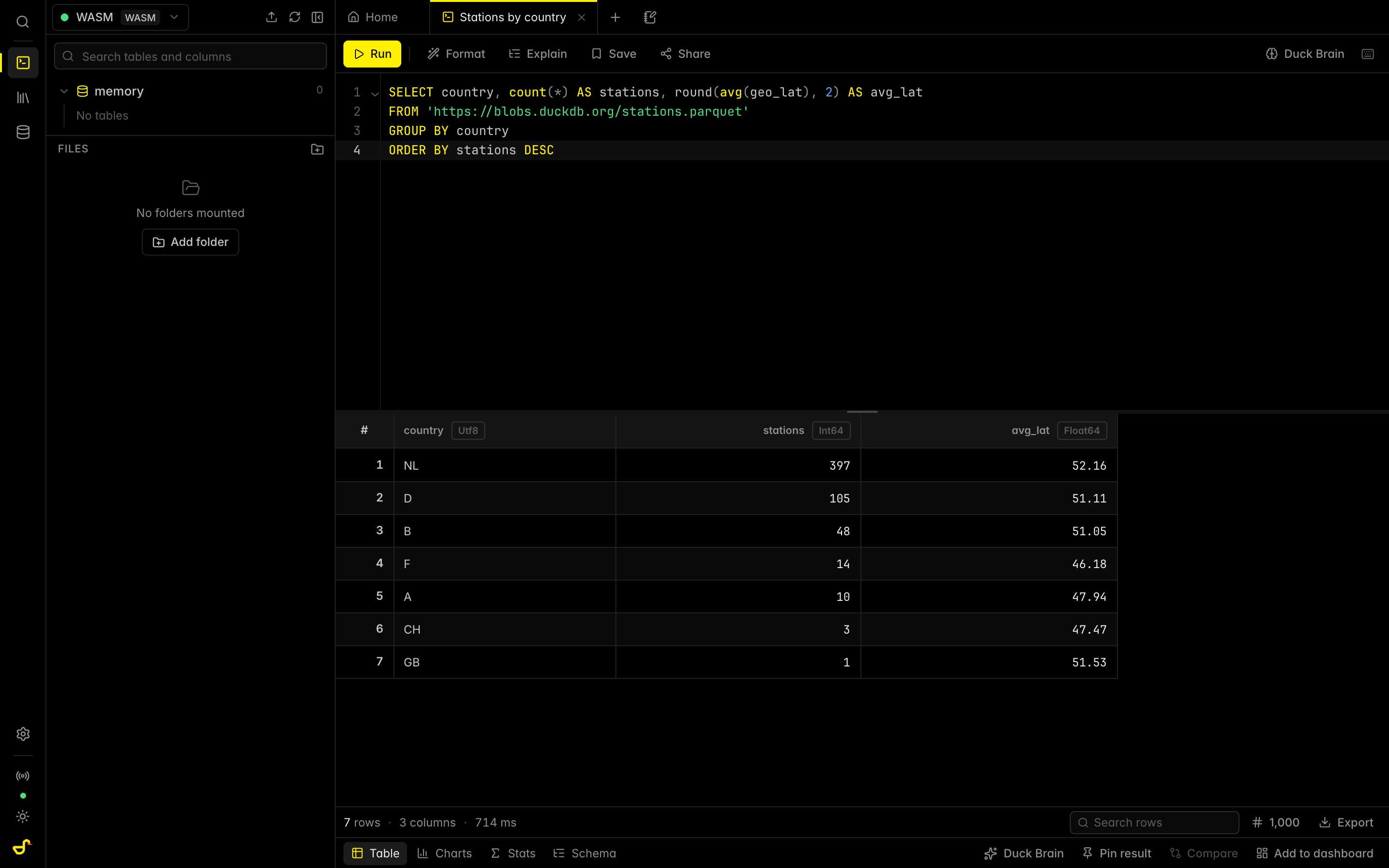
Any hosted dataset can become a one-click, runnable analysis. Add ?load= (and optionally &sql=) to the app URL. Try this one:
https://duckui.com/?load=https://blobs.duckdb.org/stations.parquet
  &sql=SELECT country, count(*) AS stations FROM stations GROUP BY country ORDER BY stations DESC
Openers see exactly what will load and what will run, confirm once, and get a live editor over your data. Nothing touches a server. Parquet, CSV, JSON, .duckdb files, and ducklake: catalogs are supported. The Share dialog generates the link and a README badge for you:

The data host needs CORS enabled, see hosting your data for a free R2/GitHub Pages setup. More examples in the gallery.
Run locally from the command line
The cli/ launcher serves the built app on 127.0.0.1 and opens it with your local files already queued to load, using the same ?load= links as above:
bun run build                                   # once; the CLI serves dist/
node cli/duck-ui.js sales.csv events.parquet    # or: npx duck-ui ... once published
node cli/duck-ui.js db.duckdb --port 6000 --no-open --sql "SHOW ALL TABLES"
CSV/TSV, Parquet, JSON/NDJSON and .duckdb files are supported. Only dist/ and the exact files you name are served (no directory listing or traversal), and requests must come from the local machine. The package is "private": true, so npx duck-ui works only after that flag is removed and the package (with a built dist/) is published.
Publish a dataset with kiosk mode
Duck-UI doubles as a zero-backend data-publishing appliance. Drop a manifest next to the build, deploy to GitHub Pages, and visitors get a read-only SQL explorer for your data:
{
  "ui": { "kiosk": true },
  "databases": [
    { "name": "My Dataset", "file": "ducklake:https://pub-xxxx.r2.dev/catalog.ducklake" }
  ]
}
Bundled .db files, remote files over HTTPS, S3, and DuckLake catalogs are all supported. Remote sources are attached in place and read-only by default. See public/databases/README.md for the full manifest format and deploy steps.
Configuration
Runtime environment variables (Docker):
| Variable | Description | Default |
|---|---|---|
DUCK_UI_EXTERNAL_CONNECTION_NAME |
Name for a pre-configured external connection | "" |
DUCK_UI_EXTERNAL_HOST |
Host URL for external DuckDB (may include a path) | "" |
DUCK_UI_EXTERNAL_PORT |
Port for external DuckDB (NAME, HOST and PORT must all be set or the connection is skipped) | null |
DUCK_UI_EXTERNAL_API_KEY |
API key sent as X-API-Key (takes priority over user/pass) |
"" |
DUCK_UI_EXTERNAL_USER / DUCK_UI_EXTERNAL_PASS |
Basic auth credentials | "" |
DUCK_UI_EXTERNAL_DATABASE_NAME |
Database name for the external connection | "" |
DUCK_UI_ALLOW_UNSIGNED_EXTENSIONS |
Allow unsigned DuckDB extensions | false |
DUCK_UI_DUCKDB_WASM_USE_CDN |
Load DuckDB WASM from CDN | false |
DUCK_UI_DUCKDB_WASM_BASE_URL |
Custom CDN base URL (the origin is added to the CSP automatically at container start) | auto jsDelivr |
DUCK_UI_PYODIDE_BASE_URL |
Where Python notebook cells load Pyodide from: a URL or same-origin path (e.g. /pyodide/) of a Pyodide 0.29.5 "full" distribution folder. A cross-origin URL's origin is added to the CSP at container start |
https://cdn.jsdelivr.net/pyodide/v0.29.5/full/ |
DUCK_UI_STUN_URLS |
Comma-separated STUN servers for live sessions. Set it empty for a LAN-only deployment with no STUN at all | Google's public STUN |
DUCK_UI_TURN_URLS |
Comma-separated TURN relays for live sessions between networks that cannot connect directly | none |
DUCK_UI_TURN_USERNAME / DUCK_UI_TURN_CREDENTIAL |
TURN credentials. They reach every browser that opens the app, so use a relay-only account | "" |
Python cells. Notebooks can hold Python cells, run by Pyodide in a Web Worker that is only started (and only downloads Pyodide, ~10 MB plus packages) when the first Python cell runs. sql("SELECT ...") returns a pandas DataFrame from the notebook's active connection (Arrow IPC via pyarrow; columnar JSON as a fallback); await sql_async(...) works where the page is not cross-origin isolated. Imported packages that ship with Pyodide (numpy, pandas, matplotlib, ...) load on demand; open matplotlib figures render as PNGs. Interrupt terminates the worker, so variables from earlier cells are lost; runs also stop after 5 minutes. For air-gapped deployments, download the matching pyodide-0.29.5.tar.bz2 release, serve its pyodide/ folder (e.g. at /pyodide/) and set DUCK_UI_PYODIDE_BASE_URL. CSP: the shipped policy already allows the default source (script-src https://cdn.jsdelivr.net, 'wasm-unsafe-eval', connect-src https:); behind your own proxy, keep those (or your mirror's origin) in script-src/connect-src. 'unsafe-eval' is not granted, so a third-party package whose native code relies on eval will fail to load under the policy.
Build-time: DUCK_UI_BASEPATH=/subpath/ for subpath deploys, DUCK_UI_DUCKDB_WASM_CDN_ONLY=true for CDN-only artifacts.
Deployment guides: reverse proxy / nginx · hosting your data with CORS
Develop
git clone https://github.com/caioricciuti/duck-ui.git
cd duck-ui
bun install
bun run dev   # http://localhost:5173
Checks, all of which CI runs:
bun run lint && bun run format:check && bun run typecheck && bun run test && bun run build
bun run test:e2e   # Playwright, against the production build
Architecture notes live in docs/architecture and CONTRIBUTING.md.
Contributing
Issues and PRs welcome. Read CONTRIBUTING.md first (it's short and it will save you time). Bug reports with a reproducible query are gold.
License
MIT. See LICENSE.
Acknowledgements
DuckDB · duckdb-wasm · Svelte · CodeMirror · Tailwind CSS · uPlot · Lucide
Sponsors
qxip

Want to sponsor Duck-UI? Get in touch.
관련 프로젝트 살펴보기
Asabeneh/30-Days-Of-Python
30 Days of Python 프로그래밍 챌린지는 Python 프로그래밍 언어를 30일 동안 배우기 위한 단계별 가이드입니다. 이 챌린지는 100일 이상 걸릴 수 있습니다. 자신의 속도에 맞춰 진행하세요. 다음 동영상도 도움이 될 수 있습니다: https://www.youtube.com/channel/UC7PNRuno1rzYPb1xLa4yktw
78,560 스타grafana/grafana
개방적이고 조합 가능한 옵저버빌리티 및 데이터 시각화 플랫폼입니다. Prometheus, Loki, Elasticsearch, InfluxDB, Postgres 등 여러 소스의 메트릭, 로그, 트레이스를 시각화합니다.
77,830 스타redis/redis
실시간 데이터 기반 애플리케이션을 구축하는 개발자에게 Redis는 가장 선호되고, 가장 빠르며, 기능이 가장 풍부한 캐시, 데이터 구조 서버이자 문서 및 벡터 쿼리 엔진입니다.
77,395 스타apache/superset
Apache Superset는 데이터 시각화 및 데이터 탐색 플랫폼입니다.
75,473 스타