
brilliantlabsAR/frame-codebase
brilliantlabsAR/frame-codebase has 533 GitHub stars and 105 forks. GitHot measured 0 stars in 24 hours and +1 in 7 days. Last checked 2026-11-21 09:08 UTC. Last push 2025-10-05.
측정된 스타 증가
- in 24h
- 0
- in 7 days
- +1
- in 15 days
- 기록 수집 중
- in 1 month
- 기록 수집 중
서로 겹치는 기간의 순증가량이며 일별 합계가 아닙니다. 측정값이 없으면 비워 둡니다. 스타는 관심도를 나타내며 품질을 보장하지 않습니다.
소개
The complete codebase for Frame
개발 도구README.md
OriginalFrame Firmware & RTL Codebase
Welcome to the complete codebase of the Frame hardware. For regular usage, check out the docs here.
System architecture
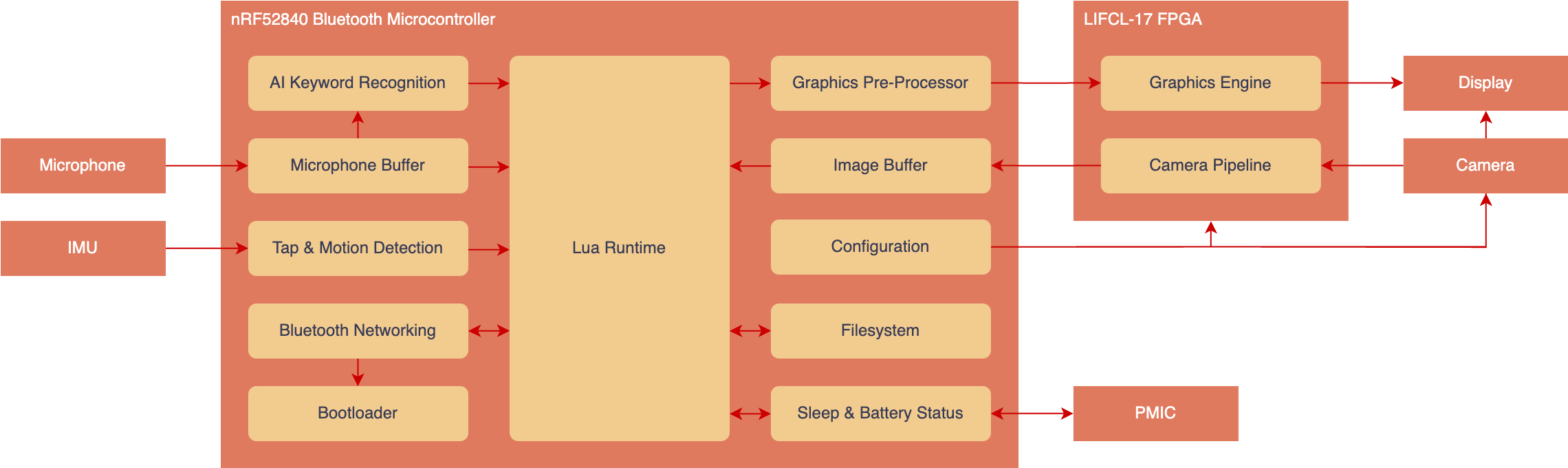
The codebase is split into three sections. The nRF52 Application, the nRF52 Bootloader, and the FPGA RTL.
The nRF52 is designed to handle the overall system operation. It runs Lua, as well as handles Bluetooth networking, AI tasks and power management. The FPGA meanwhile, simply handles acceleration of the graphics and camera.
Getting started with nRF52 firmware development
Ensure you have the ARM GCC Toolchain installed.
Ensure you have the nRF Command Line Tools installed.
Ensure you have nRF Util installed, along with the
deviceandnrf5sdk-toolssubcommands../nrfutil install device ./nrfutil install nrf5sdk-toolsClone this repository and initialize any submodules:
git clone https://github.com/brilliantlabsAR/frame-codebase.git

cd frame-codebase

git submodule update --init
You should now be able to build and flash the project to an nRF52840 DK by calling the following commands from the
frame-codebasefolder.make release make erase-jlink # Unlocks the flash protection if needed make flash-jlink
Debugging
Open the project in VSCode.
There are some build tasks already configured within
.vscode/tasks.json. Access them by pressingCtrl-Shift-P(Cmd-Shift-Pon MacOS) →Tasks: Run Task.Try running the
Buildtask. The project should build normally.You may need to unlock the device by using the
Erasetask before programming or debugging.To enable IntelliSense, be sure to select the correct compiler from within VSCode.
Ctrl-Shift-P(Cmd-Shift-Pon MacOS) →C/C++: Select IntelliSense Configuration→Use arm-none-eabi-gcc.Install the Cortex-Debug extension for VSCode in order to enable debugging.
A debugging launch is already configured within
.vscode/launch.json. Run theApplication (J-Link)launch configuration from theRun and Debugpanel, or pressF5. The project will automatically build and flash before launching.To monitor the logs, run the task
RTT Console (J-Link)and ensure theApplication (J-Link)launch configuration is running.To debug using Black Magic Probes, follow the instructions here.
Getting started with FPGA development
The complete FPGA architecture is described in the documentation here.
The FPGA RTL is prebuilt and included in fpga_application.h for convenience. If you wish to modify the FPGA RTL, follow the instructions here.