
bokub/nopaste
bokub/nopaste has 454 GitHub stars and 145 forks. Star changes are not measured yet. Last checked 2026-11-09 06:33 UTC. Last push 2025-11-03.
:clipboard: Client-side paste service
What you can do
- Syntax highlighting (use the language selector)
- Enable / disable line wrapping (use the button next to the language selector)
- Delete line (Ctrl+D)
- Multiple cursors (Ctrl+Click)
측정된 스타 증가
- in 24h
- 업데이트 지연
- in 7 days
- 업데이트 지연
- in 15 days
- 업데이트 지연
- in 1 month
- 업데이트 지연
서로 겹치는 기간의 순증가량이며 일별 합계가 아닙니다. 측정값이 없으면 비워 둡니다. 스타는 관심도를 나타내며 품질을 보장하지 않습니다.
README.md
Original
What is NoPaste?
NoPaste is an open-source website similar to Pastebin where you can store any piece of code, and generate links for easy sharing
However, what makes NoPaste special is that it works with no database, and no back-end code. Instead, the data is compressed and stored entirely in the link that you share, nowhere else!
Because of this design:
- 🗑️ Your data cannot be deleted from NoPaste
- 🔞 Your data cannot be censored
- 👁️ The server hosting NoPaste (or any clone of it) cannot read or access your data
- ⏳ Your data will be accessible forever (as long as you have the link)
- 🔀 You can access your data on every NoPaste clone, including your own
- 🔍 Google will not index your data, even if your link is public
Note: This project is a copy of Topaz's paste service, with a reworked design and a few additional features (syntax highlighting, line numbers, offline usage, embedding...)
How it works
When you click on "Generate Link", NoPaste compresses the whole text using the
LZMA algorithm, encodes it in
Base64, and puts it in the optional URL fragment, after the first # symbol: nopaste.boris.sh/#<your data goes here>
When you open a link, NoPaste reads, decodes, and decompresses whatever is after the #, and displays the result in the editor.
This process is done entirely in your browser, and the web server hosting NoPaste never has access to the fragment
For example, this is the CSS code used by NoPaste
Other features
Embedded NoPaste snippets
You can include NoPaste code snippets into your own website by clicking the Embed button and using the generated HTML code.
Here is an example of generated code and how it looks (click on the screenshot to see the interactive version)
<iframe
    width="100%"
    height="243"
    frameborder="0"
    src="https://nopaste.boris.sh/?l=py#XQAAAQAbAQAAAAAAAAA0m0pnuFI8c+qagMoNTEcTIfyUWbZjtjmBYcmJSzoNwS5iVMWHzvowv3IPM0vOG5cjrtDRTSVP/0biTIrrahfmbkuMQBBeSiSGpaJOqYJiKmUDYn2Gp1RtWE6gm8fLHMB4eyZ3+rEbUQwWyMcmWqvZ7m96RUeFyZdYbE85JGvhghqF8cyPB0ZjV0OQWsDxn5O5ysMrIcL+pKPk89EtLjAHhA1LZL9F3hzAtTx7I+GlyrxhhXGxAN//CvtaAA=="
></iframe>
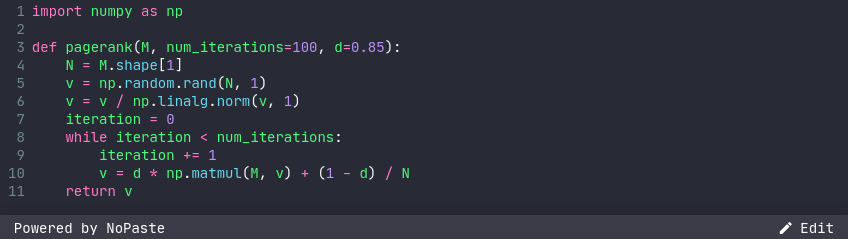
Feel free to edit the height and width attributes, so they suit your needs
Offline usage
When you visit NoPaste for the first time, its code is saved in your browser cache. After that, every NoPaste link you open will load really quick, even if your internet connection is slow.
What if you have no internet connexion at all? No problem, NoPaste will still work perfectly!
Editor features
- Syntax highlighting (use the language selector)
- Enable / disable line wrapping (use the button next to the language selector)
- Delete line (
Ctrl+D) - Multiple cursors (
Ctrl+Click) - Usual keyboard shortuts (
Ctrl+A,Ctrl+Z,Ctrl+Y...)
Maximum sizes for links
NoPaste is great for sharing code snippets on various platforms.
These are the maximum link lengths on some apps and browsers.
| App | Max length |
|---|---|
| 10,000 | |
| 4,088 | |
| Slack | 4,000 |
| QR Code | 2,610 |
| Bitly | 2,048 |
| TinyURL | 32,000 |
| Browser | Max length | Notes |
|---|---|---|
| Google Chrome | (win) 32,779 (mac) 10,000 | Will not display, but larger links work |
| Firefox | >64,000 | |
| Microsoft IE 11 | 4,043 | Will not show more than 2,083 |
| Microsoft Edge | 2,083 | Anything over 2083 will fail |
| Android | 8,192 | |
| Safari | Lots |
Generate NoPaste links
NoPaste links can be created easily from your system's command line:
# Linux
echo -n 'Hello World' | lzma | base64 -w0 | xargs -0 printf "https://nopaste.boris.sh/#%s\n"

# Mac
echo -n 'Hello World' | lzma | base64 | xargs -0 printf "https://nopaste.boris.sh/#%s\n"

# Windows / WSL / Linux
echo -n 'Hello World' | xz --format=lzma | base64 -w0 | printf "https://nopaste.boris.sh/#%s\n" "$(cat -)"
Deploy your own version of NoPaste
NoPaste is just a bunch of static files, making it really easy to deploy on any kind of file server.
Read the wiki to see how you can deploy your own version of NoPaste for free using Github Pages
관련 프로젝트 살펴보기
trimstray/the-book-of-secret-knowledge
영감을 주는 목록, 매뉴얼, 치트시트, 블로그, 팁, 원라이너, CLI/웹 도구 등을 모은 컬렉션.
257,250 스타Hack-with-Github/Awesome-Hacking
해커, 펜테스터, 보안 연구자를 위한 다양한 Awesome 목록 모음.
125,103 스타swisskyrepo/PayloadsAllTheThings
웹 애플리케이션 보안과 모의 침투 테스트/CTF에 유용한 페이로드 및 우회 방법 목록.
82,542 스타caddyserver/caddy
빠르고 확장 가능한 멀티플랫폼 HTTP/1-2-3 웹 서버이며, 자동 HTTPS를 지원합니다
78,935 스타