
bitleak/lmstfy
bitleak/lmstfy has 852 GitHub stars and 122 forks. GitHot measured 0 stars in 24 hours and 0 in 7 days. Last checked 2026-11-25 10:57 UTC. Last push 2026-04-29.
측정된 스타 증가
- in 24h
- 0
- in 7 days
- 0
- in 15 days
- 기록 수집 중
- in 1 month
- 기록 수집 중
서로 겹치는 기간의 순증가량이며 일별 합계가 아닙니다. 측정값이 없으면 비워 둡니다. 스타는 관심도를 나타내며 품질을 보장하지 않습니다.
소개
REST API를 제공하는 작업 큐
개발 도구README.md
Original
LMSTFY(Let Me Schedule Task For You)





lmstfy(pronounce /'lam.si.fai/) is a simple task queue (or job queue) service based on the Redis storage, providing the following features:
- basic job queue primitives: PUBLISH, CONSUME and DELETE via HTTP API
- support extra lifecycle management of jobs:
- job TTL (time-to-live)
- job delay trigger (at second granularity)
- job auto-retry
- dead letter
- namespace/queue level metrics
- token consume/produce rate limit
lmstfy itself doesn't handle data storage, it delegates the storage to the Redis or Redis Sentinel currently (a file based
storage backend is under implementing). So data integrity and durability is in the hand of redis,
we use AOF and replication on our production env to ensure that.
Playing with Lmstfy
If you just want to have a try, the docker-compose was highly recommended but DON'T use it in production.
We would use docker-compose to setup and play with Lmstfy.
- Running the Redis and Lmstfy server
# run the lmstfy and redis, server would listen on localhost:7777
# and admin port on localhost:7778.

% cd docker && docker-compose -p test-lmstfy up -d
- Create a new namespace and token
% curl -XPOST -d "description=test namesapce" "http://127.0.0.1:7778/token/test-ns"
- Publish a new message
# The queue would be dynamic created, so feel free to publish the message to any queues.
# Below http request would create a job with delay = 1s, ttl = 3600s and tries = 16.

% curl -XPUT -H "X-token:{ENTER YOUR TOKEN}" "http://127.0.0.1:7777/api/test-ns/test-queue?delay=1&ttl=3600&tries=16"
- Consume a job from the queue
% curl -H "X-token:{ENTER YOUR TOKEN}" "http://127.0.0.1:7777/api/test-ns/test-queue?ttr=30&timeout=2"
- ACK the job
% curl -i -XDELETE -H "X-token:{ENTER YOUR TOKEN}" "http://127.0.0.1:7777/api/test-ns/test-queue/job/{YOUR JOB ID}"
Building Lmstfy
It is as simple as:
% make
The application binary would be generated at _build dir, you can run it on the Running Lmstfy section.
Running Lmstfy
You must setup the Redis first and configure it in the lmstfy config file before running:
_build/lmstfy-server -c config/demo-conf.toml
Internal
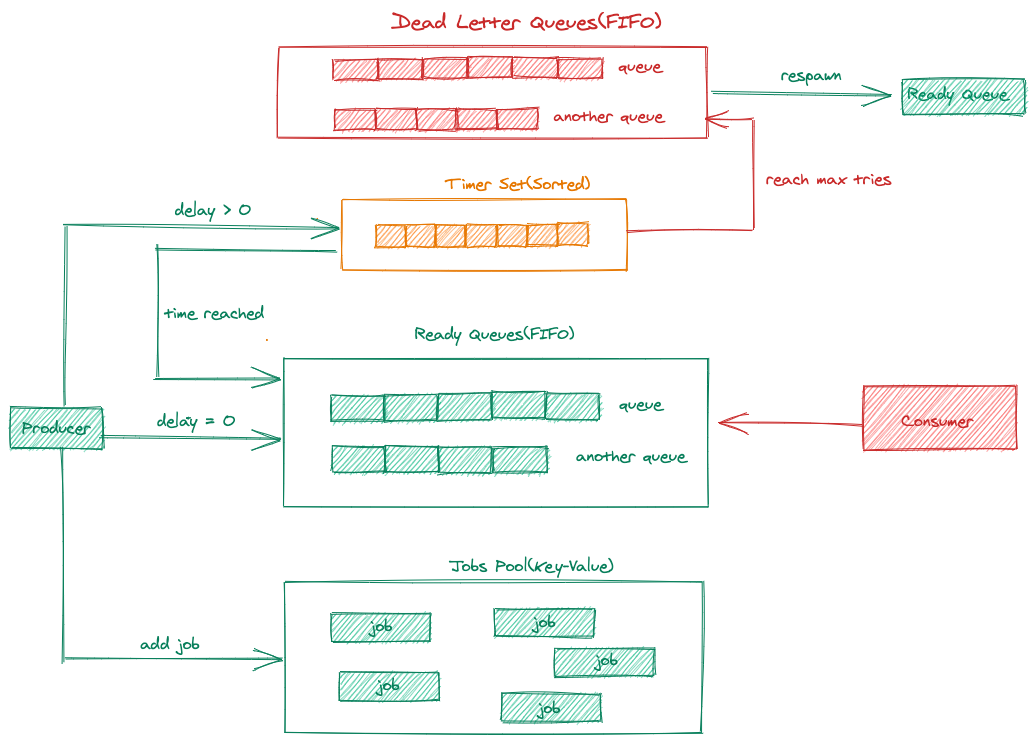
Detailed internal implementation looks like:
Client drivers
Documentation
License
LMSTFY is under the MIT license. See the LICENSE file for details.
관련 프로젝트 살펴보기
불러오는 중…