
bezkoder/spring-boot-login-example
bezkoder/spring-boot-login-example has 251 GitHub stars and 146 forks. GitHot measured 0 stars in 24 hours and -1 in 7 days. Last checked 2026-11-22 14:21 UTC. Last push 2024-02-04.
측정된 스타 증가
- in 24h
- 0
- in 7 days
- -1
- in 15 days
- 기록 수집 중
- in 1 month
- 기록 수집 중
서로 겹치는 기간의 순증가량이며 일별 합계가 아닙니다. 측정값이 없으면 비워 둡니다. 스타는 관심도를 나타내며 품질을 보장하지 않습니다.
소개
Spring Boot Login and Registration example with MySQL, JWT, Rest Api - Spring Boot Spring Security Login example
데이터README.md
OriginalSpring Boot Login example with Spring Security, MySQL and JWT
Build a Spring Boot Login and Registration example (Rest API) that supports JWT with HttpOnly Cookie. You’ll know:
- Appropriate Flow for User Login and Registration with JWT and HttpOnly Cookies
- Spring Boot Rest Api Architecture with Spring Security
- How to configure Spring Security to work with JWT
- How to define Data Models and association for Authentication and Authorization
- Way to use Spring Data JPA to interact with MySQL Database
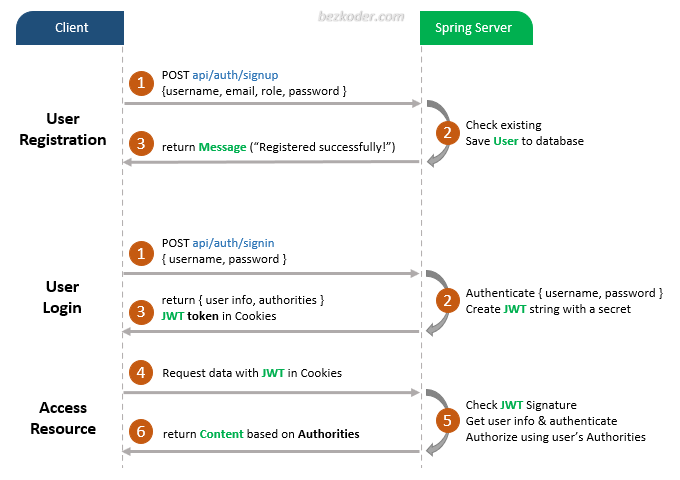
User Registration, Login and Authorization process.
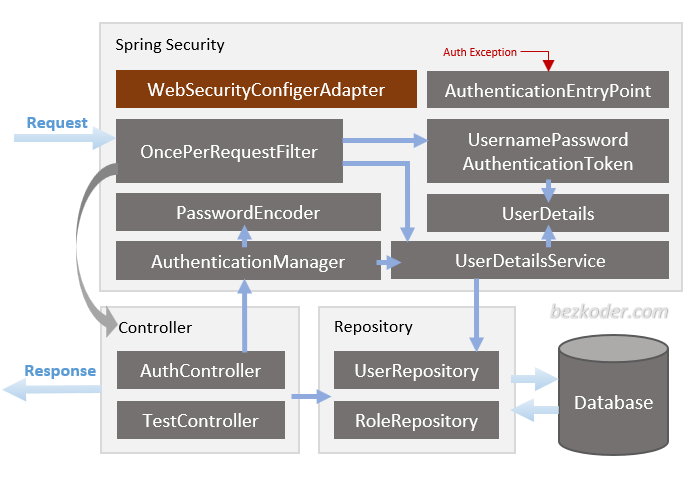
Spring Boot Server Architecture with Spring Security
You can have an overview of our Spring Boot Server with the diagram below:
For more detail, please visit:
Working with Front-end:
Angular 12 / Angular 13 / Angular 14 / Angular 15 / Angular 16 / Angular 17
Dependency
– If you want to use PostgreSQL:
<dependency>
  <groupId>org.postgresql</groupId>
  <artifactId>postgresql</artifactId>
  <scope>runtime</scope>
</dependency>
– or MySQL:
<dependency>
  <groupId>com.mysql</groupId>
  <artifactId>mysql-connector-j</artifactId>
  <scope>runtime</scope>
</dependency>
Configure Spring Datasource, JPA, App properties
Open src/main/resources/application.properties
- For PostgreSQL:
spring.datasource.url= jdbc:postgresql://localhost:5432/testdb
spring.datasource.username= postgres
spring.datasource.password= 123

spring.jpa.properties.hibernate.jdbc.lob.non_contextual_creation= true
spring.jpa.properties.hibernate.dialect= org.hibernate.dialect.PostgreSQLDialect

# Hibernate ddl auto (create, create-drop, validate, update)
spring.jpa.hibernate.ddl-auto= update

# App Properties
bezkoder.app.jwtCookieName= bezkoder
bezkoder.app.jwtSecret= ======================BezKoder=Spring===========================
bezkoder.app.jwtExpirationMs= 86400000
- For MySQL
spring.datasource.url= jdbc:mysql://localhost:3306/testdb?useSSL=false
spring.datasource.username= root
spring.datasource.password= 123456

spring.jpa.properties.hibernate.dialect= org.hibernate.dialect.MySQL5InnoDBDialect
spring.jpa.hibernate.ddl-auto= update

# App Properties
bezkoder.app.jwtCookieName= bezkoder
bezkoder.app.jwtSecret= ======================BezKoder=Spring===========================
bezkoder.app.jwtExpirationMs= 86400000
Run Spring Boot application
mvn spring-boot:run
Run following SQL insert statements
INSERT INTO roles(name) VALUES('ROLE_USER');
INSERT INTO roles(name) VALUES('ROLE_MODERATOR');
INSERT INTO roles(name) VALUES('ROLE_ADMIN');
Refresh Token
Spring Boot Refresh Token with JWT example
More Practice:
Exception handling: @RestControllerAdvice example in Spring Boot
Validation: Spring Boot Validate Request Body
Documentation: Spring Boot and Swagger 3 example
Caching: Spring Boot Redis Cache example
Associations:
Deployment:
Fullstack CRUD App
Run both Back-end & Front-end in one place:
관련 프로젝트 살펴보기
불러오는 중…