
berylliumsec/nebula
berylliumsec/nebula has 1,157 GitHub stars and 178 forks. GitHot measured +5 stars in 24 hours and +22 in 7 days. Last checked 2026-11-10 23:24 UTC. Last push 2026-11-02.
Cybersecurity Harness
What you can do
- One Project for the engagement. Keep assets, browser sessions, Kali terminals, code, files, notes, findings, and reports together.
- Security browser and interception. Capture in-scope traffic in the desktop browser, intercept and edit requests, and use Repeater and Intruder for follow-up testing.
- Bring your own skills. Add SKILL.md skills to a Project and select them in chat for assistant work.
- Kali tools and optional VPN egress. Run container commands with Docker or Podman and route authorized container traffic through a Project-selected OpenVPN profile.
측정된 스타 증가
- in 24h
- +5
- in 7 days
- +22
- in 15 days
- 업데이트 지연
- in 1 month
- 업데이트 지연
서로 겹치는 기간의 순증가량이며 일별 합계가 아닙니다. 측정값이 없으면 비워 둡니다. 스타는 관심도를 나타내며 품질을 보장하지 않습니다.
README.md
Original
Nebula
Cybersecurity harness built around the operator
Acknowledgement
First, I would like to thank Almighty God, who is the source of all knowledge. Without Him, this would not be possible.
Use Nebula only on systems and networks you own or are explicitly authorized to test.
Key features
- One Project for the engagement. Keep assets, browser sessions, Kali terminals, code, files, notes, findings, and reports together.
- Security browser and interception. Capture in-scope traffic in the desktop browser, intercept and edit requests, and use Repeater and Intruder for follow-up testing.
- Bring your own skills. Add
SKILL.mdskills to a Project and select them in chat for assistant work. - Kali tools and optional VPN egress. Run container commands with Docker or Podman and route authorized container traffic through a Project-selected OpenVPN profile.
- Operator-controlled automation. Set scope, approvals, and budgets for assistant and mission actions.
- Evidence through reporting. Preserve hashed artifacts and execution provenance, link evidence to findings, and export reports or engagement bundles.
Butler

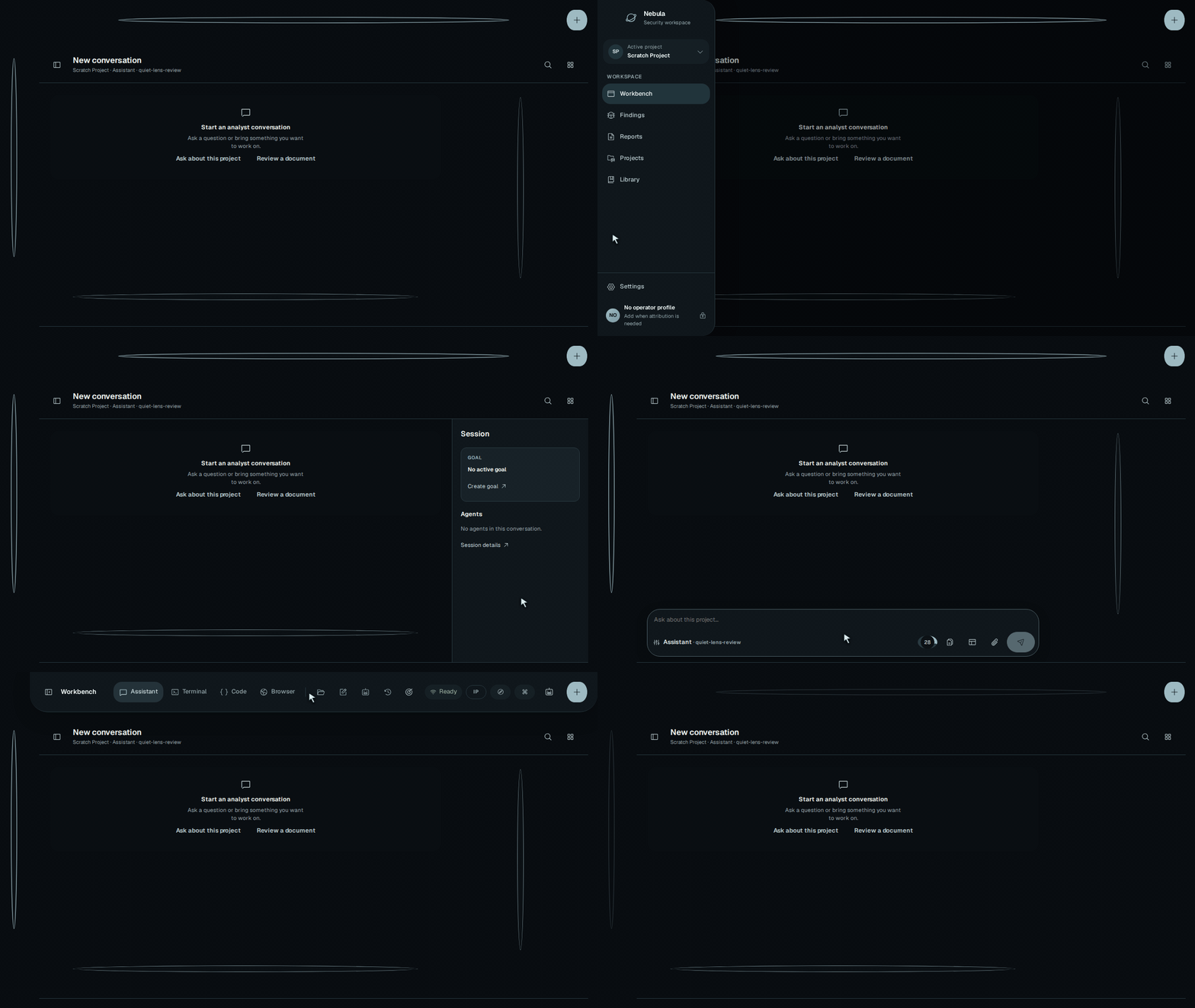
Not sure how to get started? Ask Butler. Select the Nebula logo in the header or mobile navigation, then chat or start Voice.
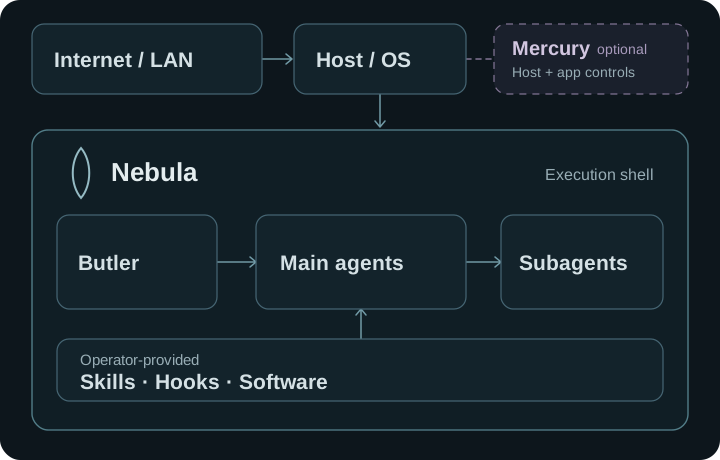
With a configured model or harness, Butler can answer questions, review the selected project's chats and goals, start or steer work, and manage settings and approvals. It shows delegated work separately from main agents; to redirect a child, ask Butler to guide its parent agent.
Voice setup: GPT-Live requires a direct OpenAI API key. Add an enabled OpenAI provider with a key in Nebula Settings, or set OPENAI_API_KEY on the Nebula host. Nebula keeps the key on the host to start the voice session; your device then exchanges audio with OpenAI over WebRTC. Voice sessions incur OpenAI API charges. Butler can delegate work to a Codex harness, but Codex access does not provide the GPT-Live key. See OpenAI's GPT-Live WebRTC setup.
Voice pauses after 20 seconds of quiet by default; change this Core-wide timeout in Butler settings. Pausing ends the paid GPT-Live session, and Resume Voice starts a new one. Butler work already submitted continues in its saved chat.

Illustrative sample project. This GIF is silent; Butler speaks in an active Voice session.
When a goal starts, Butler watches its supported progress events even if the panel is closed. The project can grant Watch, Steer, or specific Delegate actions. GPT-Live listens and speaks in Voice mode; the Core Butler runs the tools, owns the saved conversation and context compaction, and continues oversight while Voice is off. Voice does not yet speak unsolicited alerts. Separately, Butler checks relevant precedent before acting and keeps durable, selective memory of useful preferences, decisions, and lessons across projects. Open Memory in the Butler panel whenever you want to review, edit, or delete an entry.
A fresh Core data directory starts with empty Butler memory. Its SQLite records stay in that data directory across app updates, and the Chroma search index can be rebuilt from them.
Work
Use Codex or Grok as harnesses, or connect Claude, OpenRouter, Ollama, or vLLM. Docker or Podman powers Kali and container-mode automation; Host mode uses the host's filesystem and network after explicit acknowledgement. Optional OpenVPN routes container traffic, while Mercury can add independent controls when enrolled.
Install
The Linux x86_64 preview is available through the signed APT repository or as a DEB or AppImage. Back up engagement data before upgrading.
From source
Install Python 3.11–3.13, Poetry 2.1.3, Node.js 20 with npm, Rust, and the Tauri prerequisites, then run:
git clone https://github.com/BerylliumSec/nebula.git
cd nebula
poetry install --with dev
poetry run playwright install chromium
npm --prefix ui ci
npm --prefix ui run dev:desktop
Documentation
For a lightweight full-screen terminal client with live agent progress, direct chats, skills, goals and Assistant controls, see Headless Core and paired terminal Assistant.
Start with the Nebula 3 guide, system architecture, or usage scenarios. The documentation index groups setup, integrations, troubleshooting, technical reference, and release information.
관련 프로젝트 살펴보기
trimstray/the-book-of-secret-knowledge
영감을 주는 목록, 매뉴얼, 치트시트, 블로그, 팁, 원라이너, CLI/웹 도구 등을 모은 컬렉션.
257,652 스타Hack-with-Github/Awesome-Hacking
해커, 펜테스터, 보안 연구자를 위한 다양한 Awesome 목록 모음.
125,254 스타swisskyrepo/PayloadsAllTheThings
웹 애플리케이션 보안과 모의 침투 테스트/CTF에 유용한 페이로드 및 우회 방법 목록.
82,583 스타caddyserver/caddy
빠르고 확장 가능한 멀티플랫폼 HTTP/1-2-3 웹 서버이며, 자동 HTTPS를 지원합니다
78,959 스타