
benjycui/bisheng
benjycui/bisheng has 2,878 GitHub stars and 411 forks. GitHot measured -1 stars in 24 hours and +1 in 7 days. Last checked 2026-11-12 13:34 UTC. Last push 2023-09-26.
Transform Markdown(and other static files with transformers) into a SPA website using React.
What you can do
- Support browserHistory, even in GitHub Pages.
- Lazy load for Markdown data.
- Plugin system to extend default behaviour.
- Server-side render for SEO.
측정된 스타 증가
- in 24h
- -1
- in 7 days
- +1
- in 15 days
- 업데이트 지연
- in 1 month
- 업데이트 지연
서로 겹치는 기간의 순증가량이며 일별 합계가 아닙니다. 측정값이 없으면 비워 둡니다. 스타는 관심도를 나타내며 품질을 보장하지 않습니다.
README.md
OriginalBi Sheng


Bi Sheng was the Chinese inventor of the first known movable type technology.
bisheng is designed to transform Markdown(and other static files with transformers) into static websites and blogs using React.
Sites built with BiSheng
You can create a PR to extend this list with your amazing website which is built with BiSheng.
Features
bisheng is based on dora & webpack & React & react-router, and it has the following features:
- Support
browserHistory, even in GitHub Pages. - Lazy load for Markdown data.
- Plugin system to extend default behaviour.
- Server-side render for SEO.
- Support
react-helmetfor better SEO.
Big picture
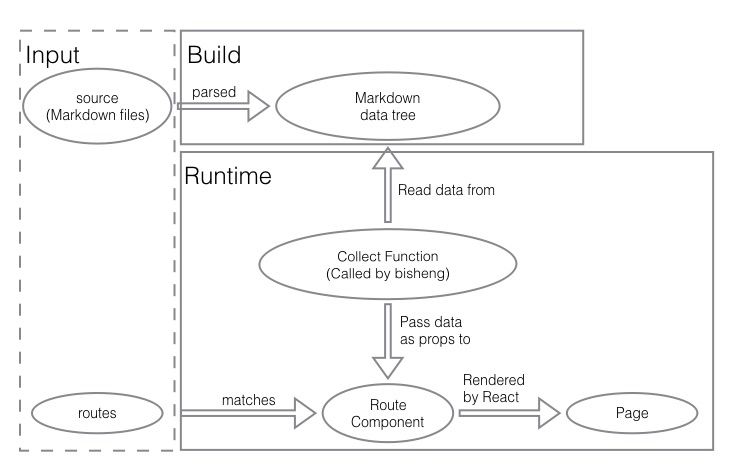
Articles
Usage
Installation:
npm install --save-dev bisheng
Then, add start to npm scripts:
{
  "scripts": {
    "start": "bisheng start"
  }
}
Create bisheng.config.js, otherwise bisheng will use the default config:
module.exports = {
  source: './posts',
  output: './_site',
  theme: './_theme',
  port: 8000,
};
Note: please make sure that source and theme exists, and theme should not be an empty directory. Just use bisheng-theme-one, if you don't know how to develop a theme. See a simple demo here.
Now, just run npm start.
Documentation
CLI
We can install bisheng as a cli command and explore what it can do by bisheng -h. However, the recommended way to use bisheng is to install it as devDependencies.
$ npm install -g bisheng
$ bisheng -h
  Usage: bisheng [command] [options]

  Commands:

    start [options]     to start a server
    build [options]     to build and write static files to `config.output`
    gh-pages [options]  to deploy website to gh-pages
    help [cmd]          display help for [cmd]

  Options:

    -h, --help     output usage information
    -V, --version  output the version number
Configuration
bisheng will read bisheng.config.js as its config file, but we can set the config file name by --config, something like this bisheng --config another.config.js.
The content of bisheng.config.js looks like this:
module.exports = {
  port: 8000,
  source: './posts',
  output: './_site',
  theme: './_theme',
  htmlTemplate: path.join(__dirname, '../template.html'),
  devServerConfig: {},
  webpackConfig(config) {
    return config;
  },
  hash: false,

  entryName: 'index',
  root: '/',
};
port: Number
default: 8000
To set the port which will be listened when we start a local server.
source: String | Array[String] | Object{ [category]: String | Array[String]}
default: './posts'
To set directory/directories where we place Markdown files.
And all the Markdown files in source will be parsed and then structured as a tree data, for example:
posts
└── dir1
  ├── a.md
  └── b.md
Will output a Markdown data tree:
{
  dir1: {
    a: {...},
    b: {...},
  },
}
And each Markdown file will be parsed as a Markdown data. Actually, a Markdown data is the returned value of mark-twain, and it could be preprocessed by plugins.
exclude: RegExp
default: null
If you want to exclude some files in your source, just use exclude. Then bisheng will not parse files which match exclude.
output: String
default: './_site'
To set directory where bisheng will generate (HTML & CSS & JavaScript) files to.
theme: String
default: './_theme'
To set directory where we put the theme of website, and it also can be a npm package name.
themeConfig: any
undefined
A set of configuration that your theme provides, and then your theme can read it from props.themeConfig.
Note:
themeConfigwill beJSON.stringifybefore it's passed to props, so you cannot pass function/RegExp throughthemeConfig.
htmlTemplate: String
default:
bisheng/lib/template.html
The HTML template which will be use to generate HTML files which will be sent to users.
Note: template will be parsed by nunjucks, and you can use the following variables in this template:
root- all attribute of htmlTemplateExtraData
htmlTemplateExtraData: Object
default:
{}
The Extra Data which will be used to render htmlTemplate.
devServerConfig: Object
default: {}
You can consult webpack-dev-server's documentation.
postcssConfig: Object
default: {
    plugins: [
      rucksack(),
      autoprefixer({
        browsers: ['last 2 versions', 'Firefox ESR', '> 1%', 'ie >= 8', 'iOS >= 8', 'Android >= 4'],
      }),
    ],
  }
You can consult webpack postcss-loader's documentation.
webpackConfig: (config) => config
default: (config) => config
To modify the webpack config, you can extend the config like this.
transformers: Object[]
[{ test: /.md$/, use: MarkdownTransformer }]
A list of transformers that will be used to transform static files.
entryName: String
default: 'index'
The name of files which will be generated by webpack, such as [entryName].js & [entryName].css.
root: String
default: '/'
If the website will be deployed under a sub-directory of a domain (something like http://benjycui.github.io/bisheng-theme-one/), we must set it (such as /bisheng-theme-one/).
License
MIT
관련 프로젝트 살펴보기
freeCodeCamp/freeCodeCamp
freeCodeCamp.org의 오픈 소스 코드베이스와 커리큘럼입니다. 수학, 프로그래밍, 컴퓨터 과학을 무료로 배울 수 있습니다.
459,070 스타donnemartin/system-design-primer
대규모 시스템 설계 방법을 배우고 시스템 설계 면접을 준비할 수 있습니다. Anki 플래시카드가 포함되어 있습니다.
377,730 스타react/react
웹과 네이티브 사용자 인터페이스를 위한 라이브러리.
252,565 스타vuejs/vue
Vue 2 저장소입니다. Vue 3은 https://github.com/vuejs/core를 방문하세요.
212,527 스타