
bcylin/QuickTableViewController
소개
Swift에서 설정 화면용 UITableView를 간단하게 만들 수 있습니다.
개발 도구측정된 스타 증가
- in 24h
- 0
- in 7 days
- 0
- in 15 days
- 기록 수집 중
- in 1 month
- 기록 수집 중
서로 겹치는 기간의 순증가량이며 일별 합계가 아닙니다. 측정값이 없으면 비워 둡니다. 스타는 관심도를 나타내며 품질을 보장하지 않습니다.
README.md
OriginalQuickTableViewController


A simple way to create a table view for settings.
Sunsetting
ℹ️ If your deployment target is iOS 13 or above, please consider using SwiftUI.
QuickTableViewController was designed to show static table contents when it was around iOS 8 and Swift 1.2. Over the past few iterations, a couple more controls were added but it still has its limitations. After the introduction of List and Form in iOS 13, SwiftUI has become a better solution for both static and dynamic table views.
QuickTableViewController will stay at the latest released version v1.3.1 from now on. Future updates will be mostly experimental. To use QuickTableViewController in UIKit, please see:
SwiftUI
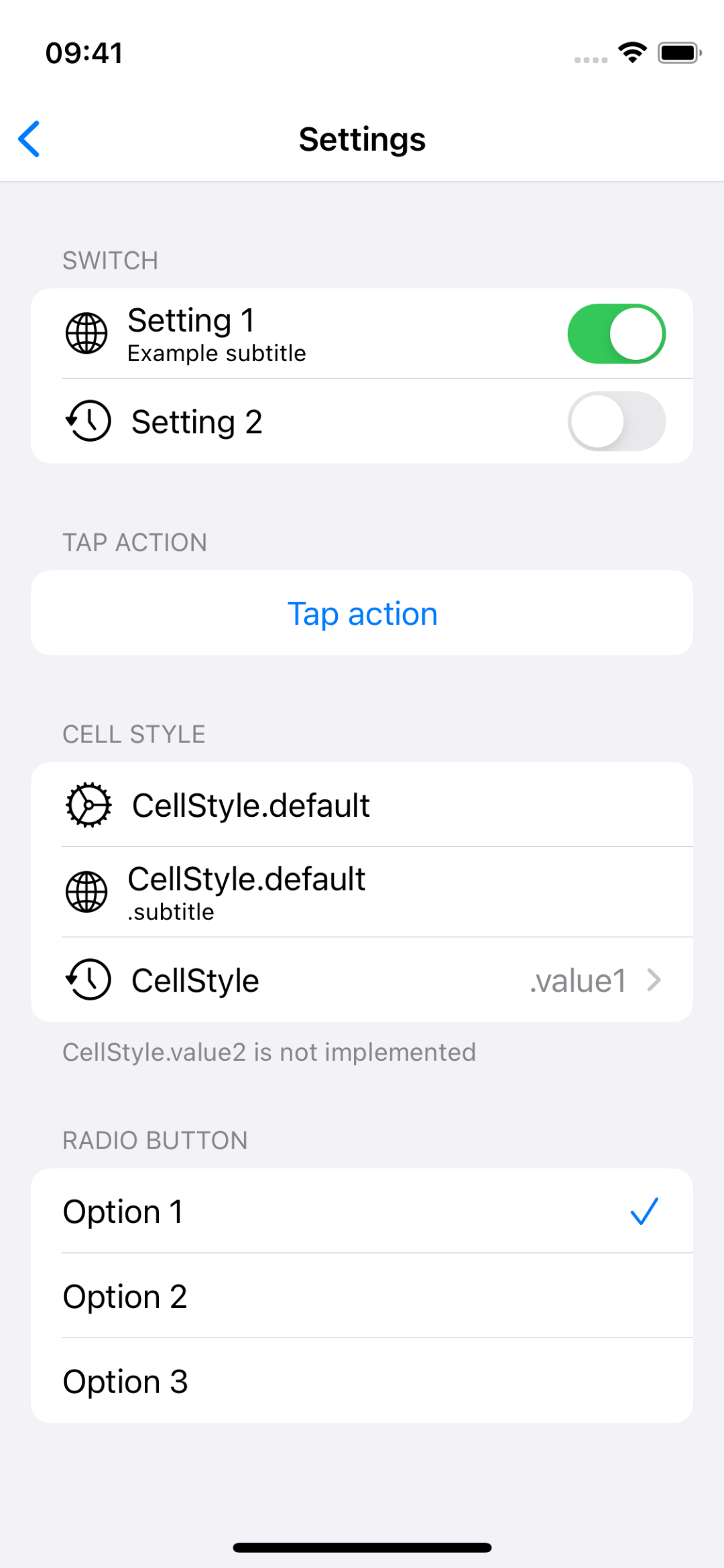
The same settings layout can be implemented in SwiftUI and integrated into UIKit using UIHostingController. For more, please see Example-iOS/SwiftUI.
var body: some View {
    Form {
        Section(header: Text("Switch")) {
            Toggle(isOn: $viewModel.flag1) {
                subtitleCellStyle(title: "Setting 1", subtitle: "Example subtitle")
                    .leadingIcon("globe")
            }
            Toggle(isOn: $viewModel.flag2) {
                subtitleCellStyle(title: "Setting 2", subtitle: nil)
                    .leadingIcon("clock.arrow.circlepath")
            }
        }

        Section(header: Text("Tap Action")) {
            Button {
                viewModel.performTapAction()
            } label: {
                Text("Tap action").frame(maxWidth: .infinity)
            }
        }

        Section(header: Text("Cell Style"), footer: Text("CellStyle.value2 is not implemented")) {
            subtitleCellStyle(title: "CellStyle.default", subtitle: nil)
                .leadingIcon("gear")
            subtitleCellStyle(title: "CellStyle.default", subtitle: ".subtitle")
                .leadingIcon("globe")
            value1CellStyle(title: "CellStyle", detailText: ".value1")
                .leadingIcon("clock.arrow.circlepath")
                .navigationFlow { viewModel.startNavigationFlow() }
        }

        Section(header: Text("Radio Button")) {
            ForEach(SettingsViewModel.Option.allCases) { option in
                checkmarkCellStyle(with: option, isSelected: viewModel.isOptionSelected(option))
            }
        }
    }
}
License
QuickTableViewController is released under the MIT license. Image source: iconmonstr
관련 프로젝트 살펴보기
불러오는 중…