프로젝트 GitHub에서 보기
ayushgoel/AGEmojiKeyboard
소개
iOS용 이모지 키보드
개발 도구측정된 스타 증가
- in 24h
- 0
- in 7 days
- 0
- in 15 days
- 기록 수집 중
- in 1 month
- 기록 수집 중
서로 겹치는 기간의 순증가량이며 일별 합계가 아닙니다. 측정값이 없으면 비워 둡니다. 스타는 관심도를 나타내며 품질을 보장하지 않습니다.
README.md
OriginalAGEmojiKeyboard


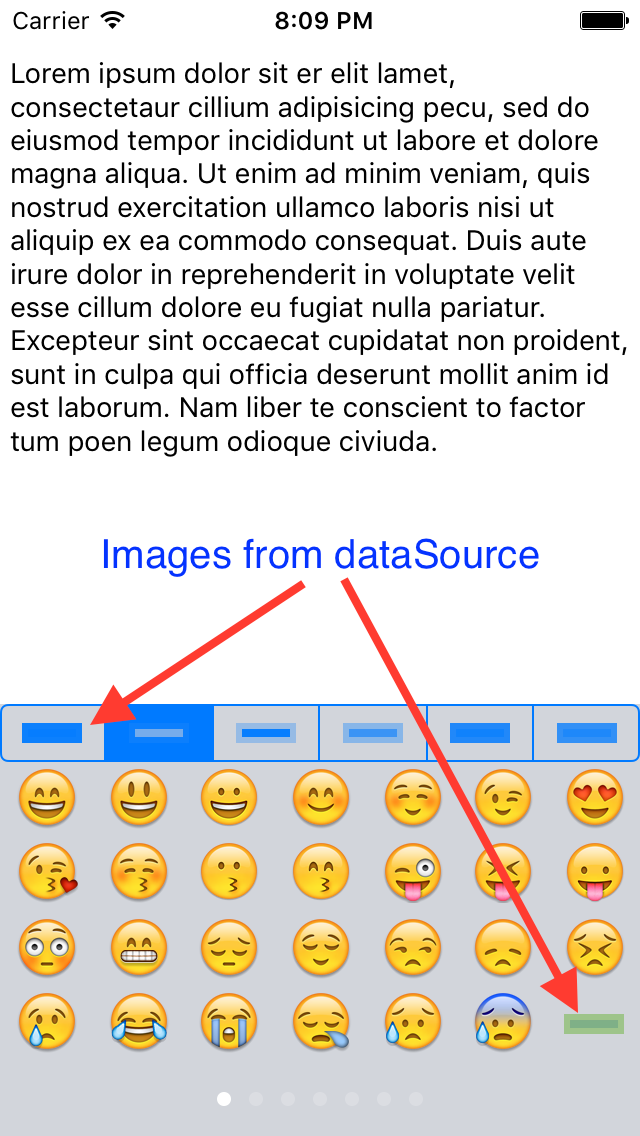
An alternate keyboard for iOS that lets you display all the emojis supported by iOS. Documentation is available via CocoaDocs.
Additions that need to be done:
- Stickers
- Custom emojis (different font)
Example Project
To run the example project:
- Clone the repo to a local folder.
- Run
pod installfrom the Example directory. - Open
AGEmojiKeyboardSample.xcworkspaceplaced in Example folder. - Run.
Installation
Via CocoaPods
AGEmojiKeyboard is available through CocoaPods, to install
it simply add the following line to your Podfile:
pod "AGEmojiKeyboard"
Copy the files
Copy the classes from AGEmojiKeyboard/ and resources from Resources/ to your project. Look at the Example/ folder to see how the classes are used for more detail.
Usage
- Use your own
ViewController(optionally) to conform to AGEmojiKeyboardViewDataSource and AGEmojiKeyboardViewDelegate protocol. - Create an instance of [AGEmojiKeyboardView][AGEmojiKeyboardView] and set it as your
textView'sinputView.
  CGRect keyboardRect = CGRectMake(0, 0, self.view.frame.size.width, 216);
  AGEmojiKeyboardView *emojiKeyboardView = [[AGEmojiKeyboardView alloc] initWithFrame:keyboardRect
                                                                           dataSource:self];
  emojiKeyboardView.autoresizingMask = UIViewAutoresizingFlexibleHeight;
  emojiKeyboardView.delegate = self;
  self.textView.inputView = emojiKeyboardView;
Author
Ayush Goel, [email protected]
License
AGEmojiKeyboard is available under the MIT license. See the LICENSE file for more info.
관련 프로젝트 살펴보기
불러오는 중…