
ayoub3bidi/mercury
ayoub3bidi/mercury has 29 GitHub stars and 3 forks. GitHot measured 0 stars in 24 hours and 0 in 7 days. Last checked 2026-11-23 09:50 UTC. Last push 2026-11-15.
측정된 스타 증가
- in 24h
- 0
- in 7 days
- 0
- in 15 days
- 기록 수집 중
- in 1 month
- 기록 수집 중
서로 겹치는 기간의 순증가량이며 일별 합계가 아닙니다. 측정값이 없으면 비워 둡니다. 스타는 관심도를 나타내며 품질을 보장하지 않습니다.
소개
FastAPI + PostgreSQL API boilerplate with Auth, Docker, Flyway migrations, and opt-in Celery worker and LangGraph agent.
데이터README.md
OriginalMercury

Start your Backend project faster than ever


Solar Stack — scaffold a customized copy with one command: see the ecosystem map
Table of content
- Introduction
- Docker Hub image
- Setup
- Test the API
- Test the database
- How to add new SQL migrations
- Integration and Unit Testing
- Linter
- Security Scan
Introduction
Mercury is a simple and reliable boilerplate that anyone can use from beginners to experts (no deep bullsh*t).
This project uses:
- Basic OAuth2 authentication, utilizing the FastAPI security module. It also supports user authentication via Google integration.
- PostgreSQL as its main database, Redis for caching, and flyway for database migration.
- Unit and integration tests.
- Security scanner (Bandit).
Docker Hub image
A pre-built API image is published on Docker Hub and updated on each release:
- Repository: ayoub3bidi/mercury
- GHCR: ghcr.io/ayoub3bidi/mercury
docker pull ayoub3bidi/mercury:latest
Use it alongside your own Postgres, Redis, and Flyway setup, or clone this repo and run the full stack with docker compose (see Setup).
Project architecture
├── src
│ └── assets
│ └── constants
│ └── controllers
│     ├── admin
│     ├── user
│ └── database
│     ├── postgres_db.py
│     ├── redis_db.py
│ └── integration_tests
│ └── middleware
│     ├── auth_guard.py
│ └── migrations
│ └── models
│ └── routes
│     ├── admin
│     ├── user
│ └── schemas
│ └── unit_tests
│ └── utils
│ └── app.py
│ └── main.py
│ └── restful_ressources.py
Setup
Prerequisites
Environment variables
cp .env.dist .env
This will create a .env file in your project locally.
APP_TITLE="Mercury API Docs"
APP_DESCRIPTION="This is the Swagger documentation of the Mercury API"
APP_VERSION=0.4.0
API_URL="http://localhost:8000"
API_VERSION="v1"
APP_ENV=local
## Postgres Configuration
POSTGRES_HOST=mercury_db
POSTGRES_PASSWORD=mercury
POSTGRES_PORT=5432
POSTGRES_USER=mercury
POSTGRES_DB=mercury
POSTGRES_SIZE_POOL=30
POSTGRES_MAX_OVERFLOW=10
POSTGRES_POOL_TIMEOUT=30
POSTGRES_POOL_RECYCLE=1800
## Redis Configuration
REDIS_HOST=mercury_cache
REDIS_PORT=6379
REDIS_CACHE_DB=0
REDIS_BROKER_DB=1
## JWT Configuration
JWT_SECRET_KEY="mysecretkey"
JWT_ALGORITHM="HS256"
ACCESS_TOKEN_EXPIRE_MINUTES=30
MERCURY_AGENT_ENABLED=false
LLM_BASE_URL="http://mercury_mock_llm:9000/v1"
LLM_API_KEY="local"
RUN_TOKEN_BUDGET=256
RUN_TIMEOUT_SECONDS=60
CELERY_TASK_TIME_LIMIT=90
OTEL_ENABLED=false
OTEL_EXPORTER_OTLP_ENDPOINT="http://localhost:4317"
## OIDC Configuration
OIDC_GOOGLE_CLIENT_ID="changeme"
OIDC_GOOGLE_CLIENT_SECRET="changeme"
GOOGLE_AUTH_URL="https://accounts.google.com/o/oauth2/auth"
GOOGLE_TOKEN_URL="https://accounts.google.com/o/oauth2/token"
GOOGLE_USER_INFO_URL="https://www.googleapis.com/oauth2/v1/userinfo"
Run the containers
docker compose up --build --force-recreate
This starts the core API, PostgreSQL, Redis, Flyway, and the local-only admin seed step. PostgreSQL uses password authentication; the sample JWT_SECRET_KEY is accepted only while APP_ENV=local. For secret files, set variables such as JWT_SECRET_KEY_FILE=/run/secrets/jwt_secret.
Default admin account
For local development, the compose startup runs an idempotent seed script that creates one admin user:
| Password | |
|---|---|
| [email protected] | Cloud.456 |
Get a JWT by calling POST /v1/token with form body [email protected] and password=Cloud.456, then use the returned access_token as Authorization: Bearer <token> for admin endpoints. The seed script exits without creating an account unless APP_ENV=local.
Test the API
You can check the Swagger documentation on localhost:8000.
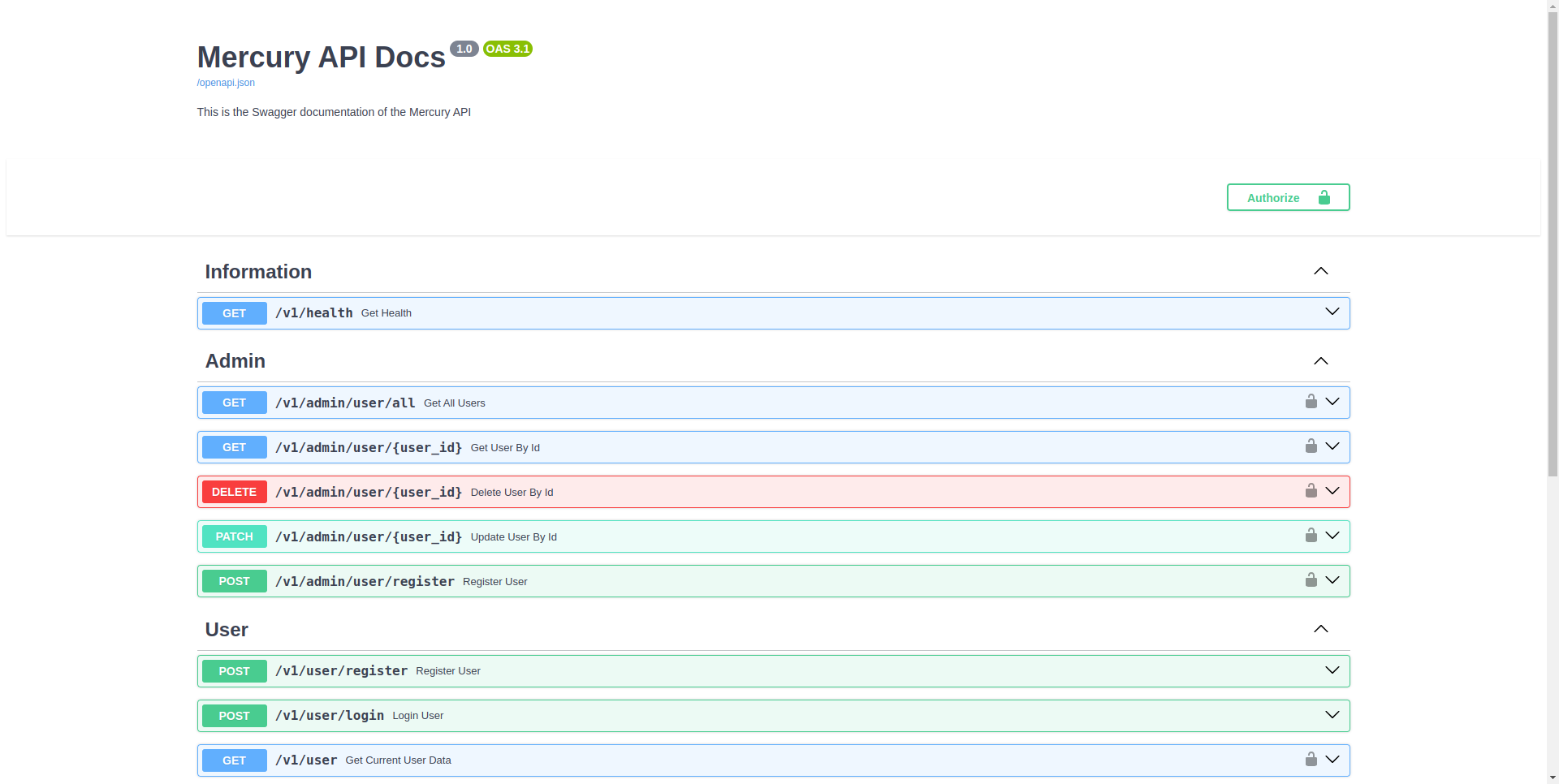
curl localhost:8000/v1/health
This will check the health of the API. The result should be like this:
{"alive":true, "status":"ok"}
GET /v1/health/live reports process liveness. GET /v1/health/ready checks PostgreSQL and Redis and returns 503 when either is unavailable. /v1/health remains a compatibility alias. Prometheus metrics are available at /metrics. Each response includes an X-Request-ID header, and application logs are JSON. OpenTelemetry traces are disabled by default; set OTEL_ENABLED=true and configure OTEL_EXPORTER_OTLP_ENDPOINT to enable them.
Optional worker and agent
The worker and agent are opt-in; test and tooling containers use a separate test profile.
# Core API only
docker compose up --build

# Worker without agent endpoints
docker compose --profile worker up --build

# Full local agent experience (uses the included mock OpenAI-compatible server)
MERCURY_AGENT_ENABLED=true docker compose --profile worker --profile agent up --build
With agent mode enabled, POST /v1/runs accepts a prompt and optional token_budget; an optional Idempotency-Key header prevents duplicate run creation. GET /v1/runs/{id} returns queued, running, completed, or failed status. The default LLM_BASE_URL points to the local mock. To use Ollama or another OpenAI-compatible service, set LLM_BASE_URL and LLM_API_KEY in .env (for Ollama on the host, use http://host.docker.internal:11434/v1).
Cache and Celery broker data use separate Redis databases (REDIS_CACHE_DB=0, REDIS_BROKER_DB=1), so FLUSHDB against the cache connection does not discard queued jobs.
Test the database
docker compose exec mercury_db psql -U mercury -d mercury
This command will take inside the postgreSQL database container where you can apply any SQL command you want.
psql (13.13 (Debian 13.13-1.pgdg120+1))
Type "help" for help.

mercury=# \d
        List of relations
 Schema | Name | Type  |  Owner
--------+------+-------+---------
 public | user | table | mercury
How to add new SQL migrations
Flyway SQL migrations are the schema source of truth. Add a new file in src/migrations/ with the next version number (V{n}__description.sql). Applied migrations are immutable; use a forward migration for changes. V3 is retained as historical migration data, V4 removes only its unchanged default admin account, and V5 creates the agent runs table.
CREATE TABLE IF NOT EXISTS public.test (
    id uuid DEFAULT uuid_generate_v4() PRIMARY KEY,
    name VARCHAR(200)
);
-- Name the file "V6__add_test_table.sql" after the current V5 migration.
If you want to know more you can check the flyway db documentation.
Integration and Unit Testing
One of important things that should be in every project is tests to keeps thing organized and make sure everything is working as intended.
Integration tests
Here's how to run the integration test locally:
docker compose --profile test up --build --abort-on-container-exit mercury_integration_tests
Unit tests
Here's how to run the integration test locally:
docker compose --profile test up --build --abort-on-container-exit mercury_unit_tests
Linter
Having a fast linter can help avoiding coding style problems, and potentially avoid future bugs that takes long hours to fix.
For the linter we're working with ruff, a very fast linter written in Rust.
Here's how to run the linter test locally:
docker compose --profile test up --build --abort-on-container-exit mercury_linter
Security Scan
For our project, we're using bandit, a tool designed to find common security issues in Python code. Here's how to run it locally:
docker compose --profile test run --build --rm mercury_security
Pre-commit
Install hooks locally to catch lint issues before CI:
pip install pre-commit
pre-commit install --install-hooks
pre-commit run --all-files
How to add a new endpoint
- Flyway migration — add
src/migrations/V{n}__description.sql(next version number). - Model — add or update a SQLAlchemy model in
src/models/. - Schema — add Pydantic request/response schemas in
src/schemas/. - Controller — implement logic in
src/controllers/. - Route — wire the endpoint in
src/routes/and register it insrc/restful_ressources.py. - Tests — add coverage under
src/integration_tests/(andsrc/unit_tests/when appropriate).
Run ./ci/integration-test.sh after changes.
Contributions
Contributions are welcome. See CONTRIBUTING.md, CODE_OF_CONDUCT.md, and SECURITY.md.
Give a star if this project helped you!
관련 프로젝트 살펴보기
불러오는 중…