
awslabs/route53-dynamic-dns-with-lambda
소개
API Gateway, Lambda, Route 53으로 구축한 동적 DNS 시스템.
개발 도구측정된 스타 증가
- in 24h
- 0
- in 7 days
- 0
- in 15 days
- 기록 수집 중
- in 1 month
- 기록 수집 중
서로 겹치는 기간의 순증가량이며 일별 합계가 아닙니다. 측정값이 없으면 비워 둡니다. 스타는 관심도를 나타내며 품질을 보장하지 않습니다.
README.md
OriginalServerless Dynamic DNS
Cloud Development Kit (CDK) Deployment
This repository contains all the required code to deploy a Serverless Dynamic DNS solution in AWS.
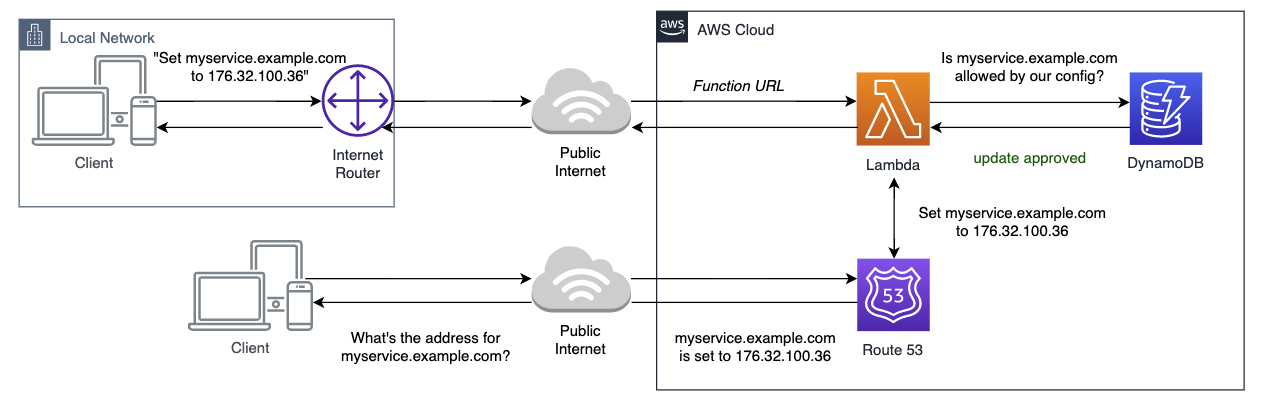
CDK will manage the deployment of the following resources:
- Lambda Function
- DynamoDB Table
- Lambda Function IAM Role
The Lambda function will be configured with a FunctionURL for PUBLIC invocation. The Lambda IAM Role will have the following permissions in addition to the standard Lambda role:
- READ (all actions) for the deployed DynamoDB Table
- Route53 List and Change record set
To deploy the CDK stack to an AWS account is suggested to use a CloudShell session: https://docs.aws.amazon.com/cloudshell/latest/userguide/welcome.html
Clone this repository:
git clone https://github.com/awslabs/route53-dynamic-dns-with-lambda.git
Install Python requirements:
pip install -r requirements.txt
To test DNS record update on the CloudShell session perl-Digest-SHA must be installed to add the shasum package.
sudo yum update
sudo yum install perl-Digest-SHA
If CDK was never used in the deployment account bootstrap it for CDK: https://docs.aws.amazon.com/cdk/v2/guide/bootstrapping.html
cdk bootstrap
If you get an error about CDK CLI not being up to date run the following:
sudo npm install -g aws-cdk
Then retry
cdk bootstrap
Deploy the stack
cdk deploy
Configuration
Route53 Hosted zone and record set
A Route53 Hosted Zone (https://docs.aws.amazon.com/Route53/latest/DeveloperGuide/hosted-zones-working-with.html) is required to update the hostname, the Hosted Zone ID must be included in the configuration and stored in the deployed DynamoDB table using the hostname as key and in the data attribute the following JSON object (Sample configuration):
{
  "route_53_zone_id": "XYZ1234567890",
  "route_53_record_ttl": 60,
  "shared_secret": "SHARED_SECRET_1"
}
To facilitate the configuration process execute the included newrecord.py Python script. (Execute this script for each hostname to be configured)
python3 newrecord.py
The script will verify CDK stack deployment is deployed, if not it will return:
Dyndns stack not found, ensure the right AWS CLI profile is being used.
If the stack is present but deployment is not completed it will return:
Stack not yet deployed try again in few minutes
if the stack is successfully deployed the script will prompt:
Hosted zone name, i.e. example.com
Type the Hosted Zone name:
example.com
If the Hosted Zone does not exist a confirmation prompt will ask for confirmation to create a new one:
Hosted zone example.com not found.
Do you want to create it? (y/n)
Type
yto continue ornto abort.
In the next steps the script will prompt for:
- Hostname (default www. i.e.: www.example.com)
- TTL (default 60)
If the default configuration is correct, just press Enter to continue, if not for each prompt type the required settings, i.e. test.example.com for the hostname etc...
Shared secret
The next prompt will ask to type a shared secret and confirm it. The shared secret will be saved in the JSON configuration and hashed when invoking the Lambda function. Lambda will read the shared secret from DynamoDB and hash it to validate the request is authorized. For example here SHARED_SECRET_123 is provided.
Enter the secret for the new record set.
SHARED_SECRET_123
Confirm the secret:
SHARED_SECRET_123
The script will summarise the configuration and prompt to confirm:
##############################################
#                                            #
# The following configuration will be saved: #
#                                            #
  Host name:  www.example.com
  Hosted zone id: ZYZ12345678901234
  Record set TTL: 60
  Secret: SHARED_SECRET_123
#                                            #
#      do you want to continue? (y/n)        #
#                                            #
##############################################
Type n to abort if anything is incorrect.
If a Hosted Zone was created during the configuration, a prompt will ask confirmation to delete the created Hosted Zone:
Type y to confirm and save the configuration:
#####################################################
#                                                   #
# The Serverless Dynamic DNS solution is now ready. #
#                                                   #
#####################################################

www.example.com can be updated with the following command:
./dyndns.sh -m set -u https://xyz1234567890xyz.lambda-url.eu-west-1.on.aws/ -h www.example.com -s SHARED_SECRET_123
The dyndns.sh bash script provided, can be use to invoke the deployed Lambda URL. This can be run via a CRON or SystemD timer to periodically update your hostname. newrecord.py provides all the flags to successfully run the script:
./dyndns.sh -m set -u https://xyz1234567890xyz.lambda-url.eu-west-1.on.aws/ -h www.example.com -s SHARED_SECRET_123
More information on how to invoke the Lambda URL can be found here: invocation.md
관련 프로젝트 살펴보기
불러오는 중…