
auchenberg/dependo
소개
CommonJS 또는 AMD 모듈의 의존성을 힘 기반 그래프 보고서로 시각화합니다.
개발 도구What you can do
- Draw a graph of nodes, where each module is represented as a node.
- Google Maps's like zooming, dragging and panning.
- Connect nodes with it's dependencies via lines.
- Hovering a node will highlight it's direct dependencies.
측정된 스타 증가
- in 24h
- 0
- in 7 days
- 0
- in 15 days
- 기록 수집 중
- in 1 month
- 기록 수집 중
서로 겹치는 기간의 순증가량이며 일별 합계가 아닙니다. 측정값이 없으면 비워 둡니다. 스타는 관심도를 나타내며 품질을 보장하지 않습니다.
README.md
Originaldependo
Visualize your CommonJS, AMD, or ES6 module dependencies in a force directed graph report - powered by D3.js.
NEW MAINTAINER WANTED: This project hasn't been maintained in while, so if you wanna help out, please let me know!
Introduction
Let me introduce dependo - A small visualization tool that draws an force directed graph of JavaScript dependencies pulled from a codebase of CommonJS, AMD, or ES6. Behind the scene I’m using a wonderful library named node-madge, to extract the dependencies and combined with the power of D3.js I draw a beautiful zoomable directed graph.
You can read the full introduction to the project in my blog post.
Features
- Draw a graph of nodes, where each module is represented as a node.
- Google Maps's like zooming, dragging and panning.
- Connect nodes with it's dependencies via lines.
- Hovering a node will highlight it's direct dependencies.
- It's possible to drag a node to a specific position, to re-layout the graph.
Report example
The best way to show something is by example, so here I generated a graph of the official RequireJS multipage example:
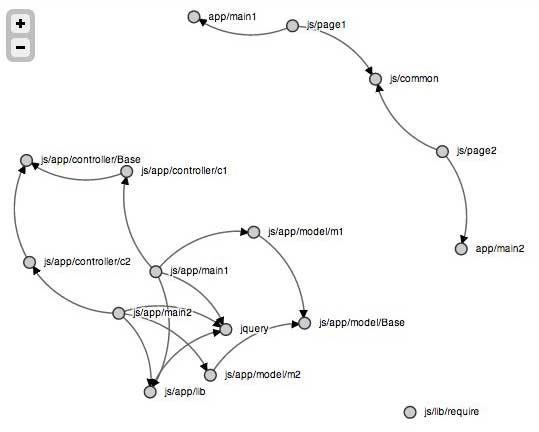
See the example here: http://auchenberg.github.com/dependo/example
Installation
To install as a library:
$ npm install dependo
To install the command-line tool:
$ sudo npm -g install dependo
Options
{
    'format': The module format to expect, 'cjs', 'amd', 'es6', or 'json'. AMD (amd) is the default format. If 'json', pass a file formatted like `example.json` in the `example/` directory.
    'optimized': Boolean, True if the parser should read modules from a optimized file (r.js). Defaults to false.
    'exclude': String from which a regex will be constructed for excluding files from the scan.
    'mainRequireModule': Name of the module if parsing an optimized file (r.js), where the main file used require() instead of define. Defaults to ''.
    'requireConfig': Path to RequireJS config used to find shim dependencies and path aliases. Not used by default.
    'reverse': Reverse dependency arrow directions.
    'title': The title of the generated HTML document.
    'extensions': Valid file extensions used to find files in directories e.g. .js,.ts Default: .js
}
API
  var Dependo = require('dependo');

  // Fire up an dependo instance
  var dependo = new Dependo(src, {
    format: 'amd',
    requireConfig: 'optional path to RequireJS config file',
    exclude: '^node_modules',
    transform: function(dep){
        //Apply a transformation on dependencies
        ....

        return dep;

    }
  });

  dependo.generateHtml();
  ...
CLI
Usage: dependo [options] <file|dir ...>

Options:

  -h, --help             output usage information
  -V, --version          output the version number
  -f, --format <name>    format to parse (amd/cjs/es6/json)
  -x, --exclude <regex>  a regular expression for excluding modules
  -t, --title <title>    the title of the generated document (dependo)
  -v, --reverse          reverse direction of arrows
  -e, --extensions       file extensions to use separated by comma
Generate HTML report of all module dependencies (AMD), and save it to /example/report.html
$ dependo -f amd /path/src > example/report.html
Grunt
I also wrote a grunt-task that can be found in this separate repository: https://github.com/auchenberg/grunt-dependo
Roadmap
dependo is still very much in progress, so here is the todo-list:
- Proper label positioning: Avoid label collisions and make the graph more readable.
- Testing! Unit tests of D3 render logic, and the grunt-task itself
Thanks to
This project wouldn't have been possible without the great work on node-madge by Patrik Henningson, or wonderful D3.js library.
Inspiration
관련 프로젝트 살펴보기
불러오는 중…