
apache/age-viewer
apache/age-viewer has 393 GitHub stars and 267 forks. GitHot measured 0 stars in 24 hours and 0 in 7 days. Last checked 2026-11-13 17:56 UTC. Last push 2026-05-15.
측정된 스타 증가
- in 24h
- 0
- in 7 days
- 0
- in 15 days
- 기록 수집 중
- in 1 month
- 기록 수집 중
서로 겹치는 기간의 순증가량이며 일별 합계가 아닙니다. 측정값이 없으면 비워 둡니다. 스타는 관심도를 나타내며 품질을 보장하지 않습니다.
소개
Graph database optimized for fast analysis and real-time data processing. It is provided as an extension to PostgreSQL.
데이터README.md
Original


What is Apache-Age Viewer
Apache-Age Viewer is a web based user interface that provides visualization of graph data stored in a postgreSQL database with AGE extension. It is graph visualisation tool, for Apache AGE.
This is a sub-project of the Apache AGE project.
Recommend Node Version & install module
Node version - ^14.16.0
Node Module - pm2
Install latest pm2 with :
npm i pm2
pm2 is an NPM module to run the project in production mode, and hence is optional for getting started with setting up development environment for Age-Viewer
Running Age-Viewer
- Install the required node modules using :
npm run setup - Run Age-Viewer using :
npm run start
This will start the age-viewer on http://localhost:3000 if port 3000 is free.
How to build using command
- Build the front-end :
npm run build-front
- Build the back-end :
npm run build-back
Start the project in production mode :
  pm2 stop ag-viewer-develop

  pm2 delete ag-viewer-develop

  pm2 start ecosystem.config.js
How to start using Age-Viewer
To start using Age-Viewer we need to have a running postgreSQL database server with Apache Age Extension
Setting up the PostgreSQL server with AGE extension
- Easiest way for Windows, Mac-OS and Linux Environment using Docker
Install docker in advance (https://www.docker.com/get-started), install the version compatible with your OS from the provided link.
Run Using Docker :
- Get the docker image -
docker pull apache/age- Create AGE docker container
docker run --name myPostgresDb -p 5455:5432 -e POSTGRES_USER=postgresUser \
-e POSTGRES_PASSWORD=postgresPW -e POSTGRES_DB=postgresDB -d apache/age
Docker variables Description --nameAssign a name to the container -pPublish a container’s port(s) to the host -eSet environment variables -dRun container in background and print container ID To Get the running log of the docker container created -
docker logs --follow myPostgresDbTo Get into postgreSQL Shell (There are two ways this can be done) -
- First get into docker shell using -
docker exec -it myPostgresDb bash
Then get into postgreSQL shell using -psql -U postgresUser postgresDB
OR
- Alternatively postgres shell can also be assessed directly (without getting into the docker shell) -
psql -U postgresUser -d postgresDB -p 5455 -h localhostand put inpostgresPWwhen prompted for password.
- First get into docker shell using -
After logging into postgreSQL shell follow the Post-Installation instruction to create a graph in the database.
Connect Apache Age-Viewer to PostgreSQL Database
Initial Connection Layout
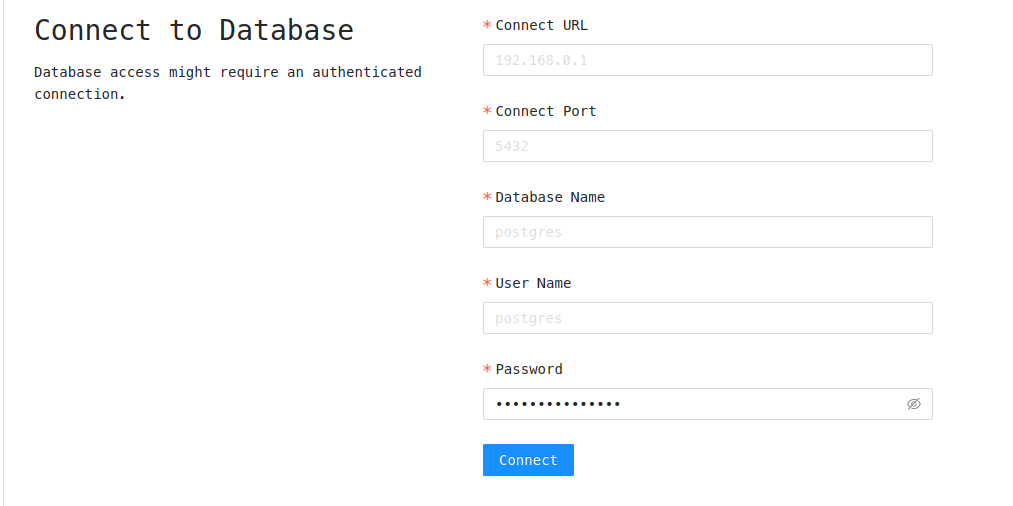 To Connect to postgreSQL server running from Docker Container
- Connect URL - localhost
- Connect Port - 5455
- Database Name - postgresDB
- User Name - postgresUser
- Password - postgresPW
The following field is same as used to make the docker container specified above as flags.
License
Apache AGE Viewer is licensed under the Apache License, Version 2.0. See LICENSE for the full license text.
관련 프로젝트 살펴보기
Asabeneh/30-Days-Of-Python
30 Days of Python 프로그래밍 챌린지는 Python 프로그래밍 언어를 30일 동안 배우기 위한 단계별 가이드입니다. 이 챌린지는 100일 이상 걸릴 수 있습니다. 자신의 속도에 맞춰 진행하세요. 다음 동영상도 도움이 될 수 있습니다: https://www.youtube.com/channel/UC7PNRuno1rzYPb1xLa4yktw
78,703 스타grafana/grafana
개방적이고 조합 가능한 옵저버빌리티 및 데이터 시각화 플랫폼입니다. Prometheus, Loki, Elasticsearch, InfluxDB, Postgres 등 여러 소스의 메트릭, 로그, 트레이스를 시각화합니다.
77,890 스타redis/redis
실시간 데이터 기반 애플리케이션을 구축하는 개발자에게 Redis는 가장 선호되고, 가장 빠르며, 기능이 가장 풍부한 캐시, 데이터 구조 서버이자 문서 및 벡터 쿼리 엔진입니다.
77,493 스타apache/superset
Apache Superset는 데이터 시각화 및 데이터 탐색 플랫폼입니다.
75,519 스타