
amitshekhariitbhu/Android-Debug-Database
amitshekhariitbhu/Android-Debug-Database has 8,708 GitHub stars and 883 forks. GitHot measured +1 stars in 24 hours and +3 in 7 days. Last checked 2026-11-09 14:43 UTC. Last push 2026-02-05.
Android 데이터베이스와 SharedPreferences를 디버깅하기 위한 라이브러리 - 디버깅을 다시 위대하게
What you can do
- See all the databases.
- See all the data in the shared preferences used in your application.
- Run any sql query on the given database to update and delete your data.
- Directly edit the database values.
측정된 스타 증가
- in 24h
- +1
- in 7 days
- +3
- in 15 days
- 업데이트 지연
- in 1 month
- 업데이트 지연
서로 겹치는 기간의 순증가량이며 일별 합계가 아닙니다. 측정값이 없으면 비워 둡니다. 스타는 관심도를 나타내며 품질을 보장하지 않습니다.
README.md
Original
Android Debug Database
Android Debug Database is a powerful library for debugging databases and shared preferences in Android applications
Android Debug Database allows you to view databases and shared preferences directly in your browser in a very simple way
What can Android Debug Database do?
- See all the databases.
- See all the data in the shared preferences used in your application.
- Run any sql query on the given database to update and delete your data.
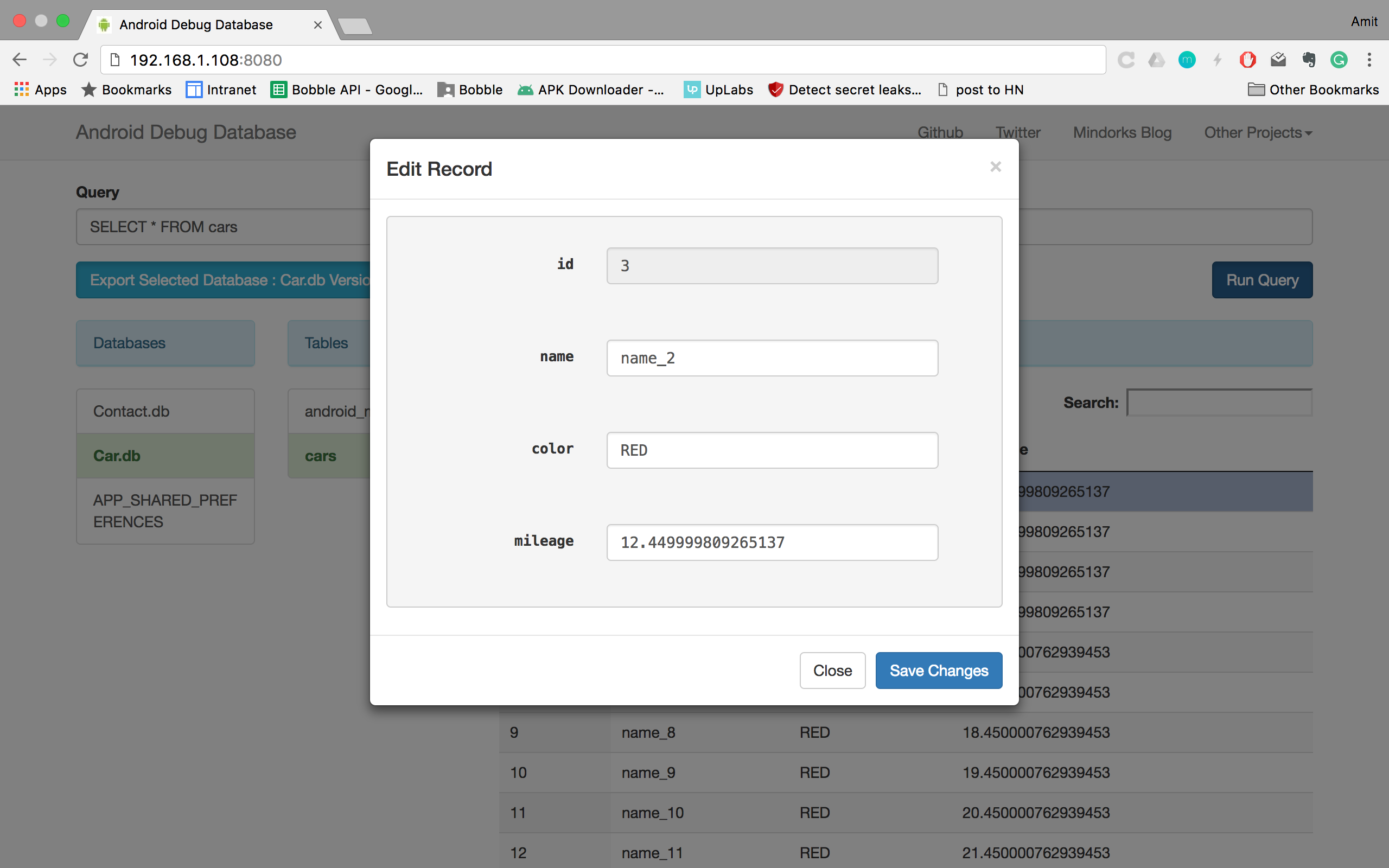
- Directly edit the database values.
- Directly edit the shared preferences.
- Directly add a row in the database.
- Directly add a key-value in the shared preferences.
- Delete database rows and shared preferences.
- Search in your data.
- Sort data.
- Download database.
- Debug Room inMemory database.
About me
Hi, I am Amit Shekhar, Founder @ Outcome School • IIT 2010-14 • I have taught and mentored many developers, and their efforts landed them high-paying tech jobs, helped many tech companies in solving their unique problems, and created many open-source libraries being used by top companies. I am passionate about sharing knowledge through open-source, blogs, and videos.
Follow Amit Shekhar
Follow Outcome School
I teach at Outcome School
Join Outcome School and get a high-paying tech job: Outcome School
Outcome School Blog - High-quality content to learn Android concepts.
All these features work without rooting your device -> No need of rooted device
Using Android Debug Database Library in your application
Add this in your settings.gradle:
maven { url 'https://jitpack.io' }
If you are using settings.gradle.kts, add the following:
maven { setUrl("https://jitpack.io") }
Add this in your build.gradle
debugImplementation 'com.github.amitshekhariitbhu.Android-Debug-Database:debug-db:1.0.7'
If you are using build.gradle.kts, add the following:
debugImplementation("com.github.amitshekhariitbhu.Android-Debug-Database:debug-db:1.0.7")
Using the Android Debug Database with encrypted database
Add this in your build.gradle
debugImplementation 'com.github.amitshekhariitbhu.Android-Debug-Database:debug-db-encrypt:1.0.7'
If you are using build.gradle.kts, add the following:
debugImplementation("com.github.amitshekhariitbhu.Android-Debug-Database:debug-db-encrypt:1.0.7")
And to provide the password for the DB, you should add this in the Gradle: DB_PASSWORD_{VARIABLE}, if for example, PERSON is the database name: DB_PASSWORD_PERSON
debug {
    resValue("string", "DB_PASSWORD_PERSON", "password")
}
Use debugImplementation so that it will only compile in your debug build and not in your release build.
That’s all, just start the application, you will see in the logcat an entry like follows :
D/DebugDB: Open http://XXX.XXX.X.XXX:8080 in your browser
You can also always get the debug address url from your code by calling the method
DebugDB.getAddressLog();
Now open the provided link in your browser.
Important:
- Your Android phone and laptop should be connected to the same Network (Wifi or LAN).
- If you are using it over usb, run
adb forward tcp:8080 tcp:8080
Note : If you want use different port other than 8080. In the app build.gradle file under buildTypes do the following change
debug {
    resValue("string", "PORT_NUMBER", "8081")
}
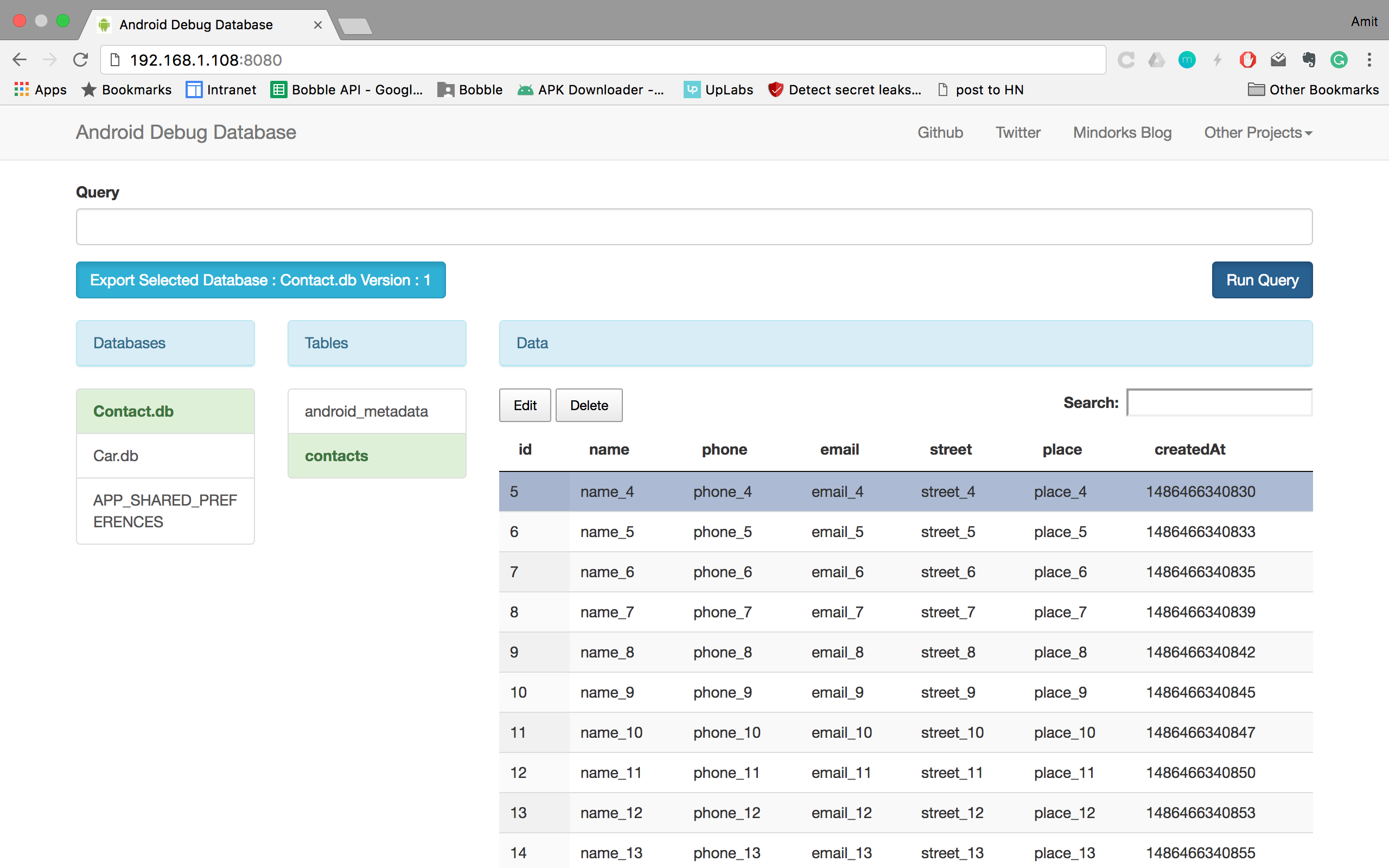
You will see something like this :
Seeing values
Editing values
Working with emulator
- Android Default Emulator: Run the command in the terminal -
adb forward tcp:8080 tcp:8080and open http://localhost:8080 - Genymotion Emulator: Enable bridge from configure virtual device (option available in genymotion)
Getting address with toast, in case you missed the address log in logcat
As this library is auto-initialize, if you want to get the address log, add the following method and call (we have to do like this to avoid build error in release build as this library will not be included in the release build) using reflection.
public static void showDebugDBAddressLogToast(Context context) {
    if (BuildConfig.DEBUG) {
       try {
            Class<?> debugDB = Class.forName("com.amitshekhar.DebugDB");
            Method getAddressLog = debugDB.getMethod("getAddressLog");
            Object value = getAddressLog.invoke(null);
            Toast.makeText(context, (String) value, Toast.LENGTH_LONG).show();
       } catch (Exception ignore) {

       }
    }
}
Adding custom database files
As this library is auto-initialize, if you want to debug custom database files, add the following method and call
public static void setCustomDatabaseFiles(Context context) {
    if (BuildConfig.DEBUG) {
        try {
            Class<?> debugDB = Class.forName("com.amitshekhar.DebugDB");
            Class[] argTypes = new Class[]{HashMap.class};
            Method setCustomDatabaseFiles = debugDB.getMethod("setCustomDatabaseFiles", argTypes);
            HashMap<String, Pair<File, String>> customDatabaseFiles = new HashMap<>();
            // set your custom database files
            customDatabaseFiles.put(ExtTestDBHelper.DATABASE_NAME,
                    new Pair<>(new File(context.getFilesDir() + "/" + ExtTestDBHelper.DIR_NAME +
                                                    "/" + ExtTestDBHelper.DATABASE_NAME), ""));
            setCustomDatabaseFiles.invoke(null, customDatabaseFiles);
        } catch (Exception ignore) {

        }
    }
}
Adding InMemory Room databases
As this library is auto-initialize, if you want to debug inMemory Room databases, add the following method and call
public static void setInMemoryRoomDatabases(SupportSQLiteDatabase... database) {
    if (BuildConfig.DEBUG) {
        try {
            Class<?> debugDB = Class.forName("com.amitshekhar.DebugDB");
            Class[] argTypes = new Class[]{HashMap.class};
            HashMap<String, SupportSQLiteDatabase> inMemoryDatabases = new HashMap<>();
            // set your inMemory databases
            inMemoryDatabases.put("InMemoryOne.db", database[0]);
            Method setRoomInMemoryDatabase = debugDB.getMethod("setInMemoryRoomDatabases", argTypes);
            setRoomInMemoryDatabase.invoke(null, inMemoryDatabases);
        } catch (Exception ignore) {

        }
    }
}
Find this project useful ? :heart:
- Support it by clicking the :star: button on the upper right of this page. :v:
TODO
- Simplify emulator issue Issue Link
- And of course many more features and bug fixes.
You can connect with me on:
License
   Copyright (C) 2024 Amit Shekhar

   Licensed under the Apache License, Version 2.0 (the "License");
   you may not use this file except in compliance with the License.
   You may obtain a copy of the License at

       http://www.apache.org/licenses/LICENSE-2.0

   Unless required by applicable law or agreed to in writing, software
   distributed under the License is distributed on an "AS IS" BASIS,
   WITHOUT WARRANTIES OR CONDITIONS OF ANY KIND, either express or implied.
   See the License for the specific language governing permissions and
   limitations under the License.
Contributing to Android Debug Database
All pull requests are welcome, make sure to follow the contribution guidelines when you submit pull request.
관련 프로젝트 살펴보기
Asabeneh/30-Days-Of-Python
30 Days of Python 프로그래밍 챌린지는 Python 프로그래밍 언어를 30일 동안 배우기 위한 단계별 가이드입니다. 이 챌린지는 100일 이상 걸릴 수 있습니다. 자신의 속도에 맞춰 진행하세요. 다음 동영상도 도움이 될 수 있습니다: https://www.youtube.com/channel/UC7PNRuno1rzYPb1xLa4yktw
78,486 스타grafana/grafana
개방적이고 조합 가능한 옵저버빌리티 및 데이터 시각화 플랫폼입니다. Prometheus, Loki, Elasticsearch, InfluxDB, Postgres 등 여러 소스의 메트릭, 로그, 트레이스를 시각화합니다.
77,790 스타redis/redis
실시간 데이터 기반 애플리케이션을 구축하는 개발자에게 Redis는 가장 선호되고, 가장 빠르며, 기능이 가장 풍부한 캐시, 데이터 구조 서버이자 문서 및 벡터 쿼리 엔진입니다.
77,332 스타apache/superset
Apache Superset는 데이터 시각화 및 데이터 탐색 플랫폼입니다.
75,455 스타