
alexeyw/lot-map
alexeyw/lot-map has 744 GitHub stars and 87 forks. Star changes are not measured yet. Last checked 2026-11-14 03:28 UTC. Last push 2026-11-12.
측정된 스타 증가
- in 24h
- 기록 수집 중
- in 7 days
- 기록 수집 중
- in 15 days
- 기록 수집 중
- in 1 month
- 기록 수집 중
서로 겹치는 기간의 순증가량이며 일별 합계가 아닙니다. 측정값이 없으면 비워 둡니다. 스타는 관심도를 나타내며 품질을 보장하지 않습니다.
소개
A live map beside the chat that shows what Claude Code is doing: tool calls, model steps, hooks, skills and subagents light up as they happen. Local only, in 7 languages.
개발 도구README.md
Originallot-map
A mod for Claude Code: a live map of the work, in a pane beside the chat. Every tool call, model step, hook and skill sends a pulse from the centre to its station, so you see memory, files, shell, web and agents at work instead of reading a list of commands.
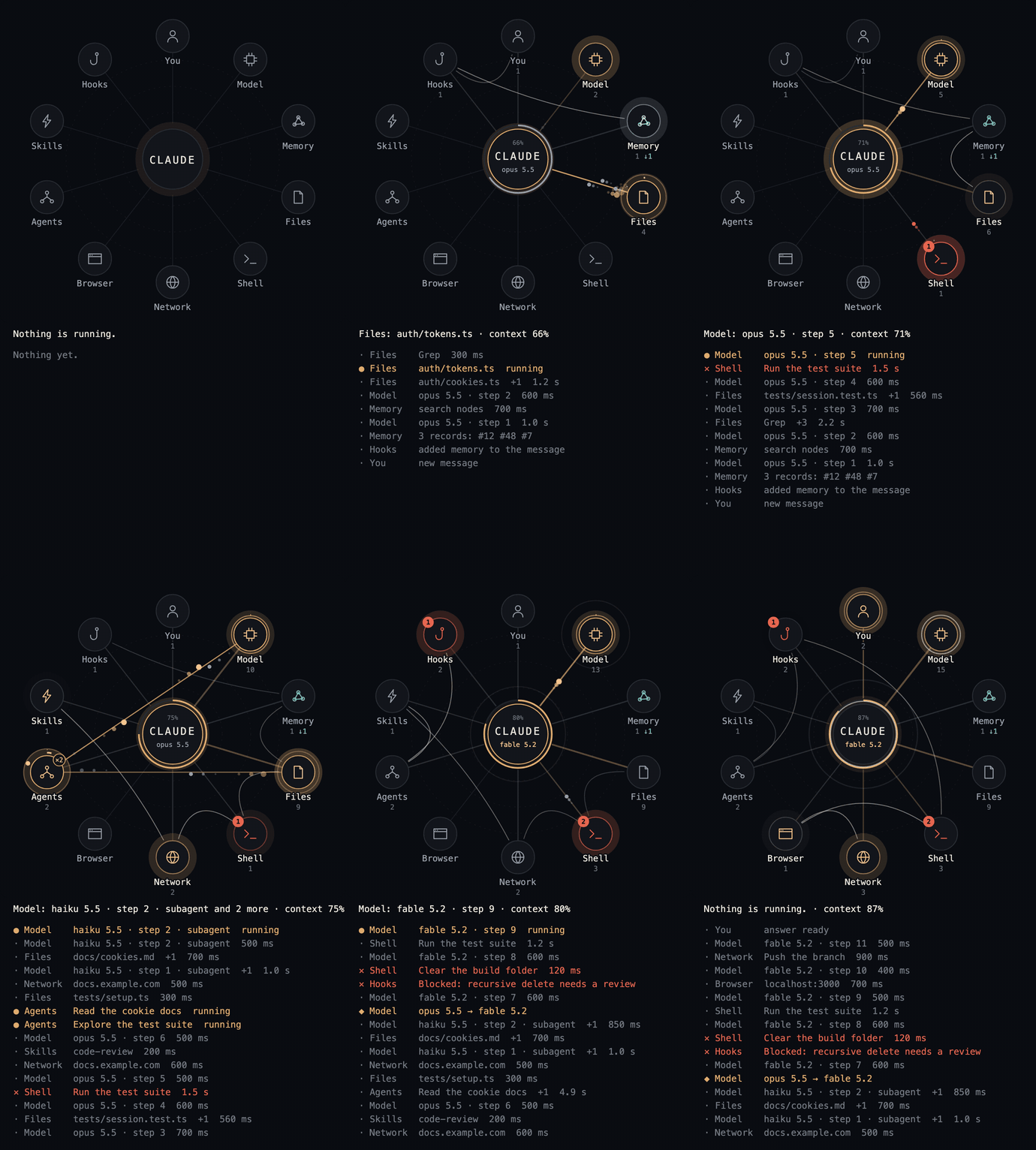
A made-up session replayed through the mod's own drawing code. Video (MP4).
Install
At the prompt of a terminal session:
/plugin install lot-map --marketplace alexeyw/lot-map
Answer y to add the marketplace, then choose a scope. From a shell:
claude plugin install lot-map --marketplace alexeyw/lot-map
If it answers that the plugin is not found in any marketplace, add the marketplace first:
claude plugin marketplace add alexeyw/lot-map
claude plugin install lot-map@lot-map
In the desktop app: click + next to the prompt box, then Plugins, Add marketplace with alexeyw/lot-map, then Add plugin.
The pane opens by itself when a session starts. In a terminal it needs at least 144 columns, otherwise type /lot-map, and it draws text only unless you ask for the map's picture: see In a terminal. Built and tested on Claude Code 2.1.321 on macOS; users report it working on Windows as well.
Updating
From a shell:
claude plugin marketplace update lot-map
claude plugin update lot-map@lot-map
Then start a new session. The first command is needed: without it the second one reports the installed version as the latest.
What each version changed is in CHANGELOG.md.
What lights up
| Station | When |
|---|---|
| You | your messages, questions and files sent to you |
| Model | each model request, context compaction |
| Memory | Claude Code's memory folder, plus whatever you name in the options |
| Files | Read, Write, Edit, Grep, Glob, and shell commands that work on files and nothing else: they read, search, move, delete or edit in place (cat, grep, mv, rm, sed, tee, find … -delete) |
| Shell | every other shell command |
| Network | web fetch and search, MCP servers, and shell commands known to reach the network: curl, gh, ssh, rsync, git push, npm install, docker pull and the like, also inside $(…) |
| Browser | browser tools |
| Agents | subagents and workflows; their own calls start from this station |
| Skills | skills and tool search |
| Hooks | settings hooks that refuse a call, ask for permission, add context or take a moment |
On Windows the PowerShell tool is read the same way as Bash, with PowerShell's own names: Get-Content and Select-String light Files, Invoke-WebRequest lights Network. A program run by its full path is read by its name, also from a quoted path with a space, and CURL.EXE is curl.
The shell stations go by the command's name, not by what it does: a script that opens a connection itself, such as python -c "…", shows as Shell. A command behind sudo, env, timeout, nohup, xargs and the like is read as the command it runs, and find … -exec as the command it is told to run. npx counts as Network only with -y, since without it it mostly runs what is installed already.
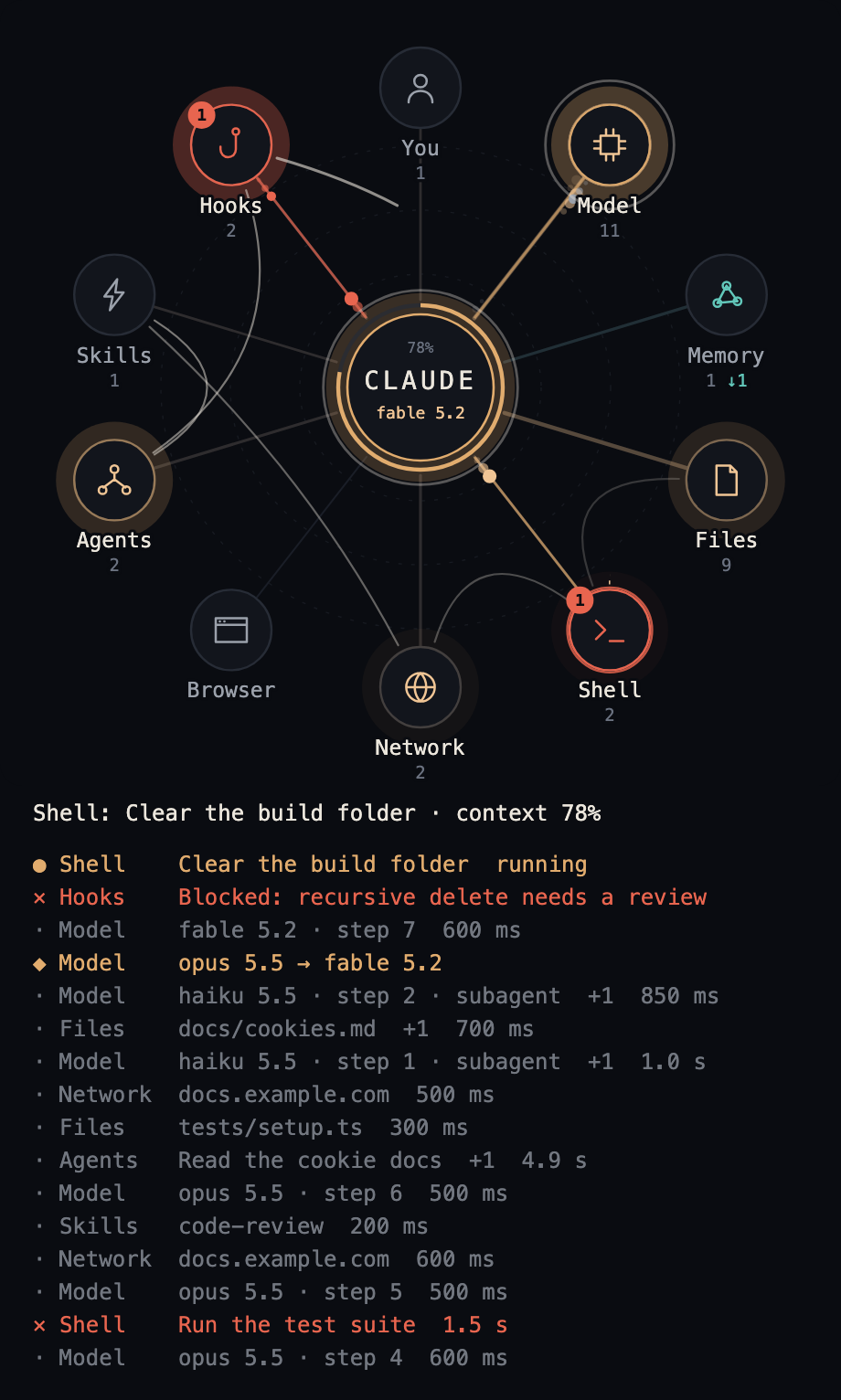
A pulse flies out when something starts and returns when it ends. Refusals and errors turn red.
Reading the map
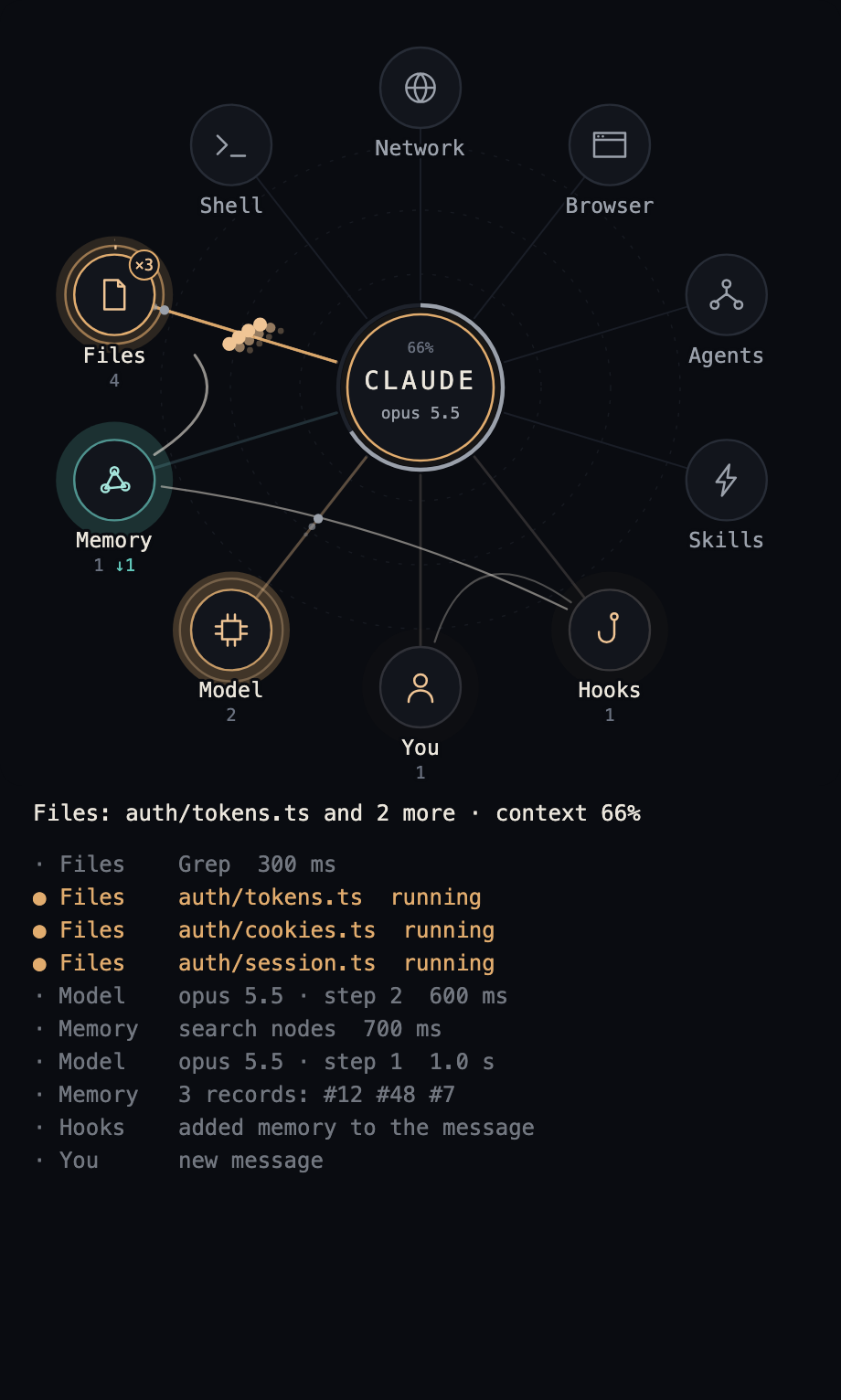
- The route. A thin line joins the last few stations the main loop went through, in order, and its newest leg draws itself. A leg stays for 40 seconds and then fades over 20, so a minute after the work stops only the spokes are left; their thickness keeps where the work went. Model steps are left out, or every leg would pass through Model.
- Worn spokes. A spoke grows thicker and brighter the more its station is used, so at the end of a session the map shows where the work went.
- How long. Two clock hands grow around a station while a call runs: the inner one goes round in a minute, the outer one in ten.
- Background work. A command sent to the background, a monitor, a background subagent or a workflow stays lit on its station after the turn that started it is over, with the clock hands growing, until the task reports that it ended. A task that failed leaves the red dot. The report itself is not shown as a message of yours.
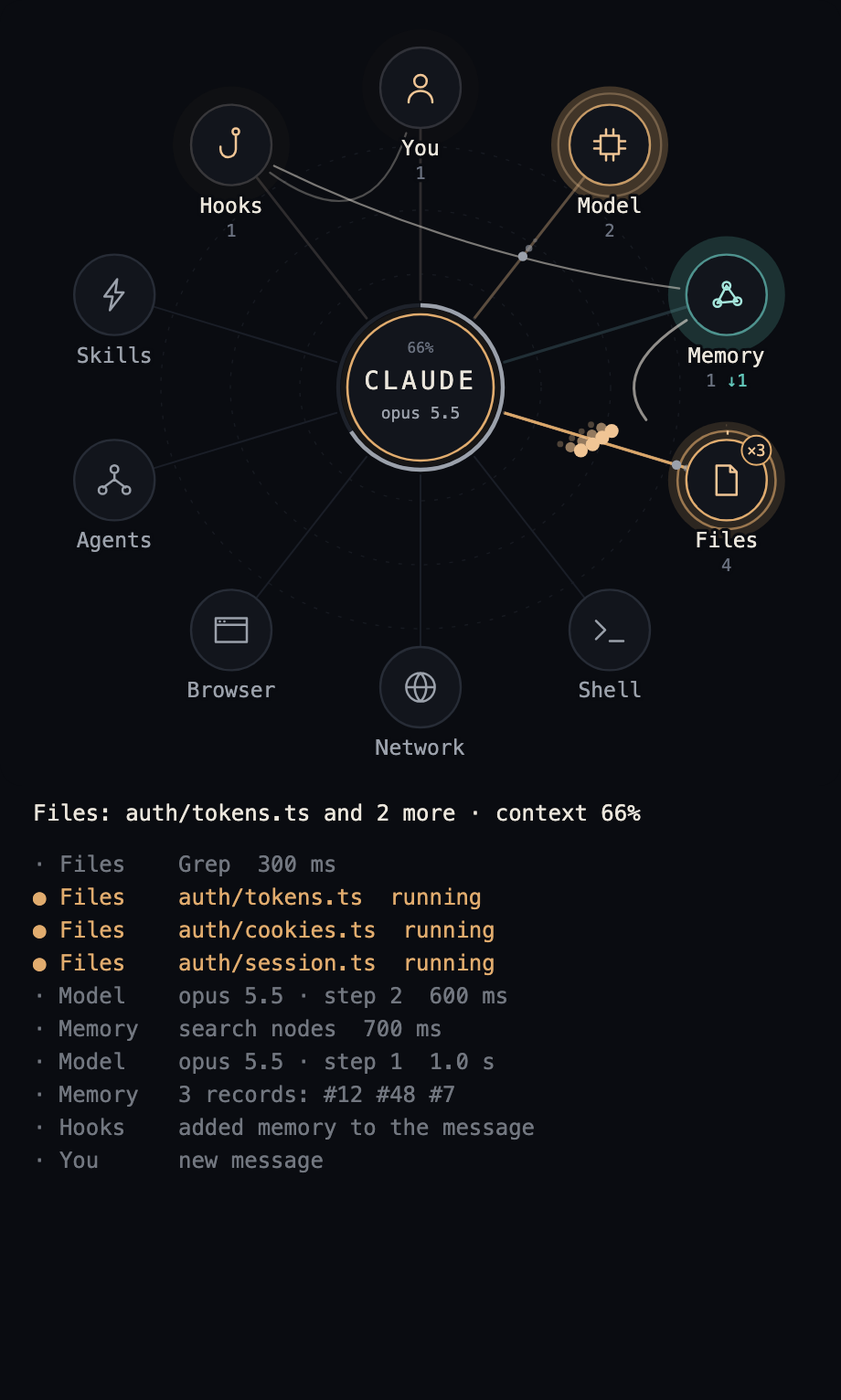
- Several at once. Calls that start together fly side by side, and the station carries their number, such as
×3. - What went wrong. A red dot with a count stays on a station from an error or a refusal until your next message.
- Memory. It has a colour of its own. A solid pulse is a memory Claude asked for; a hollow one on a dashed line is what a hook brought unasked. Under the station, the plain number counts the first and
↓the second. - The context window. The ring around the centre fills as the session goes, with the percentage above the name. It turns amber at 70% and red at 90%.
- A change of model. The centre and the Model station ring for a few seconds, and the feed gets a row such as
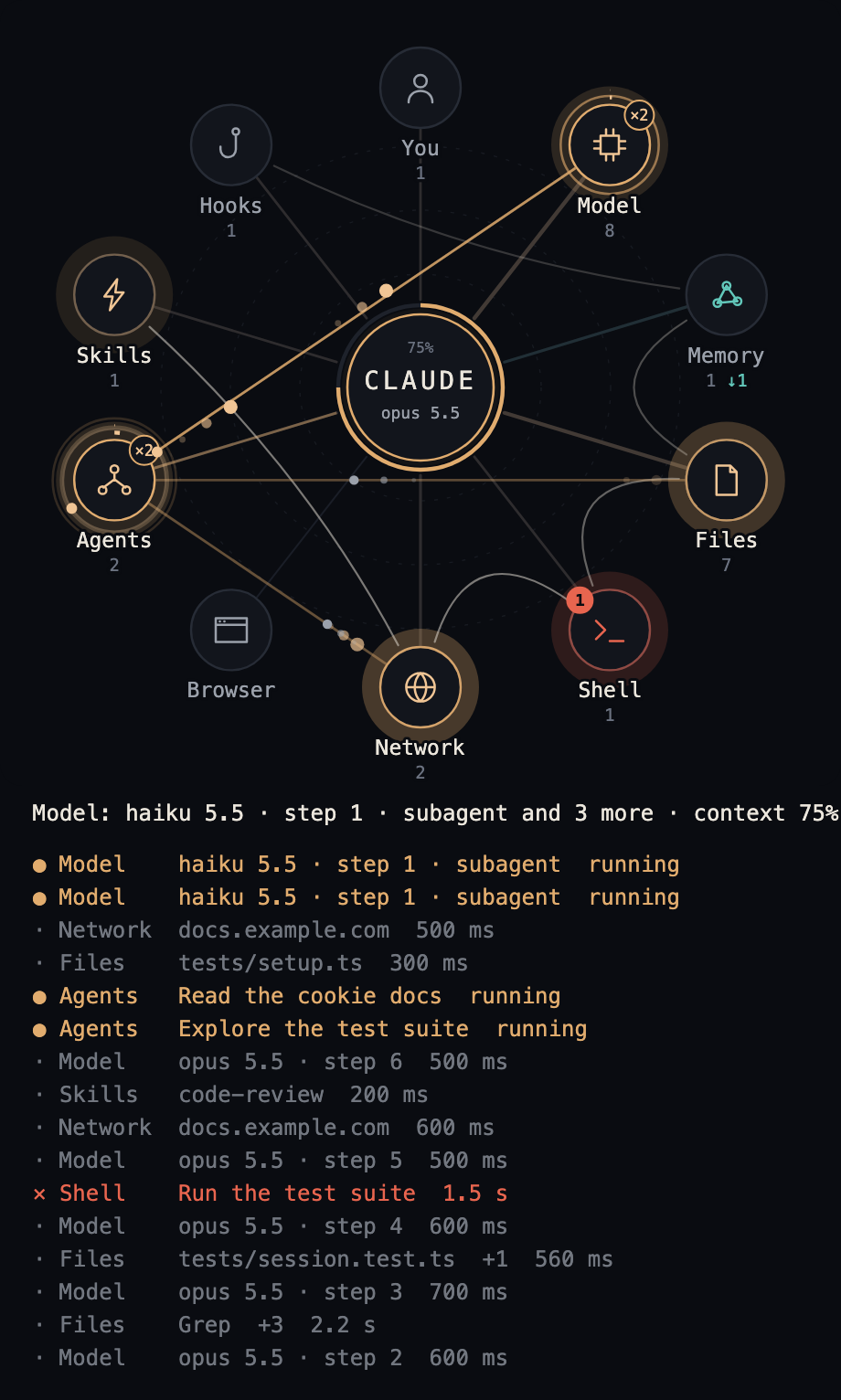
opus 5.5 → fable 5.2. This also happens when a session starts on a different model from the last session in the same folder. - Subagents. Each one still at work circles the Agents station as a small dot, and its calls start from there.
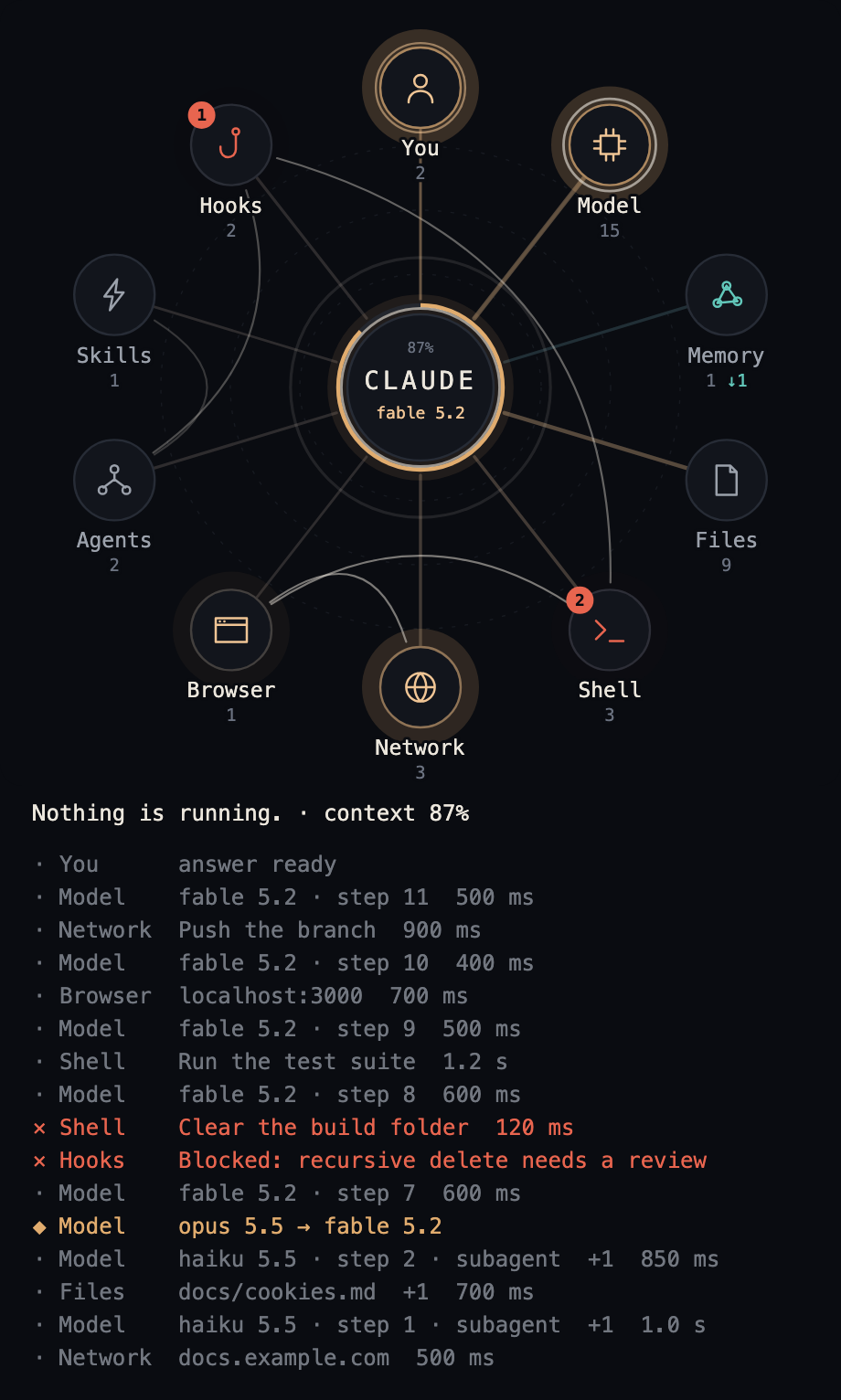
- The answer. One wide ring leaves the centre when the answer is ready.
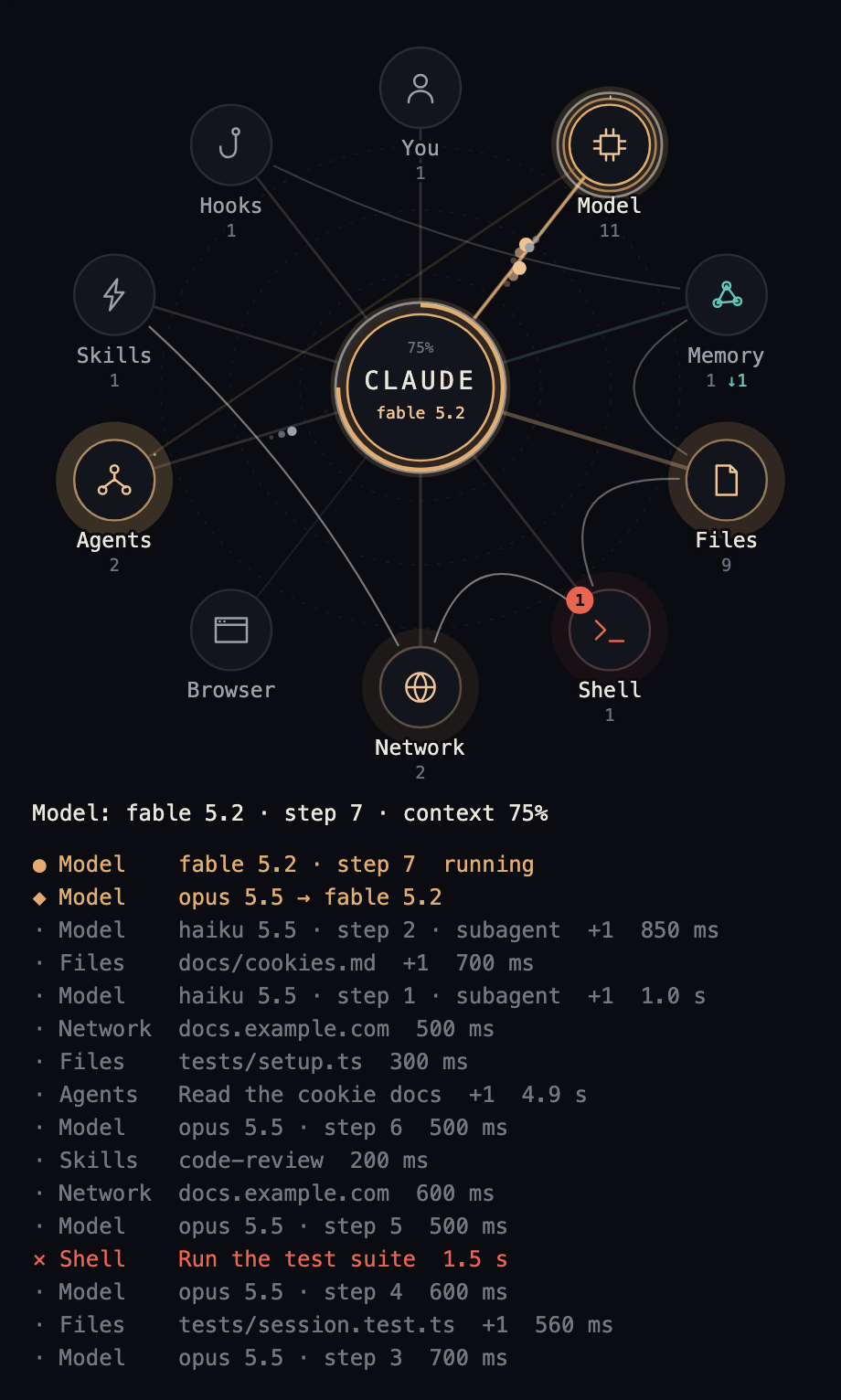
Below the map are a line that says what runs now, and the last 16 rows: ● running, · done, ✕ failed or blocked, ◆ a change of model. Finished calls that follow one another at one station fold into one row, marked +2 for the two it stands for besides the one named.
Each row is one line. Its words are cut at the pane's edge; its time stands in a column at the right, with a dash for what took none, such as a message arriving, and on the answer's row the length of the whole turn. A row with a long label has a ▸ before its time: press it to read the row whole, and again to close it. One row is open at a time. In a terminal the line of now also holds the context percentage and the model at its right, since no drawing is there to show them.
| At work | Subagents | A hook refuses |
|---|---|---|
 |
 |
 |
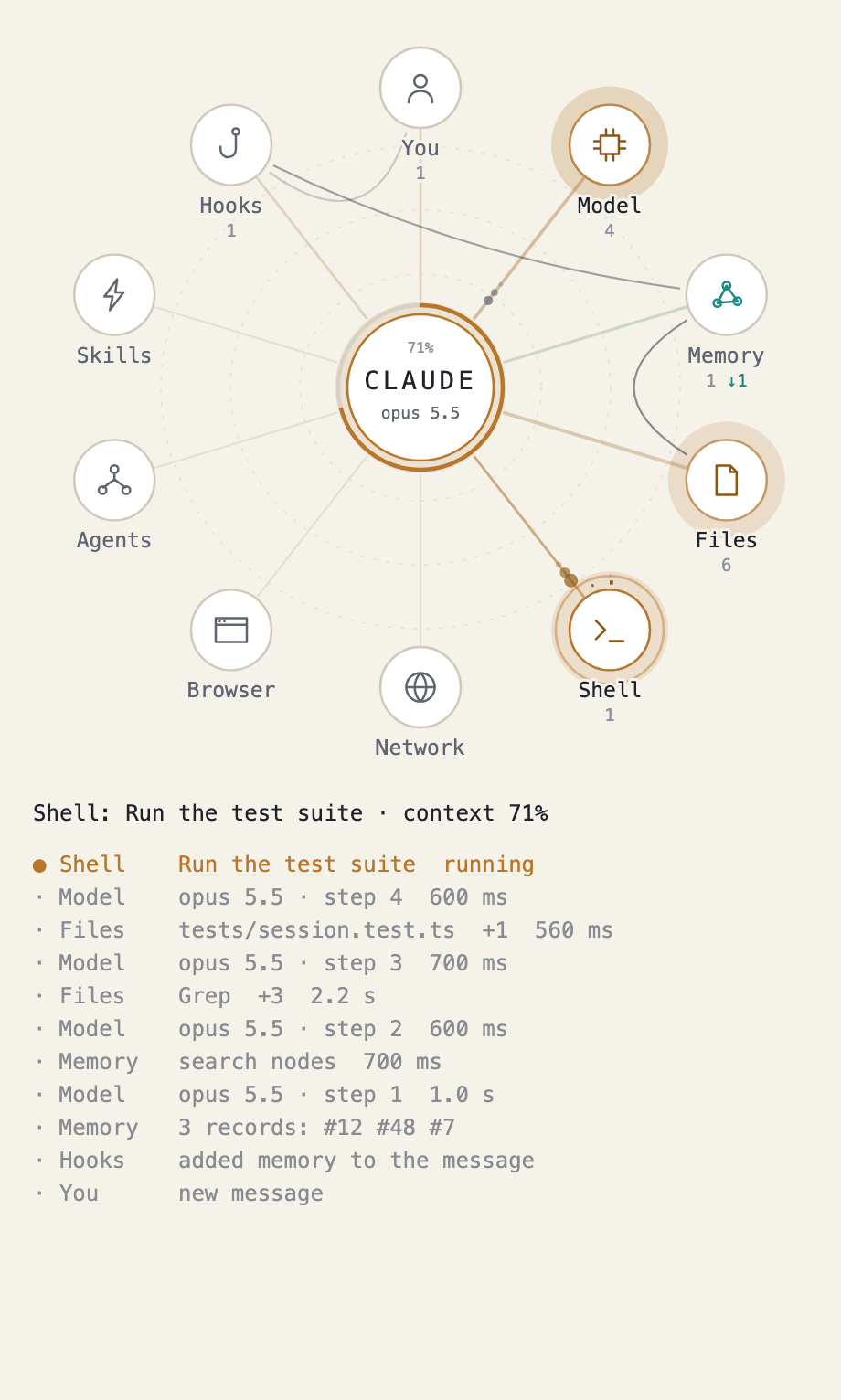
| A change of model | After the answer | Light colours |
|---|---|---|
 |
 |
 |
In a terminal
A terminal shows the rows alone. With terminalView set to picture, a terminal that shows pictures, such as iTerm2 3.5 and later, kitty or Ghostty, gets the map as a picture above the rows, moving as it does in the desktop app. Claude Code must draw in fullscreen, as it does unless CLAUDE_CODE_NO_FLICKER=0 is set; inside tmux, set allow-passthrough on and focus-events on. Any other terminal shows the rows alone, as before, and so does a pane narrower than 24 columns.
The mod paints the picture itself, from the same drawing as the desktop app's, with letters from the X.Org misc-fixed bitmap fonts, which are in the public domain; FONTS.md says where they come from. It paints up to thirty frames a second while anything on the map moves. The core breathes in the picture only while something runs, smoothly for ten minutes after the map last changed and then a frame every five seconds; at rest the picture stands still once the trails have faded.
A terminal does not say whether it is dark or light, so with theme on auto the picture is dark; on a light terminal, set theme to light. The picture has no background of its own, so the terminal's shows through it; in iTerm2 that is a shade off the pane's grey, which leaves a faint box around the map. colors with background=#rrggbb gives the picture a background of its own.
Nor does a terminal say how tall its cells are. cellShape does: how many times taller a cell is than it is wide, 2.4 by default, as iTerm2 draws Monaco 12, and about 2 for Menlo in kitty. If the picture leaves an empty band below it, raise it; if the band is at its right, lower it.
Options
The install offers them on a screen. Later, use /config in a terminal or claude plugin configure, then restart the session.
| Option | Default | Meaning |
|---|---|---|
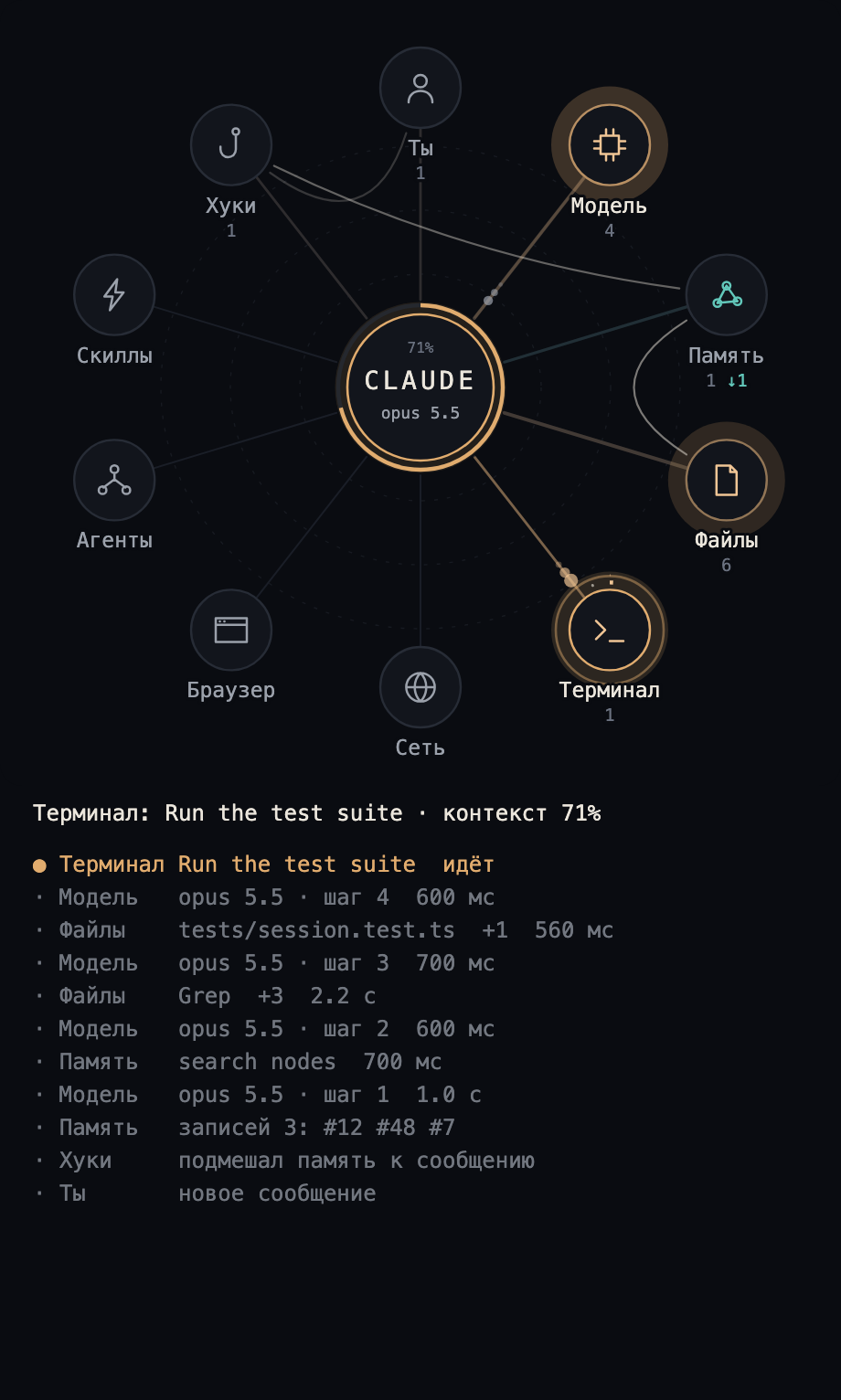
language |
en |
en, ru, es, fr, de, it or pt |
coreName |
CLAUDE |
what the circle in the middle says, up to ten characters |
memoryServers |
memory |
MCP servers whose tools light Memory |
memoryCommands |
none | shell commands or scripts that light Memory; a name counts when it is the command itself or begins with it and -, _ or ., so recall also names recall-sync.py |
memorySubcommands |
none | words after a memory command that the map may show, such as add or search; without them the command goes by its own name |
memoryPaths |
none | parts of a path that make a file a memory |
memoryLabels |
none | short names for memory tools, each as tool=name |
hookRecords |
false |
turn on if a hook of yours adds memory records numbered like [#123]; they appear on Memory by number only. Such a number in the text of any hook counts, not only a memory hook's |
hookReasons |
false |
show the first line of a hook's refusal, up to 72 characters; off, the map says only which tool was stopped |
theme |
auto |
the map's colours: dark, light, or auto, which is dark on a dark surface and light on a light one |
background |
solid |
the map's own background, or transparent, which lets the pane behind it show through. The rim around the labels keeps the background's colour, so on a surface of another shade it shows as a faint halo |
colors |
none | colours of your own, each as name=#rrggbb; see Colours of your own |
layout |
you-top |
where you are on the map: you-top, or you-bottom, which turns the ring half a turn so that you are at the bottom and the network and the browser at the top |
motion |
full |
full, or reduced: nothing flies, spreads or spins. A call still lights its station and flashes its spoke, the route still gets its leg, and those only fade; the clock hands around a running station stay, as slow as a clock's |
textSize |
footnote |
the size of the rows under the map: caption, footnote or body. A terminal has one size and ignores it |
terminalView |
text |
how the map looks in a terminal: text, the rows alone, or picture, the map's picture above them in a terminal that shows pictures; see In a terminal |
cellShape |
2.4 |
for the terminal picture: how many times taller a terminal cell is than it is wide, from 1.2 to 4, so that the picture fills its box; see In a terminal |
For example, Russian labels and your own memory server:
echo '{"language":"ru","memoryServers":"my-memory"}' | claude plugin configure lot-map@lot-map --values-stdin
Lists are written with commas.
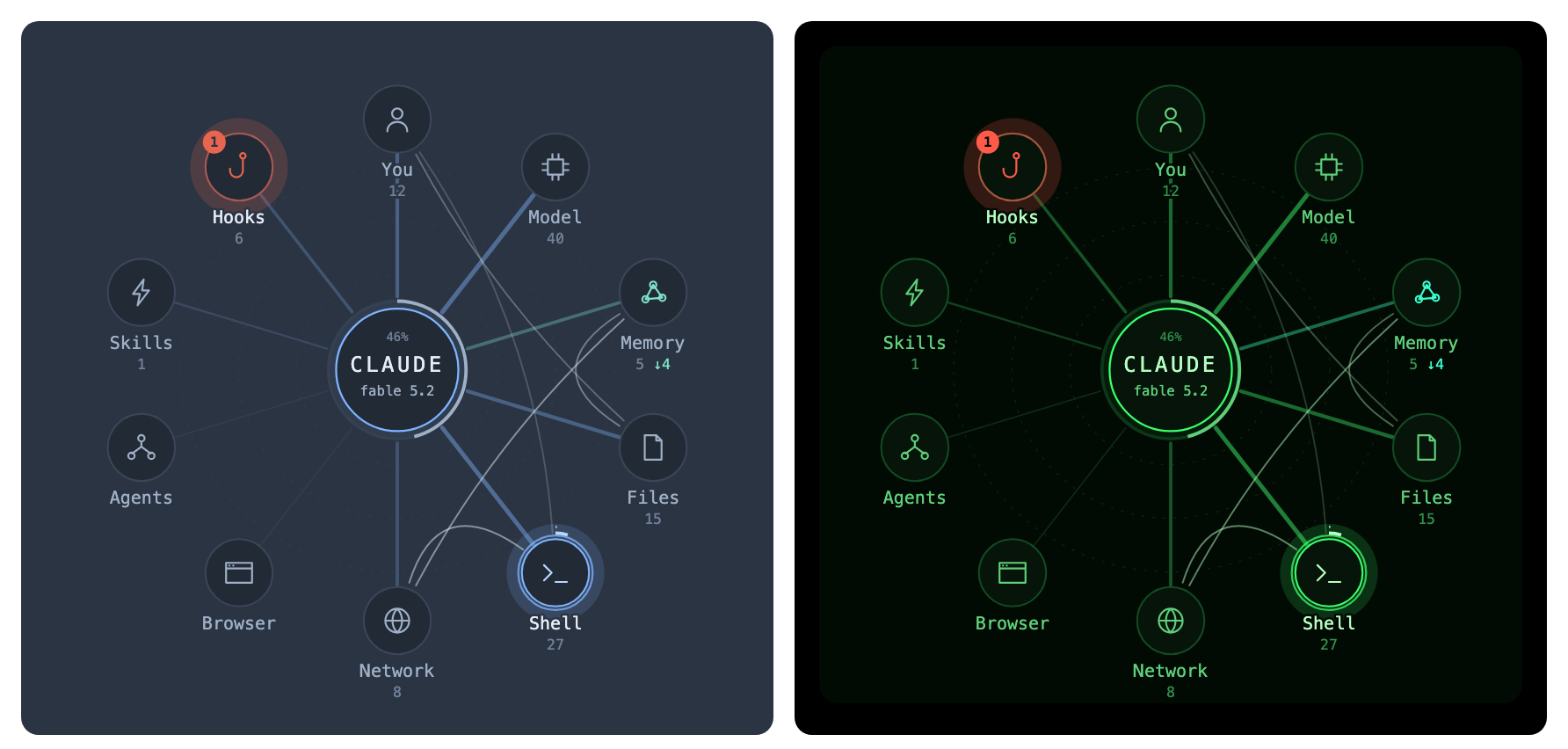
| Russian labels | layout set to you-bottom |
|---|---|
 |
 |
Colours of your own
colors replaces the map's colours one by one. Set one, a few, or all thirteen; what you leave out stays as it is.
echo '{"theme":"dark","colors":"accent=#7fb4ff,active=#b8d6ff,text=#e6edf7"}' | claude plugin configure lot-map@lot-map --values-stdin
| Name | What it colours |
|---|---|
background |
the map's ground, and the rim around the labels |
node |
the inside of a station and of the centre |
line, spoke |
the dashed contours and the idle spokes |
text, label, faint |
the name in the centre and lit labels, the other labels, the counts |
accent, active |
the main colour, and a station at work |
error |
errors and refusals |
memory, memoryActive |
the Memory station and its spoke |
route |
the route between stations |
- Only
#rgband#rrggbbare taken. Anything else, and any other name, counts as not set. - With
themeleft onauto, a colour of your own holds on a light surface as well, and the rest is repainted as before. With a whole palette of your own, setthemetodarkorlight. - With
backgroundset totransparent, still givebackgroundhere the colour of your pane: the rim around the labels takes it, and the halo is gone.
What it shows and what it keeps
The mod makes no network requests, reads no files, runs no processes, calls no model and adds nothing to the conversation. Its rows live only for the session. The same on one page: Privacy.
Like any mod that follows tool calls, it is handed every call's whole input, including command lines and the text written to files. It takes names from that and nothing else; the code that does so is classify in hooks/classify.ts. A marketplace added from this repository follows its main branch, so an update brings whatever is there: read the diff before updating if that matters to you.
It asks Claude Code for one thing: how full the context window is, after each model step. Between sessions it keeps one thing, the name of the model last used in each folder, so that it can show a change. Each is stored under the folder's full path, in Claude Code's own store for the plugin.
What its hooks do. The mod listens to the session's start, prompts, turns, model steps, tool calls, skills, compaction, and to three events of settings hooks: PreToolUse, where it sees whether a hook refused the call, asked for permission or took a moment, and UserPromptSubmit and SessionStart, where it sees the context a hook added. Each of its hooks passes the event on as it came and returns what came back as it was: it changes no input, no result, no context and no permission decision, and makes none of its own. Its one command, /lot-map, opens the pane.
A label holds a name, never content:
- a file: the last two parts of its path;
- a web address: the host alone, without a login, password, path or query; an address that can be read two ways shows only its scheme;
- a shell command: the short description Claude wrote for it, or the command's name, never the command line. The description is the model's own words, and the mod shows them as written;
- a search: the tool's name for
GrepandGlob, the wordsweb searchfor a web search andloading toolsfor a tool search, in the map's language, never the pattern or the query; - a memory call: the tool's name and a record number or short identifier, never the text or the query;
- a memory command: its name, and the word after it only if you listed that word in
memorySubcommands; - a subagent: the short description it was started with;
- a background task's report: that the task ended and whether it failed, never its summary or its output;
- a hook's refusal: the name of the tool it stopped. Its first line shows only with
hookReasonson, because a refusal may quote what the hook found.
Control characters are taken out of every label before it is drawn.
A fault on the map never reaches a tool call or a model turn.
Developing
claude plugin test .
claude plugin validate .
Words live in hooks/text.ts; a new language is one more table there and one more value of language in .claude-plugin/plugin.json.
The terminal picture is painted by hooks/raster.ts, which reads the drawing drawMap makes. A test paints every kind of drawing and fails on anything the painter does not know, so a change to the drawing that needs more of SVG shows there first. Another, the terminal picture's font has every letter the map writes, in every language, names the letters a new language needs added to hooks/font.ts; FONTS.md says how to make that file again.
Before you send a change, read CONTRIBUTING.md.