
akmalsoliev/Validoopsie
akmalsoliev/Validoopsie has 91 GitHub stars and 3 forks. Star changes are not measured yet. Last checked 2026-11-12 10:06 UTC. Last push 2026-11-09.
A simple and easy to use Data Validation library for Python.
측정된 스타 증가
- in 24h
- 기록 수집 중
- in 7 days
- 기록 수집 중
- in 15 days
- 기록 수집 중
- in 1 month
- 기록 수집 중
서로 겹치는 기간의 순증가량이며 일별 합계가 아닙니다. 측정값이 없으면 비워 둡니다. 스타는 관심도를 나타내며 품질을 보장하지 않습니다.
README.md
Original
A simple and easy to use Data Validation library for Python.




Validoopsie
Validoopsie is a remarkably lightweight and user-friendly data validation library for Python. It’s designed to help you easily declare classes and chain validations together, in a style reminiscent of popular DataFrame libraries. This makes it a familiar and intuitive tool for developers who regularly work with dataframes.
Thanks to the excellent work by Narwhals, Validoopsie incorporates the "Bring Your Own DataFrame" (BYOD) concept. This flexibility allows you to use any DataFrame that Narwhals supports for your data validation tasks. To explore the full range of supported DataFrames, you can visit this link.
The syntax of Validoopsie has been thoughtfully crafted to ensure ease of use. Every validation function is encapsulated in its own method, which can be seamlessly linked together. This method-specific design prioritizes simplicity and readability, freeing you from the need to adapt to a new API each time you switch libraries. It allows you to focus on maintaining clean and understandable code.
Validoopsie draws significant inspiration from the Great Expectations library. It strives to distill the data validation process into something straightforward and efficient. Whether you're checking data integrity or ensuring compliance with data standards, Validoopsie provides a streamlined yet powerful solution to make these tasks accessible and straightforward.
Table of Contents
Installation
pip
pip install Validoopsieuv
uv add Validoopsie
Getting Started
- 📖 Documentation
- 🚨 Impact Levels in Validoopsie
- 🎯 Threshold Levels in Validoopsie
- 🛠️ Contribution Guidelines
- ✨ Contributing a new Validation to Validoopsie
- 🧑💻 Develop your own custom validation
- 🗂️ Validation Catalog
Validoopsie is incredibly easy to use, so much so that you could do it
half-asleep. The simplicity of the library is enhanced by the BYOD (Bring Your
Own DataFrame) concept, where you merely need to utilize the Validate class
and chain your desired validations together. This approach ensures that you can
get started with minimal effort and without any unnecessary complexity.
import pandas as pd

from validoopsie import Validate

p_df = pd.DataFrame(
    {
        "name": ["John", "Doe", "Jane"],
        "target_name": ["John", "Doe", "Jane"],
        "last_name": ["Smith", "Smith", "Smith"],
        "age": [25, 30, 35],
    },
)

# `vd` stands for Validate Data
vd = Validate(p_df)
vd.EqualityValidation.PairColumnEquality(
    column="name",
    target_column="age",
    impact="high",
).UniqueValidation.ColumnUniqueValuesToBeInList(
    column="last_name",
    values=["Smith"],
).ValuesValidation.ColumnValuesToBeBetween(
    column="age",
    min_value=20,
    max_value=40,
)

vd.results
OUTPUT:
{
  "Summary": {
    "passed": false,
    "validations": [
      "PairColumnEquality_name",
      "ColumnUniqueValuesToBeInList_last_name",
      "ColumnValuesToBeBetween_age"
    ],
    "failed_validation": ["PairColumnEquality_name"]
  },
  "PairColumnEquality_name": {
    "validation": "PairColumnEquality",
    "impact": "high",
    "timestamp": "2025-10-07T11:25:04.213211+02:00",
    "column": "name",
    "result": {
      "status": "Fail",
      "threshold_pass": false,
      "message": "The column 'name' is not equal to the column'age'.",
      "failing_items": [
        "Doe - column name - column age - 30",
        "Jane - column name - column age - 35",
        "John - column name - column age - 25"
      ],
      "failed_number": 3,
      "frame_row_number": 3,
      "threshold": 0.0,
      "failed_percentage": 1.0
    }
  },
  "ColumnUniqueValuesToBeInList_last_name": {
    "validation": "ColumnUniqueValuesToBeInList",
    "impact": "low",
    "timestamp": "2025-10-07T11:25:04.216417+02:00",
    "column": "last_name",
    "result": {
      "status": "Success",
      "threshold_pass": true,
      "message": "All items passed the validation.",
      "frame_row_number": 3,
      "threshold": 0.0
    }
  },
  "ColumnValuesToBeBetween_age": {
    "validation": "ColumnValuesToBeBetween",
    "impact": "low",
    "timestamp": "2025-10-07T11:25:04.217300+02:00",
    "column": "age",
    "result": {
      "status": "Success",
      "threshold_pass": true,
      "message": "All items passed the validation.",
      "frame_row_number": 3,
      "threshold": 0.0
    }
  }
}
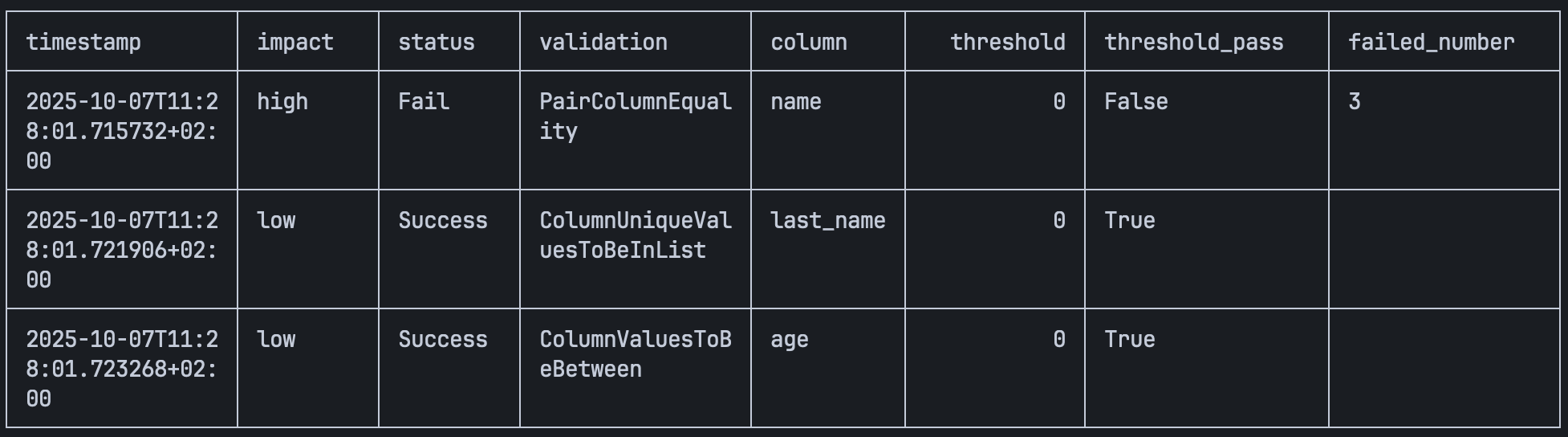
You can also display the validation results in a formatted table using the
display_summary method, which provides a clean and readable view of your
validation results:
vd.display_summary()
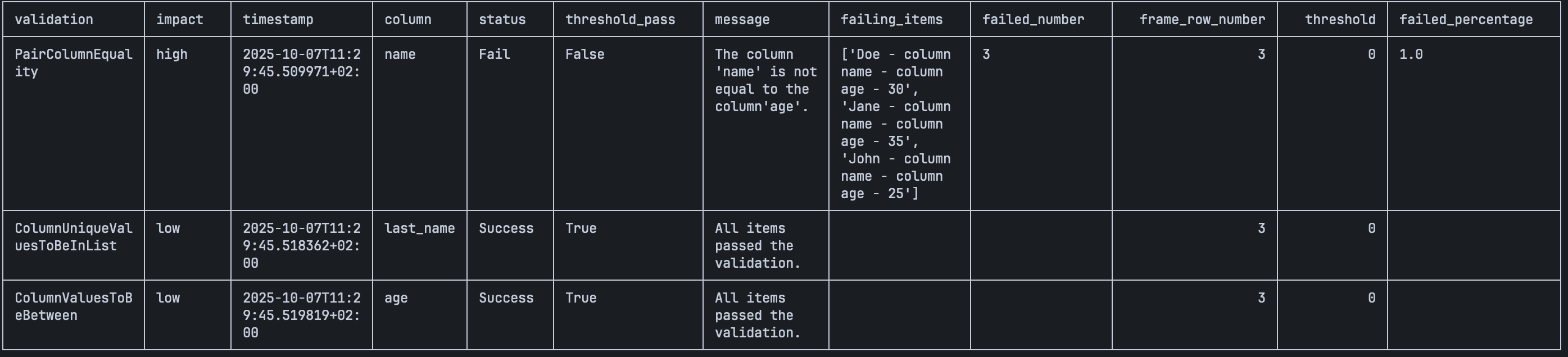
Display a full detailed table with all available information
vd.display_summary(information="full")
Customize the table format (supports tabulate formatting options)
vd.display_summary(tablefmt="pipe", maxcolwidths=20)

The display_summary method supports two information levels:
"short"(default): Shows key metrics like timestamp, impact, status, validation type, column, threshold, and failure details"full": Shows all available validation and result fields
You can also customize the table appearance using any tabulate formatting
options such as tablefmt for different table styles (e.g., "github", "grid",
"pipe", "html") and maxcolwidths to control column width.
Version
You can check the installed version of Validoopsie at any time:
from validoopsie import __version__

print(__version__)
Dunder Methods
The Validate class supports several Python dunder methods for convenience:
repr(vd)— returns a summary string with row count and number of validations:>>> repr(vd) 'Validate(rows=3, validations=3)'str(vd)— returns a human-readable status string:>>> str(vd) 'Validate: 3 validation(s), passed=False'len(vd)— returns the number of validations:>>> len(vd) 3
Validate Method
To ensure that all your validations have been correctly executed and to handle
any potential errors that may arise during the validation process, you can use
the validate method. However, it's important to note that errors will only be
raised if the impact level is set to high. Without this setting, potential
issues may not trigger an error message.
NOTE: Raised error is a custom ValueError.
import pandas as pd

from validoopsie import Validate

p_df = pd.DataFrame(
    {
        "name": ["John", "Doe", "Jane"],
        "target_name": ["John", "Doe", "Jane"],
        "last_name": ["Smith", "Smith", "Smith"],
        "age": [25, 30, 35],
    },
)

# `vd` stands for Validate Data
vd = Validate(p_df)
vd.EqualityValidation.PairColumnEquality(
    column="name",
    target_column="age",
    impact="high",
).UniqueValidation.ColumnUniqueValuesToBeInList(
    column="last_name",
    values=["Smith"],
).ValuesValidation.ColumnValuesToBeBetween(
    column="age",
    min_value=20,
    max_value=40,
).validate()
Thanks to loguru output will provide a very condenced information on validations and their status in a colorful way.

Development
Validoopsie includes a Makefile to simplify development tasks:
# Install dependencies
make setup

# Run linters (mypy, ruff)
make lint

# Run tests (includes doctests, stubtest)
make test

# Run both lint and test
make all
For more information on development, check the contribution guidelines.
License
MIT © Validoopsie
Original Creator - Akmal Soliev
관련 프로젝트 살펴보기
Asabeneh/30-Days-Of-Python
30 Days of Python 프로그래밍 챌린지는 Python 프로그래밍 언어를 30일 동안 배우기 위한 단계별 가이드입니다. 이 챌린지는 100일 이상 걸릴 수 있습니다. 자신의 속도에 맞춰 진행하세요. 다음 동영상도 도움이 될 수 있습니다: https://www.youtube.com/channel/UC7PNRuno1rzYPb1xLa4yktw
78,618 스타grafana/grafana
개방적이고 조합 가능한 옵저버빌리티 및 데이터 시각화 플랫폼입니다. Prometheus, Loki, Elasticsearch, InfluxDB, Postgres 등 여러 소스의 메트릭, 로그, 트레이스를 시각화합니다.
77,859 스타redis/redis
실시간 데이터 기반 애플리케이션을 구축하는 개발자에게 Redis는 가장 선호되고, 가장 빠르며, 기능이 가장 풍부한 캐시, 데이터 구조 서버이자 문서 및 벡터 쿼리 엔진입니다.
77,472 스타apache/superset
Apache Superset는 데이터 시각화 및 데이터 탐색 플랫폼입니다.
75,495 스타