
Xemptuous/sqlua.nvim
Xemptuous/sqlua.nvim has 209 GitHub stars and 7 forks. GitHot measured 0 in 7 days and 0 in 15 days. Last checked 2026-11-10 03:37 UTC. Last push 2026-08-20.
A SQL IDE and UI for NeoVim written in Lua. Inspired by vim-dadbod vim-dadbod-ui.
측정된 스타 증가
- in 24h
- 업데이트 지연
- in 7 days
- 0
- in 15 days
- 0
- in 1 month
- 업데이트 지연
서로 겹치는 기간의 순증가량이며 일별 합계가 아닙니다. 측정값이 없으면 비워 둡니다. 스타는 관심도를 나타내며 품질을 보장하지 않습니다.
README.md
Original🛢️ SQLua.nvim
A Modern SQL UI for NeoVim written in Lua emphasizing speed and simplicity, turning NeoVim into a full-fledged SQL IDE.
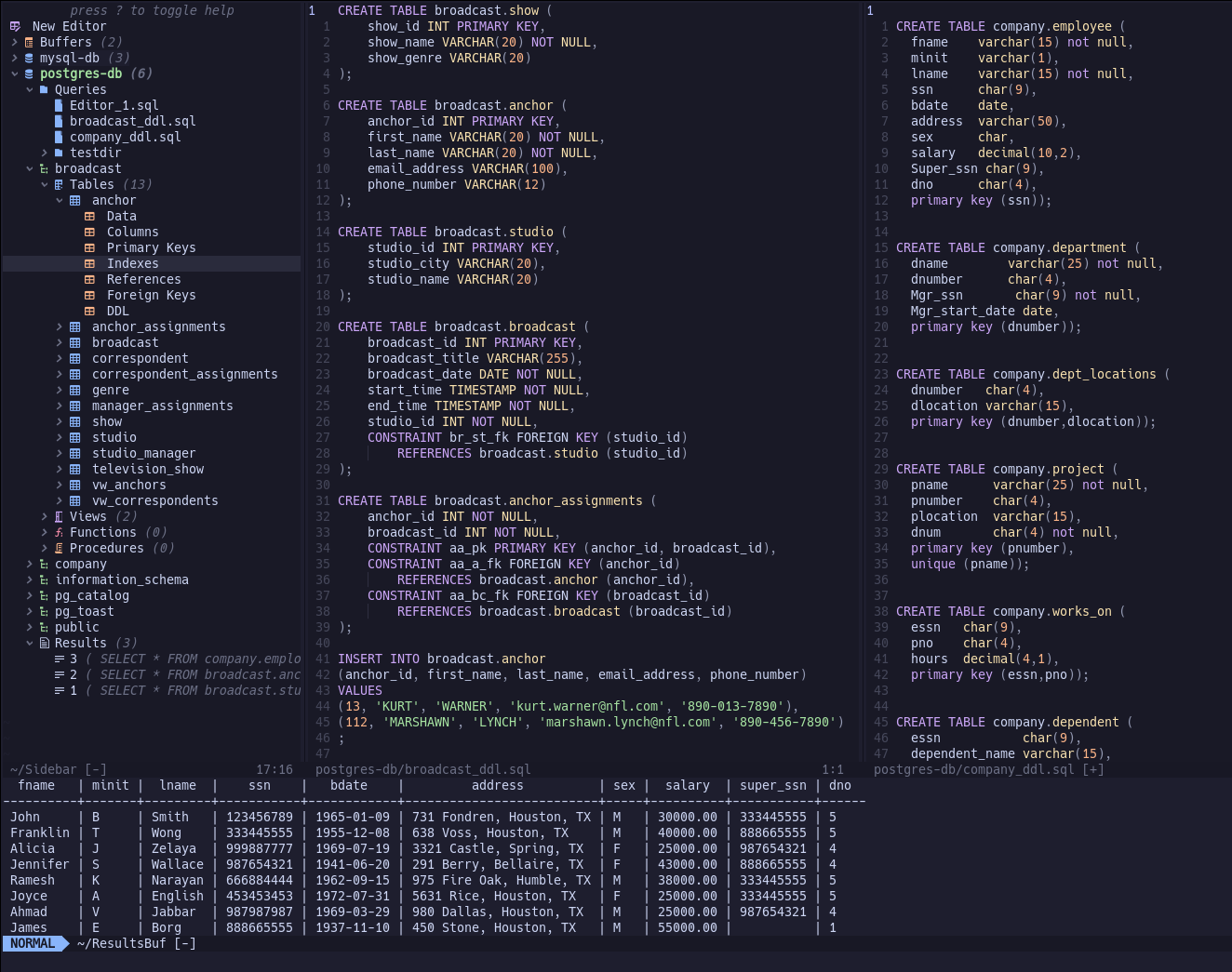
Currently supported DBMS:
- SnowFlake
- PostgreSQL
- MySQL
- MariaDB
- SQLite
Installation
Lazy
{
    'xemptuous/sqlua.nvim',
    lazy = true,
    cmd = 'SQLua',
    config = function() require('sqlua').setup() end
}
vim-plug
Plug 'xemptuous/sqlua.nvim'
Packer
use "xemptuous/sqlua.nvim"
To launch SQLua quickly, consider adding an alias to your shell config
alias nvsql="nvim '+SQLua'"
Requirements
Neovim 0.10.0+
Based on the DBMS' used, different cli tools will be required.
PostgreSQL: psqlMariaDB: mariadbMySQL: mysqlSnowflake: snowsqlSQLite: sqlite3
Setup
The connections.json file is an array of json objects contains all connection information. The required keys are name and url.
Specific formatting is required for certain databases. Here are some samples of entries for connections.json based on dbms:
PostgreSQL
{
    "name": "mydb",
    "url": "postgres://admin:pass@localhost:5432/mydb"
}
MariaDB
{
    "name": "mydb",
    "url": "mariadb://admin:pass@localhost:5432/mydb"
}
MySQL
{
    "name": "mydb",
    "url": "mysql://admin:pass@localhost:5432/mydb"
}
Snowflake
snowsql client will handle all connections
{
    "name": "mydb",
    "url": "snowflake"
}
SQLite
{
    "name": "mydb",
    "url": "/path/to/database/file.db"
}
Default Config
You can override the default settings by feeding the table as a table to the setup() function:
{
    -- the parent folder that databases will be placed, holding
    -- various tmp files and other saved queries.
    db_save_location = "~/.local/share/nvim/sqlua/",
    -- where to save the json config containing connection information
    connections_save_location = "~/.local/share/nvim/sqlua/connections.json"
    -- the default limit attached to queries
    -- currently only works on "Data" command under a table
    default_limit = 200,
    -- whether to introspect the database on SQLua open or when first expanded
    -- through the sidebar
    load_connections_on_start = false,
    keybinds = {
        execute_query = "<leader>r",
        activate_db = "<C-a>",

        -- Execute query (just like keybinds.execute_query) while in insert mode for query
        insert_execute_query = "<C-r>",
    }
}
Usage:
Open SQLua with the command :SQLua
Edit connections with :SQLuaEdit
Executing Queries
Queries run in the editor buffers will use the currently active db, which will be highlighted on the sidebar. The desired connection
can be set to "active" using the activate_db keybind, normally Ctrl+a
By default, the keymap to execute commands is set to <leader>r, acting differently based on mode:
    <leader>r (normal mode): Runs the entire buffer as a query.
    <leader>r (visual mode): Runs the selected lines as a query. (visual, visual block, and/or visual line)
You can also execute a query while editing it (default: <C-r>).
Upon executing a query, the results will be shown in a results buffer.
Note: template DDL statements do not need to set the active DB; i.e., they will always be run based on the parent table, schema, and database.
Saved Files
Each database will have a Queries folder which corresponds to the directory named after the connection, found in ~/.local/share/nvim/sqlua/
Files can be added and deleted using a and d inside this node of the sidebar tree.
Quicker Navigation
o will toggle the fold for the current level, expanding the node under the cursor, or collapsing the direct parent.
O will collapse the entire database connection in the sidebar.
Roadmap
This project is actively being developed, and will hopefully serve as NeoVim's full-fledged SQL IDE moving forward, eliminating the need for long load times and multiple vim extensions.
- Create functional connection for psql
- Be able to execute queries from buffer
- Create a minimal UI structure
- Make a functional NvimTree-sidebar for navigating the DB
- Implement multiple db's available in sidebar at once (easily jumping between them)
- Implement queries, ddl, and other template queries into the sidebar tree.
- Create asynchronous jobs for queries and connections.
- Create db-specific sql files to be stored in sqlua/dbs/ folder
- Add default limit functionality
- Implement Nvim-Tree QoL features into sidebar
- Add DB Inspection + nvim-cmp completions
- Implement connection sessions and active connections
- Add an option for "fancier" results pane output
- Implement syntax highlighting for dbout similar to other SQL IDE's (datetime, numbers, strings, null, etc.)
- Include fancy ui functionality to make SQLua sexy
관련 프로젝트 살펴보기
Asabeneh/30-Days-Of-Python
30 Days of Python 프로그래밍 챌린지는 Python 프로그래밍 언어를 30일 동안 배우기 위한 단계별 가이드입니다. 이 챌린지는 100일 이상 걸릴 수 있습니다. 자신의 속도에 맞춰 진행하세요. 다음 동영상도 도움이 될 수 있습니다: https://www.youtube.com/channel/UC7PNRuno1rzYPb1xLa4yktw
78,560 스타grafana/grafana
개방적이고 조합 가능한 옵저버빌리티 및 데이터 시각화 플랫폼입니다. Prometheus, Loki, Elasticsearch, InfluxDB, Postgres 등 여러 소스의 메트릭, 로그, 트레이스를 시각화합니다.
77,830 스타redis/redis
실시간 데이터 기반 애플리케이션을 구축하는 개발자에게 Redis는 가장 선호되고, 가장 빠르며, 기능이 가장 풍부한 캐시, 데이터 구조 서버이자 문서 및 벡터 쿼리 엔진입니다.
77,395 스타apache/superset
Apache Superset는 데이터 시각화 및 데이터 탐색 플랫폼입니다.
75,473 스타