
Valen-Team/Valen
Valen-Team/Valen has 914 GitHub stars and 88 forks. Star changes are not measured yet. Last checked 2026-11-14 18:38 UTC. Last push 2026-11-12.
측정된 스타 증가
- in 24h
- 기록 수집 중
- in 7 days
- 기록 수집 중
- in 15 days
- 기록 수집 중
- in 1 month
- 기록 수집 중
서로 겹치는 기간의 순증가량이며 일별 합계가 아닙니다. 측정값이 없으면 비워 둡니다. 스타는 관심도를 나타내며 품질을 보장하지 않습니다.
소개
Open, lightweight multimodal decision models for text, images, and video. Train and run them yourself.
창작 및 미디어README.md
Original

Valen-Decision
Fast Decisions. Continuous Evolution.
Valen-Decision is a multimodal System One decision model. Text, images and video in; structured decision probabilities out.





English · 简体中文
Try Valen · Playground · Documentation · API · Agent skill · Hugging Face
Python SDK · JavaScript SDK · C++ text integration
Introduction · Choose a version · Models & datasets · API usage · Quick start · ONNX & SDKs · Demos · Evaluation · Community · Cookbook
Introduction
Valen-Decision (万澜) brings visual perception to System One decision-making. Inspired by Jev, it evaluates text, images and video against task instructions and returns probabilities over supplied candidates, giving software a structured decision interface. The repository includes the model implementation, data processing, SFT and experimental RLCD training, and inference and evaluation commands, with support for training on your own data.
Choose a version
For a first try, use the web experience or free API without downloading weights. Which version should I choose? · GGUF local service
News
- 2026-11-10: Valen-Decision-1.5 GGUFs for every size from 0.8B to 27B are available with GGUF runtime 0.2.0, a Valen-patched llama.cpp server that takes text and image input and answers bbox questions. See the GGUF guide.
- 2026-11-09: Released Valen-Decision-1.5, covering every size from 0.8B to 27B. It adopts a new block-bidirectional attention mechanism, delivering state-of-the-art multimodal capability while keeping strong text capability. Valen-Decision-1.5 also uses a dual-head design that supports bbox output, showing strong grounding ability. Read the release post.
- 2026-10-29: The Python SDK adds
Valen.llm(): send the same questions to GPT, Claude or Gemini and get the same typed answers back, to compare decisions, tokens and latency with Valen in your own code. - 2026-10-29: Released the Valen agent skill for Claude Code, Cursor, Codex and other coding agents, with
llms.txt, Markdown versions of every docs page and an OpenAPI spec. JevalKit adds OpenAI, Anthropic and Gemini LLM baselines for side-by-side comparison. - 2026-10-26: Qualified F32/Q8_0 GGUFs released in all three sizes; run them with the Valen-patched llama.cpp and Ollama, which return candidate probabilities instead of generated text.
- 2026-10-25: Updated the modular ONNX models for 0.8B, 2B and 4B, with Python and JavaScript / TypeScript SDKs and a C++ text integration. See the ONNX & SDK guide.
- 2026-10-21: The web chat and bilingual documentation are live, with a free decision API requiring no key.
Older entries and the per-version code changes are in CHANGELOG.md.
Models and datasets
| Model | Native weights / Transformers | ONNX Runtime | GGUF / custom runtime |
|---|---|---|---|
| Valen-Decision-1.5 0.8B | 🤗 Valen-Decision-1.5-0.8B | 🤗 Valen-Decision-1.5-0.8B-ONNX | 🤗 Valen-Decision-1.5-0.8B-GGUF |
| Valen-Decision-1.5 2B | 🤗 Valen-Decision-1.5-2B | 🤗 Valen-Decision-1.5-2B-ONNX | 🤗 Valen-Decision-1.5-2B-GGUF |
| Valen-Decision-1.5 4B | 🤗 Valen-Decision-1.5-4B | 🤗 Valen-Decision-1.5-4B-ONNX | 🤗 Valen-Decision-1.5-4B-GGUF |
| Valen-Decision-1.5 9B | 🤗 Valen-Decision-1.5-9B | 🤗 Valen-Decision-1.5-9B-ONNX | 🤗 Valen-Decision-1.5-9B-GGUF |
| Valen-Decision-1.5 27B | 🤗 Valen-Decision-1.5-27B | 🤗 Valen-Decision-1.5-27B-ONNX | 🤗 Valen-Decision-1.5-27B-GGUF |
| Valen-Decision-1.0 0.8B | 🤗 Valen-0.8B | 🤗 Valen-0.8B-ONNX | 🤗 Valen-0.8B-GGUF |
| Valen-Decision-1.0 2B | 🤗 Valen-2B | 🤗 Valen-2B-ONNX | 🤗 Valen-2B-GGUF |
| Valen-Decision-1.0 4B | 🤗 Valen-4B | 🤗 Valen-4B-ONNX | 🤗 Valen-4B-GGUF |
| Valen-preview-0923 (earlier release) | 🤗 Hugging Face | — | — |
VisualDecisionBench contains Image and Video subsets for visual decision evaluation. Earlier releases include General 100k for training, General 5k for evaluation, and Sokoban for game training and evaluation.
Demos
Valen-Decision-1.5 image and video decision-making: boxes, probabilities, choices and scores from one forward pass. Click the preview to watch the full video.

Valen-Decision-1.0 demos
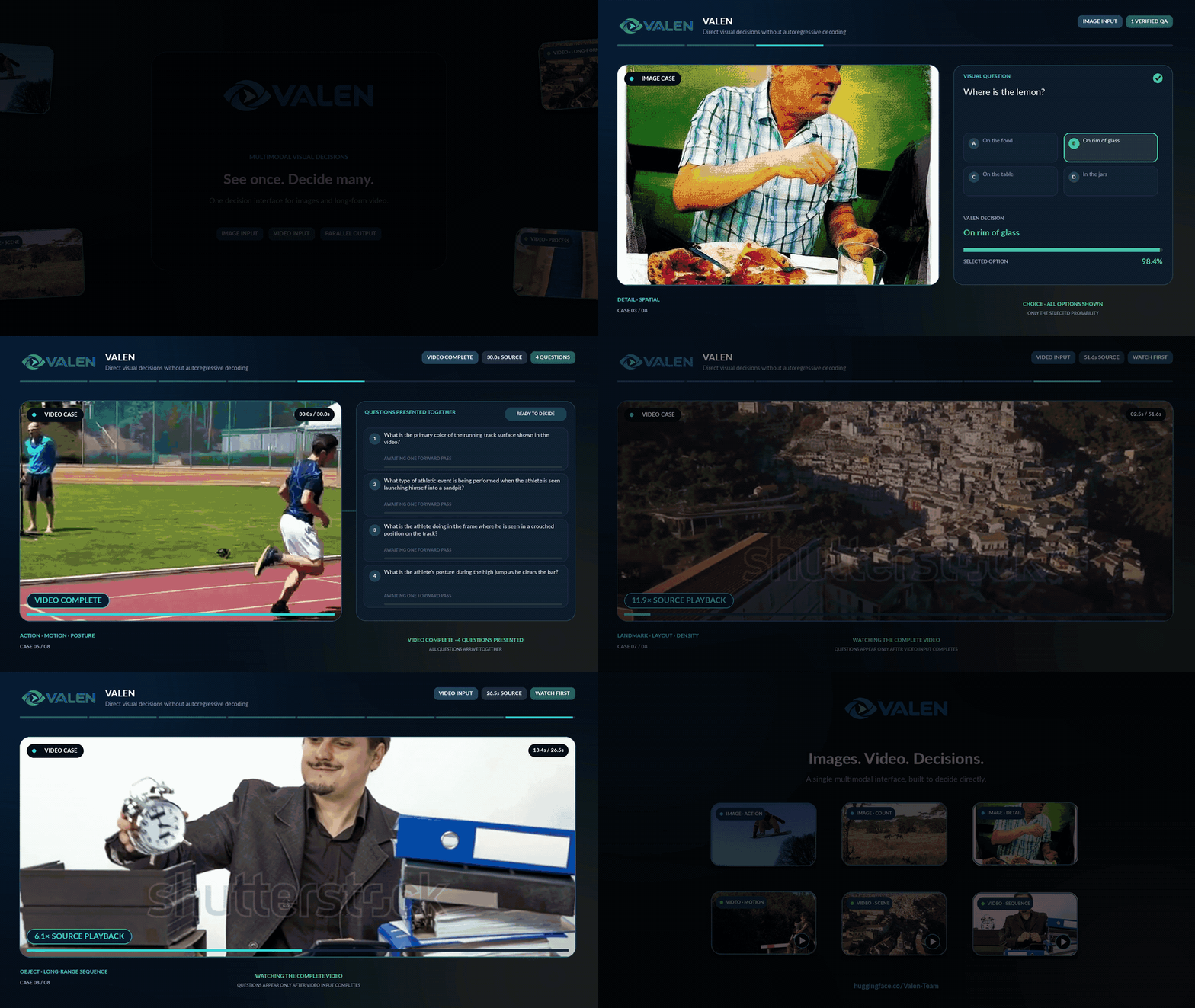 Image and video decisions |
 Game decisions |
Click either preview to watch the full video.
Evaluation results — Valen-Decision
JevalKit is our evaluation toolkit for decision models, with unified model interfaces, benchmark integration, and scoring protocols. Use it to evaluate and compare decision models across supported benchmarks.
Valen is also integrated into the Jev Decision Index. On Decision Index 0.4.1, Valen-Decision-1.5-27B ranks first of 83 entrants on the public Vision track and fifth on the full Vision score, which adds private test sets (11 November 2026 snapshot). Visit the index for comparisons with other decision models, and see per-size results.
Valen-Decision-1.5 delivers state-of-the-art multimodal decision-making while keeping strong text decision-making. The Valen-Decision-1.5 series also performs strongly on tasks that output bounding boxes. The figure below shows the evaluation results of Valen-Decision-1.5-27B.

Valen-Decision-1.0 results (0.8B / 2B / 4B)
Visual decisions at 0.8B, 2B and 4B. Valen-Decision uses Qwen3.5 + Mixer with shared-state inference, trained with SFT on millions of samples. The evaluation compares these checkpoints with published decision models on VisualDecisionBench-Image, VisualDecisionBench-Video and public JevBench.


Choose what to automate
Use Valen’s probabilities to choose which tickets to route automatically and which need human review. Compare 0.8B, 2B and 4B by measured automated coverage and error rate, then calibrate and save a routing rule for your own data without retraining the model.
What if no option fits? A customer might ask to change an address when the choices only cover refunds, delivery tracking and invoices. Add a “none of these” choice and route its selections for review. In a test of 200 English tickets, incorrect automatic acceptance of out-of-scope requests fell from 8 to 1, while 3 more in-scope requests went to review. Validate the routing policy on your own data. See the complete example and runnable code.
Earlier results remain in the archived README.
Quick start
For a local HTTP service, start with the deployment guide. Complete, tested application tutorials are maintained only in the official Cookbook: API basics, local inference, ticket routing, when no option fits, product-image screening and video tagging. 简体中文.
To have a coding agent build the integration, install the Valen agent skill:
claude plugin marketplace add Valen-Team/skills && claude plugin install valen@valen-team  # Claude Code
npx skills add Valen-Team/skills --skill valen                                             # other agents
For hosted API data use and retention, see API data handling and retention.
1. API usage
No model download or GPU is required. Try the web chat, or call the free endpoint from Python:
python -m pip install requests
import requests

response = requests.post(
    "https://api.valen-team.workers.dev/v1/decisions",
    headers={"Origin": "https://valen-team.github.io"},
    json={
        "model": "valen-2b",
        "input": "Please send my order to my new address.",
        "questions": [{
            "name": "q0",
            "type": "predicate",
            "instructions": "Is the user requesting a delivery address change?",
        }],
        "temperature": 1.0,
    },
    timeout=120,
)
response.raise_for_status()
answer = response.json()["answers"][0]
print(answer["probability"])  # Probability the condition is true, from 0 to 1
Four native output types
| Type | Question fields | Main answer fields |
|---|---|---|
predicate |
instructions |
probability: probability the condition is true |
choice |
instructions, choices: [{value, description}, …] |
choice and candidate probabilities |
score |
instructions, levels: [{label, description}, …] |
score and level probabilities |
bbox |
instructions, optional image index |
bbox, point and confidence |
For a choice question, replace questions[0] in the example with:
{
  "name": "q0",
  "type": "choice",
  "instructions": "Which part of the order does the user want to change?",
  "choices": [
    {"value": "address", "description": "Delivery address"},
    {"value": "quantity", "description": "Item quantity"}
  ]
}
For a score, supply ordered levels:
{
  "name": "q0",
  "type": "score",
  "instructions": "Rate the user's intent to change the order.",
  "levels": [
    {"label": "Low", "description": "No request to change the order"},
    {"label": "Medium", "description": "Asks whether a change is possible"},
    {"label": "High", "description": "Explicitly requests a change"}
  ]
}
score is the probability-weighted average of level indices starting at 0: the three levels above span 0–2; five levels span 0–4. Score distribution entries contain label, numeric index value, and probability. confidence is separate from the score and the maximum candidate probability.
Bbox questions
A bbox question locates what its instructions describe in an image. The hosted API answers it with Valen-Decision-1.5 0.8B, 2B and 4B (valen-0.8b, valen-2b, valen-4b), one image per request. Download the example image and send it as an input_image data URL:
curl -fL https://valen-team.github.io/cookbook/code/media/mug-counter.jpg -o mug-counter.jpg
import base64
import requests

with open("mug-counter.jpg", "rb") as f:
    image_url = "data:image/jpeg;base64," + base64.b64encode(f.read()).decode("ascii")

response = requests.post(
    "https://api.valen-team.workers.dev/v1/decisions",
    headers={"Origin": "https://valen-team.github.io"},
    json={
        "model": "valen-2b",
        "input": [{"role": "user", "content": [
            {"type": "input_image", "image_url": image_url},
        ]}],
        "questions": [{
            "name": "mug",
            "type": "bbox",
            "instructions": "The blue mug.",
        }],
    },
    timeout=120,
)
response.raise_for_status()
answer = response.json()["answers"][0]
print(answer["bbox"], answer["point"], answer["confidence"])
# [0.2828, 0.2748, 0.8247, 0.7727] [0.5537, 0.5238] 0.9027
bbox is [x1, y1, x2, y2] and point is [x, y], the centre of the box, both normalized to 0–1 against the image width and height. A bbox question has no candidates; image is the zero-based index of the image to search and defaults to 0. It can sit next to predicate, choice and score questions in one request. See bbox questions for the fields and local runtimes.
Free access and higher quotas
Use List Models to choose a model ID. Request formats and image examples are in the API reference.
For batch workloads or higher quotas, email [email protected] with your use case and expected volume. Once approved, use the official endpoint and your own key:
import os

url = "https://llm-proxy.openxxlab.com/v1/decisions"
headers = {"Authorization": "Bearer " + os.environ["VALEN_API_KEY"]}
# Replace the URL and headers in requests.post above; keep the same payload shape.
Keep keys in server-side environment variables.
2. Local inference
| Goal | Starting point |
|---|---|
| C++ Linux CPU HTTP / GGUF | Valen custom llama-server |
| Python CPU / NVIDIA CUDA, Node.js or browser applications | ONNX & SDKs |
| Native PyTorch / Transformers model | Transformers |
| GPU HTTP service | SGLang · vLLM |
| Native C++ text integration | C++ repository |
SGLang image
Use Linux x86-64, an NVIDIA GPU supporting FA3 (such as H100 or H200), a compatible CUDA driver, and Docker with Buildx and NVIDIA Container Toolkit. Build and start the image from the Valen repository root:
docker buildx build --platform linux/amd64 --load \
  -t valen-sglang:0.1.0-dev3 \
  -f serving/sglang/docker/Dockerfile .
docker run --rm --gpus device=0 --ipc=host \
  -p 127.0.0.1:30000:30000 \
  -v "$HOME/.cache/huggingface:/root/.cache/huggingface" \
  valen-sglang:0.1.0-dev3 \
  --model-path Valen-Team/Valen-2B --served-model-name valen \
  --dtype bfloat16 \
  --host 0.0.0.0 --port 30000
SGLang plugin
For a compatible official SGLang environment, install the valen-sglang wheel. See the plugin deployment guide.
Both deployment options expose /v1/systemone and /v1/decisions through the same native Valen decision head. They support single-GPU text/image predicate, choice, and score questions. Once the server is ready:
curl http://localhost:30000/v1/decisions \
  -H 'Content-Type: application/json' \
  -d '{"model":"valen","input":"A cat is on the sofa.","questions":[{"name":"on_sofa","type":"predicate","instructions":"The cat is on the sofa."}]}'
To select SystemOne, express the same question as:
curl http://localhost:30000/v1/systemone \
  -H 'Content-Type: application/json' \
  -d '{"model":"valen","state":"A cat is on the sofa.","questions":{"on_sofa":{"type":"noul","instructions":"The cat is on the sofa."}}}'
Full instructions: Image deployment · Plugin deployment.
vLLM image
Linux x86-64, an NVIDIA GPU, a compatible CUDA driver, and Docker with Buildx and NVIDIA Container Toolkit. Build the image from the repository root:
docker buildx build --platform linux/amd64 --load \
  -t valen-vllm:0.1.0-dev2 \
  -f serving/vllm/docker/Dockerfile .
docker run --rm --gpus device=0 --ipc=host \
  -p 127.0.0.1:8000:8000 \
  -v "$HOME/.cache/huggingface:/root/.cache/huggingface" \
  valen-vllm:0.1.0-dev2 \
  --model-path Valen-Team/Valen-2B \
  --served-model-name valen \
  --host 0.0.0.0 --port 8000
vLLM plugin
Install the plugin in the vLLM environment and start the service:
bash /absolute/path/to/serving-kit/vllm/install.sh
MODEL=/absolute/path/to/Valen-2B MODEL_NAME=valen CUDA_VISIBLE_DEVICES=0 \
  bash /absolute/path/to/serving-kit/vllm/serve.sh
The service listens at 127.0.0.1:8000 and supports /v1/systemone and /v1/decisions. Full instructions: Image deployment · Plugin deployment.
Transformers
Install the dependencies and load a model:
python -m pip install torch torchvision transformers pillow av
import torch
from transformers import AutoModel

model = (
    AutoModel.from_pretrained(
        "Valen-Team/Valen-Decision-1.5-2B",
        trust_remote_code=True,
        dtype="auto",
        attn_implementation="sdpa",
    )
    .to("cuda")
    .eval()
)
torch.set_float32_matmul_precision("highest")
torch.backends.cudnn.allow_tf32 = False

answer = model.predict(
    {
        "state": "A cat is sitting on the sofa.",
        "questions": {
            "animal": {
                "type": "choice",
                "instructions": "Which animal is present?",
                "criteria": {"cat": "A cat", "dog": "A dog"},
            },
            "on_sofa": {"type": "noul", "instructions": "The cat is on the sofa."},
            "clarity": {
                "type": "score",
                "instructions": "How clear is the evidence?",
                "criteria": ["Unclear", "Partly clear", "Clear"],
            },
        },
    },
    execution="shared_state",
    temperature=1.0,
)
print(answer["answers"]["animal"]["choice"])
print(answer["answers"]["animal"]["probabilities"])
print(answer["answers"]["on_sofa"]["noul"])
print(answer["answers"]["clarity"]["score"])
Send a Decisions request to the same model:
answer = model.predict(
    {
        "input": "A cat is sitting on the sofa.",
        "questions": [
            {
                "name": "on_sofa",
                "type": "predicate",
                "instructions": "The cat is on the sofa.",
            }
        ],
    },
    execution="shared_state",
    temperature=1.0,
)
print(answer["answers"])
Both protocols support text, images, video, and shared_state / question execution. See Transformers inference for complete examples.
The first load caches native model weights. Once cached, add local_files_only=True to AutoModel.from_pretrained(...) to prevent downloads, or pass a local model directory. Use native Valen-*B weights here; load ONNX models through the SDKs below.
ONNX and SDKs
Run inference in your application with ONNX Runtime, without installing PyTorch or Transformers. Python supports CPU / NVIDIA CUDA, JavaScript / TypeScript supports Node.js CPU and browser WebGPU, and C++ currently provides a SystemOne text FP32 CPU integration.
Local Python inference needs Python 3.11+; HTTP-only clients support Python 3.10+. Python downloads the full selected variant on first use, such as about 3.505 GB for 0.8B FP32, and reuses the cache on later runs. A local model directory also works.
python -m pip install "valen-sdk[onnx]==0.3.0"
from valen_sdk import Valen

with Valen.local("Valen-Team/Valen-0.8B-ONNX", variant="fp32") as client:
    result = client.decisions(
        input="Please send my order to my new address.",
        questions=[{"name": "change_address", "type": "predicate",
                    "instructions": "Is the customer requesting a delivery address change?"}],
    )
    print(result.by_name("change_address").probability)
The example prints a probability from 0 to 1; a higher value means the model is more confident that the customer is requesting a delivery address change.
Use q8-mlp to reduce download size and text memory, cuda-fp16 for CUDA, and the dedicated 0.8B web-portable variant for browsers.
See the ONNX & SDK guide for images/video, SystemOne, CUDA, browser inference, the local HTTP server and offline caching. Python SDK · JavaScript SDK · C++ text integration. To compare with GPT, Claude or Gemini on the same questions, use Valen.llm. To export your own checkpoint, use the modular ONNX exporter.
3. Evaluate VisualDecisionBench
Download and unpack the media, then run the evaluation script:
hf download Valen-Team/VisualDecisionBench --repo-type dataset --local-dir data/VisualDecisionBench
python data/VisualDecisionBench/unpack_assets.py
python -m evaluation.visualdecisionbench.evaluate \
  --model Valen-Team/Valen-Decision-1.5-2B --data data/VisualDecisionBench \
  --output output/visualdecisionbench
Add --lora --revision lora-ckpt to evaluate the earlier LoRA model. Outputs: predictions.jsonl and metrics.json, including image/video and Choice/Noul/Score breakdowns and elapsed time. Videos use 16 frames; accuracy uses hard labels, while soft-label Score questions contribute probability metrics.
4. Training and fine-tuning
Start with complete Valen-Decision-1.5-0.8B and LoRA SFT. Head warmup / joint SFT from Qwen is not language-model pretraining. RLCD is experimental.
Methods and configuration · complete executable domain recipe · save, resume and export
Community projects
Projects built with Valen models and datasets. Open an issue to add yours.
| Project | Connection to Valen | What it does |
|---|---|---|
| Jev-ToM | Research evaluation | Evaluates Valen-Preview-0923 on Theory of Mind benchmarks; see the arXiv preprint. |
| vLLM Jev | Model serving | Serves Valen-Preview-0923 for text, image and short-video decisions on Linux and Mac; see the model matrix. |
| System1-Omni | Reference serving | Python worker that serves Valen-Preview-0923 for text and single-image requests. |
| JevLight | Simulation | Traffic-signal simulation with Valen model configurations. |
| reflex | Model experiments | Valen-0.8B reference and MLX experiments on synthetic game frames. |
| LLM2Jev | Dataset evaluation | Uses Valen-Eval-Game for a single-step Sokoban evaluation of its inference pipeline. |
| tasksource | Dataset adaptation | Repackages Valen game examples into typed decisions; see its data audit. |
Contributions
Contributions to Valen are welcome. Open an issue to report a problem, share a use case or discuss experimental results. Submit a pull request to improve the code or documentation, contribute training data or add evaluation tasks. Active contributors can become part of Valen's core development team.
Scan the QR code below to join the Valen WeChat group, discuss the project and share your experiments.

License and acknowledgments
The code is released under Apache 2.0. Base models and source datasets retain their respective licenses.
Built on Qwen3.5, with the decision interface inspired by TypeSafe's Jev.
Citation
If you use Valen-Decision in your work, please cite this repository:
@misc{valen,
  author       = {{Valen Team}},
  title        = {Valen-Decision},
  version      = {0.4.0},
  howpublished = {GitHub - Valen-Team/Valen: A multimodal System One decision model for text, images and video.},
  note         = {GitHub repository},
  year         = {2026},
  url          = {https://github.com/Valen-Team/Valen}
}
User guides are maintained only on the website: Documentation · Fine-tuning · Probabilities · Cookbook.