
VITA-Group/LightGaussian
소개
[NeurIPS 2024 Spotlight] "LightGaussian: Unbounded 3D Gaussian Compression with 15x Reduction and 200+ FPS", Zhiwen Fan, Kevin Wang, Kairun Wen, Zehao Zhu, Dejia Xu, Zhangyang Wang
창작 및 미디어측정된 스타 증가
- in 24h
- 0
- in 7 days
- 0
- in 15 days
- 기록 수집 중
- in 1 month
- 기록 수집 중
서로 겹치는 기간의 순증가량이며 일별 합계가 아닙니다. 측정값이 없으면 비워 둡니다. 스타는 관심도를 나타내며 품질을 보장하지 않습니다.
README.md
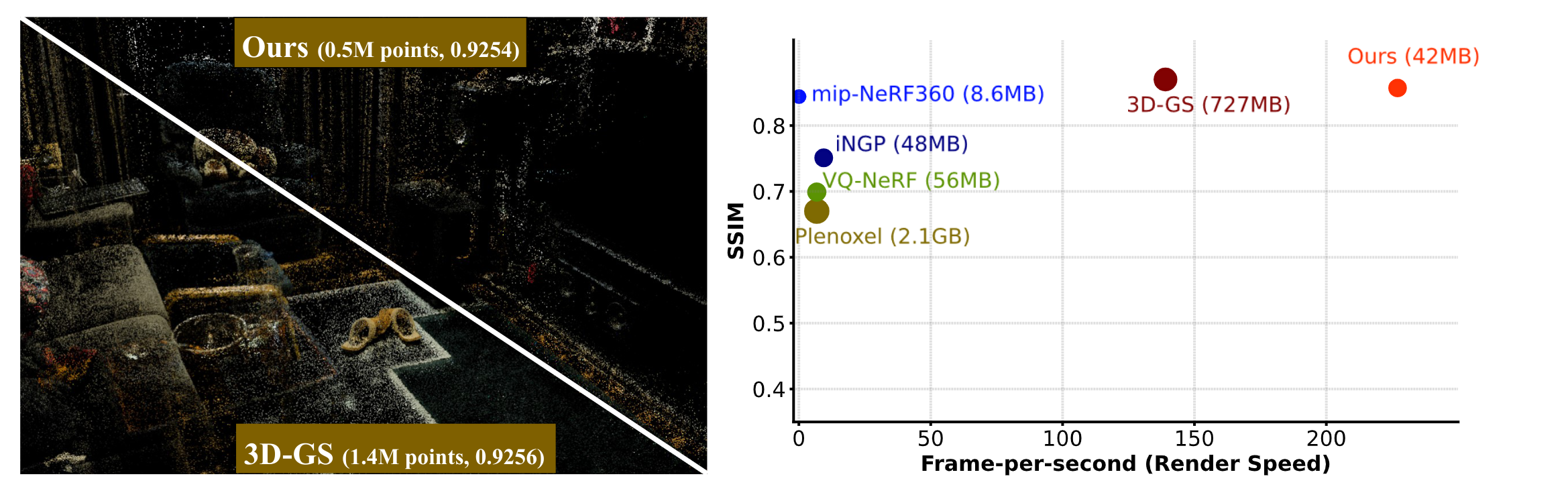
OriginalLightGaussian: Unbounded 3D Gaussian Compression with 15x Reduction and 200+ FPS


User Guidance
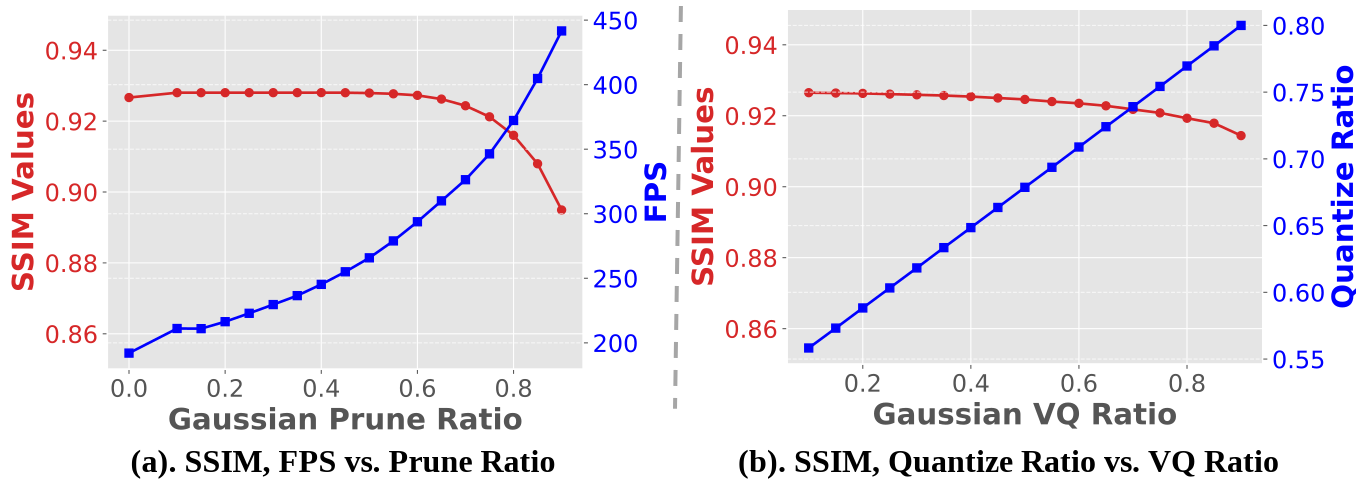
Gaussian Prune Ratio, Vector Quantization Ratio vs. FPS, SSIM
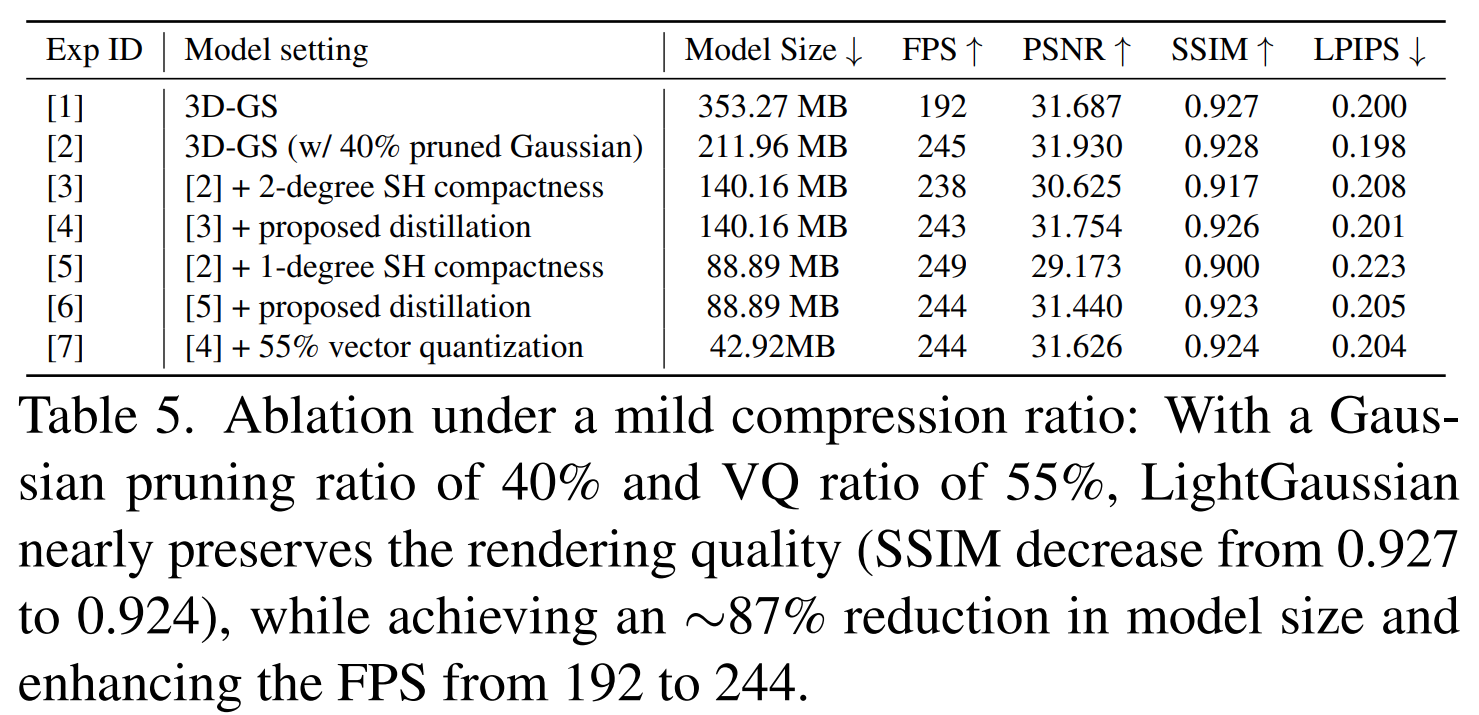
Mild Compression Ratio, with Minimum Accuracy Degradation
Setup
Local Setup
The codebase is based on gaussian-splatting
The used datasets, MipNeRF360 and Tank & Temple, are hosted by the paper authors here.
For installation:
git clone --recursive https://github.com/VITA-Group/LightGaussian.git
cd LightGaussian
# if you have already cloned LightGaussian:
# git submodule update --init --recursive
conda env create --file environment.yml
conda activate lightgaussian
note: we modified the "diff-gaussian-rasterization" in the submodule to get the Global Significant Score.
Compress to Compact Representation
Lightgaussian includes 3 ways to make the 3D Gaussians be compact
Option 1 Prune & Recovery
Users can directly prune a trained 3D-GS checkpoint using the following command (default setting):
bash scripts/run_prune_finetune.sh
Users can also train from scratch and jointly prune redundant Gaussians in training using the following command (different setting from the paper):
bash scripts/run_train_densify_prune.sh
note: 3D-GS is trained for 20,000 iterations and then prune it. The resulting ply file is approximately 35% of the size of the original 3D-GS while ensuring a comparable quality level.
Option 2 SH distillation
Users can distill 3D-GS checkpoint using the following command (default setting):
bash scripts/run_distill_finetune.sh
Option 3 VecTree Quantization
Users can quantize a pruned and distilled 3D-GS checkpoint using the following command (default setting):
bash scripts/run_vectree_quantize.sh
Render
Render with trajectory. By default ellipse, you can change it to spiral or others trajectory by changing to corresponding function.
python render_video.py --source_path PATH/TO/DATASET --model_path PATH/TO/MODEL --skip_train --skip_test --video
For render after the Vectree Quantization stage, you could render them through
python render_video.py --load_vq
Example
An example ckpt for room scene can be downloaded here, which mainly includes the following several parts:
- point_cloud.ply —— Pruned, distilled and quantized 3D-GS checkpoint.
- extreme_saving —— Relevant files obtained after vectree quantization.
- imp_score.npz —— Global significance used in vectree quantization.
TODO List
- Upload module 1: Prune & recovery
- Upload module 2: SH distillation
- Upload module 3: Vectree Quantization
- Upload docker image
Acknowledgements
We would like to express our gratitude to Yueyu Hu from NYU for the invaluable discussion on our project.
BibTeX
If you find our work useful for your project, please consider citing the following paper.
@misc{fan2023lightgaussian,
title={LightGaussian: Unbounded 3D Gaussian Compression with 15x Reduction and 200+ FPS},
author={Zhiwen Fan and Kevin Wang and Kairun Wen and Zehao Zhu and Dejia Xu and Zhangyang Wang},
year={2023},
eprint={2311.17245},
archivePrefix={arXiv},
primaryClass={cs.CV} }
관련 프로젝트 살펴보기
불러오는 중…