
TaKO8Ki/gobang
TaKO8Ki/gobang has 3,328 GitHub stars and 100 forks. GitHot measured +1 stars in 24 hours, +1 in 7 days, and +2 in 15 days. Last checked 2026-11-09 20:52 UTC. Last push 2023-11-10.
Rust로 작성된 크로스 플랫폼 TUI 데이터베이스 관리 도구
What you can do
- Cross-platform support (macOS, Windows, Linux)
- Multiple Database support (MySQL, PostgreSQL, SQLite)
- Intuitive keyboard only control
측정된 스타 증가
- in 24h
- +1
- in 7 days
- +1
- in 15 days
- +2
- in 1 month
- 업데이트 지연
서로 겹치는 기간의 순증가량이며 일별 합계가 아닙니다. 측정값이 없으면 비워 둡니다. 스타는 관심도를 나타내며 품질을 보장하지 않습니다.
README.md
Original
gobang is currently in alpha
A cross-platform TUI database management tool written in Rust


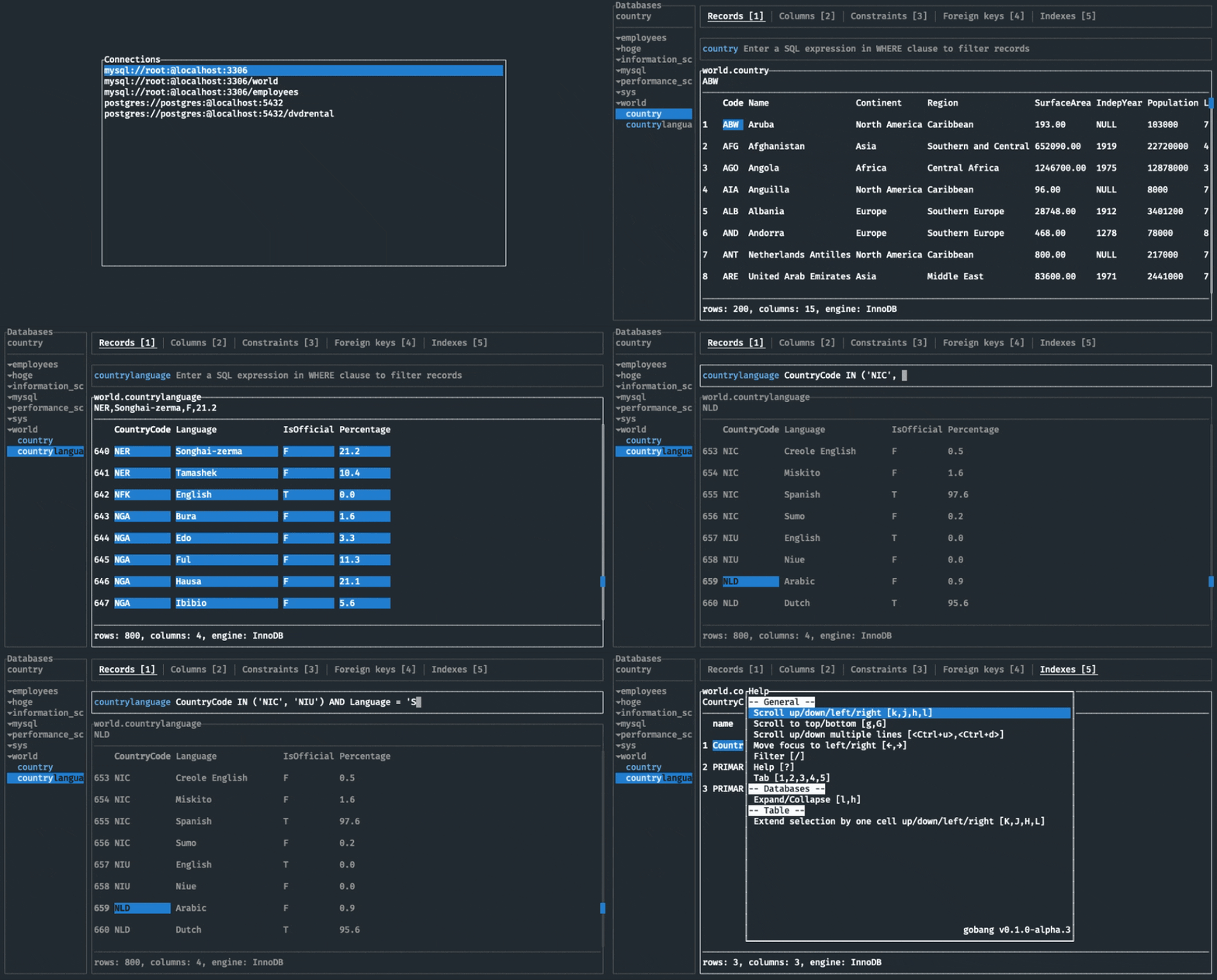
Features
- Cross-platform support (macOS, Windows, Linux)
- Multiple Database support (MySQL, PostgreSQL, SQLite)
- Intuitive keyboard only control
TODOs
- SQL editor
- Custom key bindings
- Custom theme settings
- Support the other databases
What does "gobang" come from?
gobang means a Japanese game played on goban, a go board. The appearance of goban looks like table structure. And I live in Kyoto, Japan. In Kyoto city, streets are laid out on a grid (We call it “goban no me no youna (碁盤の目のような)”). They are why I named this project "gobang".
Installation
With Homebrew (Linux, macOS)
If you’re using Homebrew or Linuxbrew, install the gobang formula:
brew install tako8ki/tap/gobang
On Windows
If you're a Windows Scoop user, then you can install gobang from the official bucket:
scoop install gobang
On NixOS
If you're a Nix user, you can install gobang from nixpkgs:
$ nix-env --install gobang
On Archlinux
If you're an Archlinux user, you can install gobang from AUR:
paru -S gobang-bin
On NetBSD
If you're a NetBSD user, then you can install gobang from pkgsrc:
pkgin install gobang
With Cargo (Linux, macOS, Windows)
If you already have a Rust environment set up, you can use the cargo install command:
cargo install --version 0.1.0-alpha.5 gobang
From binaries (Linux, macOS, Windows)
- Download the latest release binary for your system
- Set the
PATHenvironment variable
Usage
$ gobang
$ gobang -h
USAGE:
    gobang [OPTIONS]

FLAGS:
    -h, --help       Prints help information
    -V, --version    Prints version information

OPTIONS:
    -c, --config-path <config-path>    Set the config file
If you want to add connections, you need to edit your config file. For more information, please see Configuration.
Keymap
| Key | Description |
|---|---|
| h, j, k, l | Scroll left/down/up/right |
| Ctrl + u, Ctrl + d | Scroll up/down multiple lines |
| g , G | Scroll to top/bottom |
| H, J, K, L | Extend selection by one cell left/down/up/right |
| y | Copy a cell value |
| ←, → | Move focus to left/right |
| c | Move focus to connections |
| / | Filter |
| ? | Help |
| 1, 2, 3, 4, 5 | Switch to records/columns/constraints/foreign keys/indexes tab |
| Esc | Hide pop up |
Configuration
The location of the file depends on your OS:
- macOS:
$HOME/.config/gobang/config.toml - Linux:
$HOME/.config/gobang/config.toml - Windows:
%APPDATA%/gobang/config.toml
The following is a sample config.toml file:
[[conn]]
type = "mysql"
user = "root"
host = "localhost"
port = 3306

[[conn]]
type = "mysql"
user = "root"
host = "localhost"
port = 3306
password = "password"
database = "foo"
name = "mysql Foo DB"

[[conn]]
type = "postgres"
user = "root"
host = "localhost"
port = 5432
database = "bar"
name = "postgres Bar DB"

[[conn]]
type = "sqlite"
path = "/path/to/baz.db"
Contribution
Contributions, issues and pull requests are welcome!
관련 프로젝트 살펴보기
Asabeneh/30-Days-Of-Python
30 Days of Python 프로그래밍 챌린지는 Python 프로그래밍 언어를 30일 동안 배우기 위한 단계별 가이드입니다. 이 챌린지는 100일 이상 걸릴 수 있습니다. 자신의 속도에 맞춰 진행하세요. 다음 동영상도 도움이 될 수 있습니다: https://www.youtube.com/channel/UC7PNRuno1rzYPb1xLa4yktw
78,486 스타grafana/grafana
개방적이고 조합 가능한 옵저버빌리티 및 데이터 시각화 플랫폼입니다. Prometheus, Loki, Elasticsearch, InfluxDB, Postgres 등 여러 소스의 메트릭, 로그, 트레이스를 시각화합니다.
77,790 스타redis/redis
실시간 데이터 기반 애플리케이션을 구축하는 개발자에게 Redis는 가장 선호되고, 가장 빠르며, 기능이 가장 풍부한 캐시, 데이터 구조 서버이자 문서 및 벡터 쿼리 엔진입니다.
77,332 스타apache/superset
Apache Superset는 데이터 시각화 및 데이터 탐색 플랫폼입니다.
75,455 스타