
SaladLab/Unity3D.IncrementalCompiler
소개
Unity3D Incremental C# Compiler using Roslyn
창작 및 미디어측정된 스타 증가
- in 24h
- 0
- in 7 days
- 0
- in 15 days
- 기록 수집 중
- in 1 month
- 기록 수집 중
서로 겹치는 기간의 순증가량이며 일별 합계가 아닙니다. 측정값이 없으면 비워 둡니다. 스타는 관심도를 나타내며 품질을 보장하지 않습니다.
README.md
OriginalUnity3D.IncrementalCompiler
Unity3D Incremental C# Compiler using Roslyn.
- You can get faster compilation speed. Because it works as an incremental compiler
- You can use C# 5 and 6 features.
This project is at an early development stage. And still now it can support only windows platform.
Setup
Unzip a release zip file to your unity project top-most directory. (Unblocking zip file before decompressing zip file might be required to avoid TypeLoadException of Unity-Mono.)
- When Unity 4.x, use IncrementalCompiler.Unity4.zip
- When Unity 5.x, use IncrementalCompiler.Unity5.zip
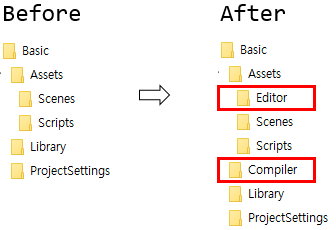
A release zip has a plugin dll which should be put at Editor folder and a few compiler related files which should be put at Compiler folder. Following before and after screenshot will helps for understanding install location.
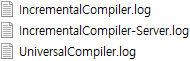
While an incremental compiler build your scripts, it saves log files to project/Temp directory. With these log files, you can see how it works.
Configuration
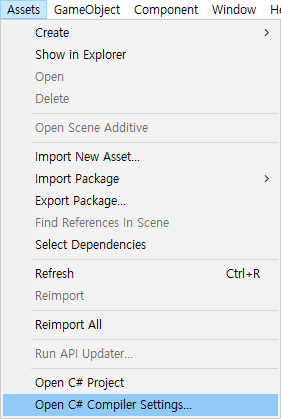
You can configure how this compiler work by settings window. Click "Assets/Open C# Compiler Settings..." in UnityEditor.
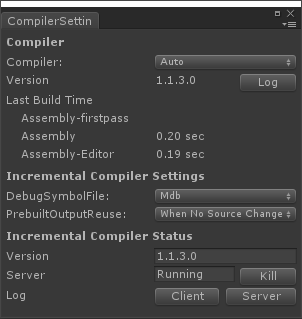
Not only settings but you can also check detailed log and information.
Also you can manually modify a configure file which is located at project/Compiler/IncrementalCompiler.xml
More information
FAQ
- When incremental compiler is installed, Unity claims something wrong like:
TypeLoadException: Could not load type 'UnityEditor.Modules.CSharpCompiler' from assembly 'UnityEditor, Version=0.0.0.0, Culture=neutral, PublicKeyToken=null'.
UnityEditor.Scripting.ScriptCompilers.CreateCompilerInstance (MonoIsland island, Boolean buildingForEditor, BuildTarget targetPlatform, Boolean runUpdater) (at C:/buildslave/unity/build/Editor/Mono/Scripting/ScriptCompilers.cs:93)
This problem is usually caused by windows file blocking system. You need to unblock zip file before uncompressing this file.
Related works
- An integration part between unity3d and incremental compiler is based on alexzzzz's works.
- Mono MDB writer for roslyn is based on DavidKarlas's work.
관련 프로젝트 살펴보기
불러오는 중…