
STVIR/pysot
STVIR/pysot has 4,609 GitHub stars and 1,109 forks. GitHot measured -1 stars in 24 hours and 0 in 7 days. Last checked 2026-11-08 00:09 UTC. Last push 2025-06-22.
SiamRPN과 SiamMask 등의 알고리즘을 구현한 SenseTime Research의 단일 객체 추적 플랫폼입니다.
측정된 스타 증가
- in 24h
- -1
- in 7 days
- 0
- in 15 days
- 업데이트 지연
- in 1 month
- 업데이트 지연
서로 겹치는 기간의 순증가량이며 일별 합계가 아닙니다. 측정값이 없으면 비워 둡니다. 스타는 관심도를 나타내며 품질을 보장하지 않습니다.
README.md
OriginalPySOT
PySOT is a software system designed by SenseTime Video Intelligence Research team. It implements state-of-the-art single object tracking algorithms, including SiamRPN and SiamMask. It is written in Python and powered by the PyTorch deep learning framework. This project also contains a Python port of toolkit for evaluating trackers.
PySOT has enabled research projects, including: SiamRPN, DaSiamRPN, SiamRPN++, and SiamMask.
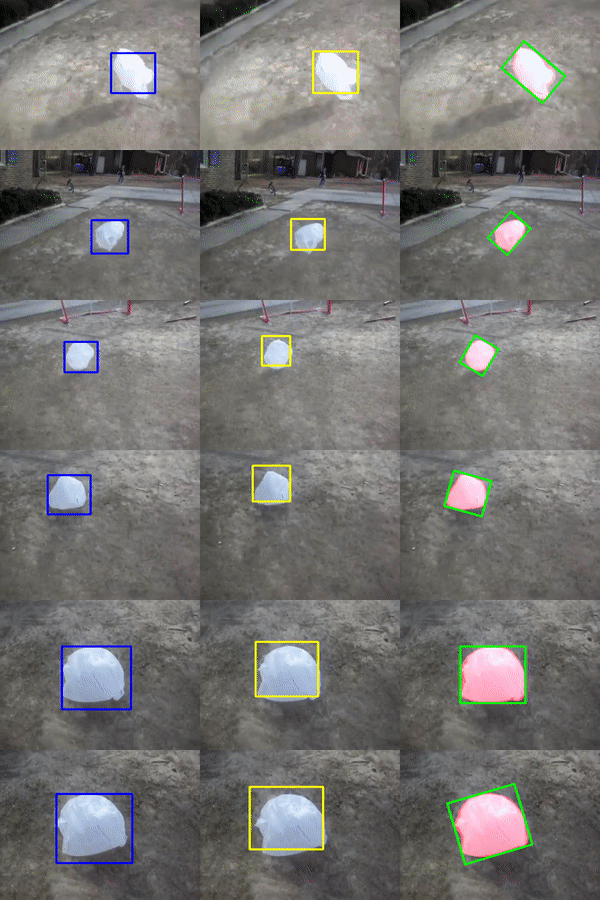
Example SiamFC, SiamRPN and SiamMask outputs.
Introduction
The goal of PySOT is to provide a high-quality, high-performance codebase for visual tracking research. It is designed to be flexible in order to support rapid implementation and evaluation of novel research. PySOT includes implementations of the following visual tracking algorithms:
using the following backbone network architectures:
Additional backbone architectures may be easily implemented. For more details about these models, please see References below.
Evaluation toolkit can support the following datasets:
:paperclip: OTB2015 :paperclip: VOT16/18/19 :paperclip: VOT18-LT :paperclip: LaSOT :paperclip: UAV123
Model Zoo and Baselines
We provide a large set of baseline results and trained models available for download in the PySOT Model Zoo.
Installation
Please find installation instructions for PyTorch and PySOT in INSTALL.md.
Quick Start: Using PySOT
Add PySOT to your PYTHONPATH
export PYTHONPATH=/path/to/pysot:$PYTHONPATH
Download models
Download models in PySOT Model Zoo and put the model.pth in the correct directory in experiments
Webcam demo
python tools/demo.py \
    --config experiments/siamrpn_r50_l234_dwxcorr/config.yaml \
    --snapshot experiments/siamrpn_r50_l234_dwxcorr/model.pth
    # --video demo/bag.avi # (in case you don't have webcam)
Download testing datasets
Download datasets and put them into testing_dataset directory. Jsons of commonly used datasets can be downloaded from Google Drive or BaiduYun. If you want to test tracker on new dataset, please refer to pysot-toolkit to setting testing_dataset.
Test tracker
cd experiments/siamrpn_r50_l234_dwxcorr
python -u ../../tools/test.py 	\
	--snapshot model.pth 	\ # model path
	--dataset VOT2018 	\ # dataset name
	--config config.yaml	  # config file
The testing results will in the current directory(results/dataset/model_name/)
Eval tracker
assume still in experiments/siamrpn_r50_l234_dwxcorr_8gpu
python ../../tools/eval.py 	 \
	--tracker_path ./results \ # result path
	--dataset VOT2018        \ # dataset name
	--num 1 		 \ # number thread to eval
	--tracker_prefix 'model'   # tracker_name
Training :wrench:
See TRAIN.md for detailed instruction.
Getting Help :hammer:
If you meet problem, try searching our GitHub issues first. We intend the issues page to be a forum in which the community collectively troubleshoots problems. But please do not post duplicate issues. If you have similar issue that has been closed, you can reopen it.
ModuleNotFoundError: No module named 'pysot'
:dart:Solution: Run export PYTHONPATH=path/to/pysot first before you run the code.
ImportError: cannot import name region
:dart:Solution: Build region by python setup.py build_ext —-inplace as decribled in INSTALL.md.
References
Fast Online Object Tracking and Segmentation: A Unifying Approach. Qiang Wang, Li Zhang, Luca Bertinetto, Weiming Hu, Philip H.S. Torr. IEEE Conference on Computer Vision and Pattern Recognition (CVPR), 2019.
SiamRPN++: Evolution of Siamese Visual Tracking with Very Deep Networks. Bo Li, Wei Wu, Qiang Wang, Fangyi Zhang, Junliang Xing, Junjie Yan. IEEE Conference on Computer Vision and Pattern Recognition (CVPR), 2019.
Distractor-aware Siamese Networks for Visual Object Tracking. Zheng Zhu, Qiang Wang, Bo Li, Wu Wei, Junjie Yan, Weiming Hu. The European Conference on Computer Vision (ECCV), 2018.
High Performance Visual Tracking with Siamese Region Proposal Network. Bo Li, Wei Wu, Zheng Zhu, Junjie Yan, Xiaolin Hu. IEEE Conference on Computer Vision and Pattern Recognition (CVPR), 2018.
Fully-Convolutional Siamese Networks for Object Tracking. Luca Bertinetto, Jack Valmadre, João F. Henriques, Andrea Vedaldi, Philip H. S. Torr. The European Conference on Computer Vision (ECCV) Workshops, 2016.
Contributors
License
PySOT is released under the Apache 2.0 license.