
Pixel-Open/magento-cloudflare-turnstile
소개
Protect your Magento store from spam messages and spam user accounts with Cloudflare Turnstile
보안측정된 스타 증가
- in 24h
- 0
- in 7 days
- 0
- in 15 days
- 기록 수집 중
- in 1 month
- 기록 수집 중
서로 겹치는 기간의 순증가량이며 일별 합계가 아닙니다. 측정값이 없으면 비워 둡니다. 스타는 관심도를 나타내며 품질을 보장하지 않습니다.
README.md
OriginalMagento Cloudflare Turnstile



Presentation
Turnstile is Cloudflare's smart CAPTCHA alternative. The module allows Turnstile to protect your Magento OpenSource or Adobe Commerce forms.
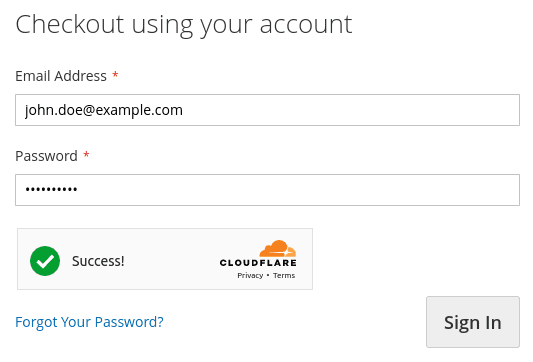
Frontend Forms
- Contact
- Login
- Register
- Reset password
- Review
- Send product to friend
- Newsletter
Admin Forms
- Login
- Reset password
Requirements
- Magento >= 2.4.4
- PHP >= 8.0
Installation
composer require pixelopen/magento-cloudflare-turnstile
Configuration
Disable all Magento Captcha
Stores > Configuration > Customers > Customer Configuration > CAPTCHA
- Enable CAPTCHA on Storefront: no
Stores > Configuration > Security > Google reCAPTCHA Storefront > Storefront
- Enable for Customer Login: no
- Enable for Forgot Password: no
- Enable for Create New Customer Account: no
- Enable for Contact Us: no
- Enable for Product Review: no
Stores > Configuration > Security > Google reCAPTCHA Admin Panel > Admin Panel
- Enable for Login: no
- Enable for Forgot Password: no
Enable Cloudflare Turnstile
Stores > Configuration > Services > Cloudflare Turnstile
Settings
- Sitekey: the sitekey given for the site in your Cloudflare dashboard
- Secret key: the secret key given for the site in your Cloudflare dashboard
Storefront
- Enabled: enable Cloudflare Turnstile
- Theme: the Turnstile theme (auto, light or dark)
- Size: the widget size (compact, normal, or flexible)
- Forms to validate: the frontend forms where a Turnstile validation is required
Admin Panel
- Enabled: enable Cloudflare Turnstile
- Theme: the Turnstile theme (auto, light or dark)
- Size: the widget size (compact, normal, or flexible)
- Forms to validate: the admin forms where a Turnstile validation is required
Override default config
You can specifically change theme and size values for a form in the layout:
<?xml version="1.0"?>
<!-- layout/customer_account_login.xml -->
<page xmlns:xsi="http://www.w3.org/2001/XMLSchema-instance" xsi:noNamespaceSchemaLocation="urn:magento:framework:View/Layout/etc/page_configuration.xsd">
    <body>
        <referenceContainer name="form.additional.info">
            <block name="pixel.open.cloudflare.turnstile.login">
                <action method="setSize">
                    <argument name="size" xsi:type="string">compact</argument>
                </action>
                <action method="setTheme">
                    <argument name="theme" xsi:type="string">dark</argument>
                </action>
            </block>
        </referenceContainer>
    </body>
</page>
Command line configuration
Settings
bin/magento config:set pixel_open_cloudflare_turnstile/settings/secret_key {secret_key}
bin/magento config:set pixel_open_cloudflare_turnstile/settings/sitekey {sitekey}
Frontend
bin/magento config:set pixel_open_cloudflare_turnstile/frontend/enabled {1|0}
bin/magento config:set pixel_open_cloudflare_turnstile/frontend/theme {auto|light|dark}
bin/magento config:set pixel_open_cloudflare_turnstile/frontend/size {normal|compact|flexible}
bin/magento config:set pixel_open_cloudflare_turnstile/frontend/forms contact,register,login,login-ajax,password
Admin
bin/magento config:set pixel_open_cloudflare_turnstile/adminhtml/enabled {1|0}
bin/magento config:set pixel_open_cloudflare_turnstile/adminhtml/theme {auto|light|dark}
bin/magento config:set pixel_open_cloudflare_turnstile/adminhtml/size {normal|compact|flexible}
bin/magento config:set pixel_open_cloudflare_turnstile/adminhtml/forms login,password
Testing
Use the following sitekeys and secret keys for testing purposes:
Sitekey
| Sitekey | Description |
|---|---|
| 1x00000000000000000000AA | Always passes |
| 2x00000000000000000000AB | Always blocks |
| 3x00000000000000000000FF | Forces an interactive challenge |
Secret key
| Secret key | Description |
|---|---|
| 1x0000000000000000000000000000000AA | Always passes |
| 2x0000000000000000000000000000000AA | Always fails |
| 3x0000000000000000000000000000000AA | Yields a "token already spent" error |
Definitely remove re-captcha
To remove all native re-captcha modules, add all modules in the "replace" node of the composer.json.
{
  "replace": {
    "magento/module-re-captcha-admin-ui": "*",
    "magento/module-re-captcha-checkout": "*",
    "magento/module-re-captcha-checkout-sales-rule": "*",
    "magento/module-re-captcha-contact": "*",
    "magento/module-re-captcha-customer": "*",
    "magento/module-re-captcha-frontend-ui": "*",
    "magento/module-re-captcha-gift-card": "*",
    "magento/module-re-captcha-invitation": "*",
    "magento/module-re-captcha-migration": "*",
    "magento/module-re-captcha-multiple-wishlist": "*",
    "magento/module-re-captcha-newsletter": "*",
    "magento/module-re-captcha-paypal": "*",
    "magento/module-re-captcha-review": "*",
    "magento/module-re-captcha-send-friend": "*",
    "magento/module-re-captcha-store-pickup": "*",
    "magento/module-re-captcha-ui": "*",
    "magento/module-re-captcha-user": "*",
    "magento/module-re-captcha-validation": "*",
    "magento/module-re-captcha-validation-api": "*",
    "magento/module-re-captcha-version-2-checkbox": "*",
    "magento/module-re-captcha-version-2-invisible": "*",
    "magento/module-re-captcha-version-3-invisible": "*",
    "magento/module-re-captcha-webapi-api": "*",
    "magento/module-re-captcha-webapi-graph-ql": "*",
    "magento/module-re-captcha-webapi-rest": "*",
    "magento/module-re-captcha-webapi-ui": "*"
  }
}
관련 프로젝트 살펴보기
불러오는 중…