
OpenForgeProject/mageforge
OpenForgeProject/mageforge has 27 GitHub stars and 2 forks. Star changes are not measured yet. Last checked 2026-11-13 21:48 UTC. Last push 2026-11-13.
측정된 스타 증가
- in 24h
- 기록 수집 중
- in 7 days
- 기록 수집 중
- in 15 days
- 기록 수집 중
- in 1 month
- 기록 수집 중
서로 겹치는 기간의 순증가량이며 일별 합계가 아닙니다. 측정값이 없으면 비워 둡니다. 스타는 관심도를 나타내며 품질을 보장하지 않습니다.
소개
MageForge is a Magento 2 module designed to assist frontend developers in streamlining their workflow and enhancing productivity.
개발 도구README.md
OriginalMageForge for Magento 2



MageForge is a powerful CLI toolkit for Magento 2 front-end development. It simplifies theme building workflows, supports multiple theme types (Magento Standard, Hyvä, TailwindCSS, custom), and includes developer tools like the Frontend Inspector.
Table of Contents
- Requirements
- Supported Theme Types
- Installation
- Quick Start
- Frontend Inspector
- Commands Reference
- Documentation
- Get your Merch
- Credits
Contributor? Jump to the Development Guide.
Requirements
- Magento 2.4.7+ (tested on 2.4.7-p10, 2.4.8-p5, 2.4.9)
- PHP 8.3+
- Node.js (LTS recommended)
- Composer
Supported Theme Types
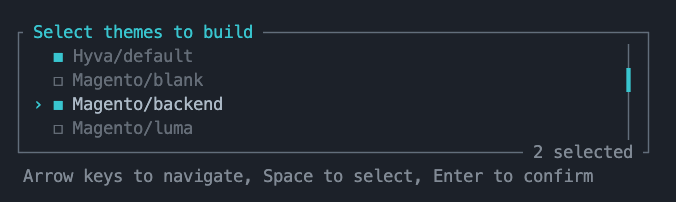
| Theme Type | Support Status |
|---|---|
| Magento Standard | ✅ Supported |
| Hyvä (TailwindCSS 3.x / 4.x) | ✅ Supported |
| Hyvä Checkout | ✅ Supported |
| Hyvä Fallback | ✅ Supported |
| Custom TailwindCSS (no Hyvä) | ✅ Supported |
| Avanta B2B | ✅ Supported |
| Your Custom Theme | Create your own Builder |
Installation
Install via Composer:
composer require openforgeproject/mageforgeEnable the module:
bin/magento module:enable OpenForgeProject_MageForge
bin/magento setup:upgrade
Quick Start
# 1. List available themes
bin/magento mageforge:theme:list

# 2. Build a theme
bin/magento mageforge:theme:build Magento/luma

# 3. Watch for changes (development mode)
bin/magento mageforge:theme:watch Magento/luma
See Commands Reference for the full command list with options and examples.
Frontend Inspector
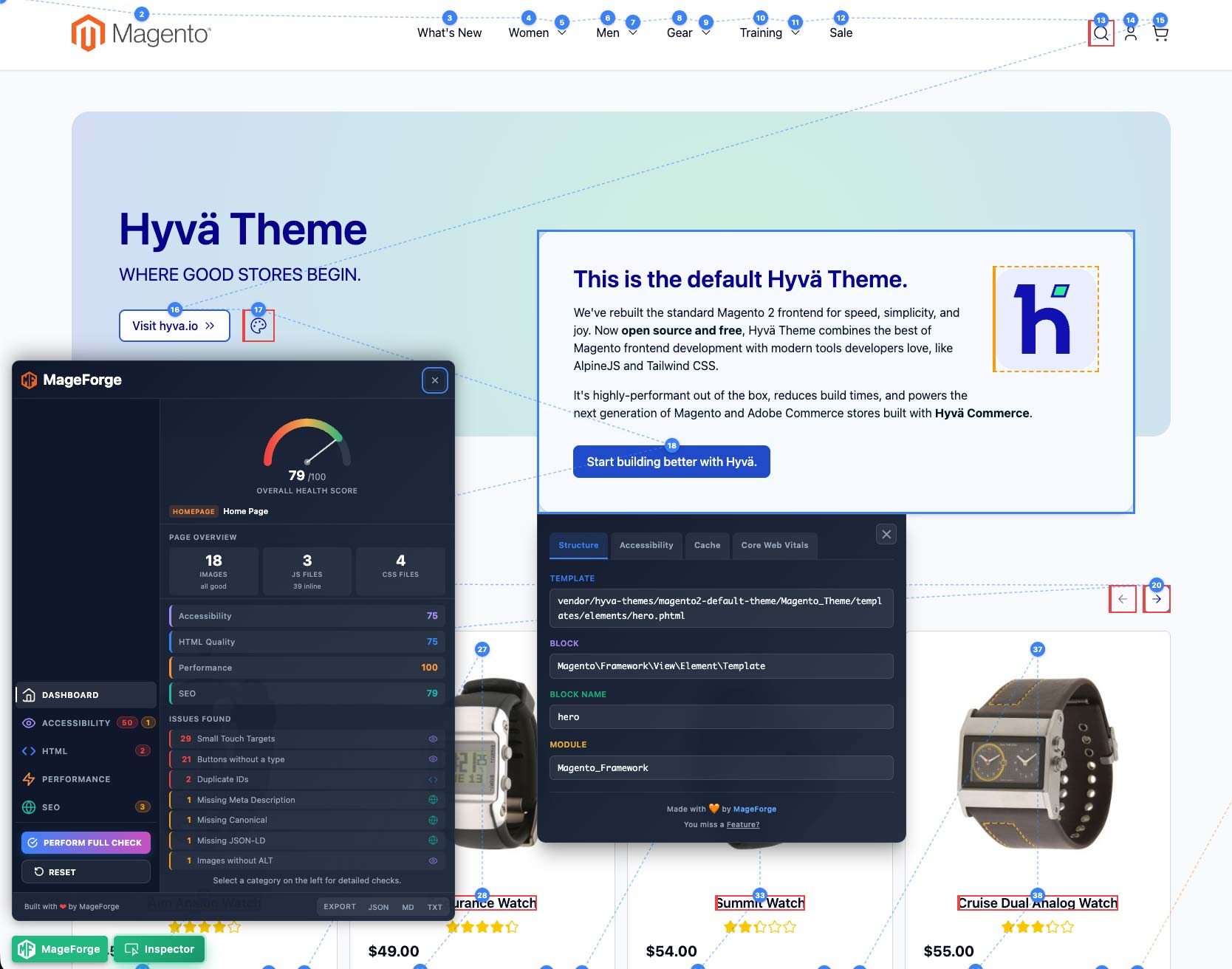
The MageForge Inspector lets you inspect Magento blocks, templates, and performance metrics directly in your browser.
Features:
- Template paths, block classes, and module names
- PHP render times and cache status (lifetime, tags)
- Web Vitals: LCP, CLS, INP per element
- Accessibility checks: ARIA roles, contrast ratios, alt text
Screenshot
Enable:
bin/magento mageforge:theme:inspector enable
The Inspector can also be enabled in Admin: Stores > Configuration > MageForge > Frontend Inspector
Use in Browser:
- Toggle:
Ctrl+Shift+I(Windows/Linux) orCmd+Option+I(macOS) - Hover over elements to inspect; click to lock on a specific block
Note: Requires Developer Mode. If not already active, run
bin/magento deploy:mode:set developer.
Commands Reference
See the dedicated Commands Reference for complete documentation of all MageForge commands, including:
- Theme commands (
list,build,watch,clean,inspector) - Hyvä commands (
tokens,compatibility:checkincluding the Tailwind CSS v4 readiness check) - System commands (
version,check) - Options, arguments, and usage examples
Documentation
- Commands Reference — Full command documentation
- Custom Theme Builders — Extend MageForge for custom themes
- Development Guide — Local dev setup, workflow, and contribution guide
Get your Merch
Support
- Bugs / Features: GitHub Issues
- Discussions: GitHub Discussions
- Contributing: See Contributing Guidelines
Credits
MageForge uses the following third-party libraries:
| Library | Author | License |
|---|---|---|
| Tabler Icons | codecalm | MIT |
Special Thanks
A big thank you to e3n-team for their continuous support and collaboration in the further development of MageForge.
Your contributions have been invaluable!
Thank you for using MageForge!