
OpenBMB/BMTools
OpenBMB/BMTools has 2,769 GitHub stars and 243 forks. GitHot measured 0 stars in 24 hours and -2 in 7 days. Last checked 2026-11-14 05:05 UTC. Last push 2023-12-05.
측정된 스타 증가
- in 24h
- 0
- in 7 days
- -2
- in 15 days
- 기록 수집 중
- in 1 month
- 기록 수집 중
서로 겹치는 기간의 순증가량이며 일별 합계가 아닙니다. 측정값이 없으면 비워 둡니다. 스타는 관심도를 나타내며 품질을 보장하지 않습니다.
소개
Tool Learning for Big Models, Open-Source Solutions of ChatGPT-Plugins
학습README.md
Original BMTools
News • Setup • How To Use • Paper • Docs • Paper List • Demo • Citation •
Read this in Chinese.
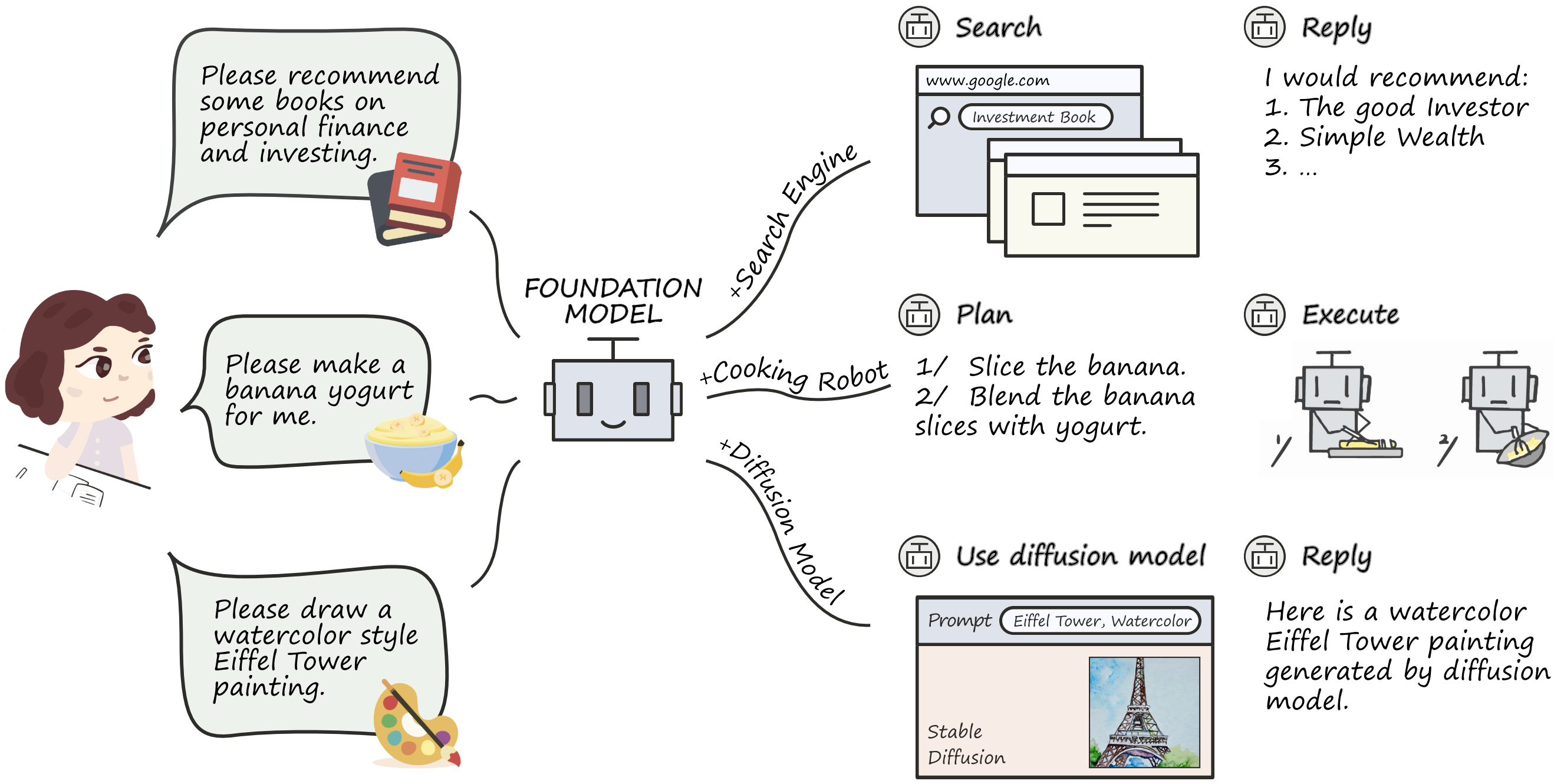
BMTools is an open-source repository that extends language models using tools and serves as a platform for the community to build and share tools. In this repository, you can (1) easily build a plugin by writing python functions (2) use external ChatGPT-Plugins.
This project is inspired by the open-source project LangChain and optimized for the usage of open-sourced tools like ChatGPT-Plugins, striving to achieve the open-source academic version of ChatGPT-Plugins.
For new features and further developments, please go to XAgent.
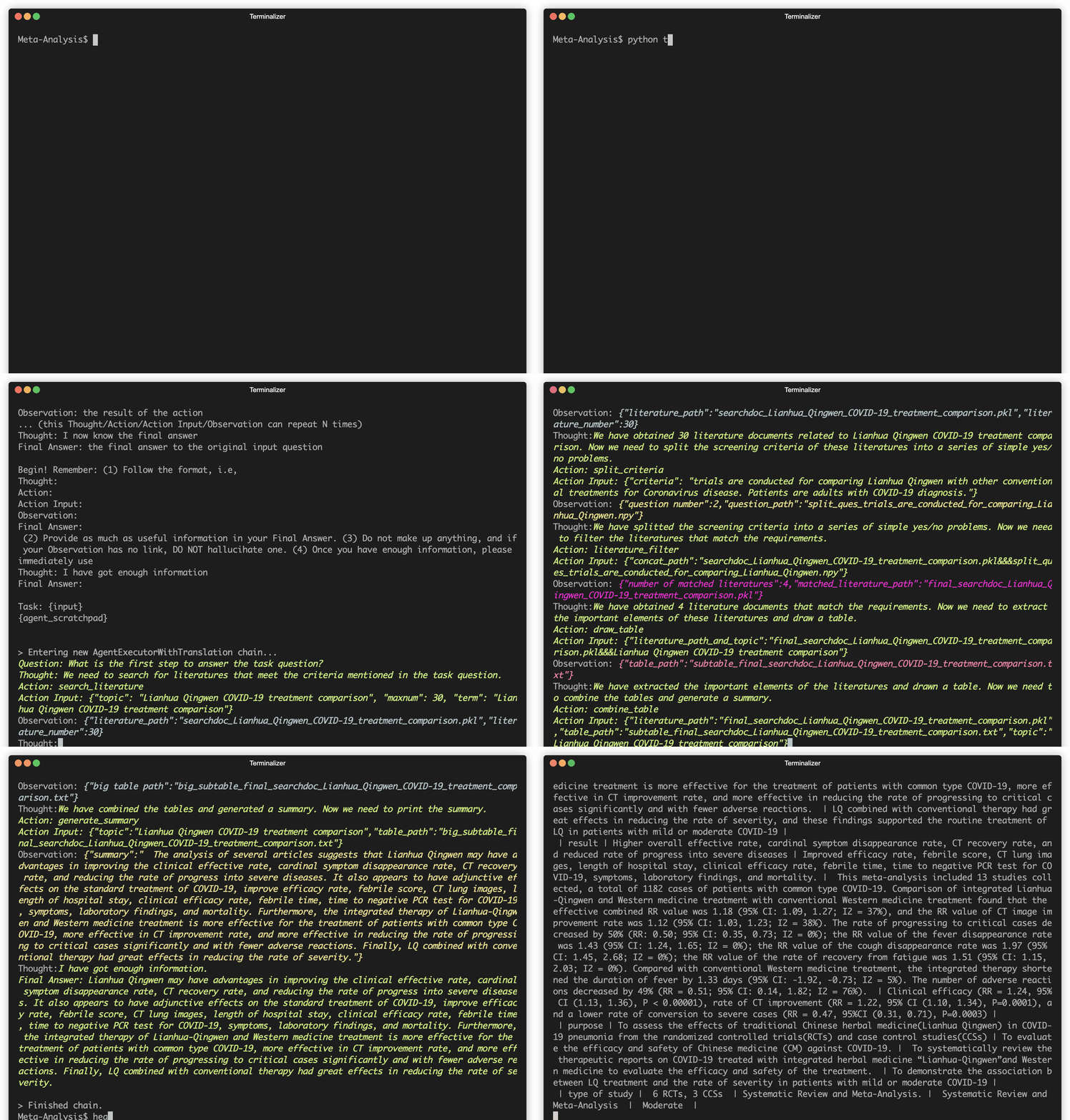
A demo of using BMTools to manipulate tools for meta analysis.
What's New
[2023/5/28] We release ToolBench, a large-scale tool learning benchmark together with a capable model.
[2023/5/25] The evaluation data used in the paper is partially released at data-test, we have also created large-scale SFT (100k+) high-quality tool-use training data at data-sft.
[2023/5/19] Three new Tools are supported: Baidu Map, Google Scholar Search, and Zillow
[2023/5/18] WebCPM is accepted by ACL 2023, a Chinese version of WebGPT.
1. Setup
git clone [email protected]:OpenBMB/BMTools.git
cd BMTools
pip install --upgrade pip
pip install -r requirements.txt
python setup.py develop
To support CPM-Bee:
git clone -b main --single-branch https://github.com/OpenBMB/CPM-Bee.git
cp -rf CPM-Bee/src/cpm_live bmtools/models/
2. Use existing tools
2.1 Set up tools
2.1.1 Local tools
Add your api keys to secret_keys.sh, then start the local tools
source secret_keys.sh
python host_local_tools.py
Then set the url of the plugin to http://127.0.0.1:8079/tools/{tool_name}/ (Remember the tailing /).
2.1.2 Use online ChatGPT-Plugins
Just load it with the URL pointed to the .well-known/ai-plugin.json
For example, set the url to https://www.klarna.com/, where https://www.klarna.com/.well-known/ai-plugin.json is a valid configuration.
2.2 Use a single tool
from bmtools.agent.singletool import load_single_tools, STQuestionAnswerer

tool_name, tool_url = 'klarna',  'https://www.klarna.com/'
tool_name, tool_config = load_single_tools(tool_name, tool_url)
print(tool_name, tool_config)
stqa =  STQuestionAnswerer()

agent = stqa.load_tools(tool_name, tool_config)
agent("{Your Question}")
2.3 Use multiple tools
We can use multiple tools at the same time. Basically, the language model will do it recursively. It will treat the whole tool as an API, send questions to it, and the tool calls its sub-APIs to solve the question and send it back to parent tools.
Try this functionality using scripts like:
from bmtools.agent.tools_controller import load_valid_tools, MTQuestionAnswerer
tools_mappings = {
    "klarna": "https://www.klarna.com/",
    "chemical-prop": "http://127.0.0.1:8079/tools/chemical-prop/",
    "wolframalpha": "http://127.0.0.1:8079/tools/wolframalpha/",
}

tools = load_valid_tools(tools_mappings)

qa =  MTQuestionAnswerer(openai_api_key='', all_tools=tools)

agent = qa.build_runner()

agent("How many benzene rings are there in 9H-Carbazole-3-carboxaldehyde? and what is sin(x)*exp(x)'s plot, what is it integrated from 0 to 1? ")
2.4 Use the web demo
Add your plugin to the mappings at beginning of web_demo.py
Start the webdemo
python web_demo.py
3. Use customized tools
3.1 Develop a tool locally
To develop a tool locally, you need to write a python function to build the tool and register it to the registry.
For example, you can write a tool that can execute python code and return the result. The following is a sample code:
from bmtools.tools import Tool
from pydantic import BaseModel

class ExecutionQuery(BaseModel):
    code: str

class ExecutionResult(BaseModel):
    result: str

def build_python_tool(config) -> Tool:
    tool = Tool(
        "PythonTool",
        "A plugin that can execute python code",
        name_for_model="python",
        description_for_model="A plugin that can execute python code",
        contact_email="your@email",
    )

    @tool.post("/execute")
    def execute_python_code(query : ExecutionQuery) -> ExecutionResult:
        return ExecutionResult(
            result=eval(query.code)
        )

    return tool
Then you need to register the tool to the registry using the following code:
from bmtools.tools import register

@register("python")
def register_python_tool():
    return build_python_tool
Here we register the tool with the name python.
3.2 Contributing to BMTools
After you have developed a tool, you can contribute it to BMTools by following the steps below:
- Fork this repository
- Create a folder in
bmtools/tools/{tool_name} - Add an
api.pyto the folder:bmtools/tools/{tool_name}/api.pyand a__init__.pyto the folder:bmtools/tools/{tool_name}/__init__.py - Register the tool in the
__init__.pyfile you created in step 3 using the code in section 3.1 - Import your tool in the
__init__.pyfile under bmtools/tools - Add a
test.pyto test your tool automatically - Add a
readme.mdin your folder containing a brief introduction, contributor information, or anything you want to let others know.
4. Optimize your tool's prompt
The functions you wrote will be converted into an interface compatible with the OpenAI plugin. The AI models will read the name, description of the tools, as well as the name and descriptions of the tools' APIs. You can adjust the following aspect to make your API better understood by AI models.
- (1)
name_for_model(tell the model what the tool is) - (2)
description_for_model(this will be displayed to the model before the tool is called, and you can include information on how to use the APIs) - (3) The function name for each API function, as well as the name in
@tool.get(). It's best if these two names match, as the name plays an important role in the model's API selection. - (4) The function's doc string (can suggest to the model whether to use this API or not)
- (5) The function's return value, which can provide the model with error messages to guide its next steps, such as retrying or indicating a preferred next step
- (6) Reduce the errors in your API function.
A simple example to refer to is the Wolfram Alpha API.
Citation
If you use BMTools in your research, please cite:
@misc{qin2023tool,
      title={Tool Learning with Foundation Models},
      author={Yujia Qin and Shengding Hu and Yankai Lin and Weize Chen and Ning Ding and Ganqu Cui and Zheni Zeng and Yufei Huang and Chaojun Xiao and Chi Han and Yi Ren Fung and Yusheng Su and Huadong Wang and Cheng Qian and Runchu Tian and Kunlun Zhu and Shihao Liang and Xingyu Shen and Bokai Xu and Zhen Zhang and Yining Ye and Bowen Li and Ziwei Tang and Jing Yi and Yuzhang Zhu and Zhenning Dai and Lan Yan and Xin Cong and Yaxi Lu and Weilin Zhao and Yuxiang Huang and Junxi Yan and Xu Han and Xian Sun and Dahai Li and Jason Phang and Cheng Yang and Tongshuang Wu and Heng Ji and Zhiyuan Liu and Maosong Sun},
      year={2023},
      eprint={2304.08354},
      archivePrefix={arXiv},
      primaryClass={cs.CL}
}
Star History
관련 프로젝트 살펴보기
sindresorhus/awesome
😎 온갖 흥미로운 주제에 관한 Awesome 목록 [참고: 기존 풀 리퀘스트를 따라잡을 여유가 생길 때까지 풀 리퀘스트가 일시적으로 비활성화되어 있습니다]
536,553 스타EbookFoundation/free-programming-books
:books: 무료로 이용할 수 있는 프로그래밍 도서
401,562 스타nilbuild/developer-roadmap
개발자의 커리어 성장을 돕는 인터랙티브 로드맵, 가이드 및 기타 교육 콘텐츠.
371,974 스타vinta/awesome-python
“Python으로 X를 하고 싶은데, 어떤 도구를 써야 할까?”에 답하는 결정판 목록.
334,612 스타