
OWASP/joomscan
OWASP/joomscan has 1,196 GitHub stars and 249 forks. Star changes are not measured yet. Last checked 2026-11-09 08:33 UTC. Last push 2024-09-11.
OWASP Joomla Vulnerability Scanner Project https://www.secologist.com/
측정된 스타 증가
- in 24h
- 업데이트 지연
- in 7 days
- 업데이트 지연
- in 15 days
- 업데이트 지연
- in 1 month
- 업데이트 지연
서로 겹치는 기간의 순증가량이며 일별 합계가 아닙니다. 측정값이 없으면 비워 둡니다. 스타는 관심도를 나타내며 품질을 보장하지 않습니다.
README.md
Original




======
OWASP JoomScan Project
OWASP Joomla! Vulnerability Scanner (JoomScan) is an open source project, developed with the aim of automating the task of vulnerability detection and reliability assurance in Joomla CMS deployments. Implemented in Perl, this tool enables seamless and effortless scanning of Joomla installations, while leaving a minimal footprint with its lightweight and modular architecture. It not only detects known offensive vulnerabilities, but also is able to detect many misconfigurations and admin-level shortcomings that can be exploited by adversaries to compromise the system. Furthermore, OWASP JoomScan provides a user-friendly interface and compiles the final reports in both text and HTML formats for ease of use and minimization of reporting overheads.
OWASP JoomScan is included in Kali Linux distributions.
WHY OWASP JOOMSCAN ?
Automated ...
*Version enumerator
*Vulnerability enumerator (based on version)
*Components enumerator (1209 most popular by default)
*Components vulnerability enumerator (based on version)(+1030 exploit)
*Firewall detector
*Reporting to Text & HTML output
*Finding common log files
*Finding common backup files
INSTALL
git clone https://github.com/rezasp/joomscan.git
cd joomscan
perl joomscan.pl
For Docker installation and usage
# Build the docker image
docker build -t rezasp/joomscan .

# Run a new docker container with reports directory mounted at the host
docker run -it -v /path/to/reports:/home/joomscan/reports --name joomscan_cli rezasp/joomscan

# For accessing the docker container you can run the following command
docker run -it -v /path/to/reports:/home/joomscan/reports --name joomscan_cli --entrypoint /bin/bash rezasp/joomscan
JOOMSCAN ARGUMENTS
Usage:	joomscan.pl [options]

--url | -u <URL>                |   The Joomla URL/domain to scan.
--enumerate-components | -ec    |   Try to enumerate components.

--cookie <String>               |   Set cookie.
--user-agent | -a <user-agent>  |   Use the specified User-Agent.
--random-agent | -r             |   Use a random User-Agent.
--timeout <time-out>            |   set timeout.
--about                         |   About Author
--update                        |   Update to the latest version.
--help | -h                     |   This help screen.
--version                       |   Output the current version and exit.
OWASP JOOMSCAN USAGE EXAMPLES
Do default checks...
perl joomscan.pl --url www.example.com
or
perl joomscan.pl -u www.example.com
Enumerate installed components...
perl joomscan.pl --url www.example.com --enumerate-components
or
perl joomscan.pl -u www.example.com --ec
Set cookie
perl joomscan.pl --url www.example.com --cookie "test=demo;"
Set user-agent
perl joomscan.pl --url www.example.com --user-agent "Googlebot/2.1 (+http://www.googlebot.com/bot.html)"
or
perl joomscan.pl -u www.example.com -a "Googlebot/2.1 (+http://www.googlebot.com/bot.html)"
Set random user-agent
perl joomscan.pl -u www.example.com --random-agent
or
perl joomscan.pl --url www.example.com -r
Set proxy
perl joomscan.pl --url www.example.com --proxy http://127.0.0.1:8080
or
perl joomscan.pl -u www.example.com --proxy https://127.0.0.1:443
Update Joomscan...
perl joomscan.pl --update
OWASP PAGE
https://www.owasp.org/index.php/Category:OWASP_Joomla_Vulnerability_Scanner_Project
GIT REPOSITORY
https://github.com/rezasp/joomscan
ISSUES
https://github.com/rezasp/joomscan/issues
PROJECT LEADERS
- Mohammad Reza Espargham [ reza[dot]espargham[at]owasp[dot]org ]
- Ali Razmjoo [ ali[dot]razmjoo[at]owasp[dot]org ]
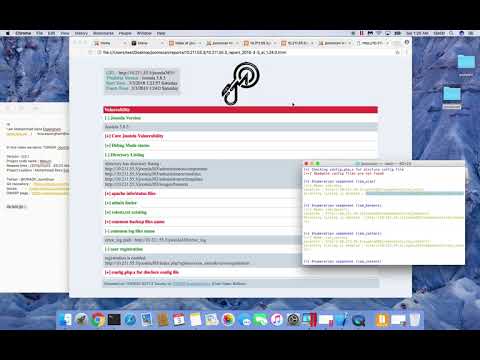
OWASP JoomScan introduction (Youtube)
관련 프로젝트 살펴보기
trimstray/the-book-of-secret-knowledge
영감을 주는 목록, 매뉴얼, 치트시트, 블로그, 팁, 원라이너, CLI/웹 도구 등을 모은 컬렉션.
257,417 스타Hack-with-Github/Awesome-Hacking
해커, 펜테스터, 보안 연구자를 위한 다양한 Awesome 목록 모음.
125,103 스타swisskyrepo/PayloadsAllTheThings
웹 애플리케이션 보안과 모의 침투 테스트/CTF에 유용한 페이로드 및 우회 방법 목록.
82,542 스타caddyserver/caddy
빠르고 확장 가능한 멀티플랫폼 HTTP/1-2-3 웹 서버이며, 자동 HTTPS를 지원합니다
78,935 스타