
NeatCode-Labs/fixupxer
NeatCode-Labs/fixupxer has 71 GitHub stars and 4 forks. GitHot measured +4 in 7 days. Last checked 2026-11-09 13:23 UTC. Last push 2026-10-29.
Android URL cleaner: strips tracking, rewrites social links for better previews, no permissions, no network. GPL-3.0-or-later.
What you can do
- Stop carrying tracking tags into the next chat. Remove known tracking parameters before copying, sharing, or opening a link. For example, example.org/read?article=42&utm_source=chat becomes example.org/read?article=42: the article selector stays. Browser Mode can do this for links Android sends to FixupXer, then open your usual browser.
- Notice an email address or sign-in token before passing it on. Private Link Guard flags certain sensitive values still present in a URL. Review them, remove a parameter, or go back. It runs offline, but cannot detect every private value or tell whether one was included intentionally.
- Teach it a cleanup the built-in rules do not know. Supply a before URL and the result you want. For supported cases, such as removing a named query parameter, FixupXer drafts a rule for that site. Review and test it before enabling it. Test Lab shows the result without opening the website.
- Choose where each site's links go. Remember a preferred browser or save an app choice for an exact website host from Ask what to do. For example, use an installed compatible native app for one site and your browser for another, without repeating the same choice each time.
측정된 스타 증가
- in 24h
- 업데이트 지연
- in 7 days
- +4
- in 15 days
- 업데이트 지연
- in 1 month
- 업데이트 지연
서로 겹치는 기간의 순증가량이며 일별 합계가 아닙니다. 측정값이 없으면 비워 둡니다. 스타는 관심도를 나타내며 품질을 보장하지 않습니다.
README.md
OriginalFixupXer
Cleaner links. X readers without an account. Better previews in your chats.







Website · Help · Supported Platforms · Privacy
FixupXer is a free, open-source Android app for cleaning links and choosing where they open. Paste a link, share it to FixupXer, or let Browser Mode process links Android routes to it. Keep using your usual browser afterwards.
The app has no ads, no account, and no Android permissions. URL processing runs entirely on your device. Opening a result hands it to another app or website, which has its own network access and privacy policy.
What you can do with it
- Read public X posts without signing in to X. Set the X Browser frontend
to
twitterviewer.net, for example, and X links routed through FixupXer open in that reader. Useful when an X sign-in prompt gets in the way of a public post or thread. Available content and complete threads depend on the reader; this does not unlock private posts. See the setup example below. - Share a preview instead of a bare social link. Convert X links to
fixupx.com, or choose embed frontends for Instagram, TikTok, and other supported platforms. These services help chat apps display media previews. Your sharing choice is separate from your Browser choice: read an X link in TwitterViewer, but share it through FxEmbed. Preview support depends on the chat app and the external service. - Stop carrying tracking tags into the next chat. Remove known tracking
parameters before copying, sharing, or opening a link. For example,
example.org/read?article=42&utm_source=chatbecomesexample.org/read?article=42: the article selector stays. Browser Mode can do this for links Android sends to FixupXer, then open your usual browser. - Notice an email address or sign-in token before passing it on. Private Link Guard flags certain sensitive values still present in a URL. Review them, remove a parameter, or go back. It runs offline, but cannot detect every private value or tell whether one was included intentionally.
- Teach it a cleanup the built-in rules do not know. Supply a before URL and the result you want. For supported cases, such as removing a named query parameter, FixupXer drafts a rule for that site. Review and test it before enabling it. Test Lab shows the result without opening the website.
- Choose where each site's links go. Remember a preferred browser or save an app choice for an exact website host from Ask what to do. For example, use an installed compatible native app for one site and your browser for another, without repeating the same choice each time.
Also included: optional local history, manual settings and rule backups, custom frontend domains, light and dark themes, and Clean link in text selection menus where the source app supports Android's Process Text action.
Screenshots
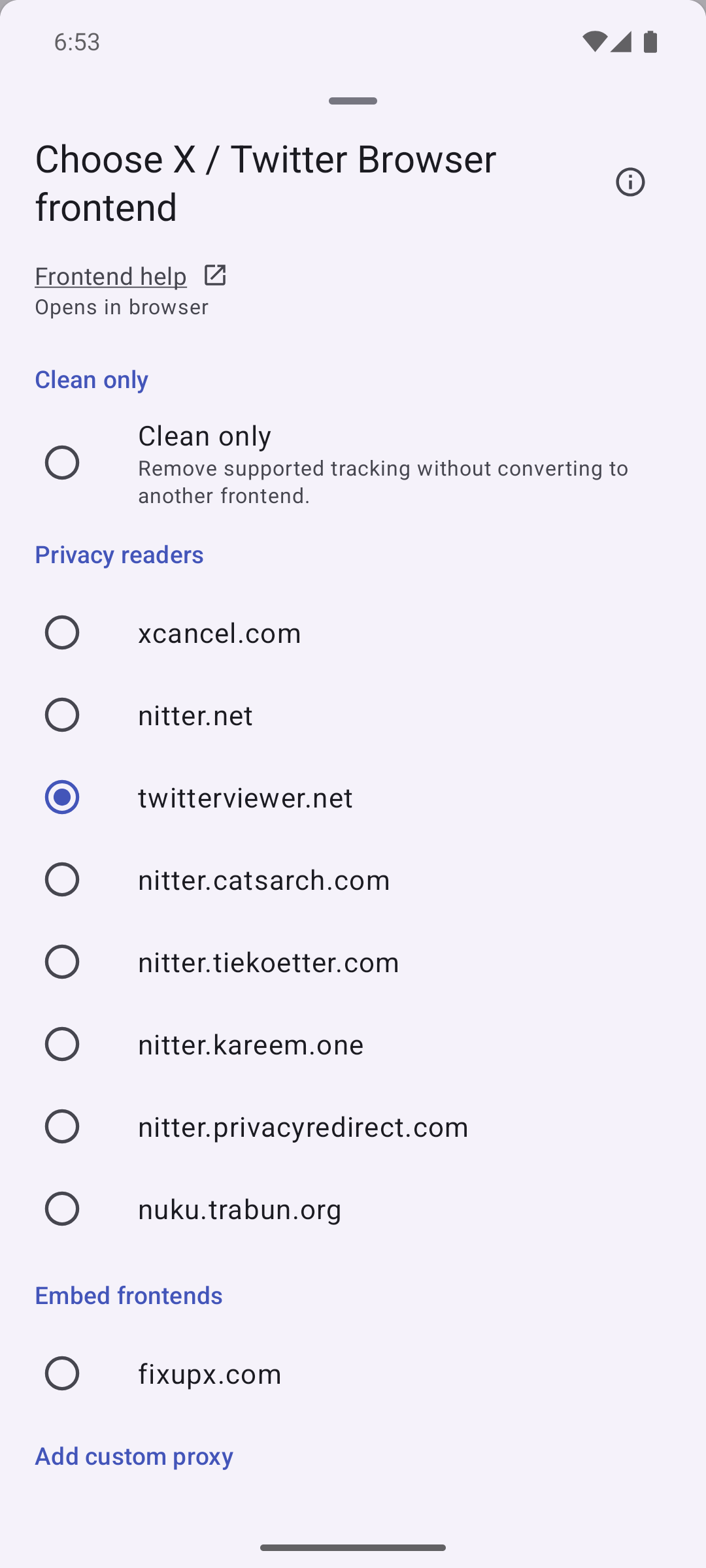 Choose an X reader |
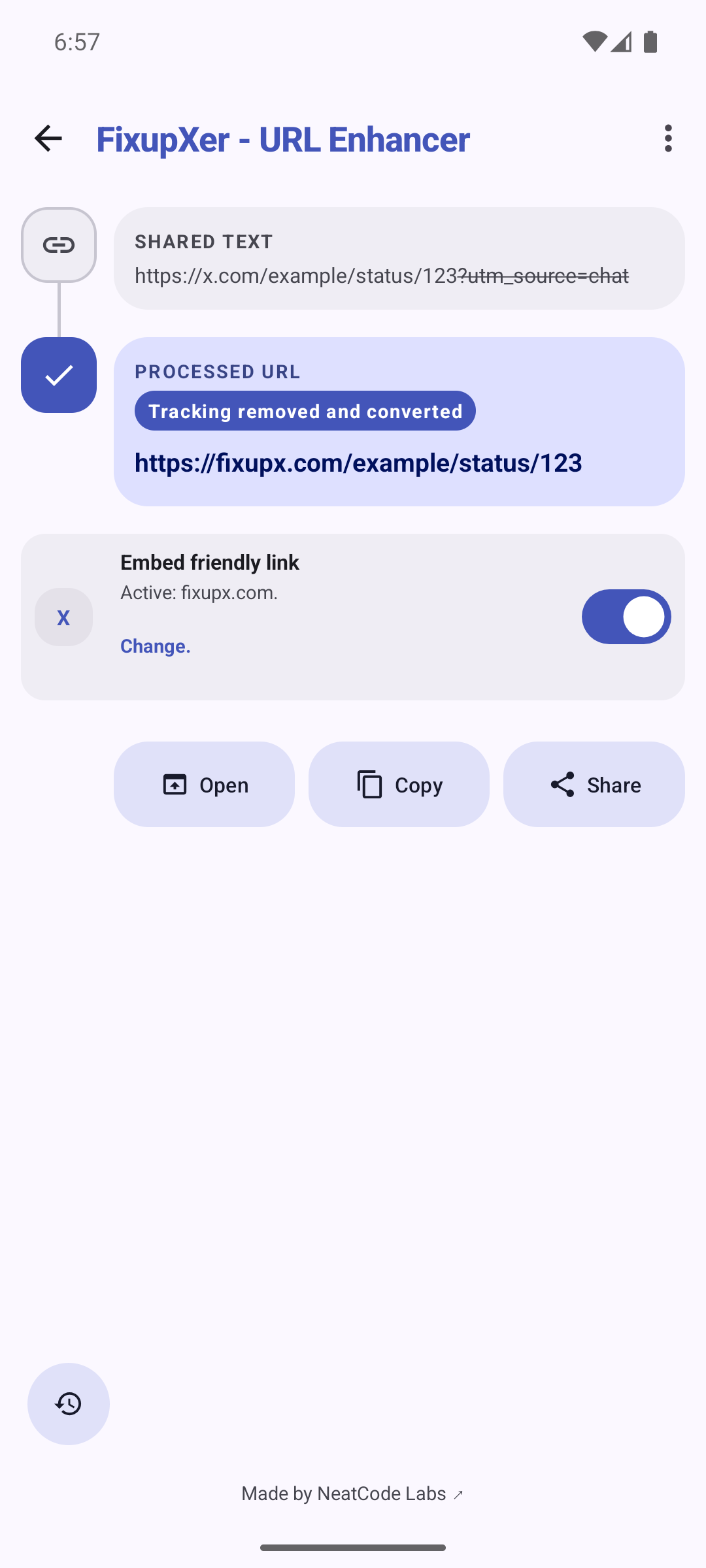 Prepare a link for chat |
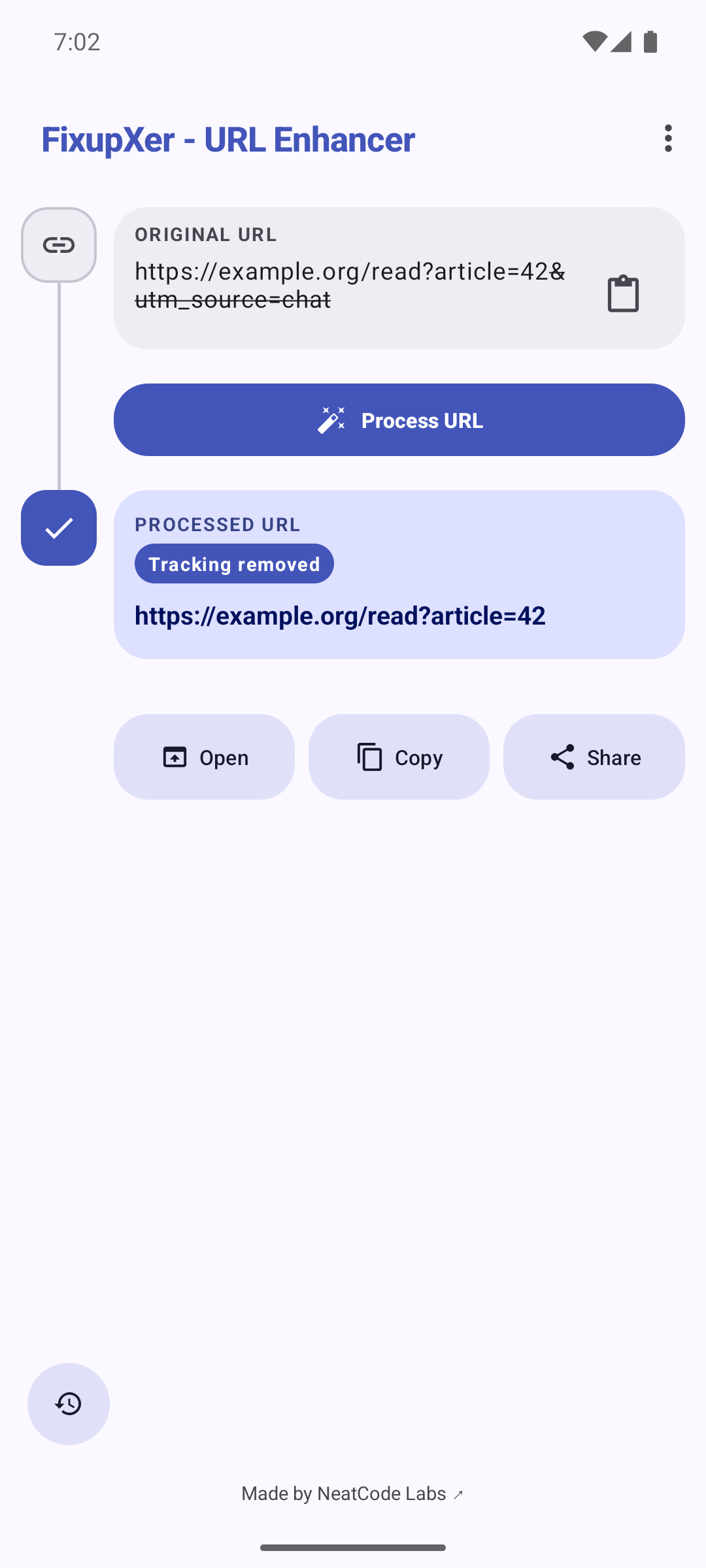 See what changed |
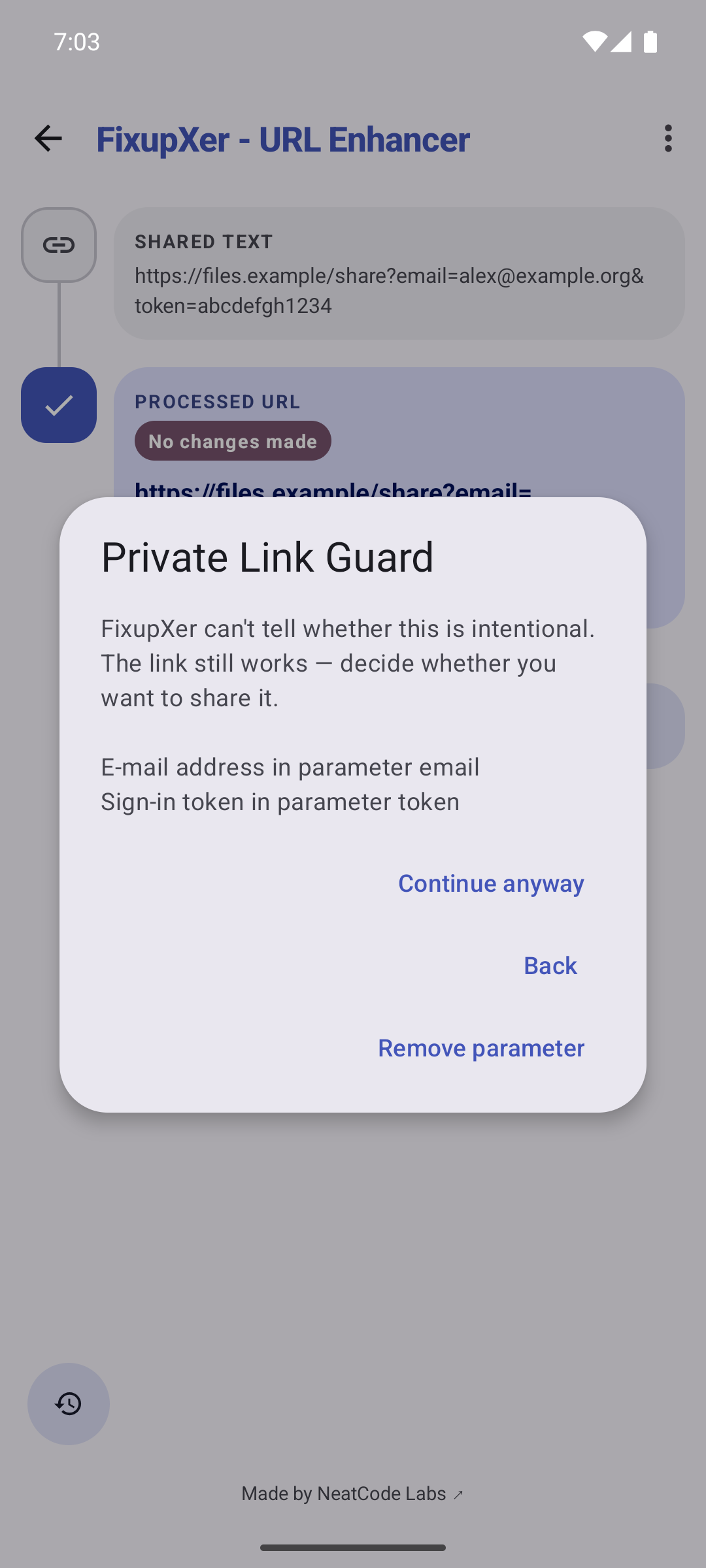 Check before passing it on |
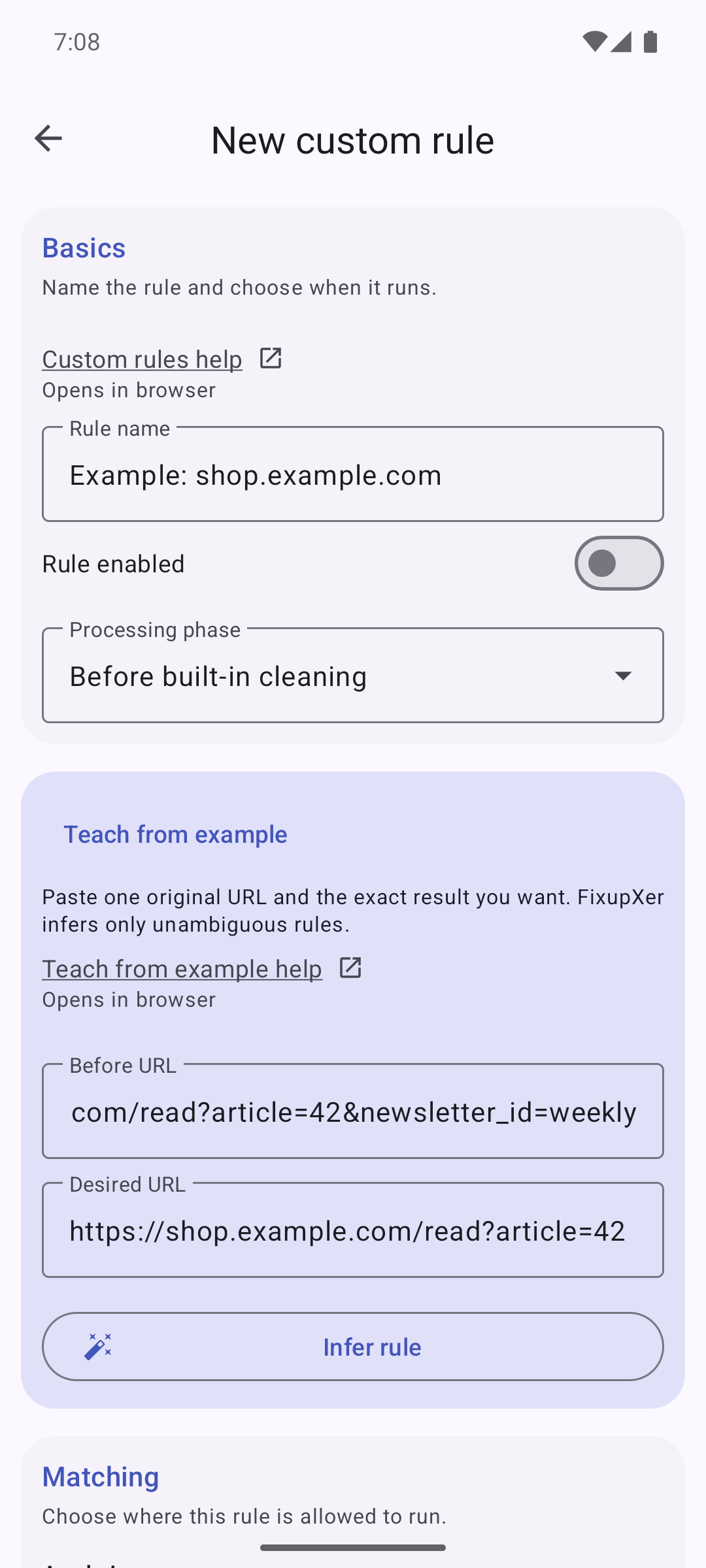 Teach from an example |
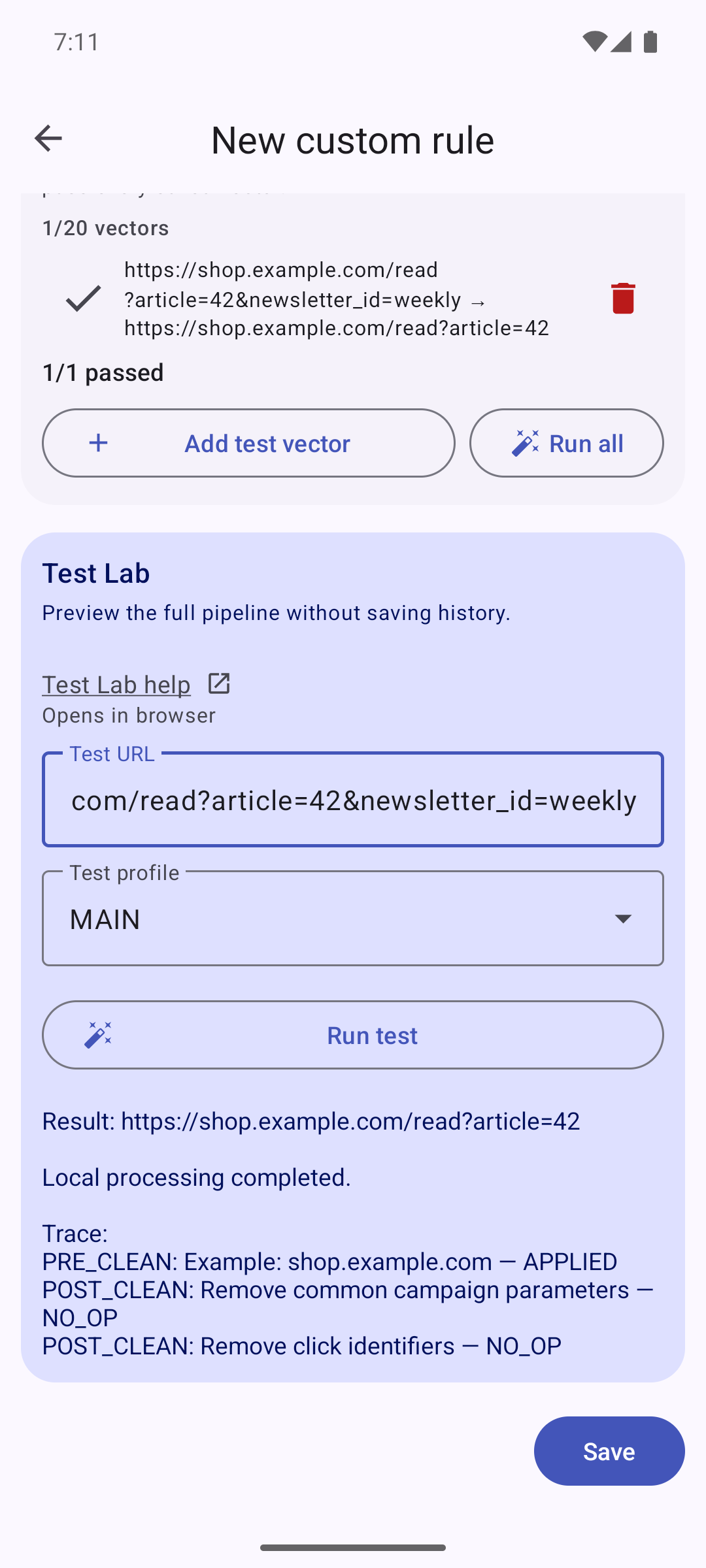 Try the rule locally |
Captured from FixupXer v2.9.0 on an Android 15 emulator. URLs and sensitive values shown in the cleaning examples are demonstration data.
Quick start
Share a link
- Use Share on a link in any app.
- Choose FixupXer.
- Copy, share, or open the cleaned result.
Paste a link
- Open FixupXer and tap the paste icon.
- Tap Process URL.
- Review the before/after result and choose an action.
Use Browser Mode
Enable Browser mode under Settings > Configure Browser mode, then select FixupXer under Android Default apps > Browser app. FixupXer does not render pages: it locally processes eligible HTTP(S) links Android sends to it, then hands the result to your selected external action. Verified App Links may bypass the default browser. Configure Browser frontends provides separate reader, embed and custom choices for seven platforms, including TikTok and Instagram. Add, edit or delete frontends in that picker; all changes remain drafts until Save. YouTube and Threads use Clean only. Copy, Share and Open in browser receive the final processed URL. Native actions restore known X, Instagram and TikTok embed links to their original platform domain; privacy readers and custom frontends stay in the browser. Set Preferred browser to remember which browser should open browser-directed links, or keep Always ask. With Ask what to do you can save a per-host app choice that is applied automatically on future links. Setup, action order, conversions, and troubleshooting are in the Browser mode setup and troubleshooting.
Read X links in a reader
- Open Settings > Configure Browser mode > Configure Browser frontends.
- Choose X / Twitter, select twitterviewer.net, and tap Save in the Browser frontends dialog.
- With Browser Mode configured, open an X link through FixupXer and choose Open in browser. The result opens on the selected reader.
The URL change happens locally: x.com/<user>/status/<id> becomes
twitterviewer.net/<user>/status/<id>. The reader then fetches the public
content. It may show ads or ask for cookie choices, and its availability and
thread support can change. FixupXer does not operate the reader or bypass
private-account restrictions.
To keep using fixupx.com for outgoing chat links, leave that selected in
Settings > Link processing > Alternative frontends > X / Twitter.
Main/Share and Browser selections are independent.
Custom URL rules
Custom rules extend the built-in cleaners while preserving the app's offline privacy model. They are disabled by default and run only after you enable them in Settings.
- Scope rules to all URLs, an exact host, a domain with subdomains, a host group, or a safe RE2/J URL pattern.
- Remove all parameters, remove selected parameters, keep only selected parameters, replace matching text, extract redirect targets, or rewrite URL components from a template.
- Run rules before built-in cleaning, after cleaning, or after social-domain conversion; limit them to Main, Share, or Browser contexts.
- Preview unsaved changes in Test Lab, inspect a bounded execution trace, add excludes, stop after a match, and reorder rules.
- Save up to 20 isolated input → expected-output test vectors per rule. A rule can be enabled only after all of its saved vectors pass; imports with failures are retained as disabled drafts.
- Start from bundled templates or import/export validated, versioned JSON bundles through Android's system file picker. Imports are atomic and can be rolled back.
See the Custom URL rules Help for beginner-friendly examples and a complete action/scope reference.
Built-in cleaning and link conversion
Dedicated cleaners cover Facebook, Instagram, Twitter/X, TikTok, LinkedIn, Reddit, Amazon, YouTube, Substack, Google Search, Google Maps, Google Store, Wikipedia, Threads, Twitch, Spotify, Pinterest, Snapchat, WhatsApp, Medium, Bing, DuckDuckGo, eBay, Netflix, AliExpress, Bilibili, The Guardian, and The New York Times. A universal cleaner removes proven common tracking parameters from other websites. Complete first-party X/Twitter post links also lose newly named sharing parameters while retaining supported functional options and photo/video path selection. Special routes and proxy options keep selective cleanup.
Curated offline redirect unwrapping handles Facebook l.php, LinkedIn
/safety/go, YouTube /redirect, Google Ads pagead/aclk, Reddit Mail,
Bluesky go.bsky.app, GeoRiot target.georiot.com/Proxy.ashx, and LinkSynergy
click.linksynergy.com/link wrappers. Destinations are decoded once and accepted
only when they are valid HTTP(S) URLs.
When a link from a supported platform is detected, the Main and Share screens show a contextual conversion toggle with the active frontend and a Change link. Every platform's picker is also always reachable from Settings → Link processing → Alternative frontends. The picker separates Embed frontends (better previews in chat apps) from Privacy frontends (read without an account) and lets you add custom domains for any platform:
- Facebook links to a user-added custom frontend (no built-in domain is
bundled; the former
facebookez.comwas retired after it began redirecting to an advertising network) - Twitter/X links to
fixupx.com(embed) or readers such astwitterviewer.net,xcancel.com,nitter.net, community Nitter instances, and automatic instance pickers - Bluesky post links to
fxbsky.app(embed) or SkyLib readers - Instagram and TikTok links to selectable built-in or custom proxies
- Reddit links to Redlib readers or
safereddit.com - Pinterest links to the
pinterest.bunk.imreader - YouTube, Threads, and Instagram reader conversions marked Experimental
These are local string transformations; FixupXer never contacts a frontend. Reader conversions are off by default, and each platform remembers its own selection with migration from known legacy proxies. Full domain rosters and platform behavior are documented in Supported Platforms.
If you open a converted URL, the receiving browser, native app, or third-party frontend performs the network request and applies its own privacy policy.
Third-party conversion services are not operated by NeatCode Labs and may change or stop working. Conversion is optional and can be disabled per link.
History
Conversion History is optional and stored only on the device.
- Tap an entry to load its cleaned URL.
- Use the visible copy, share, and delete actions on each entry.
- Clear all entries from the bottom action bar.
- Use the header settings icon to change the maximum retained entries (default: 100).
- Disable history at any time from the switch at the top of the sheet.
Backup and restore
Open Settings > Backup & restore to save a versioned JSON file through Android's system file picker. The file contains whitelisted preferences, custom rules, and remembered Browser-mode destinations. Restoring validates the whole file first, then replaces those backed-up items; it never imports URL history or rule rollback snapshots.
Backup schema v2 includes all nine Browser frontend choices, separately from Main/Share selections, and the preferred browser. Older files without a preferred browser restore Always ask. Older v1 backups still import: their four reader choices are migrated and all newly supported conversions start off. Import replaces the entire Browser map, so existing v2 embed/custom choices cannot remain enabled accidentally. Invalid files are rejected before settings change. Interrupted restores retain a recovery journal and block Browser handoff until recovery succeeds.
See the History and backup Help for migration and recovery details.
Privacy and safety
- Zero app permissions — no internet, storage, location, contacts, or notification permission.
- No telemetry or analytics — nothing is collected or transmitted.
- No app-managed sync — FixupXer never uploads preferences, history, custom proxies, rules, or rollback snapshots. Android may back up the preferences file according to your device/account settings; Room data (including URL history and custom rules) is excluded from automatic backup.
- Explicit exports — rule bundles and manual settings backups leave the app only when you choose a destination through Android's system file picker.
- Explicit handoff — FixupXer processes URLs offline; a browser, native app, share target, or privacy reader receives the result only after your selected action or Android Browser Mode routing.
- Bounded processing — input length, rule count, regex complexity, redirect hops, traces, and import sizes are limited.
- Safe user regex — custom patterns use linear-time RE2/J and never fall back to Java regular expressions.
Read the complete Privacy Policy.
Installation
See fixupxer.com/download for all download options.
- Google Play: install from the Play Store
- F-Droid: install from F-Droid
- GitHub: download the latest signed APK from GitHub Releases
GitHub APK installations may require temporarily allowing your browser or file manager to install unknown apps.
Frequently asked questions
Does FixupXer need internet access?
No. URL processing is fully offline and the app declares no network permission. Documentation and report links are opened only when requested, in an external browser.
What is the difference between cleaning and converting?
Cleaning removes tracking parameters. Conversion optionally changes a social domain to an embed-friendly or account-free reader third-party domain. Either feature can be used without the other.
Are Custom URL rules enabled automatically?
No. They remain off after installation or an update until you explicitly enable them in Settings.
Can I disable or clear history?
Yes. Open History to disable collection, delete individual entries, or clear everything. Rules and preferences are separate from History.
What happens if a conversion frontend stops working?
Open the Change link next to the conversion toggle and choose another built-in frontend or add your own custom domain. Disable the toggle to keep the original social-media domain.
Technical details
Requirements, architecture, and test status
- Android 5.0 (API 21) or newer; target/compile SDK 36
- Kotlin 1.9.23, JDK 17, Views + View Binding, Material 3
- Hilt dependency injection and Room persistence
- Modular cleaner registry with O(1) domain dispatch
- Raw-preserving URL processing with immutable per-request rule snapshots
- RE2/J 1.8 for user-authored regular expressions
- Release verification, test counts, signed-artifact checks and execution boundaries are recorded per version in the build and testing reports.
- Release lint, zero-permission manifest regression test, and REUSE compliance
Build from source
Prerequisites: JDK 17 and Android SDK 36.
git clone https://github.com/NeatCode-Labs/fixupxer.git
cd fixupxer
./gradlew assembleDebug
For a signed release build, copy keystore.properties.template to
keystore.properties, configure your own keystore, and run
./gradlew assembleRelease.
License, attribution, and contributing
FixupXer is licensed under GPL-3.0-or-later. Distributed builds and derivatives must follow the license terms, including source-disclosure and same-license requirements. All historical FixupXer versions and commits are retroactively licensed under GPL-3.0-or-later, superseding earlier license notices. The software is provided without warranty.
URL-cleaning research and independently re-implemented behaviour were informed
by ClearURLs Rules,
Léon – The URL Cleaner, and
Untracker.
Selected cleaner behaviours were independently re-implemented from Léon
(GPL-3.0-or-later) without copying code or rule data; the full audit is in
docs/THIRD_PARTY_PROVENANCE.md.
RE2/J 1.8 is used unmodified under its
upstream Go License; details are in NOTICE and
LICENSES/LicenseRef-RE2J.txt.
The alternative-frontend ecosystem used by built-in targets includes FxEmbed, InstaFix, fxTikTok, Nitter, SkyLib, Redlib, Invidious, and Farside. FixupXer does not bundle their code or operate these external services.
Community thanks:
- @serrq for proposing default-browser integration in issue #1.
- @gituser765 for documenting TikTok redirect short-link limitations in issue #2.
- @Milliw for reporting the F-Droid Settings-menu regression in issue #3.
- @IzzySoft for identifying F-Droid metadata limits in issue #4.
- @gautamnabin5 for proposing TikTok conversion support in PR #5.
- @ItsIgnacioPortal for the detailed custom-rules proposal and testing feedback in issue #6.
Thanks also to the developers and operators of the built-in embed and privacy frontend instances shown in the app. The custom-rule engine and bundled templates were independently authored for FixupXer; no third-party ruleset, parser, regex corpus, or proprietary code was copied.
Third-party company and product names remain the property of their respective holders; their appearance does not imply affiliation or endorsement.
Contributions are welcome — read CONTRIBUTING.md before opening an issue or pull request.
Support
If FixupXer is useful to you:
- Star the repository
- Report bugs through the app or GitHub Issues
- Share the app with people who value privacy
- Optionally buy us a coffee
Created by NeatCode Labs
Making the internet cleaner, one URL at a time.


관련 프로젝트 살펴보기
trimstray/the-book-of-secret-knowledge
영감을 주는 목록, 매뉴얼, 치트시트, 블로그, 팁, 원라이너, CLI/웹 도구 등을 모은 컬렉션.
257,471 스타Hack-with-Github/Awesome-Hacking
해커, 펜테스터, 보안 연구자를 위한 다양한 Awesome 목록 모음.
125,103 스타swisskyrepo/PayloadsAllTheThings
웹 애플리케이션 보안과 모의 침투 테스트/CTF에 유용한 페이로드 및 우회 방법 목록.
82,542 스타caddyserver/caddy
빠르고 확장 가능한 멀티플랫폼 HTTP/1-2-3 웹 서버이며, 자동 HTTPS를 지원합니다
78,935 스타