
N45HT/XSSRush
N45HT/XSSRush has 66 GitHub stars and 16 forks. Star changes are not measured yet. Last checked 2026-11-13 04:07 UTC. Last push 2026-11-10.
Automated Multi-Vector Cross-Site Scripting (XSS) Scanner
측정된 스타 증가
- in 24h
- 기록 수집 중
- in 7 days
- 기록 수집 중
- in 15 days
- 기록 수집 중
- in 1 month
- 기록 수집 중
서로 겹치는 기간의 순증가량이며 일별 합계가 아닙니다. 측정값이 없으면 비워 둡니다. 스타는 관심도를 나타내며 품질을 보장하지 않습니다.
README.md
Original

Automated Multi-Vector Cross-Site Scripting (XSS) Scanner & Auditor
Powered by Playwright Headless Browser Automation • Zero Backend • Standalone Python CLI






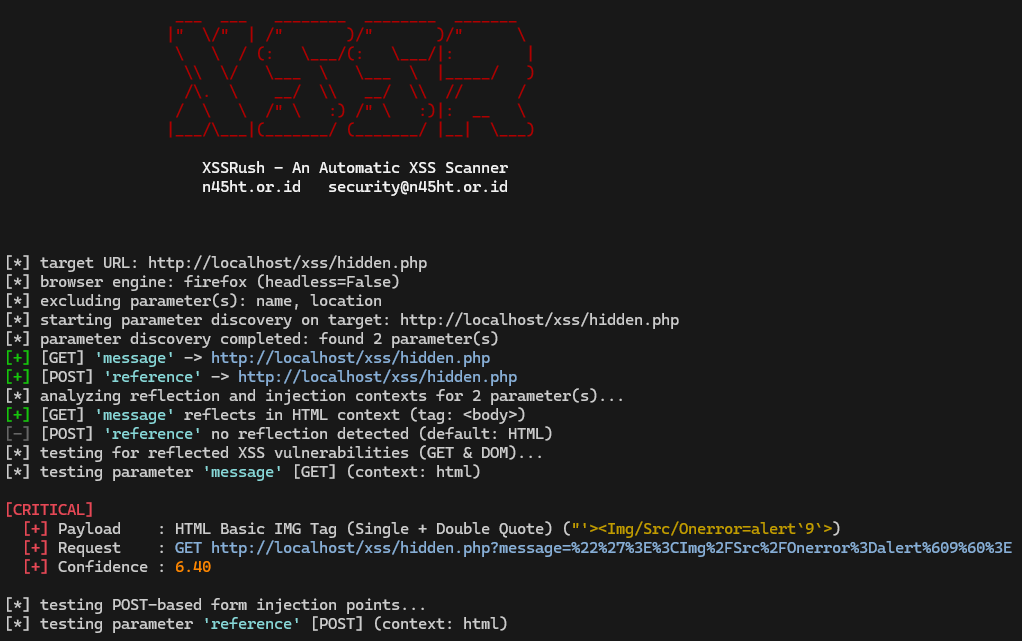
XSSR (XSSRush) is an automated Cross-Site Scripting (XSS) vulnerability scanner and security auditor developed by N45HT.
By driving real headless browser instances via Playwright, XSSR hooks into the browser event loop to intercept genuine JavaScript execution (alert, confirm, prompt). It eliminates false positives common to static regex scanners by confirming payload execution directly inside the DOM.
Audit Pipeline
XSSR executes a structured 7-phase auditing sequence:
[Step 0: Mining]  ──>  [Step 1: Canary Probing]  ──>  [Step 2: GET & DOM XSS]
                                                               │
[Step 5: Fragment] <──  [Step 4: Path XSS]  <──  [Step 3: POST Form XSS]
        │
        └───> [Step 6: Header XSS]  ───> [Verification & Reporting]
| Step | Module | Attack Vector & Description |
|---|---|---|
| 0 | modules/parameter_mining.py |
Parameter Mining: Extracts query params, form controls, global window JS variables, and probes hidden parameters using wordlists. |
| 1 | modules/reflection.py |
Reflection Analysis & Character Probing: Injects unique canary probe tokens to discover reflection points, maps syntactic contexts (html, attribute, javascript, url), and probes the Special Character Reflection Matrix (' " < > / ; ( ) { } = `). |
| 2 | modules/get_dom.py |
Reflected GET & DOM XSS: Tests context-tuned payloads into query/DOM parameters and intercepts browser dialogs. |
| 3 | modules/forms.py |
POST-Based Form XSS: Automates DOM form submission (requestSubmit()) and generates base64 HTML reproduction PoCs. |
| 4 | modules/links.py |
Path-Based XSS: Injects payloads into URL path segments and directory rewrites. |
| 5 | modules/dom.py |
Fragment-Based XSS: Tests URL hash fragments (#payload) against client-side SPA routers and DOM sinks. |
| 6 | modules/headers.py |
Header-Based XSS: Injects payloads into HTTP request headers (User-Agent, Referer, Origin, Cookie, X-Forwarded-*). |
Installation
Prerequisites
- Python 3.10 or newer
pippackage manager
# 1. Clone repository
git clone https://github.com/N45HT/XSSRush.git
cd XSSRush

# 2. Install dependencies
pip install -r requirements.txt

# 3. Install Playwright browser engine (Firefox default)
playwright install firefox
(Optional) If you plan to test with Chromium or WebKit engines:
playwright install chromium webkit
Usage Examples
1. Basic Single Target Scan (GET & POST)
python xssr.py -u "https://target.com/page?id=12"
2. Testing Custom POST Data Fields
python xssr.py -u "https://target.com/login" --scan post -d "username=admin&search=keyword"
3. Full Multi-Vector Audit
Test all vectors (GET, POST, Path, Fragment, Header) and export report:
python xssr.py -u "https://target.com/app" --scan all -o scan_report.json
4. Selecting Browser Engine
Switch to Chromium or WebKit:
python xssr.py -u "https://target.com/app" -b chromium --scan all
5. Visible GUI Browser Mode (Debugging)
Disable headless mode to visually monitor browser interactions:
python xssr.py -u "https://target.com/search?q=test" --headless false -v
6. Fine-Tuning Request Delays
Adjust delay ranges (in milliseconds) to avoid WAF rate-limiting:
python xssr.py -u "https://target.com" --scan all --delay-min 1500 --delay-max 3000
7. Custom Wordlist Parameter Mining
Probe hidden parameters using custom wordlists:
python xssr.py -u "https://target.com/view" -w "wordlists/common.txt" --scan get,post
8. Parameter Mining & Reflection Probing Only
Run parameter discovery and reflection context analysis without testing any XSS attack vectors:
python xssr.py -u "https://target.com/view" -m
9. Multi-Target Scanning & STDIN Pipeline
Scan multiple targets from a file or directly via standard input pipes:
# Load targets from file
python xssr.py -f targets.txt

# Pipe from other tools or cat in silent mode
cat targets.txt | python xssr.py -s

# Silent mining mode
cat targets.txt | python xssr.py -s -m
10. Authenticated Scanning (Cookies & Custom Headers)
Scan endpoints requiring session authentication or custom tokens:
# Pass cookies directly or via file
python xssr.py -u "https://target.com/profile" -c "PHPSESSID=abc123xyz; role=admin"
python xssr.py -u "https://target.com/profile" --cookie-file cookies.txt

# Send custom HTTP headers (e.g. Bearer token, CSRF token)
python xssr.py -u "https://target.com/api" -H "Authorization: Bearer my_jwt_token" -H "X-API-Key: secret"
11. Special Character Reflection Matrix & WAF / Rate-Limit Protection
XSSR automatically probes critical XSS characters on reflected parameters (' " < > / ; ( ) { } = ) in a single request, categorizing each character as allowed, escaped, or filtered`. In addition, XSSR features built-in WAF (Cloudflare, AWS WAF, Akamai, Imperva, ModSecurity, Wordfence, Sucuri, F5) and rate-limit (HTTP 429) auto-detection, dynamically doubling delays and applying backoff throttling without failing:
# Character matrix output is displayed automatically on reflection analysis:
python xssr.py -u "https://target.com/page?id=test" -m

# Output preview:
# [*] analyzing reflection and injection contexts for 1 parameter(s)...
# [+] [GET] 'id' reflects in HTML context (tag: <body>)
#   [*] character matrix for 'id': allowed: [ < > " ] | escaped: [ ' ] | filtered: [ ( ) { } = ]
12. Automated Crawler / Spider & Concurrency
Automatically discover internal endpoints and forms while strictly deduplicating identical forms and endpoints across visited pages, then audit them in parallel using concurrent browser worker tabs:
# Crawl seed URL with depth 2 and test discovered endpoints concurrently using 3 browser tabs:
python xssr.py -u "https://target.com" --crawl --depth 2 -t 3

# Crawl with custom maximum URLs cap and parameter mining only:
python xssr.py -u "https://target.com" --crawl --depth 3 --max-urls 100 -t 5 -m
13. Custom HTTP Headers Injection
Audit specific HTTP headers alongside default targets:
python xssr.py -u "https://target.com" --scan header --include-header "X-Client-IP,X-Custom-Auth"
14. Inspect Built-in Knowledge Bases
Inspect payloads, known parameter lists, or targeted headers and exit:
python xssr.py --show-payloads
python xssr.py --show-params
python xssr.py --show-headers
15. AI Fallback Analyzer (LLM Filter Breakout)
When a reflected parameter fails all standard rule-based and context payloads, XSSR can invoke an LLM fallback analyzer (via OpenRouter) to inspect the surrounding DOM snippet and character reflection matrix, construct tailored breakout payloads, and verify them automatically in the browser:
# Enable AI fallback with direct API key:
python xssr.py -u "https://target.com/page?id=test" --ai --ai-key "31620e4f-..."

# Or set environment variable XSSR_AI_KEY (or in .env):
export XSSR_AI_KEY="sk-or-v1-..."
python xssr.py -u "https://target.com/page?id=test" --ai --ai-model "deepseek/deepseek-chat"

# Or run in AI-only mode (skip static payload lists, directly test AI-generated payloads):
python xssr.py -u "https://target.com/page?id=test" --ai-only

# Provide custom context hint for the AI analyzer:
python xssr.py -u "https://target.com/page?id=test" --ai-only --ai-context "parameter is reflected inside script tag in variable in backtick"
Command Line Options
Target Options:
  -u, --url URL                   Target URL to scan (e.g. https://example.com/search?q=test)
  -f, --file FILE                 Load targets from file (one URL per line)

Browser & Engine Options:
  -b, --browser {firefox,chromium,webkit}
                                  Browser engine to use (default: firefox)
  --headless                      Run browser in headless mode (choices: true, false, default: true)
  --timeout TIMEOUT               Page navigation timeout in milliseconds (default: 15000)
  --delay-min DELAY_MIN           Minimum request delay in ms (default: 3000)
  --delay-max DELAY_MAX           Maximum request delay in ms (default: 5000)
  -t, --threads THREADS           Number of concurrent browser tabs/workers (1-5, default: 1)

Scan Scope Options:
  --scan MODULES                  Modules to test: get, post, path, fragment, header, or all
                                  (default: get,post)
  -w, --wordlist FILE             Custom parameter wordlist file to probe (e.g.
                                  'wordlists/common.txt')
  -m, --mining                    Perform parameter mining and reflection analysis only (no XSS
                                  testing)
  -p, --param PARAMS              Parameters to test (e.g. 'p:js,q:html' or 'name')
  -e, --exclude PARAMS            Parameters to skip during testing (comma-separated, e.g.
                                  'name,location')
  -d, --data POSTFIELDS           Custom POST data fields (e.g. 'username=admin&search=keyword')
  -c, --cookie COOKIE             Custom cookie string or path to cookie file (e.g. 'session=xyz')
  --cookie-file FILE              Load cookies from file (Netscape, JSON, or key=value format)
  -H, --header HEADER             Custom HTTP header to send with all requests (e.g. 'Authorization:
                                  Bearer token')
  --context CONTEXT               Default injection context (choices: js, html, attr, url, dom)
  --include-header HEADERS        Custom HTTP headers to add to header scan (comma-separated, e.g.
                                  'X-User-Agent,X-Referer')
  --exclude-header HEADERS        HTTP headers to skip during header scan (comma-separated, e.g.
                                  'User-Agent,Referer')

Crawler / Spider Options:
  --crawl                         Enable internal spider/crawler to discover endpoints automatically
  --depth DEPTH                   Maximum crawl depth for internal links (1-5, default: 2)
  --max-urls MAX_URLS             Maximum total URLs to collect during crawling (1-200, default: 50)

AI Assistant Options:
  --ai                            Enable AI fallback analysis when standard payloads fail
  --ai-only                       Exclusively test using AI-generated payloads (skip standard payloads)
  --ai-model MODEL                AI model to use (default: deepseek/deepseek-chat)
  --ai-key KEY                    AI provider API key (or via environment variable XSSR_AI_KEY)
  --ai-context HINT               Custom user-defined context hint or constraint for the AI analyzer

Information Options:
  --show-payloads                 Show all built-in XSS payloads and exit
  --show-params                   Show all built-in known parameters and exit
  --show-headers                  Show all built-in target HTTP headers and exit

Output & Reporting Options:
  -o, --output FILE               Save report JSON (saved to output/ folder unless absolute path is
                                  given)
  -s, --silent                    Silent mode (suppress banners and progress, output only findings)
  -v, --verbose                   Enable verbose debugging output
  -h, --help                      Show this help message and exit
  --version                       Show program's version number and exit
Legal Disclaimer
Responsible Security Research Only:
XSSR (XSSRush) is developed strictly for authorized penetration testing, security auditing, educational purposes, and responsible vulnerability research.Testing targets without prior mutual written consent is illegal in most jurisdictions. The developer accepts no liability and is not responsible for any misuse, damage, or legal consequences caused by this software. Use responsibly.
Support & Donation
If you find this project useful and want to support its ongoing development:


Author & License
- Author: N45HT
- Official Website: https://n45ht.or.id
- XSSRush Landing Page: https://xssr.n45ht.or.id
- Security Contact: [email protected]
- License: Released under the MIT License.
관련 프로젝트 살펴보기
trimstray/the-book-of-secret-knowledge
영감을 주는 목록, 매뉴얼, 치트시트, 블로그, 팁, 원라이너, CLI/웹 도구 등을 모은 컬렉션.
258,060 스타Hack-with-Github/Awesome-Hacking
해커, 펜테스터, 보안 연구자를 위한 다양한 Awesome 목록 모음.
125,360 스타swisskyrepo/PayloadsAllTheThings
웹 애플리케이션 보안과 모의 침투 테스트/CTF에 유용한 페이로드 및 우회 방법 목록.
82,623 스타caddyserver/caddy
빠르고 확장 가능한 멀티플랫폼 HTTP/1-2-3 웹 서버이며, 자동 HTTPS를 지원합니다
79,020 스타