
MuaraAI/FluxCode
MuaraAI/FluxCode has 24 GitHub stars and 3 forks. Star changes are not measured yet. Last checked 2026-11-14 02:32 UTC. Last push 2026-11-13.
측정된 스타 증가
- in 24h
- 기록 수집 중
- in 7 days
- 기록 수집 중
- in 15 days
- 기록 수집 중
- in 1 month
- 기록 수집 중
서로 겹치는 기간의 순증가량이며 일별 합계가 아닙니다. 측정값이 없으면 비워 둡니다. 스타는 관심도를 나타내며 품질을 보장하지 않습니다.
소개
Lightweight native code editor for Windows and Linux, written in Rust on GPUI. AI agent panel (ACP: OpenCode, Mura), Python-friendly terminal, built-in git, read-only viewers for binary, PDF, Office, ZIP and SQLite files. No telemetry.
개발 도구README.md
OriginalFluxCode
English · Bahasa Indonesia
A native code editor for Windows, macOS and Linux, written in Rust and drawn by the GPU. One small program with an AI agent panel, a Python-friendly terminal, built-in Source Control, and read-only views for files other editors refuse to open. No telemetry. It opens its window in 0.22 s and sits at 1.4 MB idle, in one process (benchmark).
A MuaraAI project, built by a first-semester university student in Indonesia (MyKineID). Open source, and still in development.

The agent added a docstring (line 23), the Changes card lists the file with Undo, and because access is set to Read & write, it has to ask before running a command.
Benchmark
On one Windows 11 PC, FluxCode put its window on screen in 0.22 s and sat at 1.4 MB in Task Manager once idle, in one process. Zed took 0.82 s and 66 MB; VS Code 0.29 s and 929 MB over nine processes.
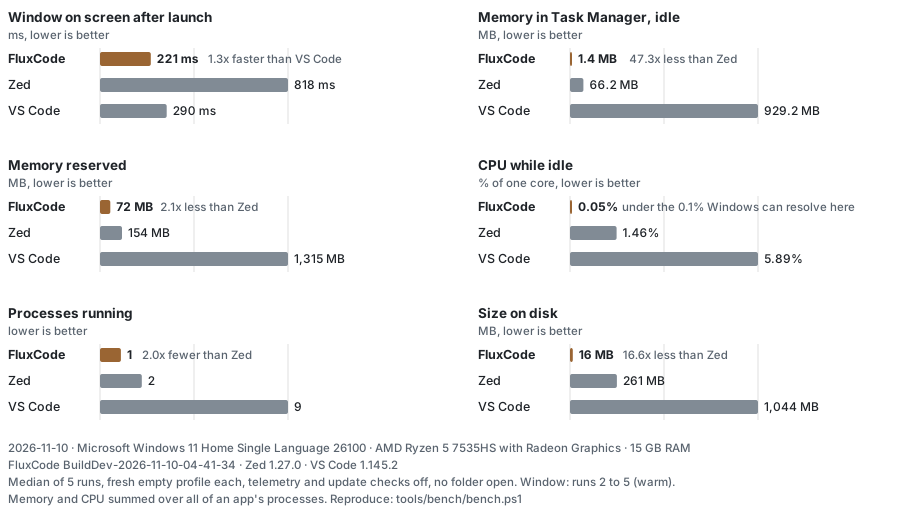
The gap is widest where an editor sits all day: idle memory. FluxCode uses 1.4 MB, Zed 66.2 MB, VS Code 929.2 MB. On disk it is 16 MB against 261 MB and 1,044 MB. Its window is on screen in 221 ms, against 818 ms for Zed and 290 ms for VS Code. Lower is better in every chart below.
Median of 5 runs each on a PC with an AMD Ryzen 5 7535HS and 15 GB of RAM, 10 November 2026. Every app started from a fresh, empty profile with telemetry and update checks off and no folder open.
Exact numbers, method, and what this does not measure
Median, with the lowest and highest of the runs in brackets:
| FluxCode BuildDev-2026-11-10-04-41-34 | Zed 1.27.0 | VS Code 1.145.2 | |
|---|---|---|---|
| Window on screen after launch (ms) | 221 (216 to 232) | 818 (387 to 1,322) | 290 (268 to 328) |
| Memory in Task Manager, idle (MB) | 1.4 (1.0 to 4.8) | 66.2 (65.2 to 71.9) | 929.2 (867.7 to 985.4) |
| Memory reserved (MB) | 72 (72 to 72) | 154 (153 to 156) | 1,315 (1,249 to 1,399) |
| CPU while idle (% of one core) | 0.05 (0.00 to 0.68) | 1.46 (1.15 to 2.60) | 5.89 (5.57 to 8.12) |
| Processes running | 1 | 2 | 9 |
| Size on disk (MB) | 16 | 261 | 1,044 |
- Window: from launch to the first visible window, runs 2 to 5 (run 1 reads the program from disk cold). VS Code shows its window before the workbench inside it has loaded.
- Memory in Task Manager: the private working set, 9 s after launch, summed over every process of the app. FluxCode hands memory it isn't using back to Windows 6 s after start, so this is its idle figure; it is about 5 MB after a click and about 30 MB while the agent install animation runs. Zed and VS Code keep theirs.
- Memory reserved: private bytes (commit), the memory the app has claimed whether or not it is in RAM right now.
- CPU while idle: CPU time from 9 s to 39 s after launch, as a share of one core. Windows counts it in 15.6 ms steps, so FluxCode's 0.05% is at the limit of what it can tell apart from zero.
- Size on disk: the install folder; for FluxCode, its one program file.
- Not measured here: typing latency, opening very large files, working in a big project, or anything with extensions and language servers loaded. Zed and VS Code do more in those areas (see the comparison table below: FluxCode has no debugger, extensions or language servers yet).
- Reproduce: close all three apps, then run
powershell -ExecutionPolicy Bypass -File tools/bench/bench.ps1 -FluxExe <path to fluxcode.exe>andpython tools/bench/chart.py. The raw runs are intools/bench/results.json.
Download
Get the newest build from Releases.
| System | File | Install |
|---|---|---|
| Windows 10/11, x64 | FluxCode-BuildDev-...-windows-x64-setup.exe |
Run it. No admin rights: it installs for your account, with a Start Menu and a Desktop shortcut. |
| macOS 11+, Apple silicon and Intel (preview) | FluxCode-BuildDev-...-macos-universal.dmg |
Open it and drag FluxCode to Applications. |
| Linux, x64 (glibc 2.35+, Vulkan) | FluxCode-BuildDev-...-linux-x64.tar.gz |
Extract, run ./install.sh. No root. |
| Windows, portable | FluxCode-BuildDev-...-windows-x64.zip |
Extract; FluxCode.exe runs from the folder (Install.cmd installs it). |
The macOS build is a preview. We have not tested it on a real Mac yet. Try it and open an issue if something breaks.
The macOS build isn't notarized by Apple yet (that takes an Apple Developer ID), so the
first open asks once: on macOS 15 and newer, open it, then System Settings > Privacy &
Security > Open Anyway; on older ones, right-click FluxCode > Open. Uninstall: Settings >
Apps on Windows, the Trash on macOS, ./install.sh --uninstall on Linux.
There are no version numbers yet: every change merged into main becomes a build named
after the moment it was made, like BuildDev-2026-11-09-18-19-54. Installed copies offer
the new one in a card and update themselves in one click. Settings > Updates turns the
check off.
A closer look
A Python error becomes a card with the file, the line and a hint; for a missing module, Fix installs it. A SQLite database opens as its tables, SQL and row counts, like Word, Excel, PDF and ZIP files do, instead of an error.
Source Control stays fast with thousands of new files and offers to ignore the folders
that hold them. Go to File (Ctrl+P) finds a file from a few letters of its name.
Six color themes, three interface sizes and your own background image. The interface also comes in Bahasa Indonesia, shown here with the update card in the FluxCream theme.
What makes it different
- Laid out and driven like VS Code. Activity bar, side bar, tabs, panel and status
bar sit where VS Code puts them, and the keys are VS Code's:
Ctrl+Shift+Pfor the Command Palette,Ctrl+Pto find a file,Ctrl+Gto go to a line,Ctrl+/to comment,Alt+Upto move a line. If you know VS Code, you already know where things are. It is not a VS Code clone: there is no debugger yet, and the extensions are build tasks rather than a catalog (see the table below). - Light like Zed. The whole editor is one Rust program drawn by the GPU with GPUI, the framework Zed is built on. In the benchmark it opens its window in 0.22 s, reserves 72 MB (Zed: 154 MB), and once idle shows 1.4 MB in Task Manager, because it hands the memory it isn't using back to Windows.
- Built for AI agents. The agent panel speaks the Agent Client Protocol and lists every agent in the ACP registry, each with its own icon. Missing ones install with one click into FluxCode's own folder. You choose the model, effort, mode and permissions under the message box; the agent can ask you multiple-choice questions and has to ask before it runs a command or changes a file; each turn's file changes can be undone.
- For beginners and experts. A beginner can pick an agent from a list, answer its questions by clicking, and keep it read-only. An expert gets the palette, the shortcuts, per-agent instruction files and every editor option in Settings: font, size, tab size, word wrap, whitespace, line numbers, folding, bracket closing, smart indent, cursor padding, scrolling past the end, interface size, themes and a background image.
Live share
Code together in real time, with your PC as the server. The people icon in the activity bar opens the Live share page in the editor area: its cards sit two to a row on a wide window and one under the other on a narrow one.
- The host opens a folder, clicks Start hosting and sends the invite code
(
FLUX1-...) to the others, in a chat or by mail. - Each guest pastes it and clicks Join, either into their own clone of the same repository or into a new folder that fills as they open files.
- Everyone types in the same files at once. The host's PC orders the edits (operational transformation), so everyone ends with the same text.
The panel lists who is in the session (by GitHub name when signed in) and which file and line each person is on. Its activity list shows each person's edits with lines added and removed and a diff; an edit made by an AI agent carries an AI label with the agent, model, effort and mode it ran with, so you can see which model wrote what.
Edits go between the host's PC and each guest, encrypted with ChaCha20-Poly1305 under the secret in the invite code; no server of ours is involved, and nobody needs a VPN or a rented server. When hosting starts, FluxCode opens every way in it can and the panel shows each one, its address, or why it isn't open:
| Way in | Who can use it | What it needs |
|---|---|---|
| Same network | anyone on the host's Wi-Fi or LAN | nothing (Windows asks once to let FluxCode through its firewall) |
| Router port (UPnP) | anyone on the internet | a router with UPnP on, like the ones game servers open ports on; not possible when the provider shares one public address between customers (carrier-grade NAT), which the panel detects and says |
| Public IPv6 | guests with IPv6 | an IPv6 address from the provider, and a router that lets connections in |
| Relay (MuaraAI) | anyone on the internet | nothing: it works behind any router and carrier-grade NAT. Shows as Relay (public) when the fallback below carries the session |
The invite code carries every address that opened. The guest tries them all at once, the
same network first, and uses the first host that proves it holds the code's secret.
The relay is a TCP tunnel run by MuaraAI: it passes bytes that are already encrypted, so
it can see that two PCs are talking, but not what they send. It costs a little speed (each
keystroke travels to live.muaraai.com and back). When MuaraAI's relay cannot be reached,
FluxCode falls back to the public bore.pub tunnel and
the panel relabels the row Relay (public), so you can tell which one carries the session.
Unticking Let people join over the internet before hosting keeps the session on the
network only. The router's port is closed again when the session ends.
Running your own relay is one command on a VPS: see relay/README.md.
- Only files someone has open travel, so a large project (a game, a Laravel or Android
project) costs no more than the files being worked on. Files over 16 MB are not shared.
Environment files, private keys, and build folders like
node_modulesortargetare never shared, even if a guest asks for them by name. - A guest cannot flood the host: joins and opens are rate limited, an edit is charged by how much it changes, and the number of guests is capped.
- Not yet: other people's carets drawn inside the editor (the panel shows their line),
separate undo per person (
Ctrl+Zcan undo a change someone else made on your screen), and syncing files an agent edits without them being open.
Extensions and FluxCompile
The Extensions view (Ctrl+Shift+X) lists what FluxCode can build, run, pack and preview:
Paper plugins, Bedrock add-ons, Gradle, Maven, Node.js, Rust, Python, Go, C/C++ (CMake
and Make), .NET and the HTML preview. An extension is one small JSON file: the files that
mark its projects, the tasks it adds, the tools it needs (with a winget id to install
them) and notes for the AI agent. Nothing runs until you click a task, so installing one
costs a few KB. More can be installed from an extension.json file.
Once an extension is installed, the Run view lists the folder's projects with their tasks, and the agent is told what each project is and how it builds.
- Paper plugins (Minecraft Java). Build, Build & deploy, Start server, Test, Clean. The
project's name is its plugin's name, read from the
plugin.ymlinside the built jar. Deploy copies the jar into the test server'spluginsfolder as<Name>-<version>.jarand removes older builds of the same plugin (found by the name inside each jar). The server is the folder above the plugin with apluginsfolder and apaper-*.jar. New plugin writes a Gradle project for that server's version, with the Gradle wrapper. - Bedrock add-ons. Check manifests (UUIDs, versions, module types, script entries,
dependencies between the packs), Deploy to Minecraft (into the game's development pack
folders) and Pack
.mcaddon, which FluxCode zips itself. New add-on writes a behavior and a resource pack that depend on each other. - FluxCompile is how FluxCode runs a Java build. It uses the JDK the project asks for
(a Gradle toolchain or Maven
release, found in the usual install folders or atools/jdk-*folder next to the project), Gradle's local build cache unless the project turns it off, and the project's own settings for parallel builds and the configuration cache. It folds Gradle's task lines into one progress line and ends with what was built. A compiler error opens the file at its line. Forcing the configuration cache or parallel builds from outside can break a build, so FluxCompile doesn't; we checked how 28 large plugins (LuckPerms, EssentialsX, WorldEdit, Geyser, ViaVersion and others) build before choosing. - Measured on a multi-module Paper plugin (55 Gradle tasks, a 609 KB jar): the first build took 14.6 s (40 tasks run, 15 from the cache), a build with nothing changed 1.9 s with Gradle's daemon warm.
Flux documents
This README is written in Flux (README.flux); the README.md GitHub shows is made from
it. A .flux file is Markdown's text plus one-line blocks for what Markdown leaves to
HTML: image width and dark-theme versions, images side by side, video, flowcharts,
callouts, collapsible sections, columns, a table of contents and sections per language.
FluxCode opens it drawn, with Preview and Source above it.
- Light at any size: one pass over the text, nothing copied, only the rows on screen drawn, and a large document's text kept packed. A 1.3-million-line document (31.8 MB, a 200,000-row table in it) shows its first screen after 0.08 ms of reading, opens in 0.3 s, and shows 16 MB in Task Manager (its text kept in 2.3 MB).
- Readable on GitHub:
fluxcode --flux-to-md README.flux README.md(or Save as Markdown in FluxCode) writes GitHub Markdown; flowcharts become Mermaid and callouts GitHub's alerts. Add--lang idfor the Indonesian sections, which ship asREADME.id.md. The tests fail when any of those files disagree.
[!TIP] The whole syntax docs/flux.md describes every block, written in Flux itself (docs/flux.flux).
What else it does
- Syntax colors for about 200 languages, picked by file name, extension or
#!line. - Multi-root workspaces: drag a folder onto the window to add it or switch to it.
- The agent panel (
Ctrl+L) runs any agent in the ACP registry, such as OpenCode 2, Claude Agent, Codex, Gemini CLI, GitHub Copilot or MuaraAI's Mura. An agent that isn't on your PC has a download button in the agent menu (with the agent's own icon from the registry); FluxCode puts it in~/.fluxcode/agents(npm packages too, not in your global npm) and starts it only while you use the panel. Model, effort, mode and permissions are buttons under the message box; each opens a list right above it with a search box, and the agent menu says which agent is on. GitHub Copilot, which offers no models over ACP, gets its model list from Copilot itself and restarts with the one you pick, in the same chat. Edit a sent message and the answer restarts from it; the agent gets an overview of the workspace. Memory is the agent's own (FluxCode adds none of its own). - Effort and models, with what they cost. Effort is a slider (low to max) that starts at medium: drag it, or click a level. Each model shows how many tokens it reads at once and writes in one answer, and free models are marked Free (from the model list OpenCode keeps on your PC). Claude Agent's models are grouped by generation, newest first, each with its price per million tokens, since the newer ones do the same work with fewer tokens.
- Usage without typing
/usage. A meter under the message box shows how full the context is; it, the gauge button or typing/usageopens a panel with the plan's limits (the 5-hour and weekly ones), when each resets, the context window, the session's cost and what uses the limits most, all read from the agent itself. Limits reset by themselves; Request usage credits asks first, then asks the plan for more and shows the answer. - Web searches you can follow. When the agent searches the web or reads a page, the chat shows the query and its sources, each one click away.
- What the agent is doing, as it does it. Thinking, reading, editing, running a command and searching are steps on one line: a running step has a thin moving line under it, and when it ends its label turns from "Reading" to "Read" and shows how long it took.
- A browser for every agent. FluxCode hands each agent session a browser it can
drive: the Chrome, Brave or Edge already on your PC (Chrome when it is there), through
Google's chrome-devtools-mcp
over the Chrome DevTools Protocol. The agent opens pages, clicks and types, reads the
console and network requests, takes screenshots and accessibility snapshots, and records
performance traces. Nothing is downloaded but the 15 MB tool, installed once into
~/.fluxcode/tools/browser; the browser gets a profile of its own, never your cookies or passwords, and Google's usage statistics are turned off. Agent settings > Browser picks the browser, a window or none, or turns it off. - Source Control commits, pushes, pulls and syncs, shows a commit graph, opens pull
requests and GitHub Actions runs through
gh, and Remove Git undoes agit init. - Source Control tells you when the remote has commits you don't. It runs a quiet
git fetchevery five minutes (and when you come back to the window), never asking for a password, and an Incoming section at the top lists the new commits: title and author, then the files each one changed, and a file's diff in the Output panel. Pull brings them in, or put them aside until more arrive. A blue dot on the Source Control icon says they are there. - After an update, a "What's new" page opens once with the notes since your last build
(from
changelog.flux, in the interface language). Help > What's New opens it again. - OpenCode 2 is the registry's native OpenCode build from opencode.ai, which FluxCode installs and checks against its SHA-256. A copy of OpenCode on your PATH is no longer used, and an existing OpenCode choice moves to OpenCode 2 with its settings.
- The color theme's name in the status bar opens the six themes, each shown as a small editor in its colors.
- Markdown files draw themselves: a README opens as text, and an eye icon above it
turns it into the drawn page GitHub shows (headings, tables, lists, local images,
GitHub's
> [!NOTE]callouts), with Source to go back. Flux documents keep their own Preview and Source. - Settings > About FluxCode links to this repository, the issue tracker and the changelog.
FluxCode, Zed and VS Code
All three are good editors made for different people. This is where each stands today.
FluxCode is the lightest of the three by a wide margin, and the gap grows the longer the editor stays open. It uses 1.4 MB idle against 66.2 MB for Zed and 929.2 MB for VS Code, and takes 16 MB on disk against 261 MB and 1,044 MB. It opens in 221 ms, against 818 ms and 290 ms. What it gives up is clear in the table: no debugger, no language servers, and no extension catalog yet.
| FluxCode | Zed | VS Code | |
|---|---|---|---|
| Built with | Rust, GPUI (GPU-drawn) | Rust, GPUI (GPU-drawn) | TypeScript on Electron (Chromium + Node.js) |
| Systems | Windows, macOS, Linux | macOS, Linux, Windows | Windows, macOS, Linux, web |
| What you download | one program, about 16 MB | an installer | an installer |
| Layout and keys | VS Code's layout and VS Code's keys for the commands it has | its own layout; a VS Code key map is available | the original |
| Start, memory, CPU, size | 0.22 s, 1.4 MB idle, 1 process, 16 MB (benchmark) | 0.82 s, 66 MB, 2 processes, 261 MB | 0.29 s, 929 MB, 9 processes, 1 GB |
| Telemetry | none | on by default, can be turned off | on by default in Microsoft's build, can be turned off |
| Language smarts (go to definition, rename, diagnostics) | not yet: colors and word completion | built in, through language servers | through extensions |
| Debugger | not yet (Run only) | yes | yes |
| Extensions | 11 built in (build, run, deploy and pack tasks, as manifests), more from a file | yes | the largest catalog |
| AI agent | any ACP agent, three access levels, per-turn changes with undo | its own agent and ACP agents | GitHub Copilot and extensions |
| Files that are not text | hex, PDF, Office, ZIP, SQLite (read-only) | images | images; more through extensions |
| Real-time collaboration | built in, through the host's PC (no account or server) | built in, through Zed's servers | Live Share extension, through Microsoft's servers |
| Remote development | WSL2 (Windows) | SSH | SSH, containers, WSL |
| Interface languages | English, Bahasa Indonesia | English | many, through language packs |
| Maturity | development builds | stable releases | stable, widely used |
| License | GPL-3.0-or-later | GPL-3.0 (the editor) | MIT for Code - OSS; Microsoft's build has its own license |
Pick FluxCode if you want a small, quiet editor on Windows or Linux with an agent you can keep on a short leash, your code can live in a WSL2 distro, and you open logs, databases and documents next to your code. Pick Zed for macOS, language servers out of the box and pair programming. Pick VS Code when you need a specific extension, a debugger or remote development beyond WSL.
Other editors at a glance
These editors were not in the benchmark, so this table has no measured numbers for them. It compares only what each project documents: what it is built with, where it runs, and what ships built in.
| Editor | Built with | Systems | Language servers | Debugger | Extensions | AI agent |
|---|---|---|---|---|---|---|
| Sublime Text | C++ | Windows, macOS, Linux | through the LSP package, not built in | none built in | Python plugins, through Package Control | none built in |
| Notepad++ | C++ (Win32, Scintilla) | Windows only | through plugins, not built in | none built in | plugins, through Plugin Admin | none built in |
| Lapce | Rust | Windows, macOS, Linux | built in | none built in | WASI plugins | none built in |
| Helix | Rust | terminal, on Windows, macOS and Linux | built in | built in, through DAP (experimental) | none yet | none built in |
| Neovim | C, with Lua | terminal, on Windows, macOS and Linux | built in | through plugins, not built in | Lua plugins, a large ecosystem | none built in, through plugins |
FluxCode sits closest to Lapce and Helix in spirit: a small Rust editor that stays out of the way. What sets it apart from them is the graphical interface, the VS Code layout and keys, and the agent panel. None of the five editors above was measured in the benchmark, so do not read this table as a speed ranking.
Privacy
FluxCode sends nothing about you. The only request it makes by itself is the update
check: a plain GET of the release list from github.com, with no build ID, machine ID or
cookie, at start and every 6 hours (Settings > Updates turns it off). Everything else goes
out only when you start it: the agent you run, git, GitHub when you sign in, and the new
build's changelog.flux when you click What's new on the update card. The
agent menu reads the public ACP agent list from cdn.agentclientprotocol.com, at most once
a day and only when you open the menu. Hosting a Live share session asks your router to
open its port (UPnP) and opens a tunnel at live.muaraai.com, unless you untick Let
people join over the internet; the relay then sees your public IP address and encrypted
bytes. If live.muaraai.com cannot be reached, FluxCode falls back to the public bore.pub
tunnel, which sees the same two things.
The first time an agent starts, FluxCode installs the agents' browser tool
(chrome-devtools-mcp) from the npm registry; Agent settings > Browser > Off skips it.
Extensions download nothing by themselves: Add Gradle wrapper asks services.gradle.org for
the current version and fetches the wrapper from Gradle's GitHub repository, and an
Install button on an extension's page runs winget in the Terminal, only when you click.
Shortcuts
VS Code's keys on Windows, macOS and Linux. Ctrl+Shift+P (or F1) lists every command
with its keys, and Settings > Keyboard shortcuts shows the same list.
| Action | Keys |
|---|---|
| Command Palette | Ctrl+Shift+P / F1 |
| Go to File / Go to Line | Ctrl+P / Ctrl+G |
| Find / Replace / Find in Files | Ctrl+F / Ctrl+H / Ctrl+Shift+F |
| Open File / Open Folder | Ctrl+O / Ctrl+K Ctrl+O |
| Save / Save All | Ctrl+S / Ctrl+K S |
| Close tab / Close all / Reopen closed | Ctrl+W / Ctrl+K Ctrl+W / Ctrl+Shift+T |
| Next / previous tab | Ctrl+Tab or Ctrl+PageDown / Ctrl+Shift+Tab or Ctrl+PageUp |
| Toggle line comment | Ctrl+/ |
| Move line up / down | Alt+Up / Alt+Down |
| Copy line up / down | Shift+Alt+Up / Shift+Alt+Down |
| Add cursor above / below | Ctrl+Alt+Up / Ctrl+Alt+Down |
| Delete line | Ctrl+Shift+K |
| New line below / above | Ctrl+Enter / Ctrl+Shift+Enter |
| Indent / outdent | Ctrl+] / Ctrl+[ |
| Word wrap | Alt+Z |
| Editor font bigger / smaller / reset | Ctrl+= / Ctrl+- / Ctrl+0 |
| Side bar / Panel / Terminal | Ctrl+B / Ctrl+J / Ctrl+` |
| Explorer / Source Control / Run / Extensions | Ctrl+Shift+E / Ctrl+Shift+G / Ctrl+Shift+D / Ctrl+Shift+X |
| Run file / Stop | F5 / Shift+F5 |
| Agent panel | Ctrl+L |
| Settings / Next theme | Ctrl+, / Ctrl+K Ctrl+T |
Ctrl+L opens the agent (as in Cursor) where VS Code would select a line.
Build from source
Rust stable, then:
cargo build --release          # target/release/fluxcode(.exe)
cargo test --bin fluxcode
- Windows: HLSL shaders need
fxc.exefrom the Windows SDK, or setGPUI_FXC_PATHtotools/fxc-shimbuilt withcargo build --release --manifest-path tools/fxc-shim/Cargo.toml. With the GNU toolchain, use aCARGO_TARGET_DIRwithout spaces (MinGWwindres).packaging/windows/build.ps1 -Installbuilds, packs and installs like a release. - Linux:
pkg-config clang libxkbcommon-dev libxkbcommon-x11-dev libwayland-dev libx11-xcb-dev libxcb1-dev libfontconfig1-dev libfreetype6-dev libvulkan-dev(Debian and Ubuntu names). - macOS: Xcode (for the Metal shaders).
packaging/macos/bundle.sh BUILD BINARY OUTpacks a binary asFluxCode.app, a.dmgand the update archive, like a release. - Builds name themselves from
FLUXCODE_BUILD(BuildDev-YYYY-MM-DD-HH-MM-SS); without it, from the current UTC time.
Contributing
FluxCode is open source, and issues are open to everyone: report a bug or suggest an idea through Issues. A bot checks each new issue for earlier reports of the same problem and for an outdated build.
Pull requests are welcome from anyone. Fork the repository, branch from main, and open
a pull request; for a new feature or a new dependency, open an issue first so the idea
can be agreed on before the code is written.
Every pull request is checked automatically, and every push is checked again:
| Check | What it looks at | Fails when |
|---|---|---|
| Safety scan | Every added line and file, read without running anything: malware patterns (download-and-run, reverse shells, miners, credential theft, process injection), leaked tokens and keys, invisible or right-to-left characters, encoded blobs, committed executables, dependencies from outside crates.io | Anything malicious or secret turns up, or someone outside the team changes CI, build or packaging files |
| Performance | The pull request and main, built the same way on the same runner and run 40 times each: executable size, start-up time, Markdown conversion time, peak memory, crate count |
Size grows more than 10%, a run gets more than 25% slower, or memory grows more than 40% (smaller changes are flagged as warnings) |
| Code quality | Only the lines the pull request adds: clippy, rustfmt, unwrap(), dbg!, thread::sleep, very long lines and files |
A clippy correctness, suspicious or perf lint, a compile error or a leftover dbg! |
| Dependencies | The RustSec advisory database, through cargo-deny | A dependency brings in an advisory main does not already have |
| Build | Windows, Linux and macOS builds, unit tests, install and start | Anything does not build, a test fails, or the app does not start |
The limits are read from main, so a pull request cannot loosen its own. The checks
help; they do not merge anything: a maintainer reads every pull request first. The full
list, how to run them locally and what each warning means are in
CONTRIBUTING.md. What changed in each build:
CHANGELOG.md.
The icon
The mark is a meander: one unbroken line that turns only at right angles and never crosses itself. The pattern is named after the river Maeander in western Anatolia (the Büyük Menderes today). The Greek geographer Strabo wrote that it winds so much that every winding course came to be called after it. One of the oldest known meanders is carved into mammoth-ivory bracelets found at Mezin, in Ukraine, more than 15,000 years ago; Greek potters of the Geometric period later painted it around whole vases.
FluxCode takes three things from it. The name: a flux is a flow, and the meander is a river drawn as a rule. The structure: code also runs as one path that turns into a block and comes back out, the way a call returns to where it started. The colors: ivory for the Mezin carvings and ochre for fired clay, on ink. The line is split at its center into two hooks of the same shape, turned 180 degrees and holding each other, so the mark looks the same upside down. The app's FluxDark and FluxCream themes use the same three colors.
License
Copyright (C) 2026 MuaraAI and contributors.
GPL-3.0-or-later: everyone is free to use, study, change and share FluxCode, and every copy carries the same freedom. Third-party components: THIRD_PARTY_NOTICES.md.