프로젝트 GitHub에서 보기

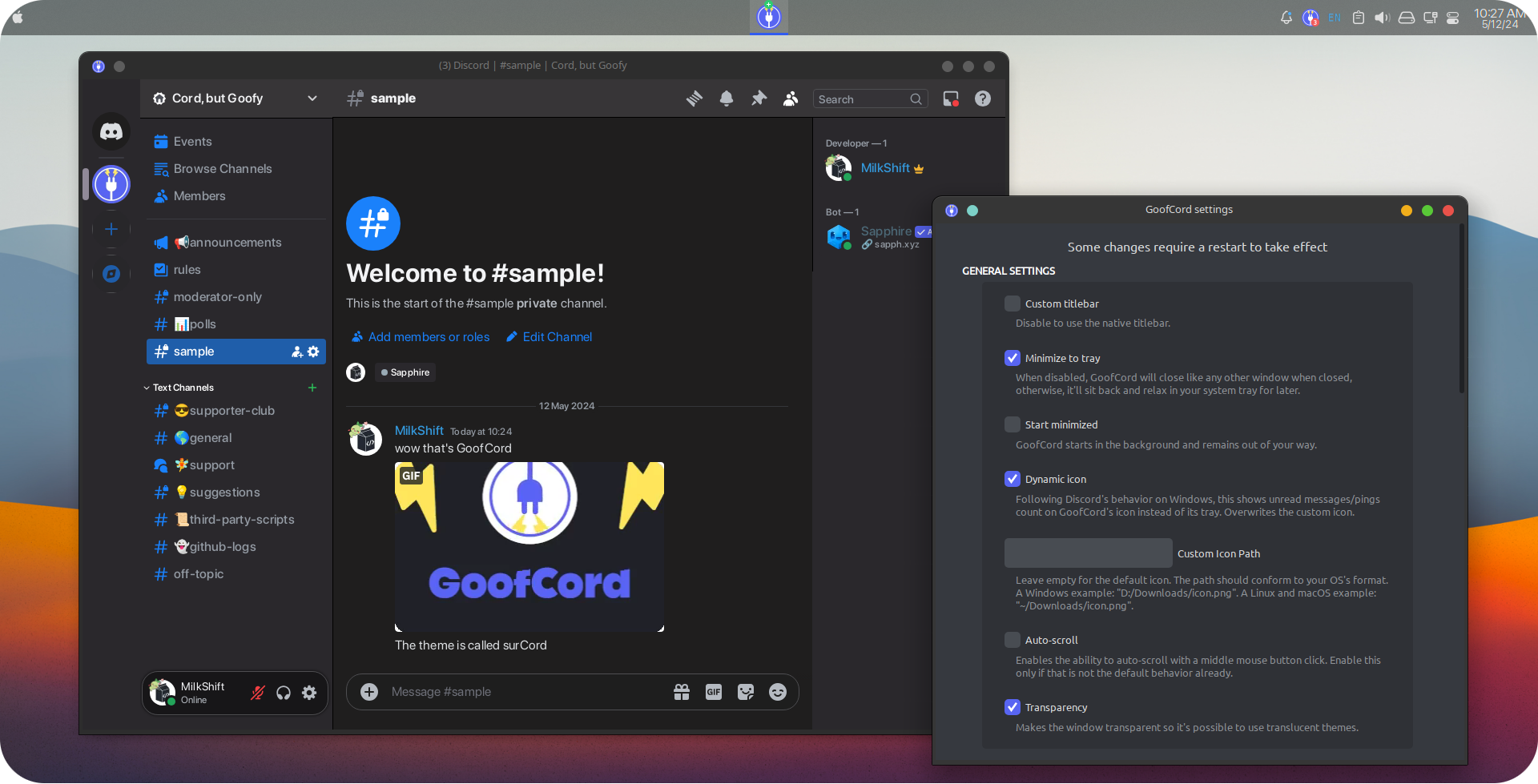
Take control of your Discord experience with GoofCord – the highly configurable and privacy-focused Discord client.



Milkshiift/GoofCord
Milkshiift/GoofCord has 1,014 GitHub stars and 30 forks. GitHot measured -1 stars in 24 hours. Last checked 2026-11-09 12:28 UTC. Last push 2026-10-28.
:shield: Take control of your Discord experience with GoofCord – a highly configurable and privacy minded discord client.
What you can do
- :lock: With Privacy in mind: GoofCord blocks as much tracking as possible and uses multiple techniques like message encryption to improve your privacy and security. Learn more
- :chart_with_upwards_trend: Fast and Performant: Noticeable speed and responsiveness improvement compared to the official client.
- :bookmark: Standalone: GoofCord is a standalone application, not reliant on the original Discord client in any way.
- :electric_plug: Plugins & Themes support: Easily use client mods like Vencord, Equicord or Shelter for plugins and themes.
측정된 스타 증가
- in 24h
- -1
- in 7 days
- 업데이트 지연
- in 15 days
- 업데이트 지연
- in 1 month
- 업데이트 지연
서로 겹치는 기간의 순증가량이며 일별 합계가 아닙니다. 측정값이 없으면 비워 둡니다. 스타는 관심도를 나타내며 품질을 보장하지 않습니다.
README.md
Original
Take control of your Discord experience with GoofCord – the highly configurable and privacy-focused Discord client.
Based on Legcord
Features :sparkles:
- :lock: With Privacy in mind: GoofCord blocks as much tracking as possible and uses multiple techniques like message encryption to improve your privacy and security. Learn more
- :chart_with_upwards_trend: Fast and Performant: Noticeable speed and responsiveness improvement compared to the official client.
- :bookmark: Standalone: GoofCord is a standalone application, not reliant on the original Discord client in any way.
- :electric_plug: Plugins & Themes support: Easily use client mods like Vencord, Equicord or Shelter for plugins and themes.
- ⌨️ Global Keybinds: Set up keybinds and use them across the system. Learn more
- 🐧 Linux support: Screensharing with audio and native Wayland support on Linux.
Installation
Windows 🪟
- Install with prebuilt binaries from the releases page.
ChooseGoofCord-Setup-<YOUR ARCHITECTURE>.exefor an installer, orGoofCord-<VERSION>-win-<YOUR ARCHITECTURE>.zipto manually unpack into a directory of your choice. - Install using winget:
winget install GoofCord - Install using Scoop:
scoop install extras/goofcord
Linux 🐧
- Install with prebuilt binaries from the releases page.
- Install from Flathub
- Install from AUR if you run an Arch-based OS. Here's an example using yay:
yay -S goofcord-bin
Keep in mind that the AUR package is not maintained by the developers of GoofCord. - Install in NixOS from nixpkgs.
macOS 🍏
Note: As I don't have a macOS device, macOS support is limited.
- Install with prebuilt binaries from the releases page.
Choose the file ending withmac-arm64.dmgif your computer uses an Apple Silicon processor. Mac computers with Apple Silicon
Otherwise, choose the file that ends withmac-x64.dmg - If you get an error like "GoofCord is damaged and can't be opened" see this issue
- If GoofCord is crashing on launch, run this command:
xattr -cr /Applications/GoofCord.app && codesign --force --deep --sign - /Applications/GoofCord.app
To explore plugins and themes, head over to the Vencord category in the Discord settings.
Building from source 🔧
- Install Bun.
- Download the source code from the latest release. Getting it from the main branch is not recommended for a stable experience.
- Open a command line in the directory of the source code
- Install the dependencies with
bun install - Package GoofCord with either
bun run packageWindows,bun run packageLinuxorbun run packageMac - Find the compiled app in the
distfolder.
Short FAQ
Need Support? Join Our Discord!
Where is the long FAQ?
How do I develop GoofCord?
- See the development guide
Can I get banned from using GoofCord?
- While using GoofCord goes against the Discord ToS, there are no known bans from using it or any client mods.
How can I access the settings? ⚙️
- Multiple ways:
- Right-click on the tray icon and click
Open Settings - Click the "Settings" button in the "GoofCord" category in the Discord settings
- Press
Ctrl+Shift+'shortcut.
- Right-click on the tray icon and click
Why Electron?
- It's the right tool for this job. While Electron may not be the perfect choice for all applications, achieving a user experience on par with the official Discord client inherently requires embedding its web version within a browser/webview. Currently, no other frameworks come close to Electron in providing this capability and covering all of GoofCord's needs.
Check out our wiki if you've got questions left
Donations
If you like GoofCord, you can support me with crypto:
- XMR (Monero):
44FyEbizgCbCaghrtCp2BGQ7WZcNRkwAMNEf9fUzgu6A3wmQq8yqrHiAMu2jT784k6NcSByJUApk8jMREMmUJQeu9g6Dxbq - USDT (Arbitrum/BEP20):
0xcacf4a4089c5a68657f2b39d8935a1ec01f999b8 - BTC:
3PRgLrYWzojWHur8WKKNRwpXwzG6J5Zf3K
관련 프로젝트 살펴보기
trimstray/the-book-of-secret-knowledge
영감을 주는 목록, 매뉴얼, 치트시트, 블로그, 팁, 원라이너, CLI/웹 도구 등을 모은 컬렉션.
257,250 스타Hack-with-Github/Awesome-Hacking
해커, 펜테스터, 보안 연구자를 위한 다양한 Awesome 목록 모음.
125,103 스타swisskyrepo/PayloadsAllTheThings
웹 애플리케이션 보안과 모의 침투 테스트/CTF에 유용한 페이로드 및 우회 방법 목록.
82,542 스타caddyserver/caddy
빠르고 확장 가능한 멀티플랫폼 HTTP/1-2-3 웹 서버이며, 자동 HTTPS를 지원합니다
78,935 스타