
MattMcManis/Axiom
MattMcManis/Axiom has 1,716 GitHub stars and 124 forks. GitHot measured -1 stars in 24 hours, +1 in 7 days, and +2 in 15 days. Last checked 2026-11-21 19:44 UTC. Last push 2021-11-09.
What you can do
- The Power of FFmpeg in a Minimal Interface
- Convert any media file to multiple formats
- Cut Video and Audio timeline
- Resize Video to standard aspect ratios
측정된 스타 증가
- in 24h
- -1
- in 7 days
- +1
- in 15 days
- +2
- in 1 month
- 기록 수집 중
서로 겹치는 기간의 순증가량이며 일별 합계가 아닙니다. 측정값이 없으면 비워 둡니다. 스타는 관심도를 나타내며 품질을 보장하지 않습니다.
소개
An FFmpeg GUI for Windows
창작 및 미디어README.md
Original
Axiom
An FFmpeg GUI for Windows
Overview
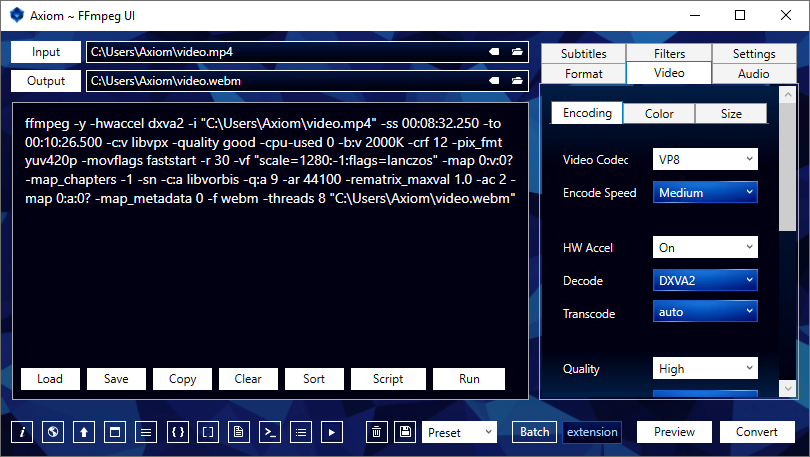
Axiom generates command scripts to be processed by the multimedia encoder, FFmpeg, and streams analyzer, FFprobe.
Convert to webm, mp4, mkv, avi, ogv, mp3, m4a, ogg, flac, wav, png, jpg, webp and more.
Features
- The Power of FFmpeg in a Minimal Interface
- Convert any media file to multiple formats
- Cut Video and Audio timeline
- Resize Video to standard aspect ratios
- Lossless, Constant and Variable Quality
- Auto-Quality and Copy Modes
- Advanced Batch Processing
- Video to Image Sequence
- Custom User Defined Settings
- Command Script Generator
Downloads
Axiom
Included Files
- Axiom UI
- FFmpeg
- youtube-dl
- Install Instructions
- User Guide pdf
- Troubleshooter
Requirements
- Extract 7z file with 7-Zip
- Axiom Microsoft .NET Framework 4.5
- youtube-dl Visual C++ 2010 x86 & Python (2.6, 2.7, or 3.2+)
FFmpeg Builds
https://www.gyan.dev/ffmpeg/builds
https://github.com/BtbN/FFmpeg-Builds/releases
Installation
Axiom is portable and can be run from any location on the computer.
- Extract
Axiom.FFmpeg.7zto a location of your choice. - Run
Axiom.exeor create a shortcut on the Desktop. - It will automatically detect
ffmpeg.exeandffprobe.exein the includedffmpegfolder. - If you move the
ffmpegfolder, set the Windows Environment Variable or specify a path in the Axiom Settings Tab.
Add FFmpeg to Environment Variables (optional):
- Move the
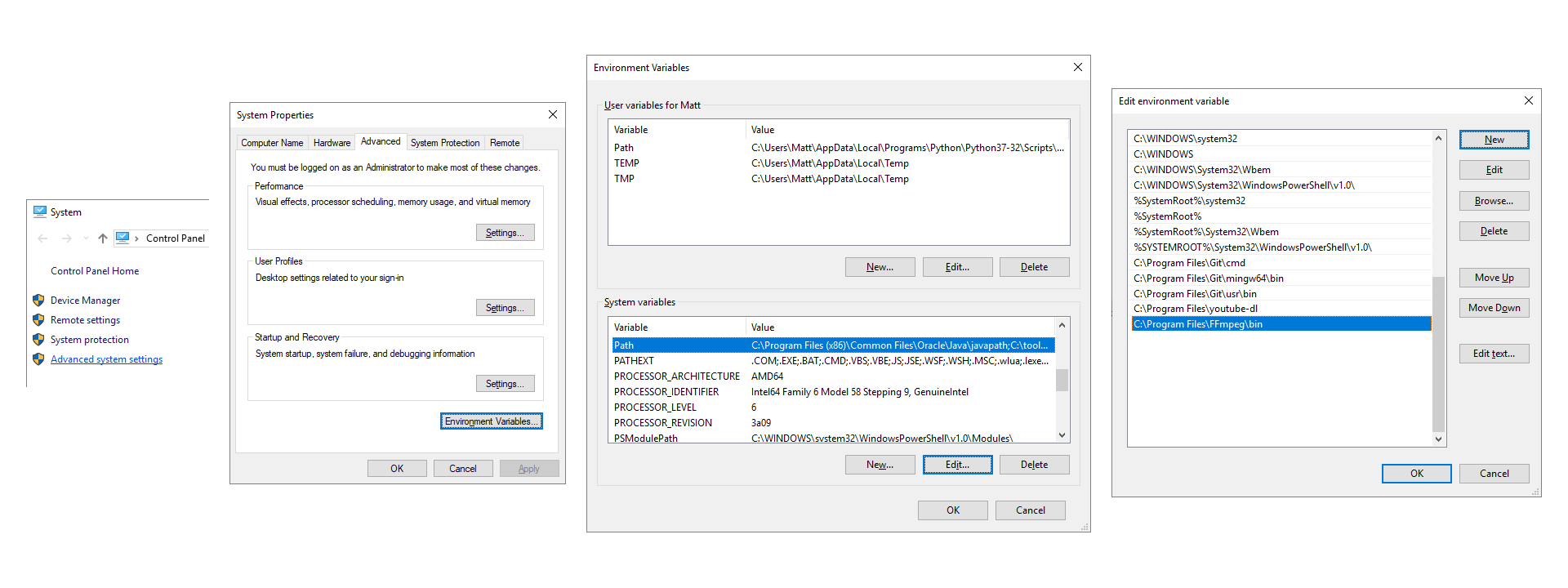
ffmpegfolder to a location of your choice, such asC:\Program Files\. - Go to Control Panel → System and Security → System → Advanced system settings
- Advanced Tab → Environment Variables → System variables → Path
- Add
C:\Program Files\ffmpeg\bin\ - Separate multiple paths with a semicolon
;(Windows 7, 8, 8.1) - Typing
ffmpegin Command Prompt will now execute without needing to specify a direct path.
YouTube Download
youtube-dl.exe is included in Axiom.FFmpeg.7z.
Requires Microsoft Visual C++ 2010 x86 & Python (2.6, 2.7, or 3.2+) installed.
Axiom will auto-detect it in its included folder. You can also add it to Windows Environment Variables or specify a path in the Axiom Settings Tab.
- Paste a YouTube URL into the Input TextBox
- Download file only:
- Select Preset:
YouTube-DL→VideoorMusic, PressDownload
- Select Preset:
- Download and Convert:
- Select any Presets or Settings you need and Press
Convert
- Select any Presets or Settings you need and Press
- Generate a Script without Downloading:
- Select any Settings you need and Press
Script
- Select any Settings you need and Press
Resources
- Axiom Wiki
- FFmpeg Wiki
- FFmpeg Documentation
- FFmpeg Filters
- Video Codecs VP8, VP9, x264, x265, AV1
- Audio Codecs AC3, AAC, Opus, Vorbis, MP3, FLAC
- CRF Quality Guide
- VBR Quality Guide
- Scaling Algorithms
- x264/x265 Profiles, Levels, Tune
- Color Space
- Hardware Acceleration
Build
Visual Studio 2015
WPF, C#, XAML
Visual C++ 19.0 Compiler

Thank you for your support.
관련 프로젝트 살펴보기
불러오는 중…